TCP/IP Protocol Driver, is reporting "tv_ConfigMgrErr24" & Code 24

kerica

New member
Local time
10:34 AM
Messages
36
TCP/IP Protocol Driver, is reporting "tv_ConfigMgrErr24" & Code 24

Hi
Recently my old computer has started freezing doing just mundane tasks like open win explorer, or
windows photo gallery, media player, or multitasking, and shutting down. i did a general health check and the report mentioned several progs which were stopping shutdown, plus this error code.

symptom: A service is reported as having an unexpected error code
cause: One or more services has failed. The service did not stop gracefully, suggesting the service may have crashed or one of its components stopped in an unsupported way.
details: Service exited with code not equal to 0 or 1077
resolution: Restart the service
related: Performance Diagnosis

symptom: tv_ConfigMgrErr24
cause: A device has a configuration problem that prevents it from working properly.
details: The device, TCP/IP Protocol Driver, is reporting "tv_ConfigMgrErr24". This device will not be available until the issue is resolved. The Plug and Play ID for this device is ROOT\LEGACY_TCPIP\0000.
resolution:
1. Verify the correct driver is installed.
2. Try updating the drivers using Windows Update.
3. Check with the manufacturer for an updated driver.
4. Attempt to uninstall and then reinstall the device using Device Manager.

I followed the advice on this link

https://support.microsoft.com/en-gb/help/299357/how-to-reset-tcp-ip-by-using-the-netshell-utility

but the problem remained. here are the test results. I still can connect to the internet despite this
not working. i wonder therefore if i need it. the device tcp/ip protocol driver has a yellow exclamation
next to it. underneath this in the list is tcp/ip registry compatabily which apparently is fine.

However surely this tcp thing isnt responsible for the computer freezing? I did a memory check
recently that found nothing. So as I was low on HDD space i decided to delete about 5gb, but I only
gained 2 which seems strange. then today when i deleted a further 400mb I actually lost space.

I think this tcp/ip issue is quite common, so advice could be useful to many people.

Thanks

Keri


alltests

alltestgroups allteststatus alltestdesc
OS Checks Passed Checks for attributes of the operating system
allchildtest allchildtotal allchildfail allchilddesc
OS Version Check 1 0 Passed


Disk Checks Passed Checks for disk status
allchildtest allchildtotal allchildfail allchilddesc
SMART Predict Failure Check 1 0 Passed
Logical Disk Dirty Bit Check 1 0 Passed


Security Center Tests Passed Checks for state of Security Center related information.
allchildtest allchildtotal allchildfail allchilddesc
User Account Control Enabled Check 1 0 Passed
Windows Update Enabled Check 1 0 Passed


System Service Checks Failed Checks for state of system services
allchildtest allchildtotal allchildfail allchilddesc
Abnormally Terminated Services Check 1 2 Failed
Workstation Service Check 1 0 Passed


Hardware Device and Driver Checks Failed Survey of Windows Management Infrastructure supported devices.
allchildtest allchildtotal allchildfail allchilddesc
Controller Device Configured Fail Count 9 0 Controller devices.
Controller Device Status Fail Count 9 0 Controller devices.
Cooling Configured Fail Count 0 0 Cooling devices.
Cooling Status Fail Count 0 0 Cooling devices.
Input Configured Fail Count 2 0 Input devices.
Input Status Fail Count 2 0 Input devices.
Memory Device Configured Fail Count 89 0 Memory devices.
Memory Device Status Fail Count 89 0 Memory devices.
Motherboard Device Configured Fail Count 18 0 Motherboard devices.
Motherboard Device Status Fail Count 18 0 Motherboard devices.
Network Configured Fail Count 39 0 Network devices.
Network Status Fail Count 39 0 Network devices.
Port Device Configured Fail Count 58 0 Port devices.
Port Device Status Fail Count 58 0 Port devices.
Power Device Configured Fail Count 2 0 Power devices.
Power Device Status Fail Count 2 0 Power devices.
Printing Device Configured Fail Count 6 0 Printing devices.
Printing Device Status Fail Count 6 0 Printing devices.
Storage Device Configured Fail Count 2 0 Storage devices.
Storage Device Status Fail Count 2 0 Storage devices.
Video Device Configured Fail Count 2 0 Video devices.
Video Device Status Fail Count 2 0 Video devices.
PlugAndPlay Device Configured Fail Count 156 1 PlugAndPlay devices.
PlugAndPlay Device Status Fail Count 156 0 PlugAndPlay devices.
 

My Computer My Computer

Computer type
PC/Desktop
OS
64 7

My Computer My Computer

Computer type
Laptop
Computer Manufacturer/Model Number
Dell M6500 Precision Work Station
OS
Windows 7 Pro SP1 64 bit
Memory
8 GB
Screen Resolution
1920x
Internet Speed
30 Mbps
Antivirus
Norton Security
Browser
IE 11
When it shuts down, is it an abrupt power off?

no i dont think so, sometimes it takes ages, depending i suppose what is
hanging in the background. and it makes this tinny ticking sound.

Also, check this out-


http://batcmd.com/windows/7/services/tcpipreg/

thanks. i looked at this but i was worried about dl and using bat files from a site which
my browser says isnt secure? [not https?]

keri
 

My Computer My Computer

Computer type
PC/Desktop
OS
64 7
Okay. I asked because an abrupt shutdown would be indicative of a failing power supply.

I don't get any warnings about that site but it depends on what security settings a person has set.
You can always set a system restore point before running the batch file. I found that link on my own and also in another thread in this forum.
 

My Computer My Computer

Computer type
Laptop
Computer Manufacturer/Model Number
Dell M6500 Precision Work Station
OS
Windows 7 Pro SP1 64 bit
Memory
8 GB
Screen Resolution
1920x
Internet Speed
30 Mbps
Antivirus
Norton Security
Browser
IE 11
Just because a website has no TLS (Transport Layer Security) certificate to make it a HTTPS doesn't mean it's insecure in the way you think.

A malicious actor could use a free Cert. from Lets Encrypt to make their site HTTPS.


All HTTPS does is encrypt the connection traffic (data) between you (the browser, etc) and the server hosting the website or data. Nothing more, nothing less. This does NOT! mean you can't get a virus. Both HTTPS and HTTP connections can all EQUALLY give you a virus.

So don't think just because a site is HTTPS is some how immune from giving you an online STD.

What version of Windows are you using? Pro, starter, Home, etc? I'll download that bat file and look at it.
 

My Computer My Computer

Computer type
PC/Desktop
OS
Windows 7 Ultimate x64
Just because a website has no TLS (Transport Layer Security) certificate to make it a HTTPS doesn't mean it's insecure in the way you think.

A malicious actor could use a free Cert. from Lets Encrypt to make their site HTTPS.


All HTTPS does is encrypt the connection traffic (data) between you (the browser, etc) and the server hosting the website or data. Nothing more, nothing less. This does NOT! mean you can't get a virus. Both HTTPS and HTTP connections can all EQUALLY give you a virus.

So don't think just because a site is HTTPS is some how immune from giving you an online STD.

What version of Windows are you using? Pro, starter, Home, etc? I'll download that bat file and look at it.

home premium sp1

i ran the bat file and restarted. I did another health check but got the same report:

symptom: A service is reported as having an unexpected error code
cause: One or more services has failed. The service did not stop gracefully, suggesting the service may have crashed or one of its components stopped in an unsupported way.
details: Service exited with code not equal to 0 or 1077
resolution: Restart the service
related: Performance Diagnosis

--------------------------------------------------------------------------------

symptom: tv_ConfigMgrErr24
cause: A device has a configuration problem that prevents it from working properly.
details: The device, TCP/IP Protocol Driver, is reporting "tv_ConfigMgrErr24". This device will not be available until the issue is resolved. The Plug and Play ID for this device is ROOT\LEGACY_TCPIP\0000.
resolution: 1. Verify the correct driver is installed.
2. Try updating the drivers using Windows Update.
3. Check with the manufacturer for an updated driver.
4. Attempt to uninstall and then reinstall the device using Device Manager.

in the first case i dont know what service has failed. in the second i dont know which driver i should update.

kerica
 

My Computer My Computer

Computer type
PC/Desktop
OS
64 7
Please run this batch file and then attach the generated services list from your desktop to your post here. You will need to zip the text file first to upload.
 

Attachments

My Computer My Computer

Computer type
PC/Desktop
OS
Windows 7 Ultimate x64
And upon further investigation I see that tv_ConfigMgrErr24 can be related to a whole host of issues. In your case a TCP/IP Protocol Driver.

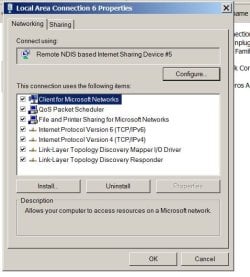
Do this once. Type View Network Connections in the search box. Right click your network adapter and chose properties. Now with all the items you see take a screenshot. You may have to take a screenshot twice to get the remaining list.

To easily take a screenshot type in Snipping Tool into search. Upload the images here.
 

My Computer My Computer

Computer type
PC/Desktop
OS
Windows 7 Ultimate x64
Also, go to device manager and under View Show hidden devices. Are there any exclamation marks next to anything?

And while we're at it. Download and run Autoruns. Go to File and save the ARN file. Zip it and upload here. I'll be able to see more things that can help figure this out.

Autoruns for Windows - Windows Sysinternals | Microsoft Docs

Something else. LOL Run Sanity Check downloaded from here and tell me if it sees anything without company or product Info. This is not, I repeat, NOT necessarily bad. It depends on what it is.

As always, scan ALL downloads at Virus Total.
 

My Computer My Computer

Computer type
PC/Desktop
OS
Windows 7 Ultimate x64
Please run this batch file and then attach the generated services list from your desktop to your post here. You will need to zip the text file first to upload.

i did this but i cant find where the generated file is.

kerica
 

My Computer My Computer

Computer type
PC/Desktop
OS
64 7
Also, go to device manager and under View Show hidden devices. Are there any exclamation marks next to anything?

Thankyou for your replies. I did this and there is an exclam mark next to tcp/ip protocol.
Also i get this yellow exclam against my internet connection. Supposedly i am not connected as i
post this.

there is one process rpdsvc.exe*32 which runs from start up, which i dont think i need and uses a lot
of memory etc, which i end manually each time.

I also have several AVG processes running which is strange as i thought i had uninstalled avg years ago. however when i did troubleshooting it didnt flag up that i had 2 virus programs running. i use microsoft essentials, previously defender. In the last 6 months i've been getting security updates almost every other day. sometimes they fail, they when i retry, the size of the file has changed. Then it says cannot update while another update is loading, then suddenly it decides everything is updated and fine.

Its freezing more and more and sometimes when connected to internet. Almost every app takes time to open or causes the cp to freeze, when it freezes the cpu usage falls to 0%, and the screen blinks each time before it resumes, sometimes several times. Also when i click on resource moniter in WTM, nothing happens, it just hangs a blank box until i close it. Basically it used to freeze when i opened multiple
applications but now just opening notepad can cause problems now.

svchost uses up a lot of memory and it seems it goes to superfetch. when i went into safe mode it
id only 1 problem and said superfetch wasnt running. but back in normal mode it clearly is. when i use the search box it often cannot find files i'm actually looking at on screen.

Both wmv and mediaplayerclassic64 seem to have problems opening and playing. Sometimes theres
a terrible sound and playback freezes and it takes ages to resolve itself. the files seem normal when
played on other devices, phone etc.

However the cp has resolved the space issue itself. Now it decides i have 28/30gb free.

And while we're at it. Download and run Autoruns. Go to File and save the ARN file. Zip it and upload here. I'll be able to see more things that can help figure this out.

Autoruns for Windows - Windows Sysinternals | Microsoft Docs

In the autoruns folder there are many exe progs. which one do i run? all of them?

Something else. LOL Run Sanity Check downloaded from here and tell me if it sees anything without company or product Info. This is not, I repeat, NOT necessarily bad. It depends on what it is.

As always, scan ALL downloads at Virus Total.

1 of the viral checkers at virus total said it was malicious so i havnt run it yet.
I noticed another prog called whysoslow. would that be useful to install?

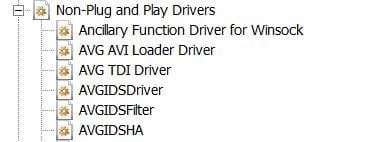
I include 2 screenshots; not sure if they are what you suggested or useful.


kerica
 

Attachments

  • screen1.JPG
    screen1.JPG
    49.4 KB · Views: 14
  • screen2.JPG
    screen2.JPG
    16.3 KB · Views: 13

My Computer My Computer

Computer type
PC/Desktop
OS
64 7
i did this but i cant find where the generated file is.

kerica


It should be on the desktop. File name ServicesList.txt

Is that non plug in play list partial? You're missing a whole list of stuff there.


1 of the viral checkers at virus total said it was malicious so i havnt run it yet.

The standard rule of thumb is four hits and it's probably malicious. Virus Total uses so many anti-virus engines that you're bound to have a false positive or two. If there are community comments you can read those that may give you some information. It also largely depends on what you are scanning. If what you are scanning operates like a trojan or what ever, then you're bound to have a high number of false positives. Such would be the case for game hacks/mods or what ever. But even those could be malicious.

That link for Autoruns is from Microsoft. But you always want to scan downloads because a hacker could take a legit file on a server and add a malicious payload. Though, I'm sure Microsoft's servers might be pretty secure.

I noticed another prog called whysoslow. would that be useful to install?

Probably not. That's for something else. You'd use that if you get constant choppy audio or something.
 

My Computer My Computer

Computer type
PC/Desktop
OS
Windows 7 Ultimate x64
OMG. Okay, you quoted yourself there making it look like me and now I have to read all that.
 

My Computer My Computer

Computer type
PC/Desktop
OS
Windows 7 Ultimate x64
Okay, read all that. You have a multitude of issues here. Probably due to the improper uninstall of AVG. I'm sure like all these anti-virus programs these days they too have their own uninstaller to properly get rid of its components. If I get the ARN file from Autoruns we can remove the individual files and there should be no ill recourse.

rpdsvc.exe is a process belonging to Real Player. If Real Player is your tunes of choice, I can tell you how to not make it start on boot with Autoruns. Or you can use StartupCPL which I used in XP but seems to work in 7 and I do use it today. Now if this is a service for Real Player we'll have to go into the services, stop it and select it for manual activation.

In the Autoruns folder you want to double click the Autoruns64.exe

Note there is another file called autorunsc64.exe. That's not the one you want. I think that's to run Autoruns via the command line.
 

My Computer My Computer

Computer type
PC/Desktop
OS
Windows 7 Ultimate x64
Your anti-virus solution is not what I'd use. MSE is just a baseline scanner. At that you'd probably be better with ClamWin. Clamwin doesn't actively monitor, but is a scanner. Free Antivirus for Windows - Open source GPL virus scanner

For me I just use Sandboxie for my browser and scan ALL downloads at Virus Total and make periodic full hard drive clones should disaster ever strike. There are a number of other things I do as well, but that's well above the scope of this thread. If you're not visiting the pirate bay and shady websites, you can get by with what I do.
 

My Computer My Computer

Computer type
PC/Desktop
OS
Windows 7 Ultimate x64
I hope this is the right way to reply. Thanks for reading my posts. I think some of these programs were left over
when my daughter used the computer. However I used event viewr and it spotted recurring issues.

1. Software protection service has stopped - sounds scary but MSE just said that everything was fine uptodate protected etc.
2. mdvmng.sys has been blocked from loading doc due to incompatabilty with sustem and i need a compatible version of the
driver. i just wonder if my mobile has blocked it deliberately, so is it an issue or not, its not really clear what all these whatnots do.
3. Autoruns said that Nmindexingservice.exe is missing.
4. there are other files missing but most are just old progs that were uninstalled by windows uninstaler or their own thing
but somehow are still hanging on.

Is there a way one can check the CPU isnt faulty? Cos when the cp freezes the cpu just goes to O% without any
extra load like a new app or prog being opened and is usually happens when i'm not connected to the net.

kerica
 

Attachments

My Computer My Computer

Computer type
PC/Desktop
OS
64 7
For 3., that's a Nero Burning Rom (and possibly Nero Express) file. If you had either program installed and then uninstalled it, there may be remnants of the program left over. I suggest running msconfig.exe and then, looking in the Startup tab to see if a Nero program is set to start when you start Windows.

I think 1 and 2 are related. "1" simply checks to see if a program that is registered with it is activated when you start it. As a result, it wouldn't be running until you try to start such a program. Both Windows and other Microsoft products like Office are registered to that. "2" sounds like it's related to Word either as a standalone or in Office since it's referring to .doc files. Since it's .doc, that would go back to something like Word prior to v2007 (possibly 2000).
 

My Computer My Computer

Computer type
Laptop
Computer Manufacturer/Model Number
Dell M6500 Precision Work Station
OS
Windows 7 Pro SP1 64 bit
Memory
8 GB
Screen Resolution
1920x
Internet Speed
30 Mbps
Antivirus
Norton Security
Browser
IE 11
Try running AVG Clear. They say don't run it in safe mode. Do that first, and then after you may have to in safe mode. Your previos AVG was not uninstalled. Uninstalling AVG AntiVirus using AVG Clear | AVG

Real Player is set to auto start as a service. You can either go into Real Player's settings and turn it off to auto start (recommend) or try and turn off its service which may get restarted again. The service name should be RealTimes Desktop Service. To get to services enter services in search and find the RealTimes Desktop Service. Hit stop and set it for manual. But I'd go into Real Player first and see if there's an option in its settings to turn off auto start on Windows boot up.

After all this I would go to search and enter cmd. Right click cmd and run as Admin. Now in command prompt enter:
sfc /scannow
 

My Computer My Computer

Computer type
PC/Desktop
OS
Windows 7 Ultimate x64
For 3., that's a Nero Burning Rom (and possibly Nero Express) file. If you had either program installed and then uninstalled it, there may be remnants of the program left over. I suggest running msconfig.exe and then, looking in the Startup tab to see if a Nero program is set to start when you start Windows.

I think 1 and 2 are related. "1" simply checks to see if a program that is registered with it is activated when you start it. As a result, it wouldn't be running until you try to start such a program. Both Windows and other Microsoft products like Office are registered to that. "2" sounds like it's related to Word either as a standalone or in Office since it's referring to .doc files. Since it's .doc, that would go back to something like Word prior to v2007 (possibly 2000).

thanks very much

kerica
 

My Computer My Computer

Computer type
PC/Desktop
OS
64 7
Try running AVG Clear. They say don't run it in safe mode. Do that first, and then after you may have to in safe mode. Your previos AVG was not uninstalled. Uninstalling AVG AntiVirus using AVG Clear | AVG

Real Player is set to auto start as a service. You can either go into Real Player's settings and turn it off to auto start (recommend) or try and turn off its service which may get restarted again. The service name should be RealTimes Desktop Service. To get to services enter services in search and find the RealTimes Desktop Service. Hit stop and set it for manual. But I'd go into Real Player first and see if there's an option in its settings to turn off auto start on Windows boot up.

After all this I would go to search and enter cmd. Right click cmd and run as Admin. Now in command prompt enter:
sfc /scannow

Thanks for this advice, I,ve done this avg has disappeared. I manually deselected rdp thing from list of startups. There were many others on the list but i left them alone. Unfortunately i've already forgotten how i did this!

I did sfc/scan both b4 and after but the message was the same
windows resource protection didnt find any integrity violations

I also did a memory test using the windows diagnostic but it found no problems.

there is a lot more memory available according to task manager, but the tcp/ip issue still remains.
I looked at event viewer again and there seem to be repeated warnings or errors which i have
attached as a txt file.

One issue which doesnt seem listed is that when i open an audio file in WMP or MPC, it plays
a bit the halts a second or two before resuming. Sometimes WMP cant open due to server.

kerica
 

Attachments

My Computer My Computer

Computer type
PC/Desktop
OS
64 7
Back
Top