Windows Gadget has stopped working error!!

mustangman16

Bringer of Questions
Power User
Local time
12:35 AM
Messages
114
I get this error all the time during the day whether i'm playing a game, listening to music or surfing the web. It comes up with the error box and sometimes asks me to debug or restarts windows gadget entirerly, rearranging and moving my gadgets every time. I send information to windows every time it asks me too, but obviously nothing has come of it. Anyone have this problem or know of a fix in progress??

Thanks
 

My Computer

Computer Manufacturer/Model Number
Dell XPS M1530
OS
Windows 7 Build 7229 x86
CPU
Intel Core 2 Duo T7250 (2.0GHz/800Mhz FSB 2M L2 Cache)
Memory
4.00 GB DDR2, 667MHz 2 Dimm
Graphics Card(s)
128MB NVIDIA GeForce 8400M G
Sound Card
SigmaTel High Definition Audio
Monitor(s) Displays
15.4 inch Wide Screen WSXGA+ TrueLife; 31.5'" HDTV
Screen Resolution
1680 X 1050
Hard Drives
200G 7200RPM SATA Hard Drive Free Fall Sensor
Keyboard
Logitech Cordless Desktop MX5500 Revolution Bluetooth
Mouse
Logitech Cordless Desktop MX5500 Revolution Bluetooth
Internet Speed
100 mbps

My Computer

Computer Manufacturer/Model Number
Compaq Desktop
OS
Windows 7 Ultimate x64
CPU
AMD Sempron Dual Core
Memory
3GB
Graphics Card(s)
NVIDIA GeForce 6150SE nForce 430
Screen Resolution
1024x768
Hard Drives
150GB Sata
Yes, I have many 3rd party gadgets from microsoft's gadget gallery that I have downloaded and are using.
 

My Computer

Computer Manufacturer/Model Number
Dell XPS M1530
OS
Windows 7 Build 7229 x86
CPU
Intel Core 2 Duo T7250 (2.0GHz/800Mhz FSB 2M L2 Cache)
Memory
4.00 GB DDR2, 667MHz 2 Dimm
Graphics Card(s)
128MB NVIDIA GeForce 8400M G
Sound Card
SigmaTel High Definition Audio
Monitor(s) Displays
15.4 inch Wide Screen WSXGA+ TrueLife; 31.5'" HDTV
Screen Resolution
1680 X 1050
Hard Drives
200G 7200RPM SATA Hard Drive Free Fall Sensor
Keyboard
Logitech Cordless Desktop MX5500 Revolution Bluetooth
Mouse
Logitech Cordless Desktop MX5500 Revolution Bluetooth
Internet Speed
100 mbps
I still need some help on this reoccuring issue.
 

My Computer

Computer Manufacturer/Model Number
Dell XPS M1530
OS
Windows 7 Build 7229 x86
CPU
Intel Core 2 Duo T7250 (2.0GHz/800Mhz FSB 2M L2 Cache)
Memory
4.00 GB DDR2, 667MHz 2 Dimm
Graphics Card(s)
128MB NVIDIA GeForce 8400M G
Sound Card
SigmaTel High Definition Audio
Monitor(s) Displays
15.4 inch Wide Screen WSXGA+ TrueLife; 31.5'" HDTV
Screen Resolution
1680 X 1050
Hard Drives
200G 7200RPM SATA Hard Drive Free Fall Sensor
Keyboard
Logitech Cordless Desktop MX5500 Revolution Bluetooth
Mouse
Logitech Cordless Desktop MX5500 Revolution Bluetooth
Internet Speed
100 mbps
I have had problems with more than 6 gadgets open at the same time :confused:
 

My Computer

Computer type
PC/Desktop
Computer Manufacturer/Model Number
Built them myself, Science Experiments !
OS
Win7 Enterprise, Win7 x86 (Ult 7600), Win7 x64 Ult 7600, TechNet RTM on AMD x64 (2.8Ghz)
CPU
AMD fx8350 4ghz, AMD-32 2400mhz, AMD-64 3200mhz, AMDx64 2.8G
Motherboard
SIS 755, ECS-K8M890M-M (Ult 7600), GigaByte & others
Memory
2gb, 4gb on the Ult 7600, 4gb on Technet RTM, 32gb on FX8350
Graphics Card(s)
Draw my own Graphics, several nVidia cards
Sound Card
on motherboard
Monitor(s) Displays
19" flat scr, 28" I-Inc widescr,22" Emprex Widescr, 23" Acer
Screen Resolution
1280 x 1024, 1440 x 900, 1920 x 1080
Hard Drives
6 pata Ide HD's & 2 Sata HD's
added 80gb external on Ult 7600 computer,
numerous extra 1tb, 2TB, 3Tb SATA HD's
A collection of ext HD Docks w/ HDs
PSU
430w, 550w, 600w, 700, 800, etc
Case
All Generic Full Towers
Cooling
Open Air & a few fans, some w/ colored LEDs
Keyboard
Compaq & Dell recycled from GoodWill
Mouse
Made in China Optical Wired Mouse
Internet Speed
Fast Cable InterNet
Antivirus
AVG Free on 24 different Desktops, NO Problems!
Browser
IE 8 is preferred, but use FireFox sometimes
Other Info
Linksys Routers, switches, & Hubs
Too Many USB Flash Drives to count, Biggest is 64GB !
Eight computers in my home network.
Sixteen computers at my business network.
Linked via TeamViewer !
Lots of old used spare computer parts everywhere!
gadget problem

hey mustangman16
Have you checked event viewer to see if there was any more info about the problem? It will tell you more about the nature of the specific problem. type event viewer in search and check the application in windows log.

Hope this helps somewhat

Ken
 

My Computer

Computer Manufacturer/Model Number
HP Pavillion dv-7 1005 Tx
OS
Win 8 Release candidate 8400
CPU
[email protected]
Memory
4 gigs
Graphics Card(s)
Nvidia 9600M
Sound Card
HD built-in
Monitor(s) Displays
17" Wxga
Screen Resolution
1440x900
Cooling
none
Internet Speed
45Mb down 5Mb up
Hey Ken I went to the event vewier and there was a **** load of errors from sidebar in the application in windows log and the custom views Administrative Errors too.
 

My Computer

Computer Manufacturer/Model Number
Dell XPS M1530
OS
Windows 7 Build 7229 x86
CPU
Intel Core 2 Duo T7250 (2.0GHz/800Mhz FSB 2M L2 Cache)
Memory
4.00 GB DDR2, 667MHz 2 Dimm
Graphics Card(s)
128MB NVIDIA GeForce 8400M G
Sound Card
SigmaTel High Definition Audio
Monitor(s) Displays
15.4 inch Wide Screen WSXGA+ TrueLife; 31.5'" HDTV
Screen Resolution
1680 X 1050
Hard Drives
200G 7200RPM SATA Hard Drive Free Fall Sensor
Keyboard
Logitech Cordless Desktop MX5500 Revolution Bluetooth
Mouse
Logitech Cordless Desktop MX5500 Revolution Bluetooth
Internet Speed
100 mbps
mustangman16
could you tell us all what they error codes and source was? Or just snip a sample or two.

Hope this helps
Ken
 

My Computer

Computer Manufacturer/Model Number
HP Pavillion dv-7 1005 Tx
OS
Win 8 Release candidate 8400
CPU
[email protected]
Memory
4 gigs
Graphics Card(s)
Nvidia 9600M
Sound Card
HD built-in
Monitor(s) Displays
17" Wxga
Screen Resolution
1440x900
Cooling
none
Internet Speed
45Mb down 5Mb up
Ken,
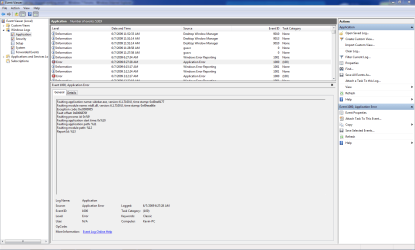
Here is a snip off the windows log application error.
 

Attachments

  • Capture.PNG
    Capture.PNG
    44.2 KB · Views: 1,372

My Computer

Computer Manufacturer/Model Number
Dell XPS M1530
OS
Windows 7 Build 7229 x86
CPU
Intel Core 2 Duo T7250 (2.0GHz/800Mhz FSB 2M L2 Cache)
Memory
4.00 GB DDR2, 667MHz 2 Dimm
Graphics Card(s)
128MB NVIDIA GeForce 8400M G
Sound Card
SigmaTel High Definition Audio
Monitor(s) Displays
15.4 inch Wide Screen WSXGA+ TrueLife; 31.5'" HDTV
Screen Resolution
1680 X 1050
Hard Drives
200G 7200RPM SATA Hard Drive Free Fall Sensor
Keyboard
Logitech Cordless Desktop MX5500 Revolution Bluetooth
Mouse
Logitech Cordless Desktop MX5500 Revolution Bluetooth
Internet Speed
100 mbps
mustangman16
Exact same event ID and source (100) and exception code I have. Have you had any other app stop working and windows says "app stopped working looking for a solution online"? That error code is related to a buffer overflow and one of its dependancies. In control panel>system> advanced settings (where you set page file size) the last panel has DEP. See what its set to.
Ken
 

My Computer

Computer Manufacturer/Model Number
HP Pavillion dv-7 1005 Tx
OS
Win 8 Release candidate 8400
CPU
[email protected]
Memory
4 gigs
Graphics Card(s)
Nvidia 9600M
Sound Card
HD built-in
Monitor(s) Displays
17" Wxga
Screen Resolution
1440x900
Cooling
none
Internet Speed
45Mb down 5Mb up
Ken
I dont get it for anything other than gadgets. I either get an error message saying its restarting gadgets or i get an error message saying they have stopped working and i sent info to microsoft. My DEP is set as Turn on DEP for essential Windows programs and services only.
Thanks
 

My Computer

Computer Manufacturer/Model Number
Dell XPS M1530
OS
Windows 7 Build 7229 x86
CPU
Intel Core 2 Duo T7250 (2.0GHz/800Mhz FSB 2M L2 Cache)
Memory
4.00 GB DDR2, 667MHz 2 Dimm
Graphics Card(s)
128MB NVIDIA GeForce 8400M G
Sound Card
SigmaTel High Definition Audio
Monitor(s) Displays
15.4 inch Wide Screen WSXGA+ TrueLife; 31.5'" HDTV
Screen Resolution
1680 X 1050
Hard Drives
200G 7200RPM SATA Hard Drive Free Fall Sensor
Keyboard
Logitech Cordless Desktop MX5500 Revolution Bluetooth
Mouse
Logitech Cordless Desktop MX5500 Revolution Bluetooth
Internet Speed
100 mbps
mustangman16
I dont think sidebar is "essential" My dep is broken (greyed out). Im just to lazy to re-install from back up right now. there is a thread (search for it) that describes the various options you can set DEP to. There is a /noexecute you can run in CMD. BUT read about it first. It can be crippling. If I remember where the thread ( or info) is i will PM the link. You can also look more closely in event viewer and if it evergave you a BSOD save the memory dump. There are people here who can diagnose it.

Good luck hope it helpedsomewhat

Ken
 

My Computer

Computer Manufacturer/Model Number
HP Pavillion dv-7 1005 Tx
OS
Win 8 Release candidate 8400
CPU
[email protected]
Memory
4 gigs
Graphics Card(s)
Nvidia 9600M
Sound Card
HD built-in
Monitor(s) Displays
17" Wxga
Screen Resolution
1440x900
Cooling
none
Internet Speed
45Mb down 5Mb up
Back
Top