Windows goes into a 'state' of nothing loading (not 'not responding')

Gaz1701

New member
Member
Local time
6:28 PM
Messages
65
I have this strange - and annoying - problem at times that I can't exactly pinpoint what's stopping it from working properly; nor can I find any pattern to when this might happen again.

My computer has this what I have started calling it a "mood", where it seems to 'forget' [or 'doesn't care'] to carry out the commands I give my computer. It's different to my PC "not responding" because everything still seems to be working [in that respect] (no graying out of the screen, no mouse busy pointer, no high CPU or memory usage). It's... just.. not.. loading things.

An example then:

When my computer's in this 'mood', I click on my Firefox logo and wait. Nothing happens. I click ctrl+shift+Esc, and it's there in the background - usually around 1,###kb - but it doesn't load it up fully, ever (but I think with Chrome, it loads it up, but the screen's just blank and doesn't load anything else up). I think the same goes for any program I try to load when it's in this 'mood'.

If I've got Firefox open already and I click a new tab/link/bookmark, it 'pretends' it's working but nothing happens (I don't remember if it even does a timeout after a while); the internet's on and working fine, so that's not the problem.

The only way I can solve it is just restart my computer.


Does anyone have any idea what's going on here? :confused:
 

My Computer My Computer

At a glance

Windows 7 Home Premium 64-bit (6.1, Build 7601)AMD Athlon(tm) 64 X2 Dual Core Processor 4400...2048MB RAM DDR2 (now installed a 2GB chip = 4...ASUS EAH5770 CU core, 1GB GDDR5 video memory
Computer type
PC/Desktop
Computer Manufacturer/Model Number
MSI MS-7325
OS
Windows 7 Home Premium 64-bit (6.1, Build 7601)
CPU
AMD Athlon(tm) 64 X2 Dual Core Processor 4400+ (2 CPUs), ~2.
Motherboard
MSI K9N4 SLI-F nForce 500 SLI chipset
Memory
2048MB RAM DDR2 (now installed a 2GB chip = 4GB altogether)
Graphics Card(s)
ASUS EAH5770 CU core, 1GB GDDR5 video memory
Sound Card
Realtek AC'97 Audio
Monitor(s) Displays
AOC I2367Fh
Screen Resolution
1920x1080
Hard Drives
SAMSUNG HD401LJ ATA Device
PSU
Tagan TG700-U25 - 700Watts
Case
NZXT Zero Aluminium Full Tower
Cooling
about 6 fans on case
Keyboard
Microsoft Natural MultiMedia Keyboard
Mouse
Trust GM-4200 Gamer Mouse Optical
Internet Speed
Not sure what speed, but it's broadband - ADSL (I think).
Antivirus
Avast! Free Antivirus
Browser
Mozillla Firefox
Look in event viewer.

http://www.sevenforums.com/tutorials/226084-event-viewer-open-use-windows-7-a.html

Look under windows logs-system

Scroll down and look for errors related to disk. Under source it will say disk. See anything like that? You will have to scroll for a long time. You do not need to look through the whole thing, just a weeks worth or so.

You might also want to perform a disk check.

http://www.sevenforums.com/tutorials/433-disk-check.html

Go from step 4 to 8. Then continue through the tutorial.
 

My Computer My Computer

At a glance

Windows 10 ProAMD Ryzen 5 2400G Processor with Radeon RX Ve...G.SKILL Ripjaws V Series 16GB (2 x 8GB) 288-P...2047MB NVIDIA GeForce GTX 1060 6GB (EVGA)
Computer type
PC/Desktop
Computer Manufacturer/Model Number
Custom Built
OS
Windows 10 Pro
CPU
AMD Ryzen 5 2400G Processor with Radeon RX Vega 11 Graphics
Motherboard
ASRock X470 Master SLI/AC AM4 AMD Promontory X470 SATA 6Gb/s
Memory
G.SKILL Ripjaws V Series 16GB (2 x 8GB) 288-Pin DDR4 SDRAM D
Graphics Card(s)
2047MB NVIDIA GeForce GTX 1060 6GB (EVGA)
Sound Card
Motherboard Built in
Monitor(s) Displays
Acer R240HY bidx 23.8-Inch IPS HDMI DVI VGA (1920 x 1080) Wi
Screen Resolution
1920 x 1080
Hard Drives
1TB Sandisk SSD PLUS (Main drive)
500 GB Seagate 7200 RPM (Games)
500 GB Western Digital 7200 RPM (Virtual Machines)
PSU
CORSAIR TX Series TX650M 650W 80+ Gold Modular Power Supply
Case
CORSAIR CARBIDE SPEC-02 Mid-Tower Gaming Case, Red LED Fan
Cooling
220mm, two 120mm, and four 60mm fans
Keyboard
Wired Dell keyboard
Mouse
Wireless Logitech mouse
Internet Speed
250mb down, 30mb up
Antivirus
Panda Cloud Antivirus
Browser
Chrome-ish x64
Other Info
Your awesome for reading this.
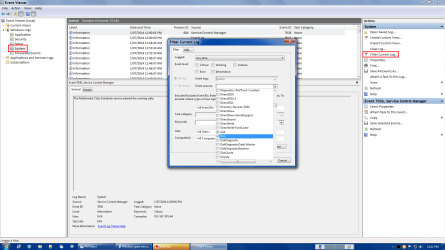
Filter

You could use "Filter Current Log ..." to speed things up.

For example:

  1. "Windows Logs > System"
  2. Choose "Filter Current Log ..."
  3. Filter Current Log window > "Event sources" drop down list
  4. Choose/Check "disk" & "Disk"
Event Viewer Filter.png
 

My Computer My Computer

At a glance

W7 Ultimate SP1, LM19.2 MATE, W10 Home 1703, ...AMD Phenom II x6 1100T, 3.3 GHz12GB DDR3 1333 G-Skill (4GB x 2), G-Skill (2G...NVIDIA GeForce GTX 660
Computer type
PC/Desktop
Computer Manufacturer/Model Number
n/a
OS
W7 Ultimate SP1, LM19.2 MATE, W10 Home 1703, W10 Pro 1703 VM, #All 64 bit
CPU
AMD Phenom II x6 1100T, 3.3 GHz
Motherboard
ASUS M4A88T-M/USB3 (AM3)
Memory
12GB DDR3 1333 G-Skill (4GB x 2), G-Skill (2GB x 2)
Graphics Card(s)
NVIDIA GeForce GTX 660
Sound Card
Realtek?
Monitor(s) Displays
Samsung S23B350
Screen Resolution
1920x1080
Hard Drives
WD Green 2TB (SATA), WD Green 3TB (SATA), WD Blue 4TB (SATA), WD Blue 6TB (SATA)
PSU
Cooler Master
Case
Antec GX300 Tower
Cooling
3x Antec TRICOOL 120mm Fans
Mouse
Wired Optical
Internet Speed
DSL
Antivirus
Avast
Browser
Pale Moon (64 bit)
Other Info
2018-12-27 Upgraded HDDs
2015-12-10 Upgraded case, graphics card, storage
2015-08-15 Upgraded motherboard & RAM
2015-07-15 Upgraded LM17.1 to LM17.2
I did what lehnerus2000 suggested (the same as the screenshot provided), but the last error date shown on mine was on the 14th June - and it's done it more recently than that; so I must be doing something wrong.

Ps. Just so you know, the 2 main error messages I'm getting on them are
1)"The device, \Device\Harddisk0\DR0, has a bad block." and
2)"The driver detected a controller error on \Device\Harddisk1\DR1."
if that makes any difference


I did a chkdsk (but then forgot about it actually) and it disappeared when it finished. How do I get it to stay on so I can see the results [or do I need to?]


Ps. No. 6 of 'Troubleshooting Steps for Windows 7' needs to be changed! You wouldn't want people still installing MSE now, would you.
 

My Computer My Computer

At a glance

Windows 7 Home Premium 64-bit (6.1, Build 7601)AMD Athlon(tm) 64 X2 Dual Core Processor 4400...2048MB RAM DDR2 (now installed a 2GB chip = 4...ASUS EAH5770 CU core, 1GB GDDR5 video memory
Computer type
PC/Desktop
Computer Manufacturer/Model Number
MSI MS-7325
OS
Windows 7 Home Premium 64-bit (6.1, Build 7601)
CPU
AMD Athlon(tm) 64 X2 Dual Core Processor 4400+ (2 CPUs), ~2.
Motherboard
MSI K9N4 SLI-F nForce 500 SLI chipset
Memory
2048MB RAM DDR2 (now installed a 2GB chip = 4GB altogether)
Graphics Card(s)
ASUS EAH5770 CU core, 1GB GDDR5 video memory
Sound Card
Realtek AC'97 Audio
Monitor(s) Displays
AOC I2367Fh
Screen Resolution
1920x1080
Hard Drives
SAMSUNG HD401LJ ATA Device
PSU
Tagan TG700-U25 - 700Watts
Case
NZXT Zero Aluminium Full Tower
Cooling
about 6 fans on case
Keyboard
Microsoft Natural MultiMedia Keyboard
Mouse
Trust GM-4200 Gamer Mouse Optical
Internet Speed
Not sure what speed, but it's broadband - ADSL (I think).
Antivirus
Avast! Free Antivirus
Browser
Mozillla Firefox
MSE is still the most recommended AV here by those who know Win7 best.

What is plugged into those Disk #'s at the time of error?

Test your HD with makers diagnostics long CD scan from steps.

Complete all steps not just a few. The skipped step is often the fix
 
MSE is still the most recommended AV here by those who know Win7 best.

1) What is plugged into those Disk #'s at the time of error?

2) Test your HD with makers diagnostics long CD scan from steps.

3) Complete all steps not just a few. The skipped step is often the fix

Sorry for the late reply.

1) I've got a 'WD 5000AAK External USB Device' plugged in

2) My HDD is a Samsung, so according to the link "no Windows diagnostic tests are offered for these drives through Seagate", and the link (if there's no downloads available) goes to a "The page you requested is not available"

3) I think I've used each of those tests (except ones that don't really apply to this situation - eg. the RAM test) at least once at some point in time.

However, doing a 'clean boot' one could be difficult by the fact that this 'mood' doesn't happen very often, and I can't just keep it like that constantly in the hopes that what's booted up is the problem.

Am installing Process Monitor now

The questions/problems from my previous post hasn't been answered yet (sorry)
 

My Computer My Computer

At a glance

Windows 7 Home Premium 64-bit (6.1, Build 7601)AMD Athlon(tm) 64 X2 Dual Core Processor 4400...2048MB RAM DDR2 (now installed a 2GB chip = 4...ASUS EAH5770 CU core, 1GB GDDR5 video memory
Computer type
PC/Desktop
Computer Manufacturer/Model Number
MSI MS-7325
OS
Windows 7 Home Premium 64-bit (6.1, Build 7601)
CPU
AMD Athlon(tm) 64 X2 Dual Core Processor 4400+ (2 CPUs), ~2.
Motherboard
MSI K9N4 SLI-F nForce 500 SLI chipset
Memory
2048MB RAM DDR2 (now installed a 2GB chip = 4GB altogether)
Graphics Card(s)
ASUS EAH5770 CU core, 1GB GDDR5 video memory
Sound Card
Realtek AC'97 Audio
Monitor(s) Displays
AOC I2367Fh
Screen Resolution
1920x1080
Hard Drives
SAMSUNG HD401LJ ATA Device
PSU
Tagan TG700-U25 - 700Watts
Case
NZXT Zero Aluminium Full Tower
Cooling
about 6 fans on case
Keyboard
Microsoft Natural MultiMedia Keyboard
Mouse
Trust GM-4200 Gamer Mouse Optical
Internet Speed
Not sure what speed, but it's broadband - ADSL (I think).
Antivirus
Avast! Free Antivirus
Browser
Mozillla Firefox
You should run a Clean Boot at all times for Best Performance. You don't need anything starting with Windows except your AV and sync - all others are freeloaders on your RAM and CPU that spy on you to gather marketing information. You should change your AV back to MSE anyway.

Install CrystalDiskInfo - Software to check the hard drive SMART status. If it's not Good then run the Seagate Seatools test on it. Then run a Disk Check

The actual drive erroring appears to be the external, so run WD Data Lifeguard Windows version on it followed by full Disk Check. Then unplug it to run for awhile to see if the problem repeats.

This is the top tech forums in web history. When we unanimously advise MSE it is based on the best performance for Win7 and the user having enough sense not to click on dodgy downloads. If chronically infected then add Malwarebytes Real Time protection which results in no repeat infections in every case I've seen.
 
Back
Top