Windows goes to sleep and won't wake up

metro5053

New member
Local time
2:59 PM
Messages
15
Hi Guys,
would like some help/advice please. I have installed Win7 clean install on my computer, my problems is that if I leave mu computer for say 30+ minutes windows goes to sleep/hibernates and I find it hard to wake up normally have to reboot.

I have been through all the power management settings, and selected Never to all the selections in the advanced section, also in my power plan. I have even formatted my Drive and reinstalled win7 but still have the same problem.

When it is asleep, I have a halfmoon key on my keyboard, I have tried pressing this to wake it up but to no avail, also pressed the main power button, but this normally shuts it down.

Is there anything I can do to stop this happening, run a small program to keep it awake, or alter something in commands to stop it.

Your help and advice is really appreciated
Thanks and Regards
Bob
 

My Computer My Computer

At a glance

Windows 7Amd2 triple core 2.84GB 1333Mhz
Computer Manufacturer/Model Number
i386
OS
Windows 7
CPU
Amd2 triple core 2.8
Motherboard
gigabyte ma
Memory
4GB 1333Mhz
Sound Card
ATI Radeon HD 4670
Monitor(s) Displays
BebQ
Hard Drives
WD 2 x 500Gb SATA2
PSU
650W
Case
CoolerMaster Scout
Cooling
4 x Fanx
Hello metro5053, welcome to Seven Forums!


Have a look at the tutorial at the link below to see if you can find something that may help you resolve your issue; though it says Vista the principal is the same with Windows 7; be sure to keep us informed as to how it sorts out.

Power Options and Sleep Mode Problems - Vista Forums
 

My Computer My Computer

At a glance

W 7 64-bit UltimateIntel Q9550 Yorkfield8GB Dominator 8500C5DATI : XFX 5870
Computer Manufacturer/Model Number
* BFK Customs *
OS
W 7 64-bit Ultimate
CPU
Intel Q9550 Yorkfield
Motherboard
ASUS P5Q Pro
Memory
8GB Dominator 8500C5D
Graphics Card(s)
ATI : XFX 5870
Sound Card
Realtek HD Audio 7-1
Monitor(s) Displays
1x 47" LCD HDMI & 3x 26" LCD HDMI
Screen Resolution
1920x1080P & 1920x1200
Hard Drives
1x 80GB Intel X25-M G2 SSD : 1x 500GB & 1x 640GB WD Caviar Black(s)
PSU
Corsair 620HX
Case
Cooler Master RC-690
Cooling
Tuniq Tower 120, 2x 140mm and 3x 120mm case fans
Keyboard
Microsoft 500
Mouse
Razer Diamondback 3G
Internet Speed
14 Mb/s
Other Info
1x Koutech 3Gb/s SATA HDD Hot Swap Rack
Hi Guys,
thanks for the link, tried to disable the sleep/hibernation mode through the admin command prompt, unfortunately did not work, I have the latest drivers, the latest bios.

I wonder, is there a program that I can run in the background that would keep the computer awake?

Thanks for you help
Bob
 

My Computer My Computer

At a glance

Windows 7Amd2 triple core 2.84GB 1333Mhz
Computer Manufacturer/Model Number
i386
OS
Windows 7
CPU
Amd2 triple core 2.8
Motherboard
gigabyte ma
Memory
4GB 1333Mhz
Sound Card
ATI Radeon HD 4670
Monitor(s) Displays
BebQ
Hard Drives
WD 2 x 500Gb SATA2
PSU
650W
Case
CoolerMaster Scout
Cooling
4 x Fanx
Hello Bob.


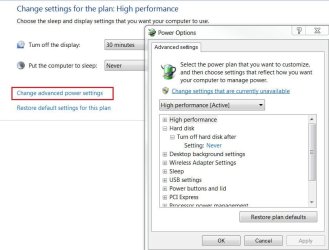
In the start menu search box type "powercfg.cpl" without the quotes and select the "High Performance" plan, then to the right select "Change plan settings", go through the plan and disable anything to do with sleep including the HDD option; now the PC will not sleep.

Power.JPG
 

My Computer My Computer

At a glance

W 7 64-bit UltimateIntel Q9550 Yorkfield8GB Dominator 8500C5DATI : XFX 5870
Computer Manufacturer/Model Number
* BFK Customs *
OS
W 7 64-bit Ultimate
CPU
Intel Q9550 Yorkfield
Motherboard
ASUS P5Q Pro
Memory
8GB Dominator 8500C5D
Graphics Card(s)
ATI : XFX 5870
Sound Card
Realtek HD Audio 7-1
Monitor(s) Displays
1x 47" LCD HDMI & 3x 26" LCD HDMI
Screen Resolution
1920x1080P & 1920x1200
Hard Drives
1x 80GB Intel X25-M G2 SSD : 1x 500GB & 1x 640GB WD Caviar Black(s)
PSU
Corsair 620HX
Case
Cooler Master RC-690
Cooling
Tuniq Tower 120, 2x 140mm and 3x 120mm case fans
Keyboard
Microsoft 500
Mouse
Razer Diamondback 3G
Internet Speed
14 Mb/s
Other Info
1x Koutech 3Gb/s SATA HDD Hot Swap Rack
Has anyone ever gotten some resolution on this??

I have some more to add to this. It has been months since this tread was last updated.

My system dual boots to Ubuntu 10. I also have a login set up for my wife on Windows 7. My systems does not exhibit the strange "not waking from sleep" when my sife is logged onto Windows 7, and when I am logged onto Ubuntu, no problems either. It is only when I am logged on as a user in Windows does the computer sleep on its own, and the only recourse I have is to reset or power down.

I also notice that all USB activity suspends, making my keyboard and mouse useless to try to wake up the system.

I have tried BIOS settings, and the last I checked, I let the OS decide how to sleep/suspend/etc. I have tried defaulting the power configurations via the methods described above.

Loading Windows 7 makes me nervous, and makes me want to run Ubuntu all the time of not for critical apps that are not written for Ubuntu.

I could use another login, though, but that makes absolutely no sense that Windows has this issue.
 

My Computer My Computer

At a glance

Windows 7 Home Premium 32-bitAMD Phenom II X4 965 Processor 3.40 GHz4 GOn board
Computer Manufacturer/Model Number
Self built
OS
Windows 7 Home Premium 32-bit
CPU
AMD Phenom II X4 965 Processor 3.40 GHz
Motherboard
MSI 485G
Memory
4 G
Graphics Card(s)
On board
Sound Card
On board
Monitor(s) Displays
Philips HDTV
Hard Drives
DMI WD5000AAKB-22UKA USB Device
Seagate Desktop USB Device
WDC WD20EARS-00MVWB0 ATA Device
Try this when you are logged into your account.

In the Start Search Bar type sleep. Click "Change when the computer sleeps" when it becomes visible.

Then use the drop down curtain in the new window to change to "Never". See picture below.

Not a cure exactly but it will negate the restart etc. needed and keep the mouse and keyboard working while you are logged on.
Mike
 
Last edited:

My Computer My Computer

At a glance

Windows7 Pro 64bit SP-1; Windows XP Pro 32bitIntel Core i7-870 Lynnfield 2.93GHz LGA 1156 ...8GB@1400MHz Crucial Ballistix DDR3-1600 4x2GBASUS ENGTX460 DirectCU/2DI/1GD5 1GB 256-bit G...
Computer Manufacturer/Model Number
Hopalong/ Godzilla
OS
Windows7 Pro 64bit SP-1; Windows XP Pro 32bit
CPU
Intel Core i7-870 Lynnfield 2.93GHz LGA 1156 95W Quad-Core
Motherboard
ASUS P7P55D-E PRO
Memory
8GB@1400MHz Crucial Ballistix DDR3-1600 4x2GB
Graphics Card(s)
ASUS ENGTX460 DirectCU/2DI/1GD5 1GB 256-bit GDDR5
Sound Card
VIA Onboard
Monitor(s) Displays
Asus VS248H-P 24"; Samsung SyncMaster 941BW 19"ws
Screen Resolution
1920x1080; 1440x900
Hard Drives
Samsung 830 120GB SSD
Intel 320 120GB SSD
Western Digital Caviar Black WD7501AALS 750GB 7200 RPM SATA 3.0Gb/s
Western Digital Caviar Black WD6401AALS 640GB 7200 RPM SATA 3.0Gb/s
PSU
COOLER MASTER Silent Pro RS850-AMBAJ3-US 850W Modular
Case
COOLER MASTER HAF 932 RC-932-KKN5-GP Black
Cooling
Scythe "Mugen-2 Rev.B" (2 ScytheKaze-Jyuni PWM fans)
Keyboard
Logitech K-320
Mouse
Kensington
Antivirus
Avast Inernet Suite
Browser
IE 9 ; Chrome
Thnak you, but that was already done. Throw any other ideas at me anytime.
 

My Computer My Computer

At a glance

Windows 7 Home Premium 32-bitAMD Phenom II X4 965 Processor 3.40 GHz4 GOn board
Computer Manufacturer/Model Number
Self built
OS
Windows 7 Home Premium 32-bit
CPU
AMD Phenom II X4 965 Processor 3.40 GHz
Motherboard
MSI 485G
Memory
4 G
Graphics Card(s)
On board
Sound Card
On board
Monitor(s) Displays
Philips HDTV
Hard Drives
DMI WD5000AAKB-22UKA USB Device
Seagate Desktop USB Device
WDC WD20EARS-00MVWB0 ATA Device
Windows 7 just "sleeps"

Maybe it is something else...

I posted before about this problem on this thread, and now I have some more information. I created another user, hoping that it would exhibit the same bejaviour as when my wife logs on. This just fell asleep on me too. The first thing I notice is the LED's on my lighted keyboard turn off, indicating that the USB no longer has power. Then I hear a rush of speed on the harddrive, then the screen goes blank. I can still hear the fans and hard drives, but no matter what I DO, THE SYSTEM WILL NOT COME BACK. i HAVE TO HOLD IN THE POWER BUTTON.

AGain, Ubuntu has no problems.

Really might have to migrate everything over. Too bad, too. Hope someone can help.
 

My Computer My Computer

At a glance

Windows 7 Home Premium 32-bitAMD Phenom II X4 965 Processor 3.40 GHz4 GOn board
Computer Manufacturer/Model Number
Self built
OS
Windows 7 Home Premium 32-bit
CPU
AMD Phenom II X4 965 Processor 3.40 GHz
Motherboard
MSI 485G
Memory
4 G
Graphics Card(s)
On board
Sound Card
On board
Monitor(s) Displays
Philips HDTV
Hard Drives
DMI WD5000AAKB-22UKA USB Device
Seagate Desktop USB Device
WDC WD20EARS-00MVWB0 ATA Device
More news.

Seems to sleep very quickly when I process some video files. Using Handbrake to convert vob files to mp4.

Happened twice today already.
 

My Computer My Computer

At a glance

Windows 7 Home Premium 32-bitAMD Phenom II X4 965 Processor 3.40 GHz4 GOn board
Computer Manufacturer/Model Number
Self built
OS
Windows 7 Home Premium 32-bit
CPU
AMD Phenom II X4 965 Processor 3.40 GHz
Motherboard
MSI 485G
Memory
4 G
Graphics Card(s)
On board
Sound Card
On board
Monitor(s) Displays
Philips HDTV
Hard Drives
DMI WD5000AAKB-22UKA USB Device
Seagate Desktop USB Device
WDC WD20EARS-00MVWB0 ATA Device
This is an interesting thread and I have been reading some of the unique posts. I was having some interesting occurrences with my system with regards to the sleep function. It seems as though my system will only enter sleep mode every other time when I select it from the shutdown menu. I have my power button set to shut down when I press it and I had it set to sleep before but it wouldn't always work for some reason.

I have win 7 ult X64 installed but I think I might need a bios flash in order to fix the problem. I'll see how it goes. I'm gonna be re-installing win 7 on a new ssd I just bought anyway so I can update the bios previous to doing that.

Jones
 

My Computer My Computer

At a glance

Windows 7 Ultimate X64 bitE84004Ghz ocz reaperSapphire HD4850
OS
Windows 7 Ultimate X64 bit
CPU
E8400
Motherboard
Asus P5Q Premium
Memory
4Ghz ocz reaper
Graphics Card(s)
Sapphire HD4850
Sound Card
Xfi Extreme Gamer
Monitor(s) Displays
asus 24" LCD
Hard Drives
OCZ Vertex 2 120 gb, 2 WD Black 750 gb, WD My Book Essential External 1tb
PSU
Enermax Modu 82+
Case
HAF X
Hi Guys,
would like some help/advice please. I have installed Win7 clean install on my computer, my problems is that if I leave mu computer for say 30+ minutes windows goes to sleep/hibernates and I find it hard to wake up normally have to reboot.

I have been through all the power management settings, and selected Never to all the selections in the advanced section, also in my power plan. I have even formatted my Drive and reinstalled win7 but still have the same problem.

When it is asleep, I have a halfmoon key on my keyboard, I have tried pressing this to wake it up but to no avail, also pressed the main power button, but this normally shuts it down.

Is there anything I can do to stop this happening, run a small program to keep it awake, or alter something in commands to stop it.

Your help and advice is really appreciated
Thanks and Regards
Bob

Are you sure you arent getting some kind of thermal shutdown ????? If you set Win 7's Power Scheme to "Never Sleep" - It aint supposed to Sleep !!!!!!!! :):):)
 

My Computer My Computer

At a glance

Win 7 Ultimate x64Core I7 980X O.C. to 4.0 Ghz12GB 1600 mhz triple channel DDR3 - KingstonATI Radeon HD 5970 2GB Video Card
Computer Manufacturer/Model Number
Alienware Aurora
OS
Win 7 Ultimate x64
CPU
Core I7 980X O.C. to 4.0 Ghz
Motherboard
Custom Intel mATX (Bios ver A10)
Memory
12GB 1600 mhz triple channel DDR3 - Kingston
Graphics Card(s)
ATI Radeon HD 5970 2GB Video Card
Sound Card
Creative Labs Titanium sound blaster
Monitor(s) Displays
30" Dell LCD
Screen Resolution
2560 x 1600
Hard Drives
240 GB OCZ Vertex 2 SSD
256 GB Samsung V2 SSD
2TB WD Black Caviar 7200 rpm SATA3
600GB WD Velociraptor 10,000 rpm SATA3
3TB WD MyBook Essential USB 3.0 7200 rpm External
PSU
850 Watt
Case
Alienware Aurora
Cooling
Water
Keyboard
Logitech G15 (original version)
Mouse
Logitech MX1000 Laser - Wireless
Internet Speed
Cable 22 Mb/sec download
Other Info
USB 3.0,
Blue Ray DVD Read/Writer
Bose Companion 3 Speakers
WRT54G Wireless Router
This is amazing. I am having the EXACT same problems! Anyone have a solution to this problem yet?
 

My Computer My Computer

At a glance

Windows 7 Pro 64 bitPhenom X6 1100tPatriot Viper II Sector 7 Edition 12GB (3 x 4...onboard
Computer Manufacturer/Model Number
N/A
OS
Windows 7 Pro 64 bit
CPU
Phenom X6 1100t
Motherboard
ASUS M4A88TD-V EVO/USB3 AM3 AMD 880G HDMI SATA 6Gb/s USB 3.0
Memory
Patriot Viper II Sector 7 Edition 12GB (3 x 4GB) 240-Pin DDR
Graphics Card(s)
onboard
Hard Drives
WD Caviar Black (WD1001FALS)?
PSU
SILVERSTONE Strider Essential series ST60F-ES 600W Power Sup
Case
XCLIO Godspeed One Advanced Fully Black Finish Computer Case
Cooling
see case
metro


you have to change the power saving setting by doing following steps
Right click on desktop and click on “Personalize”then click on “Screen Saver” icon
look at the “Power Management” and select “Change power settings” . In the new Window you will see “Balanced (recommended)” have link of “Change plan settings”. Click the "Change plan settings" link.In new window you will have two options. (“Turn off the display”) & “(Put the computer to sleep”.) To avoid from sleep mode change the settings to “Turn off the display: 20 minutes” and “Put the computer to sleep: Never”.click on "save changes " and then "OK"

Hopefully Your system is now set to not go into Stand By....
 

My Computer My Computer

At a glance

microsoft window7 Ultimate x64
Computer type
PC/Desktop
OS
microsoft window7 Ultimate x64
Back
Top