windows hangs after startup

basils57

New member
Member
VIP
Local time
1:54 AM
Messages
150
Hi Guys

I appear to have a problem with my computer. I'm running Win7 Home Premium 64bit.
When I start up it gets to the desktop and if I try to click on anything the blue circle keeps rotating and the machine hangs.
If I try system restore, I have only 1 date available - 4 days ago - and this has restored successfully, but with no difference.
I can boot into safe mode, but not into safe mode with networking - it gets to 'loading windows files' and hangs at that point. So either way at present I seem unable to log onto the internet.

Any ideas would be most helpful please.
 

My Computer

Computer type
PC/Desktop
OS
Windows 7 Home Premium 64bit.
CPU
Intel Core i5-2500k Quad @ 3.3GHz
Motherboard
ASUSTeK P8Z68-V LE (LGA1155)
Memory
8.00 GB Dual-Channel DDR3 @ 666.7MHz (5-5-5-15)
Graphics Card(s)
PL2773HDs on AMD Radeon HD 6600 Series
Monitor(s) Displays
Llyama PL2773HDS
Screen Resolution
1920x1080 pixels
Hard Drives
SAMSUNG HD103SJ ATA Device 1TB
Hi gregrocker

Have worked my way through the list, Malwarebytes was all clear, and the SCANNOW produced the following:
'Resource protection found corrupt files but was unable to fix some of them. They are included in the CBS.log'
I've attached a zip copy of the log..
On item 7, I wasn't sure which option to take, yes, no or all, so went for 'Yes'?
I have done a startup rpair 3 separate times from the installation disk.
Along the way I also got the BSOD with ref. 0x0000000F4!

As I stand now, I can start up and get to the desktop. Anything after that and it still hangs - sometimes I can open the start box prior to hanging, others not.
I can get into safe mode with networking.

Hope you can give me some positive news, and thanks again!
 

My Computer

Computer type
PC/Desktop
OS
Windows 7 Home Premium 64bit.
CPU
Intel Core i5-2500k Quad @ 3.3GHz
Motherboard
ASUSTeK P8Z68-V LE (LGA1155)
Memory
8.00 GB Dual-Channel DDR3 @ 666.7MHz (5-5-5-15)
Graphics Card(s)
PL2773HDs on AMD Radeon HD 6600 Series
Monitor(s) Displays
Llyama PL2773HDS
Screen Resolution
1920x1080 pixels
Hard Drives
SAMSUNG HD103SJ ATA Device 1TB
Here's the error from the SFC scan...
Code:
 Line 30556: 2014-07-06 19:32:35, Info                  CSI    00000319 [SR] Repairing 1 components
 Line 30557: 2014-07-06 19:32:35, Info                  CSI    0000031a [SR] Beginning Verify and Repair transaction
 Line 30558: 2014-07-06 19:32:35, Info                  CSI    0000031b [SR] Cannot repair member file [l:32{16}]"DVDMaker.exe.mui" of Microsoft-Windows-OpticalMediaDisc-Wizard.Resources, Version = 6.1.7600.16385, pA = PROCESSOR_ARCHITECTURE_AMD64 (9), Culture = [l:10{5}]"en-US", VersionScope = 1 nonSxS, PublicKeyToken = {l:8 b:31bf3856ad364e35}, Type neutral, TypeName neutral, PublicKey neutral in the store, file is missing

- not a particularly critical problem :)

I'll post a fix protocol in a few minutes.
 

My Computer

Computer type
Laptop
Computer Manufacturer/Model Number
Asus K52F or Lenovo B51-80
OS
Win 7 x64 Home Premium (and x86 VirtualBox VM)/Win10
CPU
i3 370M/i7 6500U
Motherboard
Asus/Lenovo
Memory
8GB - finally :)/8GB
Graphics Card(s)
it's an i3, dude!/dual Intel&nVidia
Sound Card
onboard
Monitor(s) Displays
15.6" built-in
Screen Resolution
1366x768/1920x1080
Hard Drives
750GB Seagate internal
Sundry external drives attached to other computers on the local network
1TB SSD on the Lenovo
PSU
n/a
Internet Speed
as much as I can get - usually on a dongle/phone, so <1MB/s
Antivirus
MSE/Defender
Browser
IE11/12/Edge/Chrome/FF(if I must)
I've uploaded a file - b57aa.zip - to my OneDrive at Noel's OneDrive
Please download and save it.

Right-click on the saved file and select Extract all...
Change the target to C:\ and click on Extract
Close all windows (it would be a good idea to print these instructions!)

Now reboot to the Repair Environment - as soon as the machine restarts, start tapping F8 - this should bring up the Advanced Boot Menu, at the top of which should be the option 'Repair my Computer'
Pick that
You'll have to log in with your username and password.

Pick the option to use a Command Prompt
At the prompt type
DIR C:\b57aa
hit the enter key - if you get a 'Not Found' error try
DIR D:\b57aa
or
DIR E:\b57aa


The drive letter in use when you find the folder will need to be substituted (for<drive>) into the following command...


XCOPY <drive>:\b57aa <drive>:\windows\winsxs /y /i /s /v /h


(e.g. XCOPY P:\wfire P:\windows\winsxs /y /i /s /v /h )


run the command (it should take almost no time) and when the prompt returns, type
EXIT
and hit the Enter key to exit Command Prompt - reboot to Normal Mode Windows.

Now run SFC /SCANNOW in an Elevated Command Prompt
then reboot and upload the new CBS.log file to your reply
 

My Computer

Computer type
Laptop
Computer Manufacturer/Model Number
Asus K52F or Lenovo B51-80
OS
Win 7 x64 Home Premium (and x86 VirtualBox VM)/Win10
CPU
i3 370M/i7 6500U
Motherboard
Asus/Lenovo
Memory
8GB - finally :)/8GB
Graphics Card(s)
it's an i3, dude!/dual Intel&nVidia
Sound Card
onboard
Monitor(s) Displays
15.6" built-in
Screen Resolution
1366x768/1920x1080
Hard Drives
750GB Seagate internal
Sundry external drives attached to other computers on the local network
1TB SSD on the Lenovo
PSU
n/a
Internet Speed
as much as I can get - usually on a dongle/phone, so <1MB/s
Antivirus
MSE/Defender
Browser
IE11/12/Edge/Chrome/FF(if I must)
Hi NoelDP

Really appreciate your assistance on this.

Sorry to be a pain, but in my advanced boot options I don't have a 'Repair my computer' line - only safe mode to SM +command prompt; Enable boot logging to Disable driver signature enforcement' and start windows normally.

The only Repair instance I have found is on the installation disk. Can I use SM with command prompt?
 

My Computer

Computer type
PC/Desktop
OS
Windows 7 Home Premium 64bit.
CPU
Intel Core i5-2500k Quad @ 3.3GHz
Motherboard
ASUSTeK P8Z68-V LE (LGA1155)
Memory
8.00 GB Dual-Channel DDR3 @ 666.7MHz (5-5-5-15)
Graphics Card(s)
PL2773HDs on AMD Radeon HD 6600 Series
Monitor(s) Displays
Llyama PL2773HDS
Screen Resolution
1920x1080 pixels
Hard Drives
SAMSUNG HD103SJ ATA Device 1TB
The only access that gives the proper permissions is the Repair Environment. You can boot using either a repair disk, or a retail OS disk and use the repair options there to do the same thing.
 

My Computer

Computer type
Laptop
Computer Manufacturer/Model Number
Asus K52F or Lenovo B51-80
OS
Win 7 x64 Home Premium (and x86 VirtualBox VM)/Win10
CPU
i3 370M/i7 6500U
Motherboard
Asus/Lenovo
Memory
8GB - finally :)/8GB
Graphics Card(s)
it's an i3, dude!/dual Intel&nVidia
Sound Card
onboard
Monitor(s) Displays
15.6" built-in
Screen Resolution
1366x768/1920x1080
Hard Drives
750GB Seagate internal
Sundry external drives attached to other computers on the local network
1TB SSD on the Lenovo
PSU
n/a
Internet Speed
as much as I can get - usually on a dongle/phone, so <1MB/s
Antivirus
MSE/Defender
Browser
IE11/12/Edge/Chrome/FF(if I must)
I've done the above via my retail disk and booted into normal mode (my gadgets had disappeared). I manged to open the Start Menu, and got a "The application is not responding" box which proceeded to disappear. But then I couldn't do anything else - mouse pointer moves, but no effect when trying to click.
So I haven't done the SFC /SCANNOW in an Elevated Command Prompt.

Any suggestions now please?
 
Last edited:

My Computer

Computer type
PC/Desktop
OS
Windows 7 Home Premium 64bit.
CPU
Intel Core i5-2500k Quad @ 3.3GHz
Motherboard
ASUSTeK P8Z68-V LE (LGA1155)
Memory
8.00 GB Dual-Channel DDR3 @ 666.7MHz (5-5-5-15)
Graphics Card(s)
PL2773HDs on AMD Radeon HD 6600 Series
Monitor(s) Displays
Llyama PL2773HDS
Screen Resolution
1920x1080 pixels
Hard Drives
SAMSUNG HD103SJ ATA Device 1TB
Hmm - what happens in Safe Mode?
If you can't get to it using F8, use the option in MSCONFIG - in the Boot tab, select Safe Boot and Network (for Safe Mode with Networking)
 

My Computer

Computer type
Laptop
Computer Manufacturer/Model Number
Asus K52F or Lenovo B51-80
OS
Win 7 x64 Home Premium (and x86 VirtualBox VM)/Win10
CPU
i3 370M/i7 6500U
Motherboard
Asus/Lenovo
Memory
8GB - finally :)/8GB
Graphics Card(s)
it's an i3, dude!/dual Intel&nVidia
Sound Card
onboard
Monitor(s) Displays
15.6" built-in
Screen Resolution
1366x768/1920x1080
Hard Drives
750GB Seagate internal
Sundry external drives attached to other computers on the local network
1TB SSD on the Lenovo
PSU
n/a
Internet Speed
as much as I can get - usually on a dongle/phone, so <1MB/s
Antivirus
MSE/Defender
Browser
IE11/12/Edge/Chrome/FF(if I must)
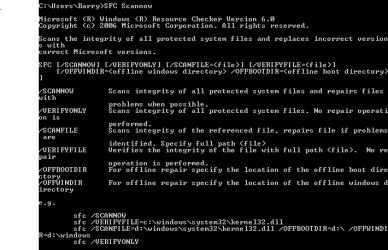
I get the attached.
 

Attachments

  • Capture.PNG
    Capture.PNG
    5.7 KB · Views: 3

My Computer

Computer type
PC/Desktop
OS
Windows 7 Home Premium 64bit.
CPU
Intel Core i5-2500k Quad @ 3.3GHz
Motherboard
ASUSTeK P8Z68-V LE (LGA1155)
Memory
8.00 GB Dual-Channel DDR3 @ 666.7MHz (5-5-5-15)
Graphics Card(s)
PL2773HDs on AMD Radeon HD 6600 Series
Monitor(s) Displays
Llyama PL2773HDS
Screen Resolution
1920x1080 pixels
Hard Drives
SAMSUNG HD103SJ ATA Device 1TB
It looks like you didn't put the backslash in the SFC command.
You entered SFC Scannow
It should be SFC /Scannow


My Computer

Computer type
PC/Desktop
Computer Manufacturer/Model Number
home built
OS
Multi-Boot W7_Pro_x64 W8.1_Pro_x64 W10_Pro_x64 +Linux_VMs +Chromium_VM
CPU
AMD Athlon II x4 620
Motherboard
Gigabyte GA-MA785G-UD3H
Memory
6GB GSkill DDR2 800
Graphics Card(s)
AMD 4670 GPU + AMD 4200 IGP
Sound Card
on board Realtek ALC889A
Monitor(s) Displays
RCA 40" LCD TV, Insignia 32" LCD TV, HP 15" LCD monitor
Screen Resolution
1680 x 1050
Hard Drives
OCZ Vertex 3 120GB,
Samsung F3 1TB (3),
Several others - WD, Seagate, Hitachi, ...
PSU
Corsair 500 W
Case
Rosewill mid tower
Cooling
CM 90mm rifle
Keyboard
Gyration wireless, Logitech wireless, Dell USB wired
Mouse
Gyration wireless, Logitech wireless, V7 USB wired
Internet Speed
Spectrum - 100Mbps D / 10Mbps U
Antivirus
Avast, MBAM3, EMET, WinPatrol
Browser
Pale Moon, Firefox, IE
Other Info
2 multi-boot PC's
Mainly HTPC/Office/Gen purpose (no gaming).
Trendnet USB KVM.
LG DVD burner/Blue Ray Player.
Tray system for removable SATA backup drives.

Not currently OCd, under-volted.
I use Hybrid sleep, rarely re-boot or shutdown.

Hauppauge HD-PVR, Avermedia PCIe TV Tuner, Hauppauge PCI TV Tuner.
Apologies for that folks.
Attached is the latest CBS.log file.
It is still hanging though.
 

My Computer

Computer type
PC/Desktop
OS
Windows 7 Home Premium 64bit.
CPU
Intel Core i5-2500k Quad @ 3.3GHz
Motherboard
ASUSTeK P8Z68-V LE (LGA1155)
Memory
8.00 GB Dual-Channel DDR3 @ 666.7MHz (5-5-5-15)
Graphics Card(s)
PL2773HDs on AMD Radeon HD 6600 Series
Monitor(s) Displays
Llyama PL2773HDS
Screen Resolution
1920x1080 pixels
Hard Drives
SAMSUNG HD103SJ ATA Device 1TB
Code:
2014-07-07 13:51:11, Info                  CSI    00000316 [SR] Repairing 1 components
2014-07-07 13:51:11, Info                  CSI    00000317 [SR] Beginning Verify and Repair transaction
2014-07-07 13:51:11, Info                  CSI    00000318 [SR] Repairing corrupted file [ml:520{260},l:72{36}]"\??\C:\Program Files\DVD Maker\en-US"\[l:32{16}]"DVDMaker.exe.mui" from store
2014-07-07 13:51:11, Info                  CSI    00000319 Repair results created:

...all fixed ;)
I'll hand you back to the specialists now :D Good luck with the other problems.
 

My Computer

Computer type
Laptop
Computer Manufacturer/Model Number
Asus K52F or Lenovo B51-80
OS
Win 7 x64 Home Premium (and x86 VirtualBox VM)/Win10
CPU
i3 370M/i7 6500U
Motherboard
Asus/Lenovo
Memory
8GB - finally :)/8GB
Graphics Card(s)
it's an i3, dude!/dual Intel&nVidia
Sound Card
onboard
Monitor(s) Displays
15.6" built-in
Screen Resolution
1366x768/1920x1080
Hard Drives
750GB Seagate internal
Sundry external drives attached to other computers on the local network
1TB SSD on the Lenovo
PSU
n/a
Internet Speed
as much as I can get - usually on a dongle/phone, so <1MB/s
Antivirus
MSE/Defender
Browser
IE11/12/Edge/Chrome/FF(if I must)
Thanks for your help and input Noel.

Look forward to hearing further.
 

My Computer

Computer type
PC/Desktop
OS
Windows 7 Home Premium 64bit.
CPU
Intel Core i5-2500k Quad @ 3.3GHz
Motherboard
ASUSTeK P8Z68-V LE (LGA1155)
Memory
8.00 GB Dual-Channel DDR3 @ 666.7MHz (5-5-5-15)
Graphics Card(s)
PL2773HDs on AMD Radeon HD 6600 Series
Monitor(s) Displays
Llyama PL2773HDS
Screen Resolution
1920x1080 pixels
Hard Drives
SAMSUNG HD103SJ ATA Device 1TB
Hi Greg

Thanks for the pointer. I've worked through it all, and unfortunately to no avail, so I've decided to do a clean re-install.
This now seems the line of least resistance, especially as I have everything backed up.. It should give the backup program a good test and see if it was money well spent!

I really appreciate all of the help and assistance that we get from the forum, it feels like a real community.

Thanks again.
 

My Computer

Computer type
PC/Desktop
OS
Windows 7 Home Premium 64bit.
CPU
Intel Core i5-2500k Quad @ 3.3GHz
Motherboard
ASUSTeK P8Z68-V LE (LGA1155)
Memory
8.00 GB Dual-Channel DDR3 @ 666.7MHz (5-5-5-15)
Graphics Card(s)
PL2773HDs on AMD Radeon HD 6600 Series
Monitor(s) Displays
Llyama PL2773HDS
Screen Resolution
1920x1080 pixels
Hard Drives
SAMSUNG HD103SJ ATA Device 1TB
There is no misfortune in doing a Clean Reinstall - Factory OEM Windows 7 as if you stick with the steps, tools and methods in the tutorial you'll end up with a perfect install - and keep it for as long as you do.

Feel free to ask back any questions and let us know how it goes.
 

My Computer

Computer type
PC/Desktop
Computer Manufacturer/Model Number
Home made Desktop
OS
Windows 10 Pro. 64/ version 1709 Windows 7 Pro/64
CPU
Intel i7-6800K @ 4.3
Motherboard
ASUS X-99 Deluxe II
Memory
Corsair Platinum 16 gig @2400
Graphics Card(s)
EVGA GTX 1070 OC
Monitor(s) Displays
Asus 27" LED LCD/VE278Q
Screen Resolution
1920-1080 or 1280-720 HDMI
Hard Drives
INTEL SSD 730-240 Gb Sata 3.0/
PSU
EVGA Platium 1200W
Case
Phanteks Luxe Tempered Glass 8 fans/ one radiator
Cooling
XSPC/ Water Cooled CPU
Keyboard
Das 4 Professional
Mouse
Logitech M705/MX Anywhere 2-S
Internet Speed
100 mbits
Antivirus
Microsoft Security Essentials/ Malwarebytes Premium 3.0/ SAS
Browser
I.E. 11 default/Firefox/ ISP Time Warner Cable/Spectrum
Other Info
LG BluRay Burner/
Sound system-KLipsch-THX/
Icy Dock ssd Hot Swap bays.
Back
Top