Windows hangs on logging off/shutting down

mysherryamour

New member
Local time
6:51 AM
Messages
4
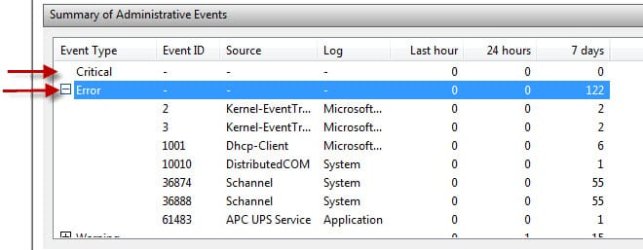
Exactly what the title says. Also I'm not sure if this is related but every time I try to make a restore point it says "Shadow copy timed out". It started doing this like a few days ago and I've successfully made several restore points before this. However, now it says that I only have one restore point. Also according to the EVENT VIEWER I've had countless errors.
 

My Computer My Computer

OS
Windows 7 Home Premium x64
Exactly what the title says. Also I'm not sure if this is related but every time I try to make a restore point it says "Shadow copy timed out". It started doing this like a few days ago and I've successfully made several restore points before this. However, now it says that I only have one restore point. Also according to the EVENT VIEWER I've had countless errors.

Hangs as in "never completes" or "takes a long time"?

Visit the following link for "Shadow copy timed out"
http://www.sevenforums.com/backup-r...m-restore-error-message-says-timed-out-3.html

See image below regarding Event Viewer
Event Viewer.jpg
 

My Computer My Computer

Computer type
PC/Desktop
Computer Manufacturer/Model Number
Custom Built
OS
Windows 7 Professional x64
CPU
Intel i5 quad processor
Motherboard
DP67BG
Memory
16 GB
Graphics Card(s)
Radeon HD 5770
Sound Card
Realtek High Definition Audio
Monitor(s) Displays
Samsung SyncMaster
Screen Resolution
1920X1080
Hard Drives
WD 2TB (SATA Internal)
WD 1TB (USB External)
PSU
Corsair GS800
Case
Tower (Generic)
Cooling
3 Internal Fans
Keyboard
MS Wireless
Mouse
MS Optical Wired
Internet Speed
54 mbps
Antivirus
Emsisoft
Browser
IE-Version 9, Palemoon-Version 24.2.0
It stayed on the shutting down screen for about an hour before the BSOD showed up. Immediately after the BSOD, powering on the computer would only result in a black screen so I took out my battery, held the power button for a minute, turned it back on (like this person said) and it worked fine again. Too scared to power off my laptop again though. D:

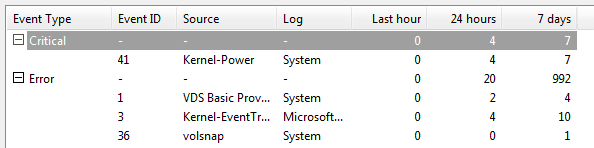
Also attached is the event viewer summary
 

Attachments

  • Untitled.png
    Untitled.png
    4.9 KB · Views: 14

My Computer My Computer

OS
Windows 7 Home Premium x64

My Computer My Computer

Computer Manufacturer/Model Number
Lenovo ThinkCenter, Custom Built PC, Acer Aspire V3-771G-9809
OS
Windows 7 enterprise 64 bit, Windows 7 Pro 64 bit ,Windows 8 64bit
CPU
Core i5-2400, Athlon 64 X2 6400+ ,Core i7-3632QM
Motherboard
ASUS M4A79 Deluxe
Memory
4GB, 4gb g.skill ddr2, 8gb
Graphics Card(s)
Radeon HD 4550 sgb, Radeon HD 4870, NVIDIA Geforce GT 650m
Monitor(s) Displays
dual samsung 22" monitors
Hard Drives
500GB, Western Digital WD Blue WD6400AAKS 640GB 7200 RPM 16MB Cache SATA 3.0Gb/s, 1TB
Case
Antec Twelve Hundred V3 Black Steel ATX Full Tower
Cooling
ASUS Silent Square Pro
Mouse
Razar Death adder
Internet Speed
20 mbps
It stayed on the shutting down screen for about an hour before the BSOD showed up. Immediately after the BSOD, powering on the computer would only result in a black screen so I took out my battery, held the power button for a minute, turned it back on (like this person said) and it worked fine again. Too scared to power off my laptop again though. D:

Also attached is the event viewer summary

Please expand the the Critical & Error events;

Event Viewer.jpg
 

My Computer My Computer

Computer type
PC/Desktop
Computer Manufacturer/Model Number
Custom Built
OS
Windows 7 Professional x64
CPU
Intel i5 quad processor
Motherboard
DP67BG
Memory
16 GB
Graphics Card(s)
Radeon HD 5770
Sound Card
Realtek High Definition Audio
Monitor(s) Displays
Samsung SyncMaster
Screen Resolution
1920X1080
Hard Drives
WD 2TB (SATA Internal)
WD 1TB (USB External)
PSU
Corsair GS800
Case
Tower (Generic)
Cooling
3 Internal Fans
Keyboard
MS Wireless
Mouse
MS Optical Wired
Internet Speed
54 mbps
Antivirus
Emsisoft
Browser
IE-Version 9, Palemoon-Version 24.2.0
There are more several errors that are not shown :P
 

Attachments

  • Untitled.png
    Untitled.png
    4 KB · Views: 12

My Computer My Computer

OS
Windows 7 Home Premium x64
There are more several errors that are not shown :P

An event 41 is used to report that something unexpected happened that prevented Windows from shutting down correctly. There may be insufficient information to explicitly define what happened. To determine what may have happened and to identify a potential resolution, it is important to know what the computer was doing at the time just before the event occurred. Do you know what the computer was doing just before the shut down?
 

My Computer My Computer

Computer type
PC/Desktop
Computer Manufacturer/Model Number
Custom Built
OS
Windows 7 Professional x64
CPU
Intel i5 quad processor
Motherboard
DP67BG
Memory
16 GB
Graphics Card(s)
Radeon HD 5770
Sound Card
Realtek High Definition Audio
Monitor(s) Displays
Samsung SyncMaster
Screen Resolution
1920X1080
Hard Drives
WD 2TB (SATA Internal)
WD 1TB (USB External)
PSU
Corsair GS800
Case
Tower (Generic)
Cooling
3 Internal Fans
Keyboard
MS Wireless
Mouse
MS Optical Wired
Internet Speed
54 mbps
Antivirus
Emsisoft
Browser
IE-Version 9, Palemoon-Version 24.2.0
Well I was attempting to install a game (Mass Effect 2 if it matters at all) and during the process my physical memory usage would suddenly spike from 40% to 97% or higher making it impossible to do anything. I had to restart my computer several times and attempt to install mass effect 2 and its dlc multiple times before it finally worked.

ALSO every time I attempted to restart the computer I would tell it to shut down then FORCE shut down and that's where it would hang at the shutting down screen until I held down the power button.
 

My Computer My Computer

OS
Windows 7 Home Premium x64
Well I was attempting to install a game (Mass Effect 2 if it matters at all) and during the process my physical memory usage would suddenly spike from 40% to 97% or higher making it impossible to do anything. I had to restart my computer several times and attempt to install mass effect 2 and its dlc multiple times before it finally worked.

ALSO every time I attempted to restart the computer I would tell it to shut down then FORCE shut down and that's where it would hang at the shutting down screen until I held down the power button.

The information I provided is from Microsoft Support, visit the following link to read the article;

Windows Kernel event ID 41 error "The system has rebooted without cleanly shutting down first" in Windows 7 or Windows Server 2008 R2

I hope you find a solution to the problem.

HTH
 

My Computer My Computer

Computer type
PC/Desktop
Computer Manufacturer/Model Number
Custom Built
OS
Windows 7 Professional x64
CPU
Intel i5 quad processor
Motherboard
DP67BG
Memory
16 GB
Graphics Card(s)
Radeon HD 5770
Sound Card
Realtek High Definition Audio
Monitor(s) Displays
Samsung SyncMaster
Screen Resolution
1920X1080
Hard Drives
WD 2TB (SATA Internal)
WD 1TB (USB External)
PSU
Corsair GS800
Case
Tower (Generic)
Cooling
3 Internal Fans
Keyboard
MS Wireless
Mouse
MS Optical Wired
Internet Speed
54 mbps
Antivirus
Emsisoft
Browser
IE-Version 9, Palemoon-Version 24.2.0
Back
Top