
I stuck with Windows XP until just a few months ago because I knew Vista was a disaster and that Windows 7 had a lot of BS design changes. But I'd had it up to here with being stuck with < 4 GB RAM (especially since I already had 16 GB in my machine) and my computer grinding to a halt as a result, so when I saw a good deal on Windows 7 Home Premium I bought it and installed the x64 version (on an AMD Phenom II x4 custom build). I knew I'd have to put up with a lot of BS in the design (just ran into another one yesterday), but the bargain would be that in exchange I'd get to use all 16 GB of my RAM and be freed from arbitrarily small desktop heap and other limits, I thought.
Well now Windows 7 is constantly grinding to a halt because of some invisible resource limit way before my RAM is exhausted. The computer will run fine up to a point, then it will start showing symptoms of flakiness such as Google Chrome windows giving me the "Aw, Snap!" blue screen, and pieces of the taskbar / system tray / quick launch not being rendered -- black squares that will sometimes be repainted if I mouseover them. Once Windows enters this flaky state of operation, it's only a matter of time before it really wigs out and practically any action I take -- opening one more browser / file explorer / whatever window, searching a web page with CTRL+F, opening a save file dialog (just happened while trying to prepare my example images), practically anything -- can suddenly trigger it to go totally haywire, displaying the taskbar and system tray at the top left of the screen and becoming unresponsive to normal interaction, with all kinds of blinking of UI elements. When this happens, I can't interact with those UI elements where they're rendered, but if I mouseover their normal locations at the bottom of the screen, I can see it rendering the rollover effects on them at the top.
Things that seem like they'd be helpful in regaining control of the computer just exacerbate the problem, such as trying to open Task Manager, ALT+TAB to change to a different window, etc. I've found that if I act quickly once this happens and don't try those other things I've just mentioned, I can usually get Windows to regain its composure long enough to start closing windows by dragging to change the height of the taskbar. That usually gets it to repaint the taskbar at the bottom and let me interact with it.
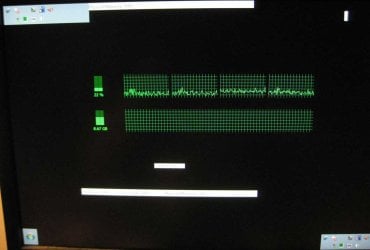
I've attached some images showing what it looks like when this happens and showing that I still have 7-8 GB of RAM free. The first image shows it in the flaky stage (8.21 GB / 51% used) and the second one shows it in full on freak out mode (8.67 GB / 54% used). In that one it's actually rendering the system tray both at the top left and bottom right at the same time, and the taskbar is nowhere in sight.
What is up with this? What resource limit is responsible for this and how can it be fixed? I want to use all of my RAM. If this is the kind of BS I'm going to have to deal with in Windows, I might be done with it and just switch to Ubuntu.
Well now Windows 7 is constantly grinding to a halt because of some invisible resource limit way before my RAM is exhausted. The computer will run fine up to a point, then it will start showing symptoms of flakiness such as Google Chrome windows giving me the "Aw, Snap!" blue screen, and pieces of the taskbar / system tray / quick launch not being rendered -- black squares that will sometimes be repainted if I mouseover them. Once Windows enters this flaky state of operation, it's only a matter of time before it really wigs out and practically any action I take -- opening one more browser / file explorer / whatever window, searching a web page with CTRL+F, opening a save file dialog (just happened while trying to prepare my example images), practically anything -- can suddenly trigger it to go totally haywire, displaying the taskbar and system tray at the top left of the screen and becoming unresponsive to normal interaction, with all kinds of blinking of UI elements. When this happens, I can't interact with those UI elements where they're rendered, but if I mouseover their normal locations at the bottom of the screen, I can see it rendering the rollover effects on them at the top.
Things that seem like they'd be helpful in regaining control of the computer just exacerbate the problem, such as trying to open Task Manager, ALT+TAB to change to a different window, etc. I've found that if I act quickly once this happens and don't try those other things I've just mentioned, I can usually get Windows to regain its composure long enough to start closing windows by dragging to change the height of the taskbar. That usually gets it to repaint the taskbar at the bottom and let me interact with it.
I've attached some images showing what it looks like when this happens and showing that I still have 7-8 GB of RAM free. The first image shows it in the flaky stage (8.21 GB / 51% used) and the second one shows it in full on freak out mode (8.67 GB / 54% used). In that one it's actually rendering the system tray both at the top left and bottom right at the same time, and the taskbar is nowhere in sight.
What is up with this? What resource limit is responsible for this and how can it be fixed? I want to use all of my RAM. If this is the kind of BS I'm going to have to deal with in Windows, I might be done with it and just switch to Ubuntu.
Attachments

My Computer
At a glance
Windows 7 Home Premium x64AMD Phenom II X4 955 BE16 GB G.SKILL Ripjaws DDR3 1600SAPPHIRE 100293L Radeon HD 5570 1GB 128-bit D...
- Computer type
- PC/Desktop
- Computer Manufacturer/Model Number
- Custom build
- OS
- Windows 7 Home Premium x64
- CPU
- AMD Phenom II X4 955 BE
- Motherboard
- Gigabyte GA-970A-UD3
- Memory
- 16 GB G.SKILL Ripjaws DDR3 1600
- Graphics Card(s)
- SAPPHIRE 100293L Radeon HD 5570 1GB 128-bit DDR3 PCI Express
- Sound Card
- Integrated
- Monitor(s) Displays
- Dell 2007WFP
- Hard Drives
- Western Digital Caviar Black WD6401AALS
- PSU
- Antec NEO ECO 620C 620W


