
What is this?
About two months ago my computer start acting strange. Minor popups in chrome. I tried to get rid of them and then shut down and my computer would take hours to boot. At some point I inserted my recovery disk thinking I could repair what's wrong, but I was prompted the disk was wiping my hard drive. Which was okay. It would always get to the last disk and wouldn't complete installation, so I repeated process. Then I got "bootmrg missing," I use my boot manager repair disk and it got me to my current status.
Now using lubuntu to research my next step to get my pc working.
About two months ago my computer start acting strange. Minor popups in chrome. I tried to get rid of them and then shut down and my computer would take hours to boot. At some point I inserted my recovery disk thinking I could repair what's wrong, but I was prompted the disk was wiping my hard drive. Which was okay. It would always get to the last disk and wouldn't complete installation, so I repeated process. Then I got "bootmrg missing," I use my boot manager repair disk and it got me to my current status.
Now using lubuntu to research my next step to get my pc working.
Attachments
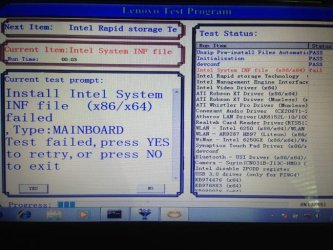
My Computer
- Computer type
- Laptop
- Computer Manufacturer/Model Number
- Lenovo
- OS
- Windows 7 Home Premium 32bit
- CPU
- x86/x64
- Memory
- 4 gigs
- Browser
- Chrome, Firefox
