Solved Windows installation problem

lynchy217

New member
Local time
1:05 AM
Messages
14
Hello, here is my issue:

I have one working laptop...which has internet, but a broken disk drive running windows 7 Professional x64, and one desktop with no working operating system and no internet access. I have been able to boot this machine in linux, but havent been able to get windows running on it yet. I have access to MSDN, so I can get the ISO I need, but cant figure out how to put it on my desktop. I have tried making a bootable USB flash drive, with no luck (booting as Forced FDD gives "invalid partition table" error and booting as Floppy gives a read error...all other options are not even read). I cannot burn a DVD without a working disk drive, and I cant get internet, so I am completely lost for ideas. Is there any way to get windows onto my desktop machine using ISO's downloaded using MSDN on my laptop? HELP!!!

PS. I dont even care whether I run xp or 7 on this machine...whatever will work. I have ISO's for both.
 

My Computer

OS
Windows 7 Professional x64
Hello, here is my issue:

I have one working laptop...which has internet, but a broken disk drive running windows 7 Professional x64, and one desktop with no working operating system and no internet access. I have been able to boot this machine in linux, but havent been able to get windows running on it yet. I have access to MSDN, so I can get the ISO I need, but cant figure out how to put it on my desktop. I have tried making a bootable USB flash drive, with no luck (booting as Forced FDD gives "invalid partition table" error and booting as Floppy gives a read error...all other options are not even read). I cannot burn a DVD without a working disk drive, and I cant get internet, so I am completely lost for ideas. Is there any way to get windows onto my desktop machine using ISO's downloaded using MSDN on my laptop? HELP!!!

PS. I dont even care whether I run xp or 7 on this machine...whatever will work. I have ISO's for both.

Use this http://www.sevenforums.com/tutorials/2432-usb-windows-7-installation-key-drive-create.html to create a bootable USB drive that works


Ken J
 
Last edited by a moderator:

My Computer

Computer Manufacturer/Model Number
HP Pavillion dv-7 1005 Tx
OS
Win 8 Release candidate 8400
CPU
[email protected]
Memory
4 gigs
Graphics Card(s)
Nvidia 9600M
Sound Card
HD built-in
Monitor(s) Displays
17" Wxga
Screen Resolution
1440x900
Cooling
none
Internet Speed
45Mb down 5Mb up
Hello lynchy217, welcome to Seven Forums!


You would be better off with a clean install when you get the Windows 7 installer booting and the best way to go about that is to wipe (secure erase) the Hard Disk Drive, have a look at the info below.

Be sure to post back with any further questions you may have and to keep us informed.
   Information

After you have made backups of everything you care to save and you want to do a real wipe "clean all" to the Hard Disk Drive (HDD) have a look at this tutorial at the link below, it over-writes everything, all the old Windows code including all the old Windows drivers, giving you the best possible space to install Windows 7 to; it goes hand-in-hand with a clean install.

SSD / HDD : Optimize for Windows Reinstallation

How to Do a Clean Installation with Windows 7


My Computer

Computer Manufacturer/Model Number
* BFK Customs *
OS
W 7 64-bit Ultimate
CPU
Intel Q9550 Yorkfield
Motherboard
ASUS P5Q Pro
Memory
8GB Dominator 8500C5D
Graphics Card(s)
ATI : XFX 5870
Sound Card
Realtek HD Audio 7-1
Monitor(s) Displays
1x 47" LCD HDMI & 3x 26" LCD HDMI
Screen Resolution
1920x1080P & 1920x1200
Hard Drives
1x 80GB Intel X25-M G2 SSD : 1x 500GB & 1x 640GB WD Caviar Black(s)
PSU
Corsair 620HX
Case
Cooler Master RC-690
Cooling
Tuniq Tower 120, 2x 140mm and 3x 120mm case fans
Keyboard
Microsoft 500
Mouse
Razer Diamondback 3G
Internet Speed
14 Mb/s
Other Info
1x Koutech 3Gb/s SATA HDD Hot Swap Rack
@zigzag3143 I tried "a bootable usb", but it cant format the drive correctly, it has gotten stuck at 74% every time ive tried it.

@
gregrocker UltraISO cant find my flash drive, it only looks for drive G and my flash drive is drive I:, is there anyway to add my drive to the drop down list?

@
Bare Foot Kid the hard drive on my desktop is empty and formatted, but this shouldnt affect my ability to boot from another drive should it? Is there anything else I can try?
 

My Computer

OS
Windows 7 Professional x64
Existing empty partitions can cause deployment issues in certain circumstances - it's better to boot to WinPE and use diskpart to clean the drive using the clean command, create a primary partition (create par pri), set it active (active), and format it (format fs=ntfs quick) - then boot back into setup and try again.
 

My Computer

Computer type
PC/Desktop
Computer Manufacturer/Model Number
Custom
OS
Windows 10 Pro x64
CPU
Intel Core i7 4790K @ 4.5GHz
Motherboard
Asus Maximus Hero VII
Memory
32GB DDR3
Graphics Card(s)
Nvidia GeForce GTX970
Sound Card
Realtek HD Audio
Screen Resolution
1920x1200
Hard Drives
1x Samsung 250GB SSD
4x WD RE 2TB (RAIDZ)
PSU
Corsair AX760i
Case
Fractal Design Define R4
Cooling
Noctua NH-D15
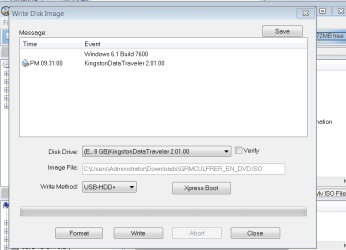
If you have the flash stick plugged in, then it should show up in the menu as shown here. Otherwise restart the computer or try another flash stick:

Capture.PNG

Be sure to follow Cluberti's advice to wipe the HD of all code before install. The tutorial for this and other tips are in the Clean Reinstall link in my last post.
 
Hey again, I was able to get it to work before i left for work this morning, the problem was that i forgot to open the prgram as an admin. I have done the disk part setup every time it hasn't worked, so that should not be a problem. Ill let you know whether the drive boots or not when I get home tonight. Thanks for all of your help!
 

My Computer

OS
Windows 7 Professional x64
Motherboard: ASUS M4A78-E
Processor: AMD Phenom II x2 3.1 GHz
RAM: G SKILL 2GB (2 x 1) 240-Pin
HD: WD 500GB + Seagate 1.5TB

If that isn't enough info, let me know.
 

My Computer

OS
Windows 7 Professional x64
Motherboard: ASUS M4A78-E
Processor: AMD Phenom II x2 3.1 GHz
RAM: G SKILL 2GB (2 x 1) 240-Pin
HD: WD 500GB + Seagate 1.5TB

If that isn't enough info, let me know.

Looks OK for Windows 7.
 

My Computer

OS
ME/XP/Vista/Win7
hey every one! the USB device i made this morning using Greg's method worked!! and my wireless network adapter installed with no problems, so im writing this from my desktop machine!! thank you all for all your help youve been great.
 

My Computer

OS
Windows 7 Professional x64
Great news.

Let us know how it runs after finishing the steps given to set up and optimize your install. Then get a Win7 backup image so you never have to reinstall again - just reimage HD or replacement from stored image using DVD Repair console.
 
Good to see you got it running and thanks for the update.
 

My Computer

Computer Manufacturer/Model Number
* BFK Customs *
OS
W 7 64-bit Ultimate
CPU
Intel Q9550 Yorkfield
Motherboard
ASUS P5Q Pro
Memory
8GB Dominator 8500C5D
Graphics Card(s)
ATI : XFX 5870
Sound Card
Realtek HD Audio 7-1
Monitor(s) Displays
1x 47" LCD HDMI & 3x 26" LCD HDMI
Screen Resolution
1920x1080P & 1920x1200
Hard Drives
1x 80GB Intel X25-M G2 SSD : 1x 500GB & 1x 640GB WD Caviar Black(s)
PSU
Corsair 620HX
Case
Cooler Master RC-690
Cooling
Tuniq Tower 120, 2x 140mm and 3x 120mm case fans
Keyboard
Microsoft 500
Mouse
Razer Diamondback 3G
Internet Speed
14 Mb/s
Other Info
1x Koutech 3Gb/s SATA HDD Hot Swap Rack
Back
Top