Windows Installer cannot be accessed

starstorms

New member
Local time
6:39 PM
Messages
9
Hello,

I have never had to resort to using a forum to solve a windows OS related problem but after several hours this has truly stumped me.

I was messing around with the uninstall a program feature and may have gotten a little overzealous as it seemed I uninstalled the windows installer. Almost every program won't open now including MS office, 3DS Max, IE, firefox, etc. Office programs fail throwing Error 1719: The Windows Installer Service could not be accessed. Several programs simply do nothing when ran for example IE. Firefox freezes up as soon as it tries to load any tabs. Many program suggest they just aren't installed at all when I try to run them. When I try to go control panel -> programs and features and hit the uninstall a program link nothing happens.

One main issue that I am running into is people keep suggesting cleanup utilities but I can't install anything new at all so they just fail.

Some programs still work though! Visual Studio C# 2010 still works fine along with a couple ftp programs and Opera (which is how I was able to post this post).

I have tried every single trick in these forums and several others I lost track of...
Windows Installer Service could not be access [Solved] | Kioskea.net
"The Windows Installer Service Could Not Be Accessed" error message when you install a program in Windows XP

I would like to note that reinstalling windows is essentially not an option and I don't even have the windows 7 install disc (away from my house for a couple of weeks).

Wow, as another symptom I ran sfc/ scannow and it said there were a bunch of errors and created a log file which I was going to attach here for your viewing pleasure but apparently now Opera (my only semi-working browser left) can't access my file system or upload any files.

Any help appreciated, thanks.
 

My Computer

Computer Manufacturer/Model Number
Asus g73-jh
OS
Windows 7 64 bit
Restore Points?

You don't have any Restore Points available?
Can you install anything (e.g. Notepad++)?

You can't start programs using any methods?

  • Run box
  • Start Menu search
  • Command Prompt
  • Icon double click
  • Icon single click + Enter
  • Context Menu
You don't have access to a Linux Live CD?
 

My Computer

Computer type
PC/Desktop
Computer Manufacturer/Model Number
n/a
OS
W7 Ultimate SP1, LM19.2 MATE, W10 Home 1703, W10 Pro 1703 VM, #All 64 bit
CPU
AMD Phenom II x6 1100T, 3.3 GHz
Motherboard
ASUS M4A88T-M/USB3 (AM3)
Memory
12GB DDR3 1333 G-Skill (4GB x 2), G-Skill (2GB x 2)
Graphics Card(s)
NVIDIA GeForce GTX 660
Sound Card
Realtek?
Monitor(s) Displays
Samsung S23B350
Screen Resolution
1920x1080
Hard Drives
WD Green 2TB (SATA), WD Green 3TB (SATA), WD Blue 4TB (SATA), WD Blue 6TB (SATA)
PSU
Cooler Master
Case
Antec GX300 Tower
Cooling
3x Antec TRICOOL 120mm Fans
Mouse
Wired Optical
Internet Speed
DSL
Antivirus
Avast
Browser
Pale Moon (64 bit)
Other Info
2018-12-27 Upgraded HDDs
2015-12-10 Upgraded case, graphics card, storage
2015-08-15 Upgraded motherboard & RAM
2015-07-15 Upgraded LM17.1 to LM17.2
No restore points unfortunately.

Nothing will install. I tried Notepad++, Firefox, IE9 update and they all fail with Opera throwing the error "Error when initializing the file dialog: 0xFFFF Internal program error."

As I said, some programs start, many do not. I have tried starting them almost every way you listed to no avail.

I do not have access to a Linux Live CD but I do have access to another computer.
 

My Computer

Computer Manufacturer/Model Number
Asus g73-jh
OS
Windows 7 64 bit
Link (network)

Are you (or Users) still listed in Properties > Security tab for your files/programs?

Can you link the 2 PCs and retrieve your log file that way?

Additional
Some utilities have portable versions (i.e. they don't have to be installed) that you can run from a USB stick.
You should be able to download one using the other PC and place it on a USB stick.
I'm not sure if you'll be able to run it though. :(

Can you run FF (or IE) in "safe mode" (i.e. without add-ons and toolbars?

Using the "Run" box type:
firefox.exe -safe-mode
 
Last edited:

My Computer

Computer type
PC/Desktop
Computer Manufacturer/Model Number
n/a
OS
W7 Ultimate SP1, LM19.2 MATE, W10 Home 1703, W10 Pro 1703 VM, #All 64 bit
CPU
AMD Phenom II x6 1100T, 3.3 GHz
Motherboard
ASUS M4A88T-M/USB3 (AM3)
Memory
12GB DDR3 1333 G-Skill (4GB x 2), G-Skill (2GB x 2)
Graphics Card(s)
NVIDIA GeForce GTX 660
Sound Card
Realtek?
Monitor(s) Displays
Samsung S23B350
Screen Resolution
1920x1080
Hard Drives
WD Green 2TB (SATA), WD Green 3TB (SATA), WD Blue 4TB (SATA), WD Blue 6TB (SATA)
PSU
Cooler Master
Case
Antec GX300 Tower
Cooling
3x Antec TRICOOL 120mm Fans
Mouse
Wired Optical
Internet Speed
DSL
Antivirus
Avast
Browser
Pale Moon (64 bit)
Other Info
2018-12-27 Upgraded HDDs
2015-12-10 Upgraded case, graphics card, storage
2015-08-15 Upgraded motherboard & RAM
2015-07-15 Upgraded LM17.1 to LM17.2
Hey,

I am on the other computer here, I uploaded the log file sort of, it was a full 8mb of text and the limit was 2 so I just copied over some from the start middle and end.

Thanks.
 

Attachments

My Computer

Computer Manufacturer/Model Number
Asus g73-jh
OS
Windows 7 64 bit
Back on my computer now, I couldn't run the portable FF normally. I also couldn't run it or my actual FF work in safe mode. They threw the error that they were not compatible with my current windows installation.

Clarification: My main FF when executed from the run dialog gives the compatibility error but when I actually run it via double click it starts and begins loading tabs but immediately freezes up.
 
Last edited:

My Computer

Computer Manufacturer/Model Number
Asus g73-jh
OS
Windows 7 64 bit
Hey,

I am on the other computer here, I uploaded the log file sort of, it was a full 8mb of text and the limit was 2 so I just copied over some from the start middle and end.

Thanks.

A clarification here.
The log file doesn't mean much to me, but other more knowledgeable members may be able to glean something from it. :(

Back on my computer now, I couldn't run the portable FF normally. I also couldn't run it or my actual FF work in safe mode. They threw the error that they were not compatible with my current windows installation.

Clarification: My main FF when executed from the run dialog gives the compatibility error but when I actually run it via double click it starts and begins loading tabs but immediately freezes up.

The problem with attempting "random fixes" is, it may make your PC, even more broken. :eek:

I was actually thinking something like CCleaner (or some other system utility program).

Given the type of problems you are having, I don't think that running a registry cleaner would be a good idea.
It would probably detect a lot of "broken keys" and offer to delete them. :eek:


The only thing I can think of is, download a "portable" file recovery program (e.g. Recuva Portable) and use it to recover all of the files that you just uninstalled.
It will be very painful though.
You may be able to recover the Windows installer and copy it back to where it should be.

I'm sorry that my suggestions haven't been more helpful to you.
 

My Computer

Computer type
PC/Desktop
Computer Manufacturer/Model Number
n/a
OS
W7 Ultimate SP1, LM19.2 MATE, W10 Home 1703, W10 Pro 1703 VM, #All 64 bit
CPU
AMD Phenom II x6 1100T, 3.3 GHz
Motherboard
ASUS M4A88T-M/USB3 (AM3)
Memory
12GB DDR3 1333 G-Skill (4GB x 2), G-Skill (2GB x 2)
Graphics Card(s)
NVIDIA GeForce GTX 660
Sound Card
Realtek?
Monitor(s) Displays
Samsung S23B350
Screen Resolution
1920x1080
Hard Drives
WD Green 2TB (SATA), WD Green 3TB (SATA), WD Blue 4TB (SATA), WD Blue 6TB (SATA)
PSU
Cooler Master
Case
Antec GX300 Tower
Cooling
3x Antec TRICOOL 120mm Fans
Mouse
Wired Optical
Internet Speed
DSL
Antivirus
Avast
Browser
Pale Moon (64 bit)
Other Info
2018-12-27 Upgraded HDDs
2015-12-10 Upgraded case, graphics card, storage
2015-08-15 Upgraded motherboard & RAM
2015-07-15 Upgraded LM17.1 to LM17.2
Hey Greg,

So I can run sfc in the terminal when running windows normally but when I try to run it off of the recover disk (actually, its a bootable usb drive with a recovery disk I downloaded online loaded onto it) it says something to the effect of "Cannot execute scan, a system repair process is pending that requires a system reboot. Restart and try again." It still says this after 4 restarts. I tried running the boot repair utility from the disk too one of those times. I'm not really sure what else it could be there, any ideas?

As for the second two options, as I said I don't have the original install disk, is there a way around that?
 

My Computer

Computer Manufacturer/Model Number
Asus g73-jh
OS
Windows 7 64 bit
As a second thought I may be able to get the install disks from my house, I will see if someone can help me out with that...
 

My Computer

Computer Manufacturer/Model Number
Asus g73-jh
OS
Windows 7 64 bit
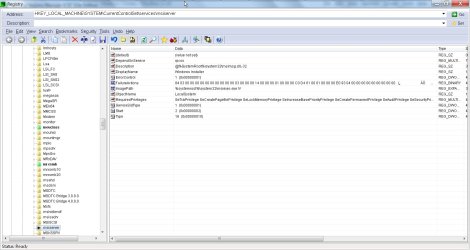
There is a manual method of getting back the windows installer up and running, which is explained in Microsoft Support website..

Method 1: Reregister the Windows Installer

Though this method is given for Windows XP and Windows Server 2003, I am not sure whether this method works for Windows 7. Still there is no harm in trying this for Windows 7 x64 as a last resort before you reinstall windows.

The attached image shows the locations of the windows installer file "msiexec.exe" on my windows 7 x64. The backup location for "msiexec.exe" is C:\windows\winsxs folder.

There are two "msiexec.exe" files in winsxs folder. 32 bit and 64 bit versions.

1st step would be to locate the msiexec.exe files in Windows\system32 and windows\sysWOW64 folders.

If these files are not present due to the fact that you have uninstalled windows installer, copy the first four files from winsxs folder to the bottom four locations given in the attached image.

2nd step would be to enter the registry values.

3rd step would be to re-register the msiexec.exe file.

Reboot and go to Windows Services management snap-in and check the startup type for Windows Installer is set to Automatic.

Method 2 given in the website does not apply to Windows 7 as the Windows Installer 5.0 is not available as a separate download.
 

Attachments

  • msiserver in registry.jpg
    msiserver in registry.jpg
    133.7 KB · Views: 20
Last edited:

My Computer

Computer Manufacturer/Model Number
Toshiba Satellite P775-S7232
OS
MS Windows 7 Ultimate 64-bit SP1
CPU
i5-2410M 2.3GHz (2.9GHz Turbo-Boost) Sandy Bridge 32nm
Motherboard
Toshiba PHRAA ver. PSBY1U-00F003
Memory
4GB+4GB Samsung DDR3 PC3-10700 (1333 MHz)
Graphics Card(s)
Video Intel(R) HD Graphics Family, 1696MB available memory
Sound Card
Realtek High Definition Audio version=6.0.1.6323
Monitor(s) Displays
17.3 " Trubrite TFT LCD, LED Backlit
Screen Resolution
1600x900 32 bit, Native support for 720P content
Hard Drives
TOSHIBA MK6476GSXN
580.614 [GB] partitioned C: 80GB and D: 500GB with hidden recovery partitons.

Spare bay for 2nd HDD but no SATA connector :-(
PSU
Toshiba AC/DC Adapter
Case
Notebook
Cooling
Built-in Fan
Keyboard
Premium Raised Tile keyboard
Mouse
Logitech M215 wireless mouse
Internet Speed
Not fast enough
Other Info
Built-in Harman Kardon speakers with Dolby Advanced Audio, Waves MaxxAudio® 3. HDMI, 1xUSB3+3xUSB2 ports, WebCam, Battery life 4hrs 11mins, 4GB Readyboost SDHC card, WD My Book Essential Ext HDDs 2 TB, 2x1TB, My Passport SE 1TB and WDTV 1st Gen for Multimedia playing on a Sony Wega 32" LCD.
Recent addition to my toys are Asus Transformer Pad TF300T with 32GB onboard sd card + 32GB microsd card.

My Computer

Computer Manufacturer/Model Number
HP Pavilion Elite 495UK
OS
Windows 7 Ultimate SP1 64-Bit
CPU
Intel Core i7 870 @ 2.93GHz
Motherboard
MSI 2A9C (CPU1)
Memory
8Gb Dual-Channel DDR3 @ 664MHz
Graphics Card(s)
nVidia GeForce GTX 460 1024MB dedicated RAM
Sound Card
Realtek HD Audio
Monitor(s) Displays
HP2310i
Screen Resolution
1920 x 1080
Hard Drives
1x1954GB Hitachi HDS22020ALA 330 (RAID), 1x1954GB Hitachi External for backup and storage
PSU
460W
Case
HP Elite
Cooling
Air cooled
Keyboard
Logitech K750 solar-powered keyboard
Mouse
Logitech Wireless M180 mouse
Internet Speed
2Mb
Other Info
Pure Avanti Flow Internet Radio with iPod Dock, 64Gb iPod, HP USB Speakers, Sony MDR-V500 Headphones, Sony Vaio F-Series Laptop

My Computer

Computer Manufacturer/Model Number
Toshiba Satellite P775-S7232
OS
MS Windows 7 Ultimate 64-bit SP1
CPU
i5-2410M 2.3GHz (2.9GHz Turbo-Boost) Sandy Bridge 32nm
Motherboard
Toshiba PHRAA ver. PSBY1U-00F003
Memory
4GB+4GB Samsung DDR3 PC3-10700 (1333 MHz)
Graphics Card(s)
Video Intel(R) HD Graphics Family, 1696MB available memory
Sound Card
Realtek High Definition Audio version=6.0.1.6323
Monitor(s) Displays
17.3 " Trubrite TFT LCD, LED Backlit
Screen Resolution
1600x900 32 bit, Native support for 720P content
Hard Drives
TOSHIBA MK6476GSXN
580.614 [GB] partitioned C: 80GB and D: 500GB with hidden recovery partitons.

Spare bay for 2nd HDD but no SATA connector :-(
PSU
Toshiba AC/DC Adapter
Case
Notebook
Cooling
Built-in Fan
Keyboard
Premium Raised Tile keyboard
Mouse
Logitech M215 wireless mouse
Internet Speed
Not fast enough
Other Info
Built-in Harman Kardon speakers with Dolby Advanced Audio, Waves MaxxAudio® 3. HDMI, 1xUSB3+3xUSB2 ports, WebCam, Battery life 4hrs 11mins, 4GB Readyboost SDHC card, WD My Book Essential Ext HDDs 2 TB, 2x1TB, My Passport SE 1TB and WDTV 1st Gen for Multimedia playing on a Sony Wega 32" LCD.
Recent addition to my toys are Asus Transformer Pad TF300T with 32GB onboard sd card + 32GB microsd card.
Well, after an absolutely unbelievable hassle and at least 20 straight infuriating hours trying these and quit a few more suggestions I finally decided to give up and go to the option I hadn't even considered at first and get the original install disks. This was another hassle but I was finally able to use those and do a repair in place install.

Even that only sort of worked, now I'm in the process of reinstalling pretty much every major program on my machine because they all started acting very strangely or just not working but with different error than before.

My suggestion to anyone having this much difficulty with this issue is just to do a clean install. You'll have to reinstall most major programs anyway.

Thanks for the help guys.
 

My Computer

Computer Manufacturer/Model Number
Asus g73-jh
OS
Windows 7 64 bit
You might still need a clean reinstall if the Repair Install resulted in such a mess.

It sounds like you had major corruption and/or infection.
 
That's a fair point... however, my mental capacity and sanity to continue working on this has been completely drained. It has also put me significantly behind on my work project as I have made no progress in the last two days thanks to this and I will have to work all weekend on that alone to catch up as I have deadlines to meet.
 

My Computer

Computer Manufacturer/Model Number
Asus g73-jh
OS
Windows 7 64 bit
I've actually done about a dozen clean installs so I'm not scared about it but as long as things are working properly I need to get some actual work done.

Thanks for the support though!
 

My Computer

Computer Manufacturer/Model Number
Asus g73-jh
OS
Windows 7 64 bit
You're very welcome.

Please post back if you encounter further problems, although a clean install should settle the issue once and for all.
 

My Computer

Computer Manufacturer/Model Number
HP Pavilion Elite 495UK
OS
Windows 7 Ultimate SP1 64-Bit
CPU
Intel Core i7 870 @ 2.93GHz
Motherboard
MSI 2A9C (CPU1)
Memory
8Gb Dual-Channel DDR3 @ 664MHz
Graphics Card(s)
nVidia GeForce GTX 460 1024MB dedicated RAM
Sound Card
Realtek HD Audio
Monitor(s) Displays
HP2310i
Screen Resolution
1920 x 1080
Hard Drives
1x1954GB Hitachi HDS22020ALA 330 (RAID), 1x1954GB Hitachi External for backup and storage
PSU
460W
Case
HP Elite
Cooling
Air cooled
Keyboard
Logitech K750 solar-powered keyboard
Mouse
Logitech Wireless M180 mouse
Internet Speed
2Mb
Other Info
Pure Avanti Flow Internet Radio with iPod Dock, 64Gb iPod, HP USB Speakers, Sony MDR-V500 Headphones, Sony Vaio F-Series Laptop
Back
Top