
Windows Installer file not located?

DeathShot

New member
Local time
11:42 PM
Messages
11
Location
Massachusetts
Hi guys, its been a long time since I came here but Google came up with no results so I hope you can help me. It seems that something I have done on my PC broke windows installer.

Other 3rd party installers work fine but programs that use windows installer specifically to install/uninstall (in this case I am trying to instal TuneUp Utilities 2011) throw up this error: "The feature you are trying to use is on a network resource that is unavailable." I have a screen shot of it attached. I don't have a clue where to find that temp file, I do know that one day I found like 20 temp files on my C:\ drive which weren't there an hour before and deleted all of them, as I was cleaning up my HDD because my C:\ drive had literally 100MB of space left. I did not touch the temp folder though, I don't believe.

I am not sure if the windows CD would repair this or not, but seeing as windows thinks it is a network issue I thought not. Anyways any help you can offer is appreciated.

Also because I do not remember if this forum lists my system info I am running Windows 7 Ultimate x64 SP1 with all the latest updates.

Thank you for any help you can give me, Michael
 

Attachments
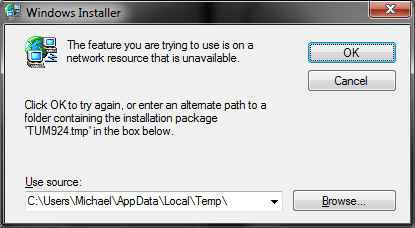
  • windows installer.png
    windows installer.png
    9.5 KB · Views: 14

My Computer

Computer Manufacturer/Model Number
Satellite A355-S69253
OS
Windows 7 Ultimate x64 SP1
CPU
Intel Core 2 Duo T6400 @ 2Ghz
Memory
4GB DDR2
Graphics Card(s)
Mobile Intel 4 Series Express Cheapset Family
Sound Card
Realtek HighDefinition Audio
Monitor(s) Displays
Generic PnP Monitor
Screen Resolution
1366x768
Hard Drives
Hitachi HTSS43232L9SA00 ATA Device (320GB with a bunch of partitions.... erm two main ones are C: Windows 7 and D: Data then there are the linux partition, swap, Vista backup, Toshiba OEM and a few unused cells of space as well.)
You can try the CD/DVD repair and you can try sfc /scannow.
 

My Computer

Computer Manufacturer/Model Number
HP pavilion DV6-Laptop
OS
win7 home premium-64bit-SP1-IE9RTM
CPU
Intel core2 duo - T6600 2.2GHZ
Memory
4.00Gb
Graphics Card(s)
ATI Mobility Radeon HD 4530
Sound Card
IDT audio Monitor
Screen Resolution
32Bpp,1366x768
Hard Drives
Western Digital 500Gb
Internet Speed
Fast DSL
Well the install CD did nothing. Booted up, entered language etc. Hit the repair key and it took its time but problem still exists. Trying the sfc thing now. Not sure what this does but so long as it doesn't delete system32 it couldn't hurt :)

Ok, I ran SFC and it did nothing. I would much rather not have to format my PC, but this is getting annoying. I need to install 3rd party programs that don't use windows installer in order to by pass other problems. Firefox and IE9 both had to be hacked into my system and windows doesn't recognize them as valid programs to open files with unless I open the files from within the program itself while it is running. Anyone have any ideas?
 
Last edited:

My Computer

Computer Manufacturer/Model Number
Satellite A355-S69253
OS
Windows 7 Ultimate x64 SP1
CPU
Intel Core 2 Duo T6400 @ 2Ghz
Memory
4GB DDR2
Graphics Card(s)
Mobile Intel 4 Series Express Cheapset Family
Sound Card
Realtek HighDefinition Audio
Monitor(s) Displays
Generic PnP Monitor
Screen Resolution
1366x768
Hard Drives
Hitachi HTSS43232L9SA00 ATA Device (320GB with a bunch of partitions.... erm two main ones are C: Windows 7 and D: Data then there are the linux partition, swap, Vista backup, Toshiba OEM and a few unused cells of space as well.)
Try starting the service and see if that fixes the problem

Click Start
Right-click Computer, and then click Manage.
If you are prompted for an administrator password or for confirmation, type your password, or click Continue.
In the console tree, click Services and Applications, and then click Services.
In the details pane, right-click Windows Installer, and then click Start.

OR
Try reinstalling the service from MS site
http://msdn.microsoft.com/en-us/library/aa371185(v=vs.85).aspx
Please read the entire page down and see what you can do with.
Good luck.
 

My Computer

Computer Manufacturer/Model Number
HP pavilion DV6-Laptop
OS
win7 home premium-64bit-SP1-IE9RTM
CPU
Intel core2 duo - T6600 2.2GHZ
Memory
4.00Gb
Graphics Card(s)
ATI Mobility Radeon HD 4530
Sound Card
IDT audio Monitor
Screen Resolution
32Bpp,1366x768
Hard Drives
Western Digital 500Gb
Internet Speed
Fast DSL
Thank you for your reply. I tried starting the service, and restarting it like you suggestion, however the problem still proceeded. I then read that article you posted, the comments, and a few more things linked there. Windows 7 comes with Windows Installer 5.0. However, the only download available is the Windows Installer 4.5 redistributable which comes with Vista. There for the latest download they have there is only compatible up to Vista SP2. I know you can install drivers using compatibility mode (I have an old desktop with a GeForce 4 GFX and I installed Windows 7 on it in preparation for an upgrade and then I installed the drivers which were only available for XP and it worked) how ever seeing as this is a core windows service and is a system function I am not sure if I should install this older version, because it might mess things up more. Can anyone advice me on what to do next?

Thank you for all your help and support,
DeathShot
 
Last edited:

My Computer

Computer Manufacturer/Model Number
Satellite A355-S69253
OS
Windows 7 Ultimate x64 SP1
CPU
Intel Core 2 Duo T6400 @ 2Ghz
Memory
4GB DDR2
Graphics Card(s)
Mobile Intel 4 Series Express Cheapset Family
Sound Card
Realtek HighDefinition Audio
Monitor(s) Displays
Generic PnP Monitor
Screen Resolution
1366x768
Hard Drives
Hitachi HTSS43232L9SA00 ATA Device (320GB with a bunch of partitions.... erm two main ones are C: Windows 7 and D: Data then there are the linux partition, swap, Vista backup, Toshiba OEM and a few unused cells of space as well.)
If you have a system repair disk, use it and it will repair your .msi file.

Good luck
 

My Computer

Computer Manufacturer/Model Number
HP pavilion DV6-Laptop
OS
win7 home premium-64bit-SP1-IE9RTM
CPU
Intel core2 duo - T6600 2.2GHZ
Memory
4.00Gb
Graphics Card(s)
ATI Mobility Radeon HD 4530
Sound Card
IDT audio Monitor
Screen Resolution
32Bpp,1366x768
Hard Drives
Western Digital 500Gb
Internet Speed
Fast DSL
If you have a system repair disk, use it and it will repair your .msi file.

Good luck

When you say system repair disk, do you mean my original Windows 7 DVD or is it something else? I know that in Windows 2000 and XP there used to be a repair option. In windows 7 it only seems to be start up repair though.
 

My Computer

Computer Manufacturer/Model Number
Satellite A355-S69253
OS
Windows 7 Ultimate x64 SP1
CPU
Intel Core 2 Duo T6400 @ 2Ghz
Memory
4GB DDR2
Graphics Card(s)
Mobile Intel 4 Series Express Cheapset Family
Sound Card
Realtek HighDefinition Audio
Monitor(s) Displays
Generic PnP Monitor
Screen Resolution
1366x768
Hard Drives
Hitachi HTSS43232L9SA00 ATA Device (320GB with a bunch of partitions.... erm two main ones are C: Windows 7 and D: Data then there are the linux partition, swap, Vista backup, Toshiba OEM and a few unused cells of space as well.)
Open Control Panel and select Backup & Restore.
in the left panel choose CREATE A SYSTEM REPAIR DISK.
 

My Computer

Computer Manufacturer/Model Number
HP pavilion DV6-Laptop
OS
win7 home premium-64bit-SP1-IE9RTM
CPU
Intel core2 duo - T6600 2.2GHZ
Memory
4.00Gb
Graphics Card(s)
ATI Mobility Radeon HD 4530
Sound Card
IDT audio Monitor
Screen Resolution
32Bpp,1366x768
Hard Drives
Western Digital 500Gb
Internet Speed
Fast DSL
Ok I found it, should I create the disk off of my faulty computer or should I do it on another one. Also does it matter if the disk was created on an x84 or x64 version of the OS?
 

My Computer

Computer Manufacturer/Model Number
Satellite A355-S69253
OS
Windows 7 Ultimate x64 SP1
CPU
Intel Core 2 Duo T6400 @ 2Ghz
Memory
4GB DDR2
Graphics Card(s)
Mobile Intel 4 Series Express Cheapset Family
Sound Card
Realtek HighDefinition Audio
Monitor(s) Displays
Generic PnP Monitor
Screen Resolution
1366x768
Hard Drives
Hitachi HTSS43232L9SA00 ATA Device (320GB with a bunch of partitions.... erm two main ones are C: Windows 7 and D: Data then there are the linux partition, swap, Vista backup, Toshiba OEM and a few unused cells of space as well.)
It's better to create the disk from another computer with your 64bit, but i don't know if it's safe to create it from within your computer. You can try because CD/DVD prices today are so affordable.
 

My Computer

Computer Manufacturer/Model Number
HP pavilion DV6-Laptop
OS
win7 home premium-64bit-SP1-IE9RTM
CPU
Intel core2 duo - T6600 2.2GHZ
Memory
4.00Gb
Graphics Card(s)
ATI Mobility Radeon HD 4530
Sound Card
IDT audio Monitor
Screen Resolution
32Bpp,1366x768
Hard Drives
Western Digital 500Gb
Internet Speed
Fast DSL
Ok, thank you. I will try and create it on another 64bit windows 7 computer and will edit this post with the results.
 

My Computer

Computer Manufacturer/Model Number
Satellite A355-S69253
OS
Windows 7 Ultimate x64 SP1
CPU
Intel Core 2 Duo T6400 @ 2Ghz
Memory
4GB DDR2
Graphics Card(s)
Mobile Intel 4 Series Express Cheapset Family
Sound Card
Realtek HighDefinition Audio
Monitor(s) Displays
Generic PnP Monitor
Screen Resolution
1366x768
Hard Drives
Hitachi HTSS43232L9SA00 ATA Device (320GB with a bunch of partitions.... erm two main ones are C: Windows 7 and D: Data then there are the linux partition, swap, Vista backup, Toshiba OEM and a few unused cells of space as well.)
Ok, thank you. I will try and create it on another 64bit windows 7 computer and will edit this post with the results.

Wondering what your result was.

More to the point I'd like to know the answer to one of your first questions: Can Windows Installer 4.5 (KB942288) be installed over 5.0 on a Windows 7 machine?

I cannot get the repair-install to work on my machine and am currently working on getting MSE security to install. I was advised to install MSI 4.5, but I KNOW that 5.0 was shipped with Win 7, and your earlier question is now my question. ??
 

My Computer

Computer Manufacturer/Model Number
HP/Compaq 6710b note/laptop
OS
Windows 7 PRO SP1 32-bit
CPU
Intel Core2Duo T7300 2GHz
Motherboard
N/A
Memory
4.0GB/3.0GB
Graphics Card(s)
N/A
Sound Card
N/A
Monitor(s) Displays
N/A
Screen Resolution
1680x1050
Hard Drives
WD Caviar Black 320GB
Internet Speed
Enough
Hi KRS03,
Thank you for bumPing and reminding me of this thread. My laptop ended up snapping in half so I could never test it out.

Btw I know tuneup utilities (google it and Download the trial) is supposed to have a 'fix' for this in their common problems solutions. The problem is that you most likely need win installer to install it. Try installing it on a flash drive.
 

My Computer

Computer Manufacturer/Model Number
Satellite A355-S69253
OS
Windows 7 Ultimate x64 SP1
CPU
Intel Core 2 Duo T6400 @ 2Ghz
Memory
4GB DDR2
Graphics Card(s)
Mobile Intel 4 Series Express Cheapset Family
Sound Card
Realtek HighDefinition Audio
Monitor(s) Displays
Generic PnP Monitor
Screen Resolution
1366x768
Hard Drives
Hitachi HTSS43232L9SA00 ATA Device (320GB with a bunch of partitions.... erm two main ones are C: Windows 7 and D: Data then there are the linux partition, swap, Vista backup, Toshiba OEM and a few unused cells of space as well.)
Back
Top