You are using an out of date browser. It may not display this or other websites correctly.
You should upgrade or use an
alternative browser.
Solved WIndows Installer not working
Hi I have just reinstalled windows 7 Professional on my hard drive, and now I am reinstalling all my software but I am having problems.
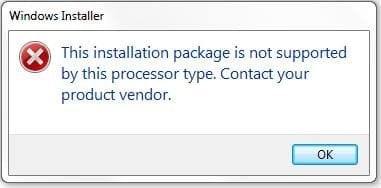
I am logged on as administrator but when I try and install some software I get the message as in the screenshot
These are genuine programs and they were installed on this computer before but will not reinstall now
Can some one help please
-
ScreenShot001.jpg
10.8 KB
· Views: 10
- Computer Manufacturer/Model Number
- Custom Made
- OS
- Windows 7 Professional 64 Bit
- CPU
- Intel Core I7 920 @ 2.6 GHz
- Motherboard
- Asus P6T SE
- Memory
- 12 Meg Triple Channel DDR3
- Graphics Card(s)
- Nvidia Gforce GTX 260
- Sound Card
- On Board
- Monitor(s) Displays
- DGM
- Hard Drives
- 500 gig Sata
- PSU
- Not sure
- Case
- Thermalite
- Cooling
- Standard cooling
- Keyboard
- Usb
- Mouse
- Usb
- Internet Speed
- 7meg
New member
Member
VIP
Thread Starter
PS I am also getting this message as per screenshot when I try to open some folders
-

ScreenShot002.jpg
11.7 KB
· Views: 8
- Computer Manufacturer/Model Number
- Custom Made
- OS
- Windows 7 Professional 64 Bit
- CPU
- Intel Core I7 920 @ 2.6 GHz
- Motherboard
- Asus P6T SE
- Memory
- 12 Meg Triple Channel DDR3
- Graphics Card(s)
- Nvidia Gforce GTX 260
- Sound Card
- On Board
- Monitor(s) Displays
- DGM
- Hard Drives
- 500 gig Sata
- PSU
- Not sure
- Case
- Thermalite
- Cooling
- Standard cooling
- Keyboard
- Usb
- Mouse
- Usb
- Internet Speed
- 7meg
New member
Guru
Gold Member
VIP
Which folder are you trying to open? Screenshot of Device Manager please. Did you install 32 bit by mistake?
- Computer type
- PC/Desktop
- Computer Manufacturer/Model Number
- Custom Build
- OS
- Windows 7 Ultimate x64 SP1
- CPU
- AMD Phenom 2 1090T
- Motherboard
- Gigabyte GA-890FXA-UD5
- Memory
- 2x8GB Kingston HyperX Fury Black 1600Mhz Unganged
- Graphics Card(s)
- MSI GTX 970 Gaming 4G
- Sound Card
- Realtek On-Board HD 7.1 Audio / Logitech G35
- Monitor(s) Displays
- 3xAcer GD245HQ
- Screen Resolution
- 1920x1080
- Hard Drives
- Samsung 850 Pro 512GB SSD - OS /
WD Caviar Black SATA 3 - 1 TBx2 - Dynamic RAID 0 /
WD Caviar Green SATA 2 - 640GBx2 - Dynamic RAID 0 /
WD Caviar Green SATA 2 - 640GB - Internal Backup /
Seagate Barracude SATA 3 - 3TB - External Backup/ Sync
- PSU
- HighPower 1000W
- Case
- Cooler Master HAF 932
- Cooling
- Noctua NH-D14
- Keyboard
- Logitech G19
- Mouse
- Logitech G500
- Internet Speed
- 100/4 Mbit Cable (100GB quota)
- Antivirus
- ZoneAlarm Extreme Security / MBAM Pro / MBAE Free / SAS Free
- Browser
- IE 11 - Firefox - Chrome
- Other Info
- Logitech F710/ G27/ G940/ Z5500 // TrackIR 5 // Nvidia 3D Surround Vision
New member
Member
VIP
Thread Starter
oh boy I have just checked and yes I have installed the 32 bit version by mistake.
So do I have to reinstall the 64 bit version from scratch again
- Computer Manufacturer/Model Number
- Custom Made
- OS
- Windows 7 Professional 64 Bit
- CPU
- Intel Core I7 920 @ 2.6 GHz
- Motherboard
- Asus P6T SE
- Memory
- 12 Meg Triple Channel DDR3
- Graphics Card(s)
- Nvidia Gforce GTX 260
- Sound Card
- On Board
- Monitor(s) Displays
- DGM
- Hard Drives
- 500 gig Sata
- PSU
- Not sure
- Case
- Thermalite
- Cooling
- Standard cooling
- Keyboard
- Usb
- Mouse
- Usb
- Internet Speed
- 7meg
New member
Guru
Gold Member
VIP
Yes, there is no upgrade path from 32bit to 64bit.
- Computer type
- PC/Desktop
- Computer Manufacturer/Model Number
- Custom Build
- OS
- Windows 7 Ultimate x64 SP1
- CPU
- AMD Phenom 2 1090T
- Motherboard
- Gigabyte GA-890FXA-UD5
- Memory
- 2x8GB Kingston HyperX Fury Black 1600Mhz Unganged
- Graphics Card(s)
- MSI GTX 970 Gaming 4G
- Sound Card
- Realtek On-Board HD 7.1 Audio / Logitech G35
- Monitor(s) Displays
- 3xAcer GD245HQ
- Screen Resolution
- 1920x1080
- Hard Drives
- Samsung 850 Pro 512GB SSD - OS /
WD Caviar Black SATA 3 - 1 TBx2 - Dynamic RAID 0 /
WD Caviar Green SATA 2 - 640GBx2 - Dynamic RAID 0 /
WD Caviar Green SATA 2 - 640GB - Internal Backup /
Seagate Barracude SATA 3 - 3TB - External Backup/ Sync
- PSU
- HighPower 1000W
- Case
- Cooler Master HAF 932
- Cooling
- Noctua NH-D14
- Keyboard
- Logitech G19
- Mouse
- Logitech G500
- Internet Speed
- 100/4 Mbit Cable (100GB quota)
- Antivirus
- ZoneAlarm Extreme Security / MBAM Pro / MBAE Free / SAS Free
- Browser
- IE 11 - Firefox - Chrome
- Other Info
- Logitech F710/ G27/ G940/ Z5500 // TrackIR 5 // Nvidia 3D Surround Vision
New member
Member
VIP
Thread Starter
Ok thank you so much.
I am well annoyed with myself I have spend loads of time and effort and installed all the updates and most of my software.
Well that's a steep learning curve for me
- Computer Manufacturer/Model Number
- Custom Made
- OS
- Windows 7 Professional 64 Bit
- CPU
- Intel Core I7 920 @ 2.6 GHz
- Motherboard
- Asus P6T SE
- Memory
- 12 Meg Triple Channel DDR3
- Graphics Card(s)
- Nvidia Gforce GTX 260
- Sound Card
- On Board
- Monitor(s) Displays
- DGM
- Hard Drives
- 500 gig Sata
- PSU
- Not sure
- Case
- Thermalite
- Cooling
- Standard cooling
- Keyboard
- Usb
- Mouse
- Usb
- Internet Speed
- 7meg

