Windows Installer Service could not be accessed.

verbatim20

New member
Local time
11:56 PM
Messages
5
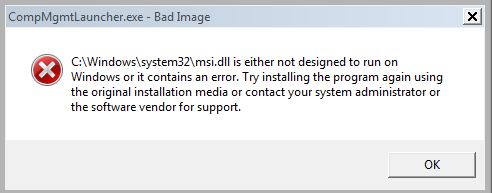
This happened the last time I reformated and I don't really understand what's going on. I have 4 harddrives. 1 SSD and the rest are standard 7200RPM drives. This is the error I get when I try to install something.


Weird thing is I can't even play games cause I get this error too.


I did unplug the harddrives from the motherboard when I cleaned it, don't know if that could cause a problem, I don't believe they we're put in the same spots.
 

My Computer

OS
Windows 7 Ultimate x64
That may have caused a problem.

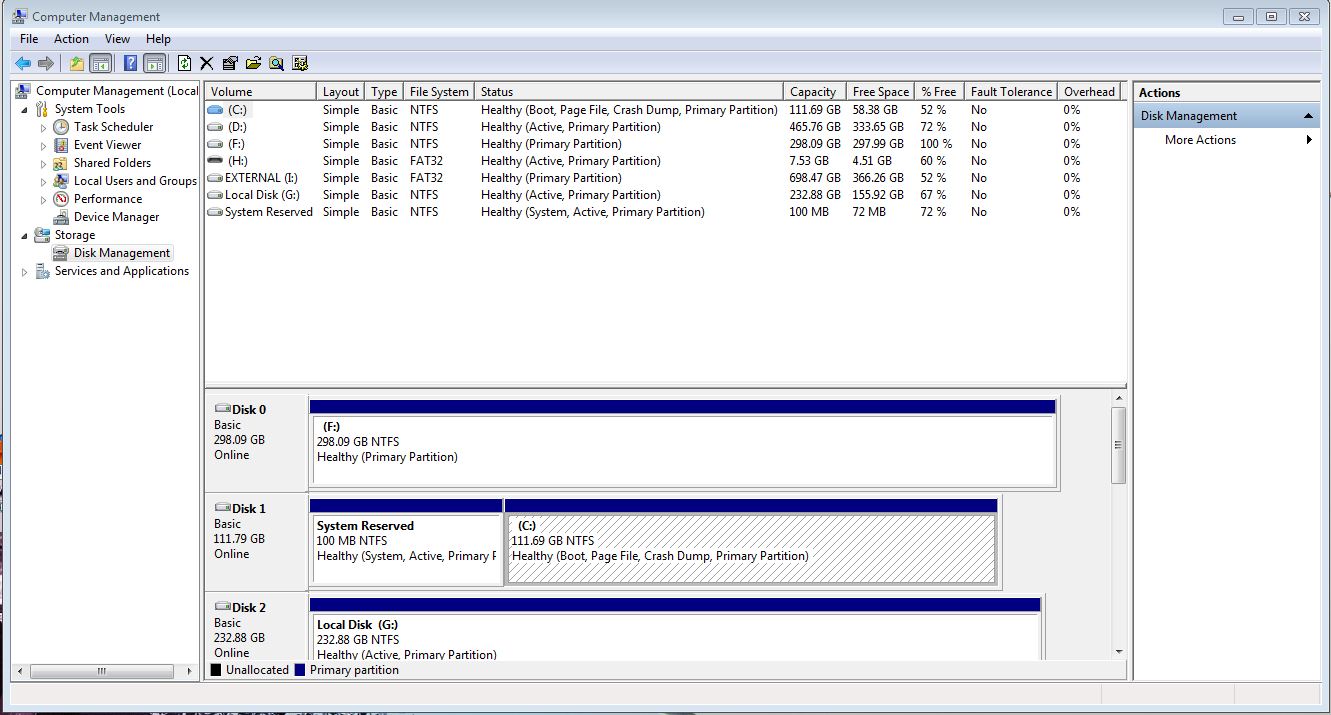
Post a screenshot of Disk Management. Start Menu -> Right click Computer -> Manage -> Disk Management from the list on the left

Alternatively: Start Menu -> Type Computer Management into the Search programs and files box -> Disk Management from the list on the left
 

My Computer

Computer Manufacturer/Model Number
HP Pavilion e9110t
OS
Windows 7 Home Premium 64 Bit
CPU
Intel(R) Core(TM)2 Quad CPU Q9550 @ 2.83GHz
Motherboard
Pegatron IPIEL-LA3
Memory
6.00 GB Hundai HMT125U6BFR8C-H9
Graphics Card(s)
ATI Radeon HD 4850
Sound Card
Realtek High Definition Audio/ATI High Definition Audio
Monitor(s) Displays
Acer AL2216W
Screen Resolution
1680x1050
Hard Drives
Hitachi HDP725050GLA360 ATA Device 500 GB
PSU
Unknown/installed by HP
Case
HP generic case
Cooling
Intel Stock Cooling
Keyboard
HP Keyboard
Mouse
HP Mouse
Internet Speed
Download: 19.15 Mbps Upload: 1.67 Mbps
Other Info
Network Adapter Realtek RTL8168D/8111D Family PCI-E Gigabit Ethernet NIC (NDIS 6.20)
Network Adapter 802.11n Wireless PCI Express Card LAN Adapter
I get this error

gNHDb.jpg


and then it opens

VkZaj.jpg
 

My Computer

OS
Windows 7 Ultimate x64
I have never seen Windows on Disk 1 before; it is usually on Disk 0. I asked gregrocker who is an expert with Windows installations to take a look.
 

My Computer

Computer Manufacturer/Model Number
HP Pavilion e9110t
OS
Windows 7 Home Premium 64 Bit
CPU
Intel(R) Core(TM)2 Quad CPU Q9550 @ 2.83GHz
Motherboard
Pegatron IPIEL-LA3
Memory
6.00 GB Hundai HMT125U6BFR8C-H9
Graphics Card(s)
ATI Radeon HD 4850
Sound Card
Realtek High Definition Audio/ATI High Definition Audio
Monitor(s) Displays
Acer AL2216W
Screen Resolution
1680x1050
Hard Drives
Hitachi HDP725050GLA360 ATA Device 500 GB
PSU
Unknown/installed by HP
Case
HP generic case
Cooling
Intel Stock Cooling
Keyboard
HP Keyboard
Mouse
HP Mouse
Internet Speed
Download: 19.15 Mbps Upload: 1.67 Mbps
Other Info
Network Adapter Realtek RTL8168D/8111D Family PCI-E Gigabit Ethernet NIC (NDIS 6.20)
Network Adapter 802.11n Wireless PCI Express Card LAN Adapter
I always want Win7 on Disk0 so if a preceding partition is incorrectly marked Active (see G) it will not derail the System boot files to itself during repairs or reinstall.

What exactly were you doing just before these errors began appearing. They look like the results of using a tweaking or optimizing suite/tool which Win7 will not tolerate as it is too lean to begin with. Have you tried to System Restore to a point before Win7 was messed up?

If that fails then run SFC -SCANNOW Command several times if necessary to clean up all System files, then if necessary a Repair Install as a last resort before a Clean Reinstall - Factory OEM Windows 7 (same steps for retail) with all other HD's and peripherals unplugged.
 
I cleaned the inside of my computer, I unplugged the harddrives from my motherboard and I don't believe I put them back into the correct slots. I didn't use any tweeking programs and I can't do a system restore to a previous point, always fails.

I'm thinking of reformmating my computer I'm just worried this problem is going to persist.

I should mention my computer cannot install the windows update after shutting down either.

Would the order of the harddrives play a part in these problems or what the harddrives were used for in the past? I did have my OS on 2 of these harddrives before and now on the SSD.
 

My Computer

OS
Windows 7 Ultimate x64
Why don't you swap the Win7 HD into Disk0 and set it first to boot in BIOS setup to see what changes?

Is it possible you disconnected or dislodged the video card when you cleaned out your PC? Look in Device Manager to see if your video card is installed, working and has the latest driver from optional Windows Updates.

You did guard against static discharge and used canned air and not a vacuum attachment, correct?

If you reinstall plug Win7 target HD into DISK0 and unplug all others, follow the steps to get a perfect Clean Reinstall - Factory OEM Windows 7 which are the same for retail.

In my last post I also gave you three other things to try which you did not respond to. Solving these problems requires utter thoroughness with no steps being missed. If you have questions, just ask back.
 
This happened the last time I reformated and I don't really understand what's going on. I have 4 harddrives. 1 SSD and the rest are standard 7200RPM drives. This is the error I get when I try to install something.


Weird thing is I can't even play games cause I get this error too.


I did unplug the harddrives from the motherboard when I cleaned it, don't know if that could cause a problem, I don't believe they we're put in the same spots.

Is the windows installer service enabled? See here for more troubleshooting tips to your installer problem-- How to Fix “The Windows Installer service could not be accessed” Error
 

My Computer

Computer Manufacturer/Model Number
HCL
OS
Winbdows 7 ultimate x64 | Ubuntu 12.04 x64 LTS
CPU
Core 2 Duo e7400 @ 2.90GHz
Motherboard
Gigabyte G31M-ES2L
Memory
3GB DDR2
Graphics Card(s)
Asus Nvidia GTX 560Ti 1GB
Sound Card
On-board
Monitor(s) Displays
HCL eZeeBee 18.5" LCD
Screen Resolution
1366x768 @ 60Hz
Hard Drives
Western Digital 320GB
PSU
Corsair CX500 V2 500W
Cooling
Stock
Keyboard
Stock
Mouse
Stock
Internet Speed
15-25kBps D/L | 10kBps U/L | Hey Don't laugh
Back
Top