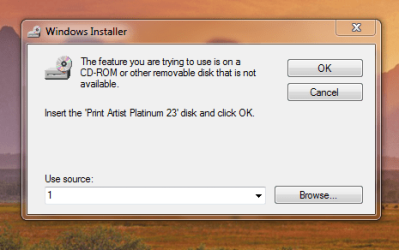
Windows Installer

dozerdobbs

New member
Local time
12:49 AM
Messages
8
Installed Windows 7, 64 Bit (OEM), on new computer build. Could not install office 2003,live mail
and other programs. Reinstalled the operating system and was able to install office,and Live Mail.
Now I have run into the same problem with streets and trips 2010 (Download from Microsoft) and print artist 23 (from disk). Both appeared to install correctly. When I try to run the programs I get ,installation path not found window,
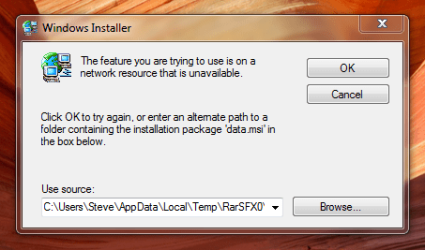
Capture.PNG Capture (2).PNG
moz-screenshot.png
moz-screenshot-1.png


I can open the programs by going to program files (X86) and opening the application file in the program. Every thing else is working fine and I have installed other programs OK.( Quicken, Picasa)
Need help please. Easy answers please , I'm a computer wanabe. Thanks
 

My Computer

OS
windows 7 home premium 64 bit
CPU
AMD Phenom 9850 Quad-Core
Motherboard
Asus M4A785 M
Memory
4 GB
Try Updatnig your windows it will install the latest version of Windows Installer.
 

My Computer

Computer Manufacturer/Model Number
AMD _(Assembled)_
OS
Dual Booting Windows 7 64-Bit Ultimate Edition and Fedora 16.
CPU
AMD Phenom X4 925
Motherboard
MSI 785g-E53
Memory
4gb DDR3 G.skill RipJaws
Graphics Card(s)
ATI Radeon HD 6770
Sound Card
Realtek
Monitor(s) Displays
Dell IN2020M LED
Screen Resolution
1600*900 20"
Hard Drives
Seagate 500 Gibs
External 320 Gb Western Digital(Got Glitchy)
PSU
Cooler Master
Case
Cooler Master
Cooling
Cooler Master
Keyboard
Logitech K100
Mouse
Razor Death Adder v2 3500 dPi (Razer Goliathus Pad)
Internet Speed
Back to college Internet with Cyberroam X|
I tried windows updater only 1 update available Security update for, Net framework 4, and it failed?
 

My Computer

OS
windows 7 home premium 64 bit
CPU
AMD Phenom 9850 Quad-Core
Motherboard
Asus M4A785 M
Memory
4 GB
Check and see if there are 64 bit versions of those programs.
 

My Computer

Computer type
PC/Desktop
Computer Manufacturer/Model Number
Home made Desktop
OS
Windows 10 Pro. 64/ version 1709 Windows 7 Pro/64
CPU
Intel i7-6800K @ 4.3
Motherboard
ASUS X-99 Deluxe II
Memory
Corsair Platinum 16 gig @2400
Graphics Card(s)
EVGA GTX 1070 OC
Monitor(s) Displays
Asus 27" LED LCD/VE278Q
Screen Resolution
1920-1080 or 1280-720 HDMI
Hard Drives
INTEL SSD 730-240 Gb Sata 3.0/
PSU
EVGA Platium 1200W
Case
Phanteks Luxe Tempered Glass 8 fans/ one radiator
Cooling
XSPC/ Water Cooled CPU
Keyboard
Das 4 Professional
Mouse
Logitech M705/MX Anywhere 2-S
Internet Speed
100 mbits
Antivirus
Microsoft Security Essentials/ Malwarebytes Premium 3.0/ SAS
Browser
I.E. 11 default/Firefox/ ISP Time Warner Cable/Spectrum
Other Info
LG BluRay Burner/
Sound system-KLipsch-THX/
Icy Dock ssd Hot Swap bays.
Streets and trips I'm sure, PrintArtist box said it was? They both work . it's annoying to have to redo shortcuts and they won,t start from the start menu. when I try to open a saved file from my documents I get the same installation path not found.
 

My Computer

OS
windows 7 home premium 64 bit
CPU
AMD Phenom 9850 Quad-Core
Motherboard
Asus M4A785 M
Memory
4 GB
More serious is the inability to update Windows.

Have you "authenticated" your Windows?

What AV/firewall software are you using?
 

My Computer

Computer Manufacturer/Model Number
Toshiba Satellite S875D-S7239 laptop
OS
MS Windows 7 Ultimate SP1 64-bit
CPU
AMD A10-4600M
Motherboard
AMD Pumori (Socket FT1)
Memory
6.00 GB Dual-Channel DDR3 @ 798MHz (11-11-12-28)
Graphics Card(s)
AMD Radeon HD 7660G
Sound Card
High Definition Audio Device
Monitor(s) Displays
Generic PnP Monitor (1600x900@60Hz)
Screen Resolution
1600x900@60Hz
Hard Drives
SSD 119GB Corsair CSSD-V128GB2 ATA Device
Keyboard
Standard PS/2 Keyboard
Mouse
HP Wireless Optical Mobile Mouse Model FHA-3410
Internet Speed
What the local pub, local coffee shop offers.
Other Info
Optical Drive:MATSHITA BD-CMB UJ160B ATA Device


Also have an Asus ha1002xp netbook with Win 7 Ultimate installed.
Yes it is authenticated, I have Comodo internet security. This is the first update that has continued to fail all others have been successful.
 

My Computer

OS
windows 7 home premium 64 bit
CPU
AMD Phenom 9850 Quad-Core
Motherboard
Asus M4A785 M
Memory
4 GB
Pity. I was hoping for an easy solution.

Installed any of those desktop substitute programs or the likes thereof lately?
 

My Computer

Computer Manufacturer/Model Number
Toshiba Satellite S875D-S7239 laptop
OS
MS Windows 7 Ultimate SP1 64-bit
CPU
AMD A10-4600M
Motherboard
AMD Pumori (Socket FT1)
Memory
6.00 GB Dual-Channel DDR3 @ 798MHz (11-11-12-28)
Graphics Card(s)
AMD Radeon HD 7660G
Sound Card
High Definition Audio Device
Monitor(s) Displays
Generic PnP Monitor (1600x900@60Hz)
Screen Resolution
1600x900@60Hz
Hard Drives
SSD 119GB Corsair CSSD-V128GB2 ATA Device
Keyboard
Standard PS/2 Keyboard
Mouse
HP Wireless Optical Mobile Mouse Model FHA-3410
Internet Speed
What the local pub, local coffee shop offers.
Other Info
Optical Drive:MATSHITA BD-CMB UJ160B ATA Device


Also have an Asus ha1002xp netbook with Win 7 Ultimate installed.
Only thing I can think of is Quicken. I did uninstall PrintArtist using Revo. Then reinstall. Could I have deleted something from the regestry?
 

My Computer

OS
windows 7 home premium 64 bit
CPU
AMD Phenom 9850 Quad-Core
Motherboard
Asus M4A785 M
Memory
4 GB
I would think that uninstalling quicken using Revo is worth a try.
 

My Computer

Computer Manufacturer/Model Number
Toshiba Satellite S875D-S7239 laptop
OS
MS Windows 7 Ultimate SP1 64-bit
CPU
AMD A10-4600M
Motherboard
AMD Pumori (Socket FT1)
Memory
6.00 GB Dual-Channel DDR3 @ 798MHz (11-11-12-28)
Graphics Card(s)
AMD Radeon HD 7660G
Sound Card
High Definition Audio Device
Monitor(s) Displays
Generic PnP Monitor (1600x900@60Hz)
Screen Resolution
1600x900@60Hz
Hard Drives
SSD 119GB Corsair CSSD-V128GB2 ATA Device
Keyboard
Standard PS/2 Keyboard
Mouse
HP Wireless Optical Mobile Mouse Model FHA-3410
Internet Speed
What the local pub, local coffee shop offers.
Other Info
Optical Drive:MATSHITA BD-CMB UJ160B ATA Device


Also have an Asus ha1002xp netbook with Win 7 Ultimate installed.
Quicken is working fine. I'm beginning to wonder if when I uninstalled Print Artist I deleted something? Can I do a repair install of windows? will I lose everything else?
 

My Computer

OS
windows 7 home premium 64 bit
CPU
AMD Phenom 9850 Quad-Core
Motherboard
Asus M4A785 M
Memory
4 GB
Jein (Ja - nein).

You will lose some customizations. The major ones are listed in this tutorial:
Repair Install

I strongly recommend reading and following that tutorial.
 

My Computer

Computer Manufacturer/Model Number
Toshiba Satellite S875D-S7239 laptop
OS
MS Windows 7 Ultimate SP1 64-bit
CPU
AMD A10-4600M
Motherboard
AMD Pumori (Socket FT1)
Memory
6.00 GB Dual-Channel DDR3 @ 798MHz (11-11-12-28)
Graphics Card(s)
AMD Radeon HD 7660G
Sound Card
High Definition Audio Device
Monitor(s) Displays
Generic PnP Monitor (1600x900@60Hz)
Screen Resolution
1600x900@60Hz
Hard Drives
SSD 119GB Corsair CSSD-V128GB2 ATA Device
Keyboard
Standard PS/2 Keyboard
Mouse
HP Wireless Optical Mobile Mouse Model FHA-3410
Internet Speed
What the local pub, local coffee shop offers.
Other Info
Optical Drive:MATSHITA BD-CMB UJ160B ATA Device


Also have an Asus ha1002xp netbook with Win 7 Ultimate installed.
I have a similar problem with Windows Installer , first the update of Microsoft Security essentials failed (mssefullinstall-amd64fre-fr-fr-vista-win7.exe), secondly it was the Microsoft .net framework that failed (dotnetfx40_full_setup.exe), third I try to install the Apple iTunes that failed too (iTunes64Setup.exe).

I understand after one week that is a Windows Installer problem itself,, softwares that do no use Microsoft Installer install very well.

Since two weeks I am actively searching for a solution with no positive result.

Note :
1 - The windows installer service is working
2 - I tried to unregister the installer and re-register it, this did not work.
3 - When my problems began, I was using Microsoft Security essentials (now I am using Avira)
4 - The deletion of some registry key give no result
5 - I tried CCLeaner to correct registry error
6 - I tried Spybot in the case that the problem was causes by a Spyware


With previous versions of windows we could correct these problems by uninstalling and resinstalling windows installer. With W7, the Installer is a part of windows.
 

My Computer

Computer Manufacturer/Model Number
gateway desktop pc with I3-550 processor
OS
Windows 7 Professionnal X64
CPU
i3-550
Motherboard
gateway
Memory
4g
Graphics Card(s)
ati readon
Monitor(s) Displays
Samsung 21"
Hard Drives
2X 500G
1. Open a Command Prompt as Administrator
2. Type reg delete HKLM\SOFTWARE\Microsoft\SQMClient\Windows\DisabledSessions /va /f and press enter.
That's it. To open command prompt as an admin, you'll have to set the User Account Control slider to the lowest setting (Never notify), then reboot.
After that, your MSI applications should install like normal. Coincidentally enough, even Office updates can't install when you're hit by this bug, since they're MSI-based. [Chris123NT via ZDNet]

This tip is to 'fix' MSI Installer
 

My Computer

Computer type
PC/Desktop
Computer Manufacturer/Model Number
Bruce ... somewhere in his 40's
OS
Windows 7 Ultimate 32bit SP1
CPU
Intel(R) Core(TM)2 Quad CPU @ 2.40GHz, 2400 MHz
Motherboard
INTEL/D975XBX2
Memory
4 GB
Graphics Card(s)
ATI Radeon HD 2600 Pro
Monitor(s) Displays
Samsung SyncMaster 914v
Screen Resolution
1280 x 1024
Hard Drives
2/500GB each ... ST3500630AS ATA Device.
One is not connected
PSU
Rocketfish 700 W
Case
G.Skill Gigabyte Chassis
Keyboard
Standard PS/2 Keyboard
Mouse
Microsoft PS/2 Mouse
Internet Speed
DSL
Antivirus
Avira Internet Security
Browser
IE 11
Other Info
ATI HDMI Audio
Hello,
Thank you for the answer.
I tried also this solution.
This key was already deleted, it does not exist.

This is the answer given by the CMD shell:

Microsoft Windows [version 6.1.7600]
Copyright (c) 2009 Microsoft Corporation. Tous droits réservés.

C:\Windows\system32>reg delete HKLM\SOFTWARE\Microsoft\SQMClient\Windows\DisabledSessions /va /f
Erreur : Erreur : le système n'a pas trouvé la clé ou la valeur de Registre spécifiée.

C:\Windows\system32>
One of the softaware I tried to install indicate that it can't install because a System Policy bock it. On forums I found many description like that but no working answer.
 

My Computer

Computer Manufacturer/Model Number
gateway desktop pc with I3-550 processor
OS
Windows 7 Professionnal X64
CPU
i3-550
Motherboard
gateway
Memory
4g
Graphics Card(s)
ati readon
Monitor(s) Displays
Samsung 21"
Hard Drives
2X 500G
Worth a try. Start and type windows installer then go to windows activation update.
 

My Computer

Computer type
PC/Desktop
Computer Manufacturer/Model Number
Home made Desktop
OS
Windows 10 Pro. 64/ version 1709 Windows 7 Pro/64
CPU
Intel i7-6800K @ 4.3
Motherboard
ASUS X-99 Deluxe II
Memory
Corsair Platinum 16 gig @2400
Graphics Card(s)
EVGA GTX 1070 OC
Monitor(s) Displays
Asus 27" LED LCD/VE278Q
Screen Resolution
1920-1080 or 1280-720 HDMI
Hard Drives
INTEL SSD 730-240 Gb Sata 3.0/
PSU
EVGA Platium 1200W
Case
Phanteks Luxe Tempered Glass 8 fans/ one radiator
Cooling
XSPC/ Water Cooled CPU
Keyboard
Das 4 Professional
Mouse
Logitech M705/MX Anywhere 2-S
Internet Speed
100 mbits
Antivirus
Microsoft Security Essentials/ Malwarebytes Premium 3.0/ SAS
Browser
I.E. 11 default/Firefox/ ISP Time Warner Cable/Spectrum
Other Info
LG BluRay Burner/
Sound system-KLipsch-THX/
Icy Dock ssd Hot Swap bays.
FINALLY. Did Jacee's fix (above) then uninstalled PrintArtist & Streets and trips deleted anything that had printartist on it, ran Ccleaner. Then reinstalled PrintArtist 23. everything seems to be working fine now. Even the windows updates are installing? thanks everyone for the help.:D
 

My Computer

OS
windows 7 home premium 64 bit
CPU
AMD Phenom 9850 Quad-Core
Motherboard
Asus M4A785 M
Memory
4 GB
Back
Top