
Windows Installer

graememcw

New member
Local time
3:39 AM
Messages
18
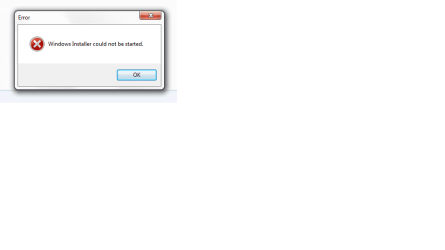
Hi, i am trying to install something, but every time i start to install it, at the point where windows installer takes over, it says "Windows Installer cannot be started".

This is the HP Wireless Assistant, purely because it is the easiest way to turn off my bluetooth chip. I used to be able to right click on the little bluetooth icon in my taskbar, and click enable, or disable, but i cant anymore, and i believe that is because HP wireless assistant broke about a week ago, and i have never fixed it, untill now when i tried reinstalling it.

I have already tried rebooting computer btw.

EDIT: Here is an image of the popup
Untitledd.png
 

My Computer

Computer Manufacturer/Model Number
HP G72-B20sa
OS
Windows 7 Home Premium 64-bit
Memory
4gb
Because i prefer to be able to right click the icon, and enable it, without having to look through a bunch of stuff to find it.

I can gaurantee that it adds nothing like 30 seconds to startup. Maybe a couple, but my laptop doesn't take much longer than 30 seconds to startup, so according to you, if i was to uninstall it, my laptop would be fully booted in less than 10 seconds... I beg to differ.

Yes, you may prefer super fast startup times, but i prefer the convenience of turning bluetooth on/off without leaving my desktop, as believe it or not, that would actually save me more time in the day... Plus it means that i can see in less than a second wether bluetooth is on or not.
 

My Computer

Computer Manufacturer/Model Number
HP G72-B20sa
OS
Windows 7 Home Premium 64-bit
Memory
4gb
One observation, if you don't treat people trying to help you for free nicer, they will cease to try.
 

My Computer

Computer Manufacturer/Model Number
* BFK Customs *
OS
W 7 64-bit Ultimate
CPU
Intel Q9550 Yorkfield
Motherboard
ASUS P5Q Pro
Memory
8GB Dominator 8500C5D
Graphics Card(s)
ATI : XFX 5870
Sound Card
Realtek HD Audio 7-1
Monitor(s) Displays
1x 47" LCD HDMI & 3x 26" LCD HDMI
Screen Resolution
1920x1080P & 1920x1200
Hard Drives
1x 80GB Intel X25-M G2 SSD : 1x 500GB & 1x 640GB WD Caviar Black(s)
PSU
Corsair 620HX
Case
Cooler Master RC-690
Cooling
Tuniq Tower 120, 2x 140mm and 3x 120mm case fans
Keyboard
Microsoft 500
Mouse
Razer Diamondback 3G
Internet Speed
14 Mb/s
Other Info
1x Koutech 3Gb/s SATA HDD Hot Swap Rack
First off, Bare foot is right, we are only trying to help, and we might not know everything, but we're trying.

Secondly, You may like it that software, and that is completely fine. However as just a warning, I am not a fan of HP because they aren't 'for the customer', they are for the money. HP software isn't the safest. And what do you mean it 'broke'? What went on to break it? And you have tried completely uninstalling it, and then redownloading it off the internet (if that is where you got it)?

If that doesn't work, you might look into a trusted complete uninstaller download and remove it, than reinstall it.

OR this could be a problem with windows installer. Does this behavior change when you uninstall/install something else?
 

My Computer

Computer type
PC/Desktop
Computer Manufacturer/Model Number
Custom Asus Build
OS
Microsoft Windows 8.1 Pro 64-bit
CPU
Intel(R) Core(TM) i3-4130 CPU @ 3.40GHz
Motherboard
B85M-E
Memory
8.00 GB
Graphics Card(s)
None
Sound Card
Realtek High Definition Audio
Monitor(s) Displays
Asus 23.6" Monitor
Screen Resolution
1920 x 1080 x 32 bits (4294967296 colors) @ 60 Hz
Hard Drives
INTEL SSDSC2BW180A4
Samsung SSD 840 PRO Series
PSU
Seasonic S12II-380Bronze
Case
Lian Li
Cooling
Fan, Passive
Keyboard
Logitech K120
Mouse
Microsoft Touch Mouse
Internet Speed
4ms Ping, 19.0 Mbps Download, 19.0 Mbps Upload
Antivirus
Eset Endpoint
Browser
Internet Explorer, Chrome
Alright, i may have overreacted a little bit. But the post that i replied to was deleted (presumably) before you saw it.

Basically, i was told that Wireless Assistant is crap, and to use windows device manager instead.
I understand that you are only trying to help, but when i first got my laptop, i deleted most of the stuff from it, and got the startup time down to something that you would expect from a new computer. Obviously, this was still with Wireless Assistant, and like i say, it wasn't much more than 40 seconds or so.

Anyways, sorry if i offended anybody, but please dont treat me like a total newb. The only reason i came here, was because the only thing i could find on thje internet was barely semi-related.

The original problem with Wireless Assistant was that one day, i just randomly got an error message when i started my computer, saying that HPWA_Main.exe failed to start, but it still worked fine when i opened it manually. Then a few days after that, i started getting another message, and HPWA stopped working completely, so i uninstalled it completely, downloaded the installer (for windows 7) and then when i ran it, Windows Installer gave the message i showed above.

I have now reinstalled windows from the recovery, and removed all of the junk again, but i shall still keep wireless assistant, as like i say, i like to be able to right click the little bluetooth icon and enable/disable from there (i believe that is a function of wireless assistant, because that stopped workign the same time wireless assistant did)
 

My Computer

Computer Manufacturer/Model Number
HP G72-B20sa
OS
Windows 7 Home Premium 64-bit
Memory
4gb
I'm glad you got it working, sad you had to completely reinstall though. hope it holds up for you. cheers
 

My Computer

Computer type
PC/Desktop
Computer Manufacturer/Model Number
Custom Asus Build
OS
Microsoft Windows 8.1 Pro 64-bit
CPU
Intel(R) Core(TM) i3-4130 CPU @ 3.40GHz
Motherboard
B85M-E
Memory
8.00 GB
Graphics Card(s)
None
Sound Card
Realtek High Definition Audio
Monitor(s) Displays
Asus 23.6" Monitor
Screen Resolution
1920 x 1080 x 32 bits (4294967296 colors) @ 60 Hz
Hard Drives
INTEL SSDSC2BW180A4
Samsung SSD 840 PRO Series
PSU
Seasonic S12II-380Bronze
Case
Lian Li
Cooling
Fan, Passive
Keyboard
Logitech K120
Mouse
Microsoft Touch Mouse
Internet Speed
4ms Ping, 19.0 Mbps Download, 19.0 Mbps Upload
Antivirus
Eset Endpoint
Browser
Internet Explorer, Chrome
Back
Top