
Windows Installer

darkhorse

New member
Power User
Local time
1:48 AM
Messages
514
Location
Denmark
Hi.

Runing Windows 7 Ultimate 32bit.

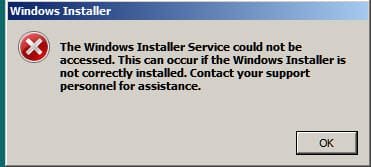
Would install a software, but got what is shown in the attachment

Also I cannot access Windows Update.

The System Configuration is set to Normal Sstartup

What can I do ?
 

Attachments

  • windowsinstalller.jpg
    windowsinstalller.jpg
    10.5 KB · Views: 2

My Computer

Computer type
PC/Desktop
Computer Manufacturer/Model Number
Homemade
OS
Windows 7 Ultimate
CPU
E7300
Motherboard
ASUS P5Q DeLuxe
Memory
4g
Graphics Card(s)
NVIDIA GeForce 7300 LE
Sound Card
N/A
Monitor(s) Displays
Acer
Screen Resolution
1600x1200
Hard Drives
Samsung HD503HI ATA Device
PSU
Seasonic
Case
ATX
Cooling
FAN
Keyboard
Logitech
Mouse
HP
Internet Speed
20/2
Antivirus
MSE
Browser
IE9, Chrome, Firefox
Hello.


Have you disabled any Services, perhaps something you 'tweaked' without knowing?
 

My Computer

Computer Manufacturer/Model Number
* BFK Customs *
OS
W 7 64-bit Ultimate
CPU
Intel Q9550 Yorkfield
Motherboard
ASUS P5Q Pro
Memory
8GB Dominator 8500C5D
Graphics Card(s)
ATI : XFX 5870
Sound Card
Realtek HD Audio 7-1
Monitor(s) Displays
1x 47" LCD HDMI & 3x 26" LCD HDMI
Screen Resolution
1920x1080P & 1920x1200
Hard Drives
1x 80GB Intel X25-M G2 SSD : 1x 500GB & 1x 640GB WD Caviar Black(s)
PSU
Corsair 620HX
Case
Cooler Master RC-690
Cooling
Tuniq Tower 120, 2x 140mm and 3x 120mm case fans
Keyboard
Microsoft 500
Mouse
Razer Diamondback 3G
Internet Speed
14 Mb/s
Other Info
1x Koutech 3Gb/s SATA HDD Hot Swap Rack
Click start
In the search area type "cmd"
In the start menu right click "cmd.exe" and select RunAs Administrator.
Now type: msiexec /regserver
Let us know if this helps.
 
Hello.


Have you disabled any Services, perhaps something you 'tweaked' without knowing?

No, only thing I chekced was if Windows Installer under Services was set to manaul and started.

Also windows updates is running and set to automatic. Even that if I try Update, I get this:

"Windows updated cannot curretnly check for updates, because the service is not running".

And it is ??
 

My Computer

Computer type
PC/Desktop
Computer Manufacturer/Model Number
Homemade
OS
Windows 7 Ultimate
CPU
E7300
Motherboard
ASUS P5Q DeLuxe
Memory
4g
Graphics Card(s)
NVIDIA GeForce 7300 LE
Sound Card
N/A
Monitor(s) Displays
Acer
Screen Resolution
1600x1200
Hard Drives
Samsung HD503HI ATA Device
PSU
Seasonic
Case
ATX
Cooling
FAN
Keyboard
Logitech
Mouse
HP
Internet Speed
20/2
Antivirus
MSE
Browser
IE9, Chrome, Firefox
Click start
In the search area type "cmd"
In the start menu right click "cmd.exe" and select RunAs Administrator.
Now type: msiexec /regserver
Let us know if this helps.


Obviuosly not unfortunately, but I have Superantispyware running just now. Will see when it has run and do a reboot.

Will be back later with info
 

My Computer

Computer type
PC/Desktop
Computer Manufacturer/Model Number
Homemade
OS
Windows 7 Ultimate
CPU
E7300
Motherboard
ASUS P5Q DeLuxe
Memory
4g
Graphics Card(s)
NVIDIA GeForce 7300 LE
Sound Card
N/A
Monitor(s) Displays
Acer
Screen Resolution
1600x1200
Hard Drives
Samsung HD503HI ATA Device
PSU
Seasonic
Case
ATX
Cooling
FAN
Keyboard
Logitech
Mouse
HP
Internet Speed
20/2
Antivirus
MSE
Browser
IE9, Chrome, Firefox

My Computer

Computer Manufacturer/Model Number
* BFK Customs *
OS
W 7 64-bit Ultimate
CPU
Intel Q9550 Yorkfield
Motherboard
ASUS P5Q Pro
Memory
8GB Dominator 8500C5D
Graphics Card(s)
ATI : XFX 5870
Sound Card
Realtek HD Audio 7-1
Monitor(s) Displays
1x 47" LCD HDMI & 3x 26" LCD HDMI
Screen Resolution
1920x1080P & 1920x1200
Hard Drives
1x 80GB Intel X25-M G2 SSD : 1x 500GB & 1x 640GB WD Caviar Black(s)
PSU
Corsair 620HX
Case
Cooler Master RC-690
Cooling
Tuniq Tower 120, 2x 140mm and 3x 120mm case fans
Keyboard
Microsoft 500
Mouse
Razer Diamondback 3G
Internet Speed
14 Mb/s
Other Info
1x Koutech 3Gb/s SATA HDD Hot Swap Rack
Back
Top