- Local time
- 11:03 AM
- Messages
- 231
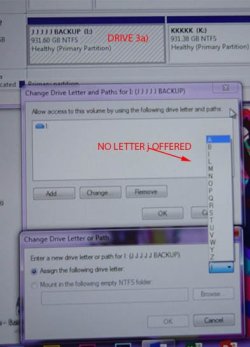
I have 3 external USB hard drives/partitions: J & K which are two partitions in a Western Digital 2 TB USB3 HDD; L & M ditto on another identical WD 2 TB HDD; and occasionally N which is a 465 GB LaCie USB2 HDD. When the two WD drives are disconnected, N changes to I. Another variation is with the J and K drives connected but not the N, J is re-lettered to I.
This caused a potentially serious problem recently when I went to make a test clone of my 256 GB SSD (my C: drive) on to N. In the confusion I actually started the cloning to my X, a 1 TB internal which contains all my documents, Pictures etc. etc. and had been re-lettered to N (I am a little hazy about the lettering now). My X (now re-lettered to I masquerading as N) was immediately wiped (cloning does that) and I had to spend many hours copying back all those files (857 GB) from J (my backup of X which fortunately was up to date). I have noticed similar behaviour before at various times.
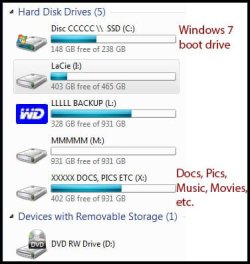
To avoid this in the future, I have renamed all my HDDs with their correct drive letters. For example, C: to CCCCC and X to XXXXX. Being the name of the HDD rather than its letter, it (hopefully) will not change, so I can ignore those pesky drive letters. (Image attached.)
-- But why does Windows play around like this? (Whenever I change a drive's letter I am warned that software that relies on letters might get confused, so there must be a reason for letters.)
-- Can I get it to stop changing drive letters?
Thanks.
This caused a potentially serious problem recently when I went to make a test clone of my 256 GB SSD (my C: drive) on to N. In the confusion I actually started the cloning to my X, a 1 TB internal which contains all my documents, Pictures etc. etc. and had been re-lettered to N (I am a little hazy about the lettering now). My X (now re-lettered to I masquerading as N) was immediately wiped (cloning does that) and I had to spend many hours copying back all those files (857 GB) from J (my backup of X which fortunately was up to date). I have noticed similar behaviour before at various times.
To avoid this in the future, I have renamed all my HDDs with their correct drive letters. For example, C: to CCCCC and X to XXXXX. Being the name of the HDD rather than its letter, it (hopefully) will not change, so I can ignore those pesky drive letters. (Image attached.)
-- But why does Windows play around like this? (Whenever I change a drive's letter I am warned that software that relies on letters might get confused, so there must be a reason for letters.)
-- Can I get it to stop changing drive letters?
Thanks.
Attachments
My Computer
At a glance
Windows 7 Home Premium 64bitIntel Pentium Edition G3220 3.0 GHz8 GB DDR3 1600 MHz DIMMNot Known
- Computer type
- PC/Desktop
- Computer Manufacturer/Model Number
- Gigabyte ATX case with 500 W power supply GZ-M1
- OS
- Windows 7 Home Premium 64bit
- CPU
- Intel Pentium Edition G3220 3.0 GHz
- Motherboard
- Gigabyte Socket 1150 MicroATX Mot Ultra Durable, GA-H81M-S2H
- Memory
- 8 GB DDR3 1600 MHz DIMM
- Graphics Card(s)
- Not Known
- Sound Card
- Not known
- Monitor(s) Displays
- Samsung LS24D590 23.6"
- Screen Resolution
- 1920 x 1080
- Hard Drives
- 256 GB Solid State Drive (C: on which Windows 7 is installed)-
1 TB internal conventional HD (X:)-
Two WD "Elements" " 2TB USB drives as backups
- PSU
- 500 W
- Case
- Gigabyte ATX case
- Cooling
- Several fans!
- Keyboard
- Accuratus 301 USB Compact, white.
- Mouse
- Microsoft Basic Optical Mouse v2.0, two-button, tethered
- Internet Speed
- 10 to 12 Mb per second
- Antivirus
- Kaspersky Internet Security 2016, Malwarebytes (paid)
- Browser
- Firefox (ocassionally Safari)
- Other Info
- The 256 GB SSD (C:) also has Adobe Photoshop CS6 and InDesign CS6, MS Office, Adobe Lightroom, and other small programs.