Windows & Itunes garbling Cyrillic ID3 tags

Pugamust

New member
Local time
3:18 AM
Messages
8
Hi, I was wondering if anyone might know of a way to make windows be able to read non unicode cyrillic letters. I have a bunch of mp3's that I want to put into Itunes but all their info is garbled [Ëþáîâíîå íàñòðîåíèå]. I know that its a Unicode problem because I found a few online converters that correctly change them. They are presently in CP1251 but windows thinks that they are from a different set and so ascribes different letters corresponding to that other set instead of the correct Cyrillic ones (or atleast that is what I've understood from the research I've done).

However, I still cannot find a solution to this problem. There are a few solutions for Macs such as Cyrfix which work directly with Itunes, but absolutely nothing for windows. It would seem that there would have to be a simple solution out there for such a small problem, but I'll be darned if I can find it.

The strange thing is that some of the files show up fine with the correct Cyrillic letters in windows explorer but when I transfer them into Itunes they get garbled. So I'm not sure if the problem is solely with windows and Unicode, or if I need two separate solutions for windows and Itunes for them to be able to correctly read the ID3 tags.

Thanks in advance for your Help!

P.S. and I'm running Windows 7 HP 64bit and the latest version of Itunes if that makes a difference. And FYI Cyrillic shows up fine in my web browsers and emails and I have the Russian keyboard installed, including several fonts specifically for CP1251.
 

My Computer My Computer

At a glance

Windows 7
OS
Windows 7
Hi, Welcome to SF,

You could try Unicode Rewriter it's platform independent Unicode Rewriter is a Java tool which converts ID3 tags of MP3 files into Unicode. The reconverted MP3 files can be processed by iTunes

Unicode Rewriter | Get Unicode Rewriter at SourceForge.net

Hope this helps,
Captain
 

My Computer My Computer

At a glance

Windows 7 Ultimate - 64-bit | Windows 8 Pro -...Intel® Core™ i7 Processor 3,610QM (2.30Hz, 6M...8 GBNVIDIA® GeForce® GT 650M 2GB Graphics, Optimu...
Computer Manufacturer/Model Number
Samsung NP550P5C-S02IN
OS
Windows 7 Ultimate - 64-bit | Windows 8 Pro - 64-bit
CPU
Intel® Core™ i7 Processor 3,610QM (2.30Hz, 6MB L3 Cach
Memory
8 GB
Graphics Card(s)
NVIDIA® GeForce® GT 650M 2GB Graphics, Optimus™ techno
Sound Card
SoundAlive™ JBL 3 Speakers (With sub-Woofer)
Monitor(s) Displays
39.62cm (15.6) SuperBright 300nit HD+ LED Display
Screen Resolution
1,600 x 900, Anti-Reflective
Hard Drives
1TB S-ATA II Hard Drive (5,400RPM)
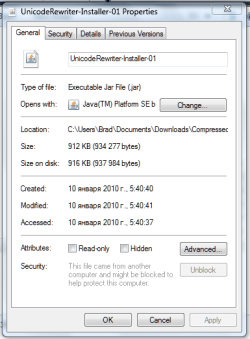
Thanks, I can't get the program to install tho :(, when I click the install button I get the error message java.io.FileNotFoundException: C:\Program Files\Unicode Rewriter\README.txt (Access Denied). I just can't seem to catch a break! lol :p
 

My Computer My Computer

At a glance

Windows 7
OS
Windows 7
Thanks, I can't get the program to install tho :(, when I click the install button I get the error message java.io.FileNotFoundException: C:\Program Files\Unicode Rewriter\README.txt (Access Denied). I just can't seem to catch a break! lol :p
Try to Right Click and Run as Administrator
Also Go To C:\Program Files\Unicode Rewriter Take Ownership of the Unicode Rewriter

Hope this helps,
Captain
 

My Computer My Computer

At a glance

Windows 7 Ultimate - 64-bit | Windows 8 Pro -...Intel® Core™ i7 Processor 3,610QM (2.30Hz, 6M...8 GBNVIDIA® GeForce® GT 650M 2GB Graphics, Optimu...
Computer Manufacturer/Model Number
Samsung NP550P5C-S02IN
OS
Windows 7 Ultimate - 64-bit | Windows 8 Pro - 64-bit
CPU
Intel® Core™ i7 Processor 3,610QM (2.30Hz, 6MB L3 Cach
Memory
8 GB
Graphics Card(s)
NVIDIA® GeForce® GT 650M 2GB Graphics, Optimus™ techno
Sound Card
SoundAlive™ JBL 3 Speakers (With sub-Woofer)
Monitor(s) Displays
39.62cm (15.6) SuperBright 300nit HD+ LED Display
Screen Resolution
1,600 x 900, Anti-Reflective
Hard Drives
1TB S-ATA II Hard Drive (5,400RPM)
Try to Right Click and Run as Administrator
Also Go To C:\Program Files\Unicode Rewriter Take Ownership of the Unicode Rewriter

Hope this helps,
Captain

It doesn't give me the option the run as administrator only to open, I was able to take ownership but, unfortunately, still nothing :(
 

My Computer My Computer

At a glance

Windows 7
OS
Windows 7
That's weird .. I'm assuming that your right clicking on the Setup file
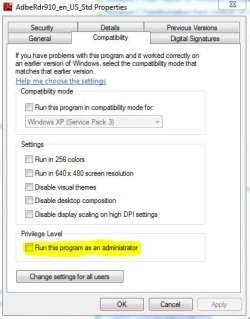
If that didn't work, Right Click and Go To Properties then goto the Tab "Compatibility" then check on Run as administrator

Admin.JPG
 

My Computer My Computer

At a glance

Windows 7 Ultimate - 64-bit | Windows 8 Pro -...Intel® Core™ i7 Processor 3,610QM (2.30Hz, 6M...8 GBNVIDIA® GeForce® GT 650M 2GB Graphics, Optimu...
Computer Manufacturer/Model Number
Samsung NP550P5C-S02IN
OS
Windows 7 Ultimate - 64-bit | Windows 8 Pro - 64-bit
CPU
Intel® Core™ i7 Processor 3,610QM (2.30Hz, 6MB L3 Cach
Memory
8 GB
Graphics Card(s)
NVIDIA® GeForce® GT 650M 2GB Graphics, Optimus™ techno
Sound Card
SoundAlive™ JBL 3 Speakers (With sub-Woofer)
Monitor(s) Displays
39.62cm (15.6) SuperBright 300nit HD+ LED Display
Screen Resolution
1,600 x 900, Anti-Reflective
Hard Drives
1TB S-ATA II Hard Drive (5,400RPM)
Hopefully this work... This is all I get when I go into properties.

Capture.PNG
 

My Computer My Computer

At a glance

Windows 7
OS
Windows 7

My Computer My Computer

At a glance

Windows 7 Ultimate - 64-bit | Windows 8 Pro -...Intel® Core™ i7 Processor 3,610QM (2.30Hz, 6M...8 GBNVIDIA® GeForce® GT 650M 2GB Graphics, Optimu...
Computer Manufacturer/Model Number
Samsung NP550P5C-S02IN
OS
Windows 7 Ultimate - 64-bit | Windows 8 Pro - 64-bit
CPU
Intel® Core™ i7 Processor 3,610QM (2.30Hz, 6MB L3 Cach
Memory
8 GB
Graphics Card(s)
NVIDIA® GeForce® GT 650M 2GB Graphics, Optimus™ techno
Sound Card
SoundAlive™ JBL 3 Speakers (With sub-Woofer)
Monitor(s) Displays
39.62cm (15.6) SuperBright 300nit HD+ LED Display
Screen Resolution
1,600 x 900, Anti-Reflective
Hard Drives
1TB S-ATA II Hard Drive (5,400RPM)
!!!!!!It worked!!!!!! Thank you sooooo much! The weird thing is that now its automatically converting them when I put them into Itunes without even having to use the program. IDK, and I'm not even going to ask lol. Thanks again, you have no idea how much of a headache this saves me!
 

My Computer My Computer

At a glance

Windows 7
OS
Windows 7
!!!!!!It worked!!!!!! Thank you sooooo much! The weird thing is that now its automatically converting them when I put them into Itunes without even having to use the program. IDK, and I'm not even going to ask lol. Thanks again, you have no idea how much of a headache this saves me!

You are Most Welcome :D
Thank You For Posting Back
 

My Computer My Computer

At a glance

Windows 7 Ultimate - 64-bit | Windows 8 Pro -...Intel® Core™ i7 Processor 3,610QM (2.30Hz, 6M...8 GBNVIDIA® GeForce® GT 650M 2GB Graphics, Optimu...
Computer Manufacturer/Model Number
Samsung NP550P5C-S02IN
OS
Windows 7 Ultimate - 64-bit | Windows 8 Pro - 64-bit
CPU
Intel® Core™ i7 Processor 3,610QM (2.30Hz, 6MB L3 Cach
Memory
8 GB
Graphics Card(s)
NVIDIA® GeForce® GT 650M 2GB Graphics, Optimus™ techno
Sound Card
SoundAlive™ JBL 3 Speakers (With sub-Woofer)
Monitor(s) Displays
39.62cm (15.6) SuperBright 300nit HD+ LED Display
Screen Resolution
1,600 x 900, Anti-Reflective
Hard Drives
1TB S-ATA II Hard Drive (5,400RPM)
You run the program using Java tools if I remember correctly. But actually I found a much easier way to fix the problem (after I had several unrelated computer issues and had to replace my hard drive). So if it's a simple matter of the tags are coming up garbled when you see them in Windows Explorer and when you put them in Itunes, etc. then all you need to do is go into Control Panel >> Clock, Languages, and Region >> Region and Language >> Administrative >> Change System locale. And once you get there just change the system locale to Russia (or whatever country/language you are dealing with), restart the computer, and everything will come up perfectly. (What this does is set the default non-unicode code to be a Cyrillic based code instead of a latin based one, as far as I understand)

I had thought that I originally had tried this but obviously not, because it worked like a charm after I had to replace my hard drive. Anyways, I hope this helps! Vsevo Horoshevo!
 

My Computer My Computer

At a glance

Windows 7
OS
Windows 7
that is the thing! they come up fine everywhere except dumbass intunes! I am soo frustrated...
:-(
 

My Computer My Computer

At a glance

Windows 7 64 bit
OS
Windows 7 64 bit
...Control Panel >> Clock, Languages, and Region >> Region and Language >> Administrative >> Change System locale...

What da? Clock, languages, administrative.... wha are u taking about?
 

My Computer My Computer

At a glance

Windows 7 64 bit
OS
Windows 7 64 bit
Do you know how to get into Control Panel? It's in the start menu, in the right hand column. When you click on Control Panel it opens up a window. In that window you will see one of two things -- either it will show you 8 categories where you can go and change setting for your computer (such as, System & Security, Network & Internet, Programs, and Clock Languages & Region, etc... this is the 'new' way that they are displayed) or it will show about 50 little icons representing all the individual things that you can change (i.e. this is the 'old' way, the only difference is that they're not grouped in categories). If its the first setup then follow my instructions in my previous post, if its the second then simply find the icon that says "Region and Language" then click on the "Administrative" tab and then "Change System Locale."

Sometimes songs may seem to be coming up fine in Windows Explorer, because their file names are coming up correctly, but their tags are in some other code (usually win1251 or K0I8), which happens to be the information that Itunes reads.

Now that is all assuming that you are dealing with Cyrillic id3 tags or at least some other non latin alphabet. If you're dealing with English tags that aren't coming up in Itunes then that's a whole other problem I'd say. Are you dealing with Russian songs?
 

My Computer My Computer

At a glance

Windows 7
OS
Windows 7
I was just a bit confused by the sequence you've mentioned. I found it in Control Panel/Region and Laguage then tab "Administrative" where I found the magic button "Change system Locale", chose Russia and all my problems when away... Thanks bro! What a stupid problem! Feel dumb at the moment! PAka!
 

My Computer My Computer

At a glance

Windows 7 64 bit
OS
Windows 7 64 bit
Hey, no problem. Imagine how I felt after trying to figure out how to fix this problem for over a year, only to discover all I needed to do was change one little setting! Anyways, I'm glad I could help! Vsevo Horoshevo!
 

My Computer My Computer

At a glance

Windows 7
OS
Windows 7
Back
Top