Windows Journal

TheByzantine

New member
Local time
4:55 PM
Messages
4
I am trying to use Windows Journal. I tried to install the drivers, but cannot type anything. The pointer changes to a dot below the header.

I cannot find Windows Journal in the Start Menu. I have to use seach to get access.

Windows 7 and Internet Explorer 9 Beta.

Can someone help me?
 

My Computer

Computer Manufacturer/Model Number
HP s5220y
OS
Windows 7 x64
CPU
Processor Pentium(R) Dual-Core CPU E5300 @ 2.60GHz, 2
Motherboard
BIOS Version/Date Phoenix Technologies, LTD 5.24, 6/19/2009
Memory
400 GB
When you see it, from search, cant you right click and pin to start menu or task bar?
 

My Computer

Computer type
PC/Desktop
Computer Manufacturer/Model Number
Dell XPS 420
OS
Windows 10, Home Clean Install
CPU
Intel Core2 processsor Q8200(2.33Ghz 1333FSB) Quad Core Tech
Motherboard
Dell
Memory
6 gb
Graphics Card(s)
ATI Radeon 256MB HD3650
Sound Card
Intergrated 7.1 Channel Audio
Monitor(s) Displays
Dell SP2009W 20"
Hard Drives
640 GB Serial ATA Hard drive
Cooling
Fan
Keyboard
Dell USB Keyboard
Mouse
Dell Premium Optical USB
Internet Speed
DSL 2.85
Windows Journal is now pinned to the task bar. Now if it would work.

Thanks.
 

My Computer

Computer Manufacturer/Model Number
HP s5220y
OS
Windows 7 x64
CPU
Processor Pentium(R) Dual-Core CPU E5300 @ 2.60GHz, 2
Motherboard
BIOS Version/Date Phoenix Technologies, LTD 5.24, 6/19/2009
Memory
400 GB
Talk to me. In detail, how did you get Windows Journal?
 

My Computer

Computer type
PC/Desktop
Computer Manufacturer/Model Number
Dell XPS 420
OS
Windows 10, Home Clean Install
CPU
Intel Core2 processsor Q8200(2.33Ghz 1333FSB) Quad Core Tech
Motherboard
Dell
Memory
6 gb
Graphics Card(s)
ATI Radeon 256MB HD3650
Sound Card
Intergrated 7.1 Channel Audio
Monitor(s) Displays
Dell SP2009W 20"
Hard Drives
640 GB Serial ATA Hard drive
Cooling
Fan
Keyboard
Dell USB Keyboard
Mouse
Dell Premium Optical USB
Internet Speed
DSL 2.85
It apparently came with the HP Pavillion Slimline. I did not install it. A friend has one and was talking about Windows Journal. So, I looked for it.

I have had to do two system restores. Internet Explorer 9 beta may be a problem. Not much else to say.
 

My Computer

Computer Manufacturer/Model Number
HP s5220y
OS
Windows 7 x64
CPU
Processor Pentium(R) Dual-Core CPU E5300 @ 2.60GHz, 2
Motherboard
BIOS Version/Date Phoenix Technologies, LTD 5.24, 6/19/2009
Memory
400 GB

My Computer

Computer type
PC/Desktop
Computer Manufacturer/Model Number
Dell XPS 420
OS
Windows 10, Home Clean Install
CPU
Intel Core2 processsor Q8200(2.33Ghz 1333FSB) Quad Core Tech
Motherboard
Dell
Memory
6 gb
Graphics Card(s)
ATI Radeon 256MB HD3650
Sound Card
Intergrated 7.1 Channel Audio
Monitor(s) Displays
Dell SP2009W 20"
Hard Drives
640 GB Serial ATA Hard drive
Cooling
Fan
Keyboard
Dell USB Keyboard
Mouse
Dell Premium Optical USB
Internet Speed
DSL 2.85
I figured it out. Thanks.
 

My Computer

Computer Manufacturer/Model Number
HP s5220y
OS
Windows 7 x64
CPU
Processor Pentium(R) Dual-Core CPU E5300 @ 2.60GHz, 2
Motherboard
BIOS Version/Date Phoenix Technologies, LTD 5.24, 6/19/2009
Memory
400 GB
Good, your welcome.
 

My Computer

Computer type
PC/Desktop
Computer Manufacturer/Model Number
Dell XPS 420
OS
Windows 10, Home Clean Install
CPU
Intel Core2 processsor Q8200(2.33Ghz 1333FSB) Quad Core Tech
Motherboard
Dell
Memory
6 gb
Graphics Card(s)
ATI Radeon 256MB HD3650
Sound Card
Intergrated 7.1 Channel Audio
Monitor(s) Displays
Dell SP2009W 20"
Hard Drives
640 GB Serial ATA Hard drive
Cooling
Fan
Keyboard
Dell USB Keyboard
Mouse
Dell Premium Optical USB
Internet Speed
DSL 2.85
For the life of me I can't remove this bloody thing. I manage alot of accounts in Outlook 2010 and with a Journal entry for each I spend alot of time scrolling. If I uninstall this, it would remove at least half a page of lines.

It's not in the Office 2010 options, nor can I find it in the Programs and Features options to uninstal, and I even searched here to no avail.
 

My Computer

OS
Windows 7, Windowx XP, Ubuntu 10.04
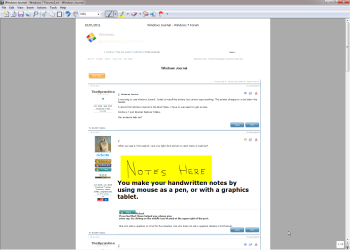
Windows Journal is to make handwritten notes. When you launch Journal first time, it installs Journal print device, which allows you to save (= print to Journal) images to Journal. You can then write your notes to the image.

The cursor is shown as a dot because of this. You can not type to a Journal note using your keyboard, instead you use your mouse (or grapchics tablet) to write to it.

Windows Journal is included in every edition of Seven from Home Premium and better. The program executable is Journal.exe in Program Files\Windows Journal folder.

Here's a typical example of using Journal. Save (=print) an image, in this example a web page, to Journal, then make your handwritten notes to it:

Journal_1.png
 
Last edited:

My Computer

Computer type
Laptop
Computer Manufacturer/Model Number
HP ENVY 17-1150eg
OS
Windows 10 Pro x64 EN-GB
CPU
1.6 GHz Intel Core i7-720QM Processor
Memory
6 GB
Graphics Card(s)
ATI Mobility Radeon HD 5850 Graphics
Sound Card
Beats sound system with integrated subwoofer
Monitor(s) Displays
17" laptop display, 22" LED and 32" Full HD TV through HDMI
Screen Resolution
1600*900 (1), 1920*1080 (2&3)
Hard Drives
Internal: 2 x 500 GB SATA Hard Disk Drive 7200 rpm
External: 2TB for backups, 3TB USB3 network drive for media
Cooling
As Envy runs a bit warm, I have it on a Cooler Master pad
Keyboard
Logitech diNovo Media Desktop Laser (bluetooth)
Mouse
Logitech Performance Mouse MX
Internet Speed
50/10 Mbps VDSL
Antivirus
Windows Defender 4.3.9431.0
Browser
Maxthon 3.5.2., IE11
Windows Journal is to make handwritten notes. When you launch Journal first time, it installs Journal print device, which allows you to save (= print to Journal) images to Journal. You can then write your notes to the image.

The cursor is shown as a dot because of this. You can not type to a Journal note using your keyboard, instead you use your mouse (or grapchics tablet) to write to it.

Windows Journal is included in every edition of Seven from Home Premium and better. The program executable is Journal.exe in Program Files folder.

Here's a typical example of using Journal. Save (=print) an image, in this example a web page, to Journal, then make your handwritten notes to it:

View attachment 132478


It's pretty much a useless feature for me. It appeared after some updating because I never noticed it until recently.

I can't figure out how to remove it. I mean I am a seasoned technician and this thing has me stumped. All the usual methods don't apply in my case.
 

My Computer

OS
Windows 7, Windowx XP, Ubuntu 10.04
It's pretty much a useless feature for me. It appeared after some updating because I never noticed it until recently.
No, it came with the Windows 7. It's included in Home Premium and better editions.

I can't figure out how to remove it. I mean I am a seasoned technician and this thing has me stumped. All the usual methods don't apply in my case.
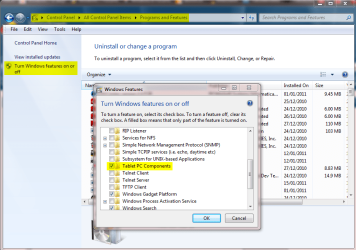
Go to Control Panel > Programs and Features. Click Turn Windows features on or off on the left pane. Scroll down to Tablet PC Components, deselect it, click OK. Reboot.

TabletPC_components.png

This uninstalls all Tablet PC components, including Windows Journal.

Kari
 

My Computer

Computer type
Laptop
Computer Manufacturer/Model Number
HP ENVY 17-1150eg
OS
Windows 10 Pro x64 EN-GB
CPU
1.6 GHz Intel Core i7-720QM Processor
Memory
6 GB
Graphics Card(s)
ATI Mobility Radeon HD 5850 Graphics
Sound Card
Beats sound system with integrated subwoofer
Monitor(s) Displays
17" laptop display, 22" LED and 32" Full HD TV through HDMI
Screen Resolution
1600*900 (1), 1920*1080 (2&3)
Hard Drives
Internal: 2 x 500 GB SATA Hard Disk Drive 7200 rpm
External: 2TB for backups, 3TB USB3 network drive for media
Cooling
As Envy runs a bit warm, I have it on a Cooler Master pad
Keyboard
Logitech diNovo Media Desktop Laser (bluetooth)
Mouse
Logitech Performance Mouse MX
Internet Speed
50/10 Mbps VDSL
Antivirus
Windows Defender 4.3.9431.0
Browser
Maxthon 3.5.2., IE11
It's pretty much a useless feature for me. It appeared after some updating because I never noticed it until recently.
No, it came with the Windows 7. It's included in Home Premium and better editions.

I can't figure out how to remove it. I mean I am a seasoned technician and this thing has me stumped. All the usual methods don't apply in my case.
Go to Control Panel > Programs and Features. Click Turn Windows features on or off on the left pane. Scroll down to Tablet PC Components, deselect it, click OK. Reboot.

View attachment 132483

This uninstalls all Tablet PC components, including Windows Journal.

Kari


Thank you for your replies Kari. The problem is, I don't have the Windows features option. Well, I do, but it's empty. I believe I may have caused that while I was tweaking Windows one day. I do alot of tweaking...

I can't find another way to remove this.
 

My Computer

OS
Windows 7, Windowx XP, Ubuntu 10.04
In that case, deleting the Windows Journal folder should IMO do no harm? But, on the other hand, the whole folder takes under 10 MB so it's quite meaningless.

Kari
 

My Computer

Computer type
Laptop
Computer Manufacturer/Model Number
HP ENVY 17-1150eg
OS
Windows 10 Pro x64 EN-GB
CPU
1.6 GHz Intel Core i7-720QM Processor
Memory
6 GB
Graphics Card(s)
ATI Mobility Radeon HD 5850 Graphics
Sound Card
Beats sound system with integrated subwoofer
Monitor(s) Displays
17" laptop display, 22" LED and 32" Full HD TV through HDMI
Screen Resolution
1600*900 (1), 1920*1080 (2&3)
Hard Drives
Internal: 2 x 500 GB SATA Hard Disk Drive 7200 rpm
External: 2TB for backups, 3TB USB3 network drive for media
Cooling
As Envy runs a bit warm, I have it on a Cooler Master pad
Keyboard
Logitech diNovo Media Desktop Laser (bluetooth)
Mouse
Logitech Performance Mouse MX
Internet Speed
50/10 Mbps VDSL
Antivirus
Windows Defender 4.3.9431.0
Browser
Maxthon 3.5.2., IE11
In that case, deleting the Windows Journal folder should IMO do no harm? But, on the other hand, the whole folder takes under 10 MB so it's quite meaningless.

Kari


I may just do that. Problem is, the journal is implemented into Office, so not sure if that will muck it up or not.

No worries, I would just reinstall in that case.

I mean I may as well keep fixing it until it's broke, no? :P
 

My Computer

OS
Windows 7, Windowx XP, Ubuntu 10.04
The Windows Journal, included in Windows 7 and located in Program Files\Windows Journal and the Journal feature in Office, located in for instance Office 2010 in Program Files\Common Files\Microsoft Shared\THEMES14\JOURNAL, are two different completely, totally different things with nothing whatsoever to do with each other.

Windows Journal is to made handwritten notes, Office Journal is to "record" chosen Office activities. Deleting windows Journal does not delete Office Journal.

Kari
 

My Computer

Computer type
Laptop
Computer Manufacturer/Model Number
HP ENVY 17-1150eg
OS
Windows 10 Pro x64 EN-GB
CPU
1.6 GHz Intel Core i7-720QM Processor
Memory
6 GB
Graphics Card(s)
ATI Mobility Radeon HD 5850 Graphics
Sound Card
Beats sound system with integrated subwoofer
Monitor(s) Displays
17" laptop display, 22" LED and 32" Full HD TV through HDMI
Screen Resolution
1600*900 (1), 1920*1080 (2&3)
Hard Drives
Internal: 2 x 500 GB SATA Hard Disk Drive 7200 rpm
External: 2TB for backups, 3TB USB3 network drive for media
Cooling
As Envy runs a bit warm, I have it on a Cooler Master pad
Keyboard
Logitech diNovo Media Desktop Laser (bluetooth)
Mouse
Logitech Performance Mouse MX
Internet Speed
50/10 Mbps VDSL
Antivirus
Windows Defender 4.3.9431.0
Browser
Maxthon 3.5.2., IE11
Sorry for the late reply. I have give the appropriate thanks.
 

My Computer

OS
Windows 7, Windowx XP, Ubuntu 10.04
Back
Top