

- Local time
- 2:42 PM
- Messages
- 29
Hi all,
My files from my laptop are always visible by other devices on the same network.
For example, I turned on my laptop and my TV can see all the files on my laptop. (In the pictures folder, videos etc...)
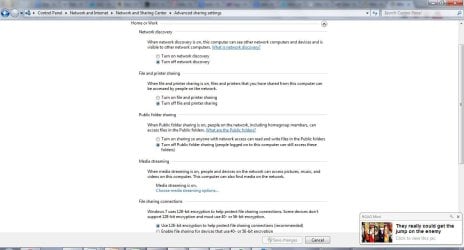
I have attached a screenshot below.
It seems to only apply to my LAN network not my WiFi. My TV and my laptop are connected to the same WiFi network and when I do that, my TV can see my files. But if I used a LAN cable directly from the modem, the TV can no longer see my files.
How can I solve this problem?
Thanks!

My files from my laptop are always visible by other devices on the same network.
For example, I turned on my laptop and my TV can see all the files on my laptop. (In the pictures folder, videos etc...)
I have attached a screenshot below.
It seems to only apply to my LAN network not my WiFi. My TV and my laptop are connected to the same WiFi network and when I do that, my TV can see my files. But if I used a LAN cable directly from the modem, the TV can no longer see my files.
How can I solve this problem?
Thanks!
Attachments
My Computer
- Computer Manufacturer/Model Number
- ThinkPad x61, ThinkPad T420i, ThinkPad Edge E430, ThinkPad x230t
- OS
- Windows 7 Professional 64Bit
- CPU
- Intel Core i7 3612QM (2.1Ghz)
- Memory
- 4GB DDR3 1600
- Graphics Card(s)
- nVidia GT 630M
- Sound Card
- Dolby Home Theater V4
- Monitor(s) Displays
- LG 72' 3D Smart TV/ Thinkpad 1366x768
- Screen Resolution
- 1920x1080/1366x768
- Hard Drives
- 1 TB Hitachi/320GB Hitachi 7200 RPM
- Internet Speed
- 1000MB Fibre

 . I disabled media sharing and now it works!

