Solved Windows Live Essentials 2011

Keyoung59

New member
Member
Local time
12:55 PM
Messages
41
Location
Houston
I had Windows Live Essentials installed and removed it and now I'm trying to install it back and the problem is that when I try and install it. It's staying that the programs are still installed but there is no Windows Live Essentials in the Programs/Features to remove it and I searched for the programs there is nothing there.

Thanks,

Kevin


FIX :

This is the fix thanks to: tagen

This is what I did:

1.) Installed: Everything Everything Search Engine

2.) Searched for these with Find Everything and uninstalled all of them.

Writer.msi
Mail.msi
MailLang.msi
Companion.mui.msi
MeshRuntime.msi
WindowsLiveSync.msi
MeshRuntime.msi

3.) Then what I did was run Windows Update and installed Windows Live Essentials 2011 rebooted.

Then I got the Installer back in Program/Features and ran it and Repaired it. Everything is running fine now.
 
Last edited:

My Computer

Computer Manufacturer/Model Number
HP Pavilion p6140f / Modifications
OS
Windows 7 Ultimate x64-bit SP1
CPU
Intel Core 2 Quad Q9650 3.00GHz
Motherboard
ASUS IPIBL-LB
Memory
8GB PC2-6400 DDR2 Copper Heat Spreaders
Graphics Card(s)
XFX GeForce 9400GT 1GB DDR2 PCI Express 2.0
Sound Card
High Definition Audio
Monitor(s) Displays
Acer 22" x223w, Acer 19" G205H
Screen Resolution
1680 x 1050, 1600 x 900
Hard Drives
128 GB Crucial RealSSD C300 (OS)
750 GB WD Caviar Black 7200RPM Serial ATA HDD
2 TB WD Caviar Green Serial ATA HDD
2 X 1 TB WD Caviar Green Serial ATA HDD
2 X 1.5 TB Seagate FreeAgent USB 2.0 7200RPM
500 GB Seagate FreeAgent USB 2.0 7200RPM
PSU
Sunbeam 650W ATX12V V2.3
Case
HP Case
Keyboard
Microsoft SideWinder X6 Black Keyboard
Mouse
Microsoft SideWinder X8 Black 2.4GHz Wireless 4000
Internet Speed
http://www.speedtest.net/result/951887022.png
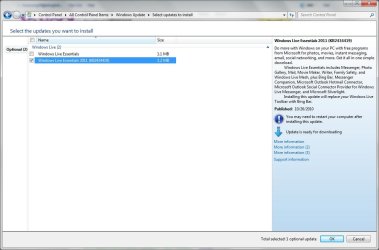
Find KB2434419 (which is the live essentials 2011 update). That would fix it.
 

My Computer

Computer Manufacturer/Model Number
HP, Dell, Gateway, Toshiba - 4 laptops and 2 desktops
OS
Vista, Windows7, Mint Mate, Zorin, Windows 8
CPU
from 1.6GHz Duo to i7
Monitor(s) Displays
2x HP w2207
Hard Drives
5x HDD, 7x SSD, 12x Externals
Keyboard
with trackball - no mices
Mouse
Trackball mice
Internet Speed
DSL 6000
Pictures

This is the update in Windows the one you posted but nothing happens.
1.JPG

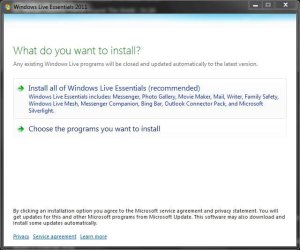
I tried both ways and nothing happens.
2.JPG

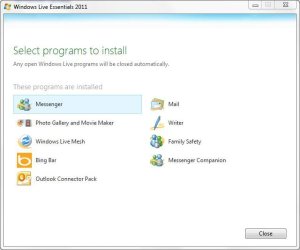
Saying that everything is installed.
3.JPG

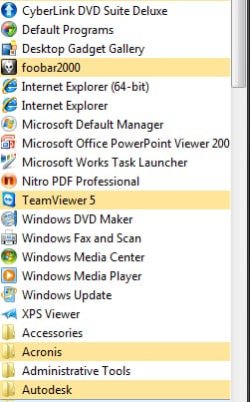
There is nothing under All Programs.
4.jpg

Thanks for helping anything else that can fix it?
 

My Computer

Computer Manufacturer/Model Number
HP Pavilion p6140f / Modifications
OS
Windows 7 Ultimate x64-bit SP1
CPU
Intel Core 2 Quad Q9650 3.00GHz
Motherboard
ASUS IPIBL-LB
Memory
8GB PC2-6400 DDR2 Copper Heat Spreaders
Graphics Card(s)
XFX GeForce 9400GT 1GB DDR2 PCI Express 2.0
Sound Card
High Definition Audio
Monitor(s) Displays
Acer 22" x223w, Acer 19" G205H
Screen Resolution
1680 x 1050, 1600 x 900
Hard Drives
128 GB Crucial RealSSD C300 (OS)
750 GB WD Caviar Black 7200RPM Serial ATA HDD
2 TB WD Caviar Green Serial ATA HDD
2 X 1 TB WD Caviar Green Serial ATA HDD
2 X 1.5 TB Seagate FreeAgent USB 2.0 7200RPM
500 GB Seagate FreeAgent USB 2.0 7200RPM
PSU
Sunbeam 650W ATX12V V2.3
Case
HP Case
Keyboard
Microsoft SideWinder X6 Black Keyboard
Mouse
Microsoft SideWinder X8 Black 2.4GHz Wireless 4000
Internet Speed
http://www.speedtest.net/result/951887022.png
Hmm, this is somewhat puzzling. It apparently went thru the installation routine (proof, your second snip that always comes up). Does it show in "Installed updates"? and did it disallear from ""Available updates".- in any case, it is liable to come back and you can try again.
 

My Computer

Computer Manufacturer/Model Number
HP, Dell, Gateway, Toshiba - 4 laptops and 2 desktops
OS
Vista, Windows7, Mint Mate, Zorin, Windows 8
CPU
from 1.6GHz Duo to i7
Monitor(s) Displays
2x HP w2207
Hard Drives
5x HDD, 7x SSD, 12x Externals
Keyboard
with trackball - no mices
Mouse
Trackball mice
Internet Speed
DSL 6000
Can you find windows live in program files folder? Maybe the shortcuts somehow disappeared during the uninstall?
 

My Computer

Computer Manufacturer/Model Number
Zepto Nox A15LL
OS
Windows 7 Ultimate 32bit
CPU
2,00 gigahertz Intel Pentium Dual
Motherboard
Zepto Zepto AURA_V0.27-EC0.23
Memory
2gb
Graphics Card(s)
Nvidia 9600M GT
Sound Card
High Definition Audio Device
Let`s check if any other program installed on the computer is interfering with this process. You can place the computer in a clean boot state to uninstall the program. To do so, follow these steps.
a) Click Start, type “msconfig.exe” (without quotes) in the Start Search box, and then press Enter to start the System Configuration Utility. If you are prompted for an administrator password or for confirmation, type your password, or click Continue.
b) On the General tab, click Selective Startup, and then click to clear the Load startup items check box. (The Use Original Boot.ini check box is unavailable.)
c) On the Services tab, click to select the Hide all Microsoft services check box, and then click Disable all. Click OK, and then click Restart. Try uninstalling the program and check.
 

My Computer

Computer Manufacturer/Model Number
HP p6270z
OS
Windows 7 Home Premium x64
CPU
AMD Athlon II X4 620
Motherboard
Foxconn ALOE (CPU 1)
Memory
4.00GB Dual Channel DDR3 @ 666Mhz (9-9-9-24)
Graphics Card(s)
HD Radeon 4200 (Integrated)
Sound Card
Realtek High Definition Audio
Monitor(s) Displays
HP 2311 (1920x1080) @ 60Hz
Screen Resolution
1920x1080
Hard Drives
488GB Seagate ST3500418AS SCSI Disk Device (RAID)
Windows Live Essential Installation

Sounds like a lazy uninstallation - thanks to a very lousy standard uninstall program that comes with windows 7. The Microsoft Programs and Features software is such trash it always leaves misinformation behind in the registry. Do yourself a HUGE FAVOR and download Revo Uninstaller - saves many headaches and a free version is available.

To remove all of the registry info from the registry and backups fire up Explorer and surf to COMPUTER: C LOCAL DISK: PROGRAM FILES 86: WINDOWS LIVE: AND FINALLY WINDOWS LIVE INSTALLER FOLDER. (This should have been left behind after the uninstall) Find the file named Wlarp.exe with the windows logo and double click it. It.s the uninstaller program for all of Windows Live. Follow the instructions and it should clear up your registry. For some damn reason it doesn't really work with the standard Microsoft Uninstaller - so it just leaves all the junk in your registry.

If for some reason you can't find Wlarp.exe on your computer I'm sure you can download it from the Microsoft site or anyone can send you a copy of theirs as an attachment in an email. (God I hope that's not illegal... if it is then scratch that - never came out of my mouth)

I wish you luck. The only thing of essentials that works on my laptop is the photo gallery and messenger - nothing else will install. No Worries - you'll get it fixed though with no problems. Take Care !

- Tagen
 

My Computer

Computer Manufacturer/Model Number
Hewlett Packard G71-340US
OS
windows 7 64 Bit
CPU
Intel(R) Core(TM)2 Duo CPU T6600 @ 220GHz
Memory
4 GB (2) 2 GB SODIMM DDR-2 800MHz Kinston
Graphics Card(s)
(2) Mobile Intell (R) 4 Series Express Chipset Family
Screen Resolution
1600 X 900 HD TrueBrite
Keyboard
IBM enhanced (101 or 102 key) keyboard
Mouse
Logitech Cordless and Microsoft Intelipoint 5000 Wireless
Internet Speed
Clearwire High Broadbrand
ImJustMatter:

This is the only thing in the folder
3.JPG

EchoX860:

It didn't work.

tagen:

Already have REVO just there is nothing under the Installed Program List with Widnows Live. I did just remove the Windows Live Mesh but still nothing else will work
2.JPG
This is what I get when I try and run View attachment 118939

1.JPG

By the way I had to go find it and download it it wasn't on my computer.
Any other idea's we can try?

Thanks to all that posted

Also this is what Windows Updates is saying.
5.JPG
 

My Computer

Computer Manufacturer/Model Number
HP Pavilion p6140f / Modifications
OS
Windows 7 Ultimate x64-bit SP1
CPU
Intel Core 2 Quad Q9650 3.00GHz
Motherboard
ASUS IPIBL-LB
Memory
8GB PC2-6400 DDR2 Copper Heat Spreaders
Graphics Card(s)
XFX GeForce 9400GT 1GB DDR2 PCI Express 2.0
Sound Card
High Definition Audio
Monitor(s) Displays
Acer 22" x223w, Acer 19" G205H
Screen Resolution
1680 x 1050, 1600 x 900
Hard Drives
128 GB Crucial RealSSD C300 (OS)
750 GB WD Caviar Black 7200RPM Serial ATA HDD
2 TB WD Caviar Green Serial ATA HDD
2 X 1 TB WD Caviar Green Serial ATA HDD
2 X 1.5 TB Seagate FreeAgent USB 2.0 7200RPM
500 GB Seagate FreeAgent USB 2.0 7200RPM
PSU
Sunbeam 650W ATX12V V2.3
Case
HP Case
Keyboard
Microsoft SideWinder X6 Black Keyboard
Mouse
Microsoft SideWinder X8 Black 2.4GHz Wireless 4000
Internet Speed
http://www.speedtest.net/result/951887022.png
Alright... wlarp.exe advice sucked - let's do this...

Kevin -

Sorry about the wlarp.exe suggestion not working. I've had nothing but issues with WLE 2011 and was hoping things would be easier for you. So I'm going to just list out things I did that helped me and hopefully something will either work positively for you or at least head you in a direction towards the answers you need.

First - keep in mind that my WLE is not working as it should so consider the source when taking any advice from me. After I uninstalled the old Essentials I could never get the installer to install anything. As of now I have everything of Essentials BETA except for Mail ( will not install for any reason whatsoever) and Writer is not working. ( it just likes to tease me by giving me an error message that "writer had to close for some reason" NO - writer was never even open. ) But Messenger, Mesh, Photo Gallery, Movie Maker, Sign In Assistant, etc... even Windows Live Essentials Installer Program - they all work perfectly - but I have no idea why mail and writer have crapped out on me. I guess Bill Gates just hates me.

This is how I was able to install those programs... I cheated.

First you need to enable hidden system files and folders to be seen in Folder Options.

Next find your way to C: Program Files (x86) - Common Files- Windows Live (it will be disguised as an empty folder but it isn't)- and inside you'll see the hidden 'cache' folder. Inside mine was approx 25 seperate WLE installers in seperate folders and they all had a different purpose. Active X, Language Files, Support Files, and of course the individual program installers. So I double clicked on ALL OF THEM and the only thing that wouldn't install was mail.msi because it was asking for the location of some other file that wasn't on my computer. But everything else installed with no problems.
If you don't have all of these installers in that location they could be in your C:\Windows\Installer Folder (again - another hidden folder), or in one of the many 'temp' or 'local/roaming' folders under either the Administrator or your profile. My favorite way to find anything on my laptop is a freeware program called everything . It's small, easy, free, and I swear to God it could find Jimmy Hoffa if it wanted to. Here is a list of just a few file names to search for :

Writer.msi
Mail.msi
MailLang.msi
Companion.mui.msi
MeshRuntime.msi
WindowsLiveSync.msi
MeshRuntime.msi

But remember that they'll all be in their own seperate folders and they are NOT NAMED, just labeled with a 20 digit number on the folder ( very obnoxious but the Everything program that I mentioned has no problems finding the named installer files inside). So that might be one way of clearing up your issue.

Have you tried using BOTH the online AND standalone installer? The offline standalone installer worked better for me and I think that's how I ended up with all of the individual installers stored on my C Drive. And there should be a link to those offline beta installers here on this site. It runs about 155mbs I think.

Another way to check on the uninstall process on your computer is using the free uninstaller from Iobit. Even though my Revo Uninstaller PRO and Windows Programs uninstaller didn't list any of the essentials programs on their software, when I booted up my Iobit it was still listed on it's software. When it ran the 'leftover scan' (similar to Revo) and it found a buttload of essential crap that was telling the WLE Installer that it was already on my computer. Anyway it's a great product and it's free so you have nothing to lose. And you might be surprised at what your computer still thinks it has. (I've discovered that Revo is far from perfect)

And of course there are the usual steps in fixing Windows that I'm positive you've already done and tried - but - since everyone at Microsoft thought it would be fun to irritate me with these things I thought what the hell... I'm gonna irritate you too.

How long ago was this? Is system restore not an option to get your previous versions back and then you can just do an update and not another install?

Have you run System File Checker to fix any system errors? You never kinow... you could have a msiexec file that is corrupt and it's going to lead to more problems. GO TO START: ACCESSORIES: RIGHT CLICK ON COMMAND PROMPT AND RUN AS ADMINISTRATOR: AT THE PROMPT TYPE sfc /SCANNOW Should take around 15 minutes or so and when finished it will tell you if you had corrupt files and it repaired them or if it couldn't find anything corrupt. Either way type exit hit return and REBOOT IF IT DID A REPAIR. Try installing Essentials now.

What is your Event Viewer telling you in regards to errors?

Are you sure you checked the "I accept the agreement" box on the installer window before clicking 'Next' ? (sorry about asking that one - it always pissed me off when the MSoft people would ask me that. I think they thought I was Sarah Palin or something)

Anyway I don't know if any of this will help out your situation, but I can tell you the most definitive thing I learned with this issue is that there are probably around two thousand individual reasons for why you and I and thousands of people are having the same problem and Microsoft can't simply issue an update or fixit solution for all of them. ( Although seriously... they are the Authors of this software and haven't offered up any serious or reasonable solutions. Pathetic ) Until I started snooping on my computer and started thinking outside of the Microsoft box, I wasn't getting anywhere. But if I think of anything else I'll let you know. And keep me posted on your progress... maybe you'll end up fixing my WLE.

BEST OF LUCK TO YOU -

Tagen

 

My Computer

Computer Manufacturer/Model Number
Hewlett Packard G71-340US
OS
windows 7 64 Bit
CPU
Intel(R) Core(TM)2 Duo CPU T6600 @ 220GHz
Memory
4 GB (2) 2 GB SODIMM DDR-2 800MHz Kinston
Graphics Card(s)
(2) Mobile Intell (R) 4 Series Express Chipset Family
Screen Resolution
1600 X 900 HD TrueBrite
Keyboard
IBM enhanced (101 or 102 key) keyboard
Mouse
Logitech Cordless and Microsoft Intelipoint 5000 Wireless
Internet Speed
Clearwire High Broadbrand
You've joined the legions of folks that live '11 has caused grief to. However, in a fit of pique, prior to a system re-install, I had a play about with it.

Using SIW, I made a list of ALL the programs listed as being installed on my PC. I then installed Live Essentials (everything!) used SIW again and compared the lists. This is the list of new stuff that appeared after the install.

By using the msiexec /x command prompt and the uninstallers "names" listed below, I managed to clear out live '11 AFTER using the official method. I could then re-install live mail '08 (?) without a problem. Whereas, before, I was being told that a newer version of live mail was already installed.

Handle with care though. At a minimum, create a restore point.

Just in case.


Code:
Live Essentials        {FE044230-9CA5-43F7-9B58-5AC5A28A1F33}
Microsoft SQL Server 2005 Compact Edition        {F0B430D1-B6AA-473D-9B06-AA3DD01FD0B8}
D3DX10    Microsoft        {E09C4DB7-630C-4F06-A631-8EA7239923AF}
Live Remote Service        {E02A6548-6FDE-40E2-8ED9-119D7D7E641F}
Live Remote Client        {DF6D988A-EEA0-4277-AAB8-158E086E439B}
Live Writer Resources        {DDC8BDEE-DCAC-404D-8257-3E8D4B782467}
Live MIME IFilter        {DA54F80E-261C-41A2-A855-549A144F2F59}
Live Communications Platform        {D45240D3-B6B3-4FF9-B243-54ECE3E10066}
Live Photo Common        {D436F577-1695-4D2F-8B44-AC76C99E0002}
MSVCRT_amd64    Microsoft        {D0B44725-3666-492D-BEF6-587A14BD9BD9}
Live UX Platform        {CE95A79E-E4FC-4FFF-8A75-29F04B942FF2}
Live Mail        {C66824E4-CBB3-4851-BB3F-E8CFD6350923}
Live Writer        {AAAFC670-569B-4A2F-82B4-42945E0DE3EF}
Live Mesh        {A0C91188-C88F-4E86-93E6-CD7C9A266649}
Live Movie Maker        {92EA4134-10D1-418A-91E1-5A0453131A38}
MSVCRT    Microsoft        {8DD46C6A-0056-4FEC-B70A-28BB16A1F11F}
Mesh Runtime        {8C6D6116-B724-4810-8F2D-D047E6B7D68E}
Microsoft Silverlight        {89F4137D-6C26-4A84-BDB8-2E5A4BB71E00}
Live Remote Client Resources        {847B0532-55E3-4AAF-8D7B-E3A1A7CD17E5}
Live Messenger        {80956555-A512-4190-9CAD-B000C36D6B6B}
Live Messenger Companion Core        {78A96B4C-A643-4D0F-98C2-A8E16A6669F9}
Live UX Platform Language Pack        {6A05FEDF-662E-46BF-8A25-010E3F1C9C69}
Live SOXE        {682B3E4F-696A-42DE-A41C-4C07EA1678B4}
Bing Bar Platform        {65C0025A-2CDE-43C5-82D0-C7A56EF0DB39}
Live Remote Service Resources2        {656DEEDE-F6AC-47CA-A568-A1B4E34B5760}
Live Language Selector        {5EB6F3CB-46F4-451F-A028-7F6D8D35D7D0}
Messenger Companion        {50816F92-1652-4A7C-B9BC-48F682742C4B}
Live PIMT Platform        {4CBABDFD-49F8-47FD-BE7D-ECDE7270525A}
Live Family Safety        {46A5FBE9-ADB3-4493-A1CC-B4CFFD24D26A}
Live Photo Gallery        {34F4D9A4-42C2-4348-BEF4-E553C84549E7}
Live Mesh ActiveX Control for Remote Connections        {2902F983-B4C1-44BA-B85D-5C6D52E2C441}
Live SOXE Definitions        {200FEC62-3C34-4D60-9CE8-EC372E01C08F}
Junk Mail filter update        {1F6AB0E7-8CDD-4B93-8A23-AA9EB2FEFCE4}
Live ID Sign-in Assistant        {1B8ABA62-74F0-47ED-B18C-A43128E591B8}
Live Installer        {0B0F231F-CE6A-483D-AA23-77B364F75917}
Bing Bar            {08234a0d-cf39-4dca-99f0-0c5cb496da81}
 

My Computer

OS
windows 7 ultimate
Thanks...

tagen,

I just want to say thanks for helping got it working fine now because of you. Need to buy you a beer.

This is what I did:

1.) Installed: Everything <== Great Program Thanks Everything Search Engine

2.) Searched for these with Find Everything and uninstalled all of them.

Writer.msi
Mail.msi
MailLang.msi
Companion.mui.msi
MeshRuntime.msi
WindowsLiveSync.msi
MeshRuntime.msi

3.) Then when I did was run Windows Update and installed Windows Live Essentials 2011 rebooted.

Then I got the Installer back in Program/Features and ran it and Repaired it. Everything is running fine now.

Thank you to everyone that posted.

Kevin
 

My Computer

Computer Manufacturer/Model Number
HP Pavilion p6140f / Modifications
OS
Windows 7 Ultimate x64-bit SP1
CPU
Intel Core 2 Quad Q9650 3.00GHz
Motherboard
ASUS IPIBL-LB
Memory
8GB PC2-6400 DDR2 Copper Heat Spreaders
Graphics Card(s)
XFX GeForce 9400GT 1GB DDR2 PCI Express 2.0
Sound Card
High Definition Audio
Monitor(s) Displays
Acer 22" x223w, Acer 19" G205H
Screen Resolution
1680 x 1050, 1600 x 900
Hard Drives
128 GB Crucial RealSSD C300 (OS)
750 GB WD Caviar Black 7200RPM Serial ATA HDD
2 TB WD Caviar Green Serial ATA HDD
2 X 1 TB WD Caviar Green Serial ATA HDD
2 X 1.5 TB Seagate FreeAgent USB 2.0 7200RPM
500 GB Seagate FreeAgent USB 2.0 7200RPM
PSU
Sunbeam 650W ATX12V V2.3
Case
HP Case
Keyboard
Microsoft SideWinder X6 Black Keyboard
Mouse
Microsoft SideWinder X8 Black 2.4GHz Wireless 4000
Internet Speed
http://www.speedtest.net/result/951887022.png
Good info there, Thanks for posting back.
 

My Computer

Computer type
PC/Desktop
Computer Manufacturer/Model Number
Self Built
OS
Win 10 Pro x64
CPU
Intel I5-2500K @3.3GHz
Motherboard
Asrock P67 Extreme4
Memory
16GB G.Skill Ripjaws X (4x4GB)
Graphics Card(s)
EVGA GeForce 750 Ti SC 2GB
Sound Card
ASUS Xonar DG 5.1 Channels 24-bit 96KHz PCI Interface Sound
Monitor(s) Displays
auria eq2367
Screen Resolution
1920 x 1080
Hard Drives
250GB Samsung 850 EVO SSD
1TB WD Blue
1TB Hitachi
PSU
SeaSonic X 650W 80 Plus Gold
Case
Corsair Obsidian 750D
Cooling
Corsair H60, Three 140mm case fans
Keyboard
Logitech Wireless Keyboard K520
Mouse
Logitech Wireless Mouse M310
Internet Speed
Wave Broadband ~ 100 dn 5 up
Antivirus
Windows Defender, Malwarebytes Premium
Browser
Edge, IE11, Chrome
Other Info
Laptop specs: HP g7-1365dx /
CPU: AMD A6-3420M APU with Radeon(tm) HD Graphics /
RAM: Crucial 8Gb (2x4Gb) /
SSD: Crucial M4-CT128M4SSD2 ATA Device/ FW 000F /
GFX: AMD Radeon HD 6520G /
OS: Windows 10 Pro x64
Back
Top