
Windows Live Essentials

Dzomlija

Dark Lord of the Sith
Guru
VIP
Local time
1:25 AM
Messages
1,258
Has anybody had issues installing Windows Live Essentials?

I've already tried the online version that downloads only the utilities requested, and the full 134MB download version, but only "Writer" and "Silverlight" will install onto Windows 7 BETA x64.

What's up with that?
 

My Computer

Computer type
PC/Desktop
Computer Manufacturer/Model Number
Virtual Machine
OS
Windows 7 Professional 32-bit SP1
CPU
AMD A4/A6
Motherboard
Intel Corporation 440BX Desktop Reference Platform
Memory
3.00GB EDO
Graphics Card(s)
VMware SVGA 3D
Sound Card
High Definition Audio Device
Monitor(s) Displays
Generic Non-PnP Monitor on VMware SVGA 3D
Screen Resolution
1440x900
Hard Drives
1 x 60GB VMware Virtual SATA Hard Drive ATA Device
Antivirus
Kaspersky Total Security
All installed for me on 32 and 64 bit
 

My Computer

Computer Manufacturer/Model Number
Three desktops and one laptop with good specs..
OS
Vista and now 7 in 32 and 64 bit.
No problems here at all.
 

My Computer

Computer Manufacturer/Model Number
Custom
OS
Windows 7
CPU
Athlon 64 x2 5000 @3Ghz
Motherboard
MSI K9A platinum
Memory
2Gb DDr II 6400
Graphics Card(s)
Gainward Golden Sample Radeon HD 4850 1Gb
Sound Card
Realtek HD Audio
Monitor(s) Displays
2 x 19" Panasonic Panasync CRT's
Screen Resolution
1600x1200
Hard Drives
2 x 500Gb Seagate
PSU
Hiper Type R 680w
Case
Coolermaster Centurion II
Keyboard
SteelSeries G7
Mouse
SteelSeries M1
Internet Speed
28Mbit/sec
Hmm. A little food for though, then...

I've tried disabling Avast!, and also running the installer as Administrator, but still only "Writer" and "Silverlight" are the only components that will install properly...
 

My Computer

Computer type
PC/Desktop
Computer Manufacturer/Model Number
Virtual Machine
OS
Windows 7 Professional 32-bit SP1
CPU
AMD A4/A6
Motherboard
Intel Corporation 440BX Desktop Reference Platform
Memory
3.00GB EDO
Graphics Card(s)
VMware SVGA 3D
Sound Card
High Definition Audio Device
Monitor(s) Displays
Generic Non-PnP Monitor on VMware SVGA 3D
Screen Resolution
1440x900
Hard Drives
1 x 60GB VMware Virtual SATA Hard Drive ATA Device
Antivirus
Kaspersky Total Security
What error do you get? I had no problems installing on 32 and 64 bit with Win 7 Beta 7000

Win7onLaptop - Windows Live

I do not recall the error number, but it mentioned something about another instance of Window Live Installer also running, or another program installer running, but there was nothing else.

Oddly enough, when I switched on this morning, the first thing I did was try again, and this the installation proceeded without error.

I've already used Windows 7 "Send Feedback" to tell Microsoft about this experience....
 

My Computer

Computer type
PC/Desktop
Computer Manufacturer/Model Number
Virtual Machine
OS
Windows 7 Professional 32-bit SP1
CPU
AMD A4/A6
Motherboard
Intel Corporation 440BX Desktop Reference Platform
Memory
3.00GB EDO
Graphics Card(s)
VMware SVGA 3D
Sound Card
High Definition Audio Device
Monitor(s) Displays
Generic Non-PnP Monitor on VMware SVGA 3D
Screen Resolution
1440x900
Hard Drives
1 x 60GB VMware Virtual SATA Hard Drive ATA Device
Antivirus
Kaspersky Total Security
This is most horrible application I ever installed on my system! How can anyone want use it? First it didn't leave me no other choice then upgrade my messenger (which did not then log in later more, giving me error). I only wanted Movie Maker and it installed alot other stuff I did not want. It turned out I didn't want Movie Maker too when did try it :p Copied old one from Vista to 7 partition and is working great. Then I spent half an hour with Revouninstaller, moving all the crap that Live Essentials put on my system and re-installing messenger :confused: I prefer to find full installers for all applications, then at least get stuff that really want, not that Microsoft think I would want :rolleyes:
 

My Computer

Computer Manufacturer/Model Number
IBM
OS
Windows 7 x64
CPU
Intel Core 2 T8100 @ 2.10GHz
Memory
3 GB SO-DIMM DDR2-800
Graphics Card(s)
Nvidia GeForce Go 7300
Sound Card
SteelSeries Siberia 7.1 3D
Screen Resolution
1680x1050
Mouse
Logitech MX
This is most horrible application I ever installed on my system! How can anyone want use it? First it didn't leave me no other choice then upgrade my messenger (which did not then log in later more, giving me error). I only wanted Movie Maker and it installed alot other stuff I did not want. It turned out I didn't want Movie Maker too when did try it :p Copied old one from Vista to 7 partition and is working great. Then I spent half an hour with Revouninstaller, moving all the crap that Live Essentials put on my system and re-installing messenger :confused: I prefer to find full installers for all applications, then at least get stuff that really want, not that Microsoft think I would want :rolleyes:
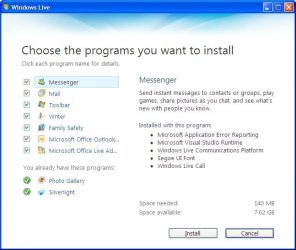
Actually, you can get the full installer for Wndows Live - IF you pay attention to what you're doing on the web:
  1. Go to Essentials - Windows Live
  2. Click on "Download"
  3. When the "Do you want to run or save this file?" message comes up, click "Cancel"
  4. Click "Try Again" ("Trying again downloads a standalone installer to your computer. This takes a little while, but may work better, depending on your connection settings.")
Also, when you start the installer (either from the web or from the standalone download), you do get the option of choosing which components of Live you want to install or not:

Windows_Live.JPG

Apologies for this screenshot being taken from Windows XP, but I'm at work now and don't have access to either Windows Vista or Windows 7 here yet...
 

My Computer

Computer type
PC/Desktop
Computer Manufacturer/Model Number
Virtual Machine
OS
Windows 7 Professional 32-bit SP1
CPU
AMD A4/A6
Motherboard
Intel Corporation 440BX Desktop Reference Platform
Memory
3.00GB EDO
Graphics Card(s)
VMware SVGA 3D
Sound Card
High Definition Audio Device
Monitor(s) Displays
Generic Non-PnP Monitor on VMware SVGA 3D
Screen Resolution
1440x900
Hard Drives
1 x 60GB VMware Virtual SATA Hard Drive ATA Device
Antivirus
Kaspersky Total Security
yeah i got it with without running admin working....

restart...
have no windows open and you have avast closed...
start it...
 

My Computer

Computer Manufacturer/Model Number
Tx2500z Tablet Pc/Homemade Server
OS
Windows 7 Ult x64(x2), HomePrem x32(x4), Server 08 (+VM), 08 R2 (VM) , SuSe 11.2 (VM), XP 32 (VM)
CPU
Turion X2 ultra (oh well came with laptop)/P4 @3.2 (yes P4)
Motherboard
IDK HP Motherboard / Intel DG965SS
Memory
OCZ Dual Channel 4GB kit/ 1gb Dual Channel
Graphics Card(s)
HD 3200 graphics /GMA x3100 (yay for intergrated!!)
Sound Card
Realtek HD Audio(mic working, well sort of)/Siig IC-70012
Monitor(s) Displays
built-in Hp 12" laptop screen/ Acer 19"
Screen Resolution
1280x800 /1440x900
Cooling
All Air Cooled
Mouse
Logi MX Rev. /MS Wheel Optical 1.1A /Logitech Optical Mouse
Internet Speed
College baby but its still routed through vpn to 1536k...
Other Info
love my wacom pen and pressure sensitivity...
wished it worked in 7, SUSE for that matter though
As I said, Live installed ok this morning when it was the first thing I did after login.

Avast was also on this 'round.
 

My Computer

Computer type
PC/Desktop
Computer Manufacturer/Model Number
Virtual Machine
OS
Windows 7 Professional 32-bit SP1
CPU
AMD A4/A6
Motherboard
Intel Corporation 440BX Desktop Reference Platform
Memory
3.00GB EDO
Graphics Card(s)
VMware SVGA 3D
Sound Card
High Definition Audio Device
Monitor(s) Displays
Generic Non-PnP Monitor on VMware SVGA 3D
Screen Resolution
1440x900
Hard Drives
1 x 60GB VMware Virtual SATA Hard Drive ATA Device
Antivirus
Kaspersky Total Security
Installed fine for me also, I'm just not a fan of Live Mail and although I can probably move Win Mail from Vista, I couldn't make it the default mail handler in earlier releases of 7 so am trying to get Live mail to do what I want. Good luck with that. :rolleyes: Sent feedback on this also.

Gary
 

My Computer

Computer Manufacturer/Model Number
Dell XPS420
OS
Vista Ult 64 bit Seven Ult RTM x64
CPU
Intel Core2 Quad Q6600 2.40 gigahertz
Memory
Crucial Ballistix 4x2GB PC2 6400
Graphics Card(s)
NVIDIA GeForce 8600 GTS 256 MB
Sound Card
Creative SB X-Fi audio
Monitor(s) Displays
HP w2207 + HPvs15
Screen Resolution
1680x1050 + 1024x768
Hard Drives
2-WD5000AAKS-500 GB
WD5000AAV-500 GB external
Keyboard
Microsoft Comfort Curve
Mouse
MX Revolution
Other Info
Wacom Intuos 2 Graphics Tablet
Experience Index=5.5
Installed fine for me also, I'm just not a fan of Live Mail and although I can probably move Win Mail from Vista, I couldn't make it the default mail handler in earlier releases of 7 so am trying to get Live mail to do what I want. Good luck with that. :rolleyes: Sent feedback on this also.

Gary

Actually, I prefer Outlook 2007 over "Windows Mail" or "Live Mail". I'm testing a recent add-on for Outlook, "Windows Live Connector", that allows me to download and send live.com and hotmail.com mail. Although it would appear that the "Windows Live Connector" option is available for installation only if the Live installer detect Office on your system...
 

My Computer

Computer type
PC/Desktop
Computer Manufacturer/Model Number
Virtual Machine
OS
Windows 7 Professional 32-bit SP1
CPU
AMD A4/A6
Motherboard
Intel Corporation 440BX Desktop Reference Platform
Memory
3.00GB EDO
Graphics Card(s)
VMware SVGA 3D
Sound Card
High Definition Audio Device
Monitor(s) Displays
Generic Non-PnP Monitor on VMware SVGA 3D
Screen Resolution
1440x900
Hard Drives
1 x 60GB VMware Virtual SATA Hard Drive ATA Device
Antivirus
Kaspersky Total Security
Yea, I prefer Outlook also, but haven't upgraded yet. The biggest problem I have with live mail is there is no way I've found to make it use the Windows contacts folder and when I import my contacts into live mail it doesn't import all the business contacts correctly as there is no first and last name for them. Just the full name of the biz. Also it did not import any contacts that didn't have an email address. I want all contacts in one place and not too keen on having to go through and fix or relist a large number of contacts.

I would also prefer to have email from all of my accounts go into one set of folders. I can tell which is which by the To column and then don't have to check several different folders.

Gary
 

My Computer

Computer Manufacturer/Model Number
Dell XPS420
OS
Vista Ult 64 bit Seven Ult RTM x64
CPU
Intel Core2 Quad Q6600 2.40 gigahertz
Memory
Crucial Ballistix 4x2GB PC2 6400
Graphics Card(s)
NVIDIA GeForce 8600 GTS 256 MB
Sound Card
Creative SB X-Fi audio
Monitor(s) Displays
HP w2207 + HPvs15
Screen Resolution
1680x1050 + 1024x768
Hard Drives
2-WD5000AAKS-500 GB
WD5000AAV-500 GB external
Keyboard
Microsoft Comfort Curve
Mouse
MX Revolution
Other Info
Wacom Intuos 2 Graphics Tablet
Experience Index=5.5
Actually, you can get the full installer for Wndows Live - IF you pay attention to what you're doing on the web:
  1. Go to Essentials - Windows Live
  2. Click on "Download"
  3. When the "Do you want to run or save this file?" message comes up, click "Cancel"
  4. Click "Try Again" ("Trying again downloads a standalone installer to your computer. This takes a little while, but may work better, depending on your connection settings.")
Also, when you start the installer (either from the web or from the standalone download), you do get the option of choosing which components of Live you want to install or not:


Apologies for this screenshot being taken from Windows XP, but I'm at work now and don't have access to either Windows Vista or Windows 7 here yet...
It installs alot more that is seen on that list :shock: I don't know if windows default uninstaller even shows all ,but if you look with Revouninstaller, you see many programs installed ,you had no idea they inside that package.
 

My Computer

Computer Manufacturer/Model Number
IBM
OS
Windows 7 x64
CPU
Intel Core 2 T8100 @ 2.10GHz
Memory
3 GB SO-DIMM DDR2-800
Graphics Card(s)
Nvidia GeForce Go 7300
Sound Card
SteelSeries Siberia 7.1 3D
Screen Resolution
1680x1050
Mouse
Logitech MX
It installs alot more that is seen on that list :shock: I don't know if windows default uninstaller even shows all ,but if you look with Revouninstaller, you see many programs installed ,you had no idea they inside that package.

If you pay attention during the install, you will see those "hidden" items being installed also. These items are, in fact, support files required for the proper functioning of the selected items that you chose to install. In essence, the hidden items are the "run-time" files common to all Live utilities.
 

My Computer

Computer type
PC/Desktop
Computer Manufacturer/Model Number
Virtual Machine
OS
Windows 7 Professional 32-bit SP1
CPU
AMD A4/A6
Motherboard
Intel Corporation 440BX Desktop Reference Platform
Memory
3.00GB EDO
Graphics Card(s)
VMware SVGA 3D
Sound Card
High Definition Audio Device
Monitor(s) Displays
Generic Non-PnP Monitor on VMware SVGA 3D
Screen Resolution
1440x900
Hard Drives
1 x 60GB VMware Virtual SATA Hard Drive ATA Device
Antivirus
Kaspersky Total Security
You probably opened it up twice somehow. (probably multiple clicks happens to me sometimes)
 

My Computer

OS
Windows 7 64bit/Windows Vista Ultimate 64bit
CPU
E4400
Memory
4 gigs
Graphics Card(s)
8800GT
Screen Resolution
1680x1050
Hard Drives
WD 500G WD 320G
Cooling
Zalman CNPS 9700LED
Keyboard
G15
Mouse
G5
I was gonna say the same thing as Gilbert - Peter, did you double verify that there was not already a setup.exe or some MSI file running in the background?
 

My Computers

System One System Two

  • Computer type
    PC/Desktop
    Computer Manufacturer/Model Number
    The Beast Model A (homebrew)
    OS
    Windows 11 21H2 Current build
    CPU
    AMD Ryzen 9 3950X
    Motherboard
    MSI MEG X570 GODLIKE
    Memory
    4 * 32 GB - Corsair Vengeance 3600 MHz
    Graphics Card(s)
    EVGA GeForce RTX 3080 Ti XC3 ULTRA GAMING (12G-P5-3955-KR)
    Sound Card
    Realtek® ALC1220 Codec
    Monitor(s) Displays
    2x Eve Spectrum ES07D03 4K Gaming Monitor (Matte) | Eve Spec
    Screen Resolution
    3x 3840 x 2160
    Hard Drives
    3x Samsung 980 Pro NVMe PCIe 4 M.2 2 TB SSD (MZ-V8P2T0B/AM) } 3x Sabrent Rocket NVMe 4.0 1 TB SSD
    PSU
    PC Power & Cooling’s Silencer Series 1050 Watt, 80 Plus Plat
    Case
    Fractal Design Define 7 XL Dark ATX Full Tower Case
    Cooling
    SteelSeries Apex Pro Wired Gaming Keyboard
    Keyboard
    SteelSeries Apex Pro
    Mouse
    Logitech MX Master 3S | MX Master 3 for business
    Internet Speed
    AT&T LightSpeed Gigabit Duplex Ftth
    Antivirus
    Windows Defender + MB 3
    Browser
    Nightly (default) + Firefox (stable),Chrome, Edge
  • Computer type
    PC/Desktop
    System Manufacturer/Model Number
    Dell Latitude E5470
    OS
    ChromeOS Flex Dev Channel (current)
    CPU
    Intel(R) Core(TM) i5-6300U CPU @ 2.40GHz, 2501 Mhz, 2 Core(s), 4 Logical Processor(s)
    Motherboard
    Dell
    Memory
    16 GB
    Graphics Card(s)
    Intel(R) HD Graphics 520
    Sound Card
    Intel(R) HD Graphics 520 + RealTek Audio
    Monitor(s) Displays
    Dell laptop display 15"
    Screen Resolution
    1920 * 1080
    Hard Drives
    Toshiba 128GB M.2 22300 drive
    INTEL Cherryville 520 Series SSDSC2CW180A 180 GB SATA III SSD
    PSU
    Dell
    Case
    Dell
    Cooling
    Dell
    Keyboard
    Dell
    Mouse
    Logitech MX Master 3S (shared w. Sys 1) | Dell TouchPad
    Internet Speed
    AT&T LightSpeed Gigabit Duplex Ftth
It's possible that something was happening in the background that I was not aware of at the time. As I said in an earlier post, the following morning when I first powered up, the install proceeded flawlessly.

Once I'm done with some critical backups from within Vista, I'm going to format my entire system and install only Windows 7 as my primary OS. That'll be the acid test, I suppose, to find out if the problem was originally PEBCAK, or if there was a genuine issue with the Live Essentials installer on Windows 7.

What I'll say so far from what I've seen is that if this kind of stability is what Microsoft considers a BETA, then I think Windows 7 RTM is going to be spectacular! This bodes extremely well for the future of Microsoft.
 

My Computer

Computer type
PC/Desktop
Computer Manufacturer/Model Number
Virtual Machine
OS
Windows 7 Professional 32-bit SP1
CPU
AMD A4/A6
Motherboard
Intel Corporation 440BX Desktop Reference Platform
Memory
3.00GB EDO
Graphics Card(s)
VMware SVGA 3D
Sound Card
High Definition Audio Device
Monitor(s) Displays
Generic Non-PnP Monitor on VMware SVGA 3D
Screen Resolution
1440x900
Hard Drives
1 x 60GB VMware Virtual SATA Hard Drive ATA Device
Antivirus
Kaspersky Total Security
I harbor similar hopes - but I know M$ better than that....

After all, they took Longhorn and made it ... Vista.

And, the really sad part is that I still prefer Vista over XP....
 

My Computers

System One System Two

  • Computer type
    PC/Desktop
    Computer Manufacturer/Model Number
    The Beast Model A (homebrew)
    OS
    Windows 11 21H2 Current build
    CPU
    AMD Ryzen 9 3950X
    Motherboard
    MSI MEG X570 GODLIKE
    Memory
    4 * 32 GB - Corsair Vengeance 3600 MHz
    Graphics Card(s)
    EVGA GeForce RTX 3080 Ti XC3 ULTRA GAMING (12G-P5-3955-KR)
    Sound Card
    Realtek® ALC1220 Codec
    Monitor(s) Displays
    2x Eve Spectrum ES07D03 4K Gaming Monitor (Matte) | Eve Spec
    Screen Resolution
    3x 3840 x 2160
    Hard Drives
    3x Samsung 980 Pro NVMe PCIe 4 M.2 2 TB SSD (MZ-V8P2T0B/AM) } 3x Sabrent Rocket NVMe 4.0 1 TB SSD
    PSU
    PC Power & Cooling’s Silencer Series 1050 Watt, 80 Plus Plat
    Case
    Fractal Design Define 7 XL Dark ATX Full Tower Case
    Cooling
    SteelSeries Apex Pro Wired Gaming Keyboard
    Keyboard
    SteelSeries Apex Pro
    Mouse
    Logitech MX Master 3S | MX Master 3 for business
    Internet Speed
    AT&T LightSpeed Gigabit Duplex Ftth
    Antivirus
    Windows Defender + MB 3
    Browser
    Nightly (default) + Firefox (stable),Chrome, Edge
  • Computer type
    PC/Desktop
    System Manufacturer/Model Number
    Dell Latitude E5470
    OS
    ChromeOS Flex Dev Channel (current)
    CPU
    Intel(R) Core(TM) i5-6300U CPU @ 2.40GHz, 2501 Mhz, 2 Core(s), 4 Logical Processor(s)
    Motherboard
    Dell
    Memory
    16 GB
    Graphics Card(s)
    Intel(R) HD Graphics 520
    Sound Card
    Intel(R) HD Graphics 520 + RealTek Audio
    Monitor(s) Displays
    Dell laptop display 15"
    Screen Resolution
    1920 * 1080
    Hard Drives
    Toshiba 128GB M.2 22300 drive
    INTEL Cherryville 520 Series SSDSC2CW180A 180 GB SATA III SSD
    PSU
    Dell
    Case
    Dell
    Cooling
    Dell
    Keyboard
    Dell
    Mouse
    Logitech MX Master 3S (shared w. Sys 1) | Dell TouchPad
    Internet Speed
    AT&T LightSpeed Gigabit Duplex Ftth
In my opinion Vista's only fault, OS wise was that new drivers and patches had to be made for vista for a wide array of devices and software. The reason why people are opening up to Windows 7 is because it uses Vista drivers for the most part and do not have to integrate themselves the way they did with Vista. Sure there are some very welcomed upgrades that come with Windows 7 but for the most part its Vista after a long hard look at itself in the mirror.
 

My Computer

OS
Windows 7 64bit/Windows Vista Ultimate 64bit
CPU
E4400
Memory
4 gigs
Graphics Card(s)
8800GT
Screen Resolution
1680x1050
Hard Drives
WD 500G WD 320G
Cooling
Zalman CNPS 9700LED
Keyboard
G15
Mouse
G5
Back
Top