Windows Live Mail 2009

hlouise

New member
Local time
12:44 AM
Messages
33
About a month ago when I receive an e-mail in Windows Live Mail 2009 the margins in the message have changed. The margins are too close to the edge. I have tried everything I can think of to get the margins back to where they should be. I read how to change the margins for printing if there is a problem, but nothing for reading a new e-mail.

In addition to this, if I print the e-mail some of the text is in color and I have never changed the print color.

How can I correct these 2 problems?
 

My Computer

Computer type
PC/Desktop
Computer Manufacturer/Model Number
Built by local computer store
OS
Windows 7 64 bit
Keyboard
Microft
Mouse
Dell
Antivirus
Micoft Essentials
Browser
IE 11
You could try repairing Live Essentials. Go to programs and features select Windows Live Essentials you will then be given an option to uninstall or repair.
 

My Computer

Computer Manufacturer/Model Number
Put together
OS
Win7 Pro-64 Bit
CPU
i7-2600-3.4GHz
Motherboard
ASRock Z68M
Memory
8 GIG DDR3
Graphics Card(s)
onboard
Sound Card
onboard
Hard Drives
Seagate 1TB 7200RPM
PSU
680 W
Case
black
Cooling
stock fans
Keyboard
Microsoft
Mouse
Microsoft optical
I went to Programs - Windows Security Essentials and Windows Live are listed, but when I click on either one just that program opens and there is no option to uninstall or repair. I do not want to uninstall because I think I would end up with more problems. I may have to just live with what I got, wish I knew what hapened to cause this problem. Been using Windows Live mail for a couple years and never had a problem until now. Prior to this I was using Outlook Express, but that was discontinued. Windows Live is very similar and want to keep it.
 

My Computer

Computer type
PC/Desktop
Computer Manufacturer/Model Number
Built by local computer store
OS
Windows 7 64 bit
Keyboard
Microft
Mouse
Dell
Antivirus
Micoft Essentials
Browser
IE 11
You should upgrade to the latest version WLM 2012, it will not cause you to lose anything.
 

My Computer

Computer Manufacturer/Model Number
Look in my Signature.
OS
Win7 H.Prem. 32bit+SP1
Roderunner, I checked out WLM 2012 and most people do not like it. WLM 2011 was not popular and apparently 2012 is not either. They use the "ribbon" feature and I have that with Excel and do not like it. All this new stuff gets more and more complicated and I am too old to change (a senior). Checking out the new versions I see where quite a few people liked Outlook Express best and why these programs have to keep changing I do not understand. New and improved is not always the best. Thank you for replying to my message.
 

My Computer

Computer type
PC/Desktop
Computer Manufacturer/Model Number
Built by local computer store
OS
Windows 7 64 bit
Keyboard
Microft
Mouse
Dell
Antivirus
Micoft Essentials
Browser
IE 11
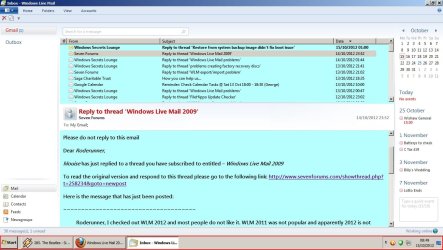
The possible reason most don't like WLM 2012 is that they don't know how to use it. This is how mine looks.

Untitled.jpg
 

My Computer

Computer Manufacturer/Model Number
Look in my Signature.
OS
Win7 H.Prem. 32bit+SP1
My version shows Inbox, sent, trash, deleted, etc. all on the left side of the screen so it is easy to click on them. Do you have to go to Home to see these? What is the website to install 2012 (just the e-mail)? If I do that and do not like it can I revert back to 2009? Do I need to uninstall 2009 first? If I did I would lose all my messages and contacts. That would not be good.

As you notice I need specific instructions to make the change if I decide to. You are replying to someone who is really nervous about making changes. Do not want to crash or make it worse. Thanks for your help.
 

My Computer

Computer type
PC/Desktop
Computer Manufacturer/Model Number
Built by local computer store
OS
Windows 7 64 bit
Keyboard
Microft
Mouse
Dell
Antivirus
Micoft Essentials
Browser
IE 11
My version shows Inbox, sent, trash, deleted, etc. all on the left side of the screen so it is easy to click on them. Do you have to go to Home to see these?
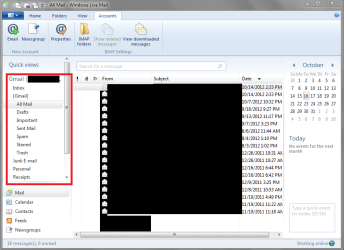
I can see all folders in the left side in WLM 2012 - see screen print below.
I don't use hotmail in WLM, I only have a Gmail account in WLM.

What is the website to install 2012 (just the e-mail)?
Download Windows Live Essentials including WLM 2012 at
Windows Essentials - Download Windows Live Essentials
When you run the downloaded install program you need to pay attention and choose what you want to install and/or update.

If I do that and do not like it can I revert back to 2009?
I'm not sure as I've never re-installed 2009 over 2012.
I ALWAYS create a System Backup Image before making changes like this if i have any doubt.
That way I can recover and restore if needed, no matter what the program does...

Do I need to uninstall 2009 first?
I don't think so, you should be able to install 2012 right over 2009.

If I did I would lose all my messages and contacts. That would not be good.
I agree with your concern, that's why a backup/restore strategy is needed!
I've never reverted back to an old version like you are asking about.
Best to wait for someone that has done this for an experienced answer.

You should be able to recover and restore all data and programs if you have a valid backup/restore strategy!

Here's a pic of WLM 2012 showing folders in the left margin with the ribbon displayed.

WLMSP06.PNG

Hope this helps,
David
 

My Computer

Computer type
PC/Desktop
Computer Manufacturer/Model Number
home built
OS
Multi-Boot W7_Pro_x64 W8.1_Pro_x64 W10_Pro_x64 +Linux_VMs +Chromium_VM
CPU
AMD Athlon II x4 620
Motherboard
Gigabyte GA-MA785G-UD3H
Memory
6GB GSkill DDR2 800
Graphics Card(s)
AMD 4670 GPU + AMD 4200 IGP
Sound Card
on board Realtek ALC889A
Monitor(s) Displays
RCA 40" LCD TV, Insignia 32" LCD TV, HP 15" LCD monitor
Screen Resolution
1680 x 1050
Hard Drives
OCZ Vertex 3 120GB,
Samsung F3 1TB (3),
Several others - WD, Seagate, Hitachi, ...
PSU
Corsair 500 W
Case
Rosewill mid tower
Cooling
CM 90mm rifle
Keyboard
Gyration wireless, Logitech wireless, Dell USB wired
Mouse
Gyration wireless, Logitech wireless, V7 USB wired
Internet Speed
Spectrum - 100Mbps D / 10Mbps U
Antivirus
Avast, MBAM3, EMET, WinPatrol
Browser
Pale Moon, Firefox, IE
Other Info
2 multi-boot PC's
Mainly HTPC/Office/Gen purpose (no gaming).
Trendnet USB KVM.
LG DVD burner/Blue Ray Player.
Tray system for removable SATA backup drives.

Not currently OCd, under-volted.
I use Hybrid sleep, rarely re-boot or shutdown.

Hauppauge HD-PVR, Avermedia PCIe TV Tuner, Hauppauge PCI TV Tuner.
My version shows Inbox, sent, trash, deleted, etc. all on the left side of the screen so it is easy to click on them. Do you have to go to Home to see these? What is the website to install 2012 (just the e-mail)? If I do that and do not like it can I revert back to 2009? Do I need to uninstall 2009 first? If I did I would lose all my messages and contacts. That would not be good.

As you notice I need specific instructions to make the change if I decide to. You are replying to someone who is really nervous about making changes. Do not want to crash or make it worse. Thanks for your help.
In my image, clicking the dropbox next to Gmail shows/hides the folders.
Upgrading to WLM 2012 will not change your current settings and you will not lose any messages.
Once 2012 is installed, their are a few minor changes you can make to make it look nice.
When installing WLM 2012
only install what you want, currently installed programs will be updated.
 

My Computer

Computer Manufacturer/Model Number
Look in my Signature.
OS
Win7 H.Prem. 32bit+SP1
David, I did as you recommended, first I did a restore date, then I updated Windows to 2012. I just updated the mail portion, but whenI clicked on the envelope icon I had to go thru a couple windows before getting to e-mail. My old messages were there and it looked OK, but the margins are just the same, the left margin is too close to the edge and it is hard to read. No other program has this problem, just Windows Live Mail. I cannot imagine what is wrong, I cannot change the margins. I did use the restore and went back to 2009 so that I don't have to go thru several windows before getting the e-mail.

I really appreciate you trying to help me. I used "Smart Computing" questions and answers for years getting answers to computer problems, but the magazine has discontinued this service and many people are unhappy about that. It is hard to get help because everything is changing so fast. Happy to have this forum to ask questions.
 

My Computer

Computer type
PC/Desktop
Computer Manufacturer/Model Number
Built by local computer store
OS
Windows 7 64 bit
Keyboard
Microft
Mouse
Dell
Antivirus
Micoft Essentials
Browser
IE 11
Hi hlouise and sorry you can't this working :(

I did find this, so maybe something changed in newer versions.
Comparison with Windows Mail

While Windows Live Mail is the successor to Windows Mail on Windows Vista, there were several differences in functionality between Windows Live Mail and Windows Mail when it was released in 2007. These include:

Ability to view and edit HTML email by source has been removed in Windows Live Mail
Ability to set margins has been removed
Source: Windows Live Mail - Wikipedia, the free encyclopedia

My primary Email client is Outlook 2010, and WLM is a secondary for me.
I don't have a WLM 2009 setup, so i can't test it to see what it looks like.
I only have WLM 2011 and 2012...

There are other free Email clients such as Mozilla Thunderbird
But that would be a learning curve to use...Something you can check out if your interested.

but whenI clicked on the envelope icon I had to go thru a couple windows before getting to e-mail
I don't understand your problem, as i can double-click an email to open it without going through other windows ...

Can you show a screen print of an email that is ok with margins, and one that is not ok?

I'm quite senior too :( ... but "an old geek" :) :geek:
 

My Computer

Computer type
PC/Desktop
Computer Manufacturer/Model Number
home built
OS
Multi-Boot W7_Pro_x64 W8.1_Pro_x64 W10_Pro_x64 +Linux_VMs +Chromium_VM
CPU
AMD Athlon II x4 620
Motherboard
Gigabyte GA-MA785G-UD3H
Memory
6GB GSkill DDR2 800
Graphics Card(s)
AMD 4670 GPU + AMD 4200 IGP
Sound Card
on board Realtek ALC889A
Monitor(s) Displays
RCA 40" LCD TV, Insignia 32" LCD TV, HP 15" LCD monitor
Screen Resolution
1680 x 1050
Hard Drives
OCZ Vertex 3 120GB,
Samsung F3 1TB (3),
Several others - WD, Seagate, Hitachi, ...
PSU
Corsair 500 W
Case
Rosewill mid tower
Cooling
CM 90mm rifle
Keyboard
Gyration wireless, Logitech wireless, Dell USB wired
Mouse
Gyration wireless, Logitech wireless, V7 USB wired
Internet Speed
Spectrum - 100Mbps D / 10Mbps U
Antivirus
Avast, MBAM3, EMET, WinPatrol
Browser
Pale Moon, Firefox, IE
Other Info
2 multi-boot PC's
Mainly HTPC/Office/Gen purpose (no gaming).
Trendnet USB KVM.
LG DVD burner/Blue Ray Player.
Tray system for removable SATA backup drives.

Not currently OCd, under-volted.
I use Hybrid sleep, rarely re-boot or shutdown.

Hauppauge HD-PVR, Avermedia PCIe TV Tuner, Hauppauge PCI TV Tuner.
I didn't make myself clear when I said I clicked on the e-mail icon. What I meant was when I clicked the envelope icon on the MENU BAR I had to go thru a couple windows before getting to the e-mail program. I was then able to open the messages with no problem. For the past year the margins on WLM 2009 were just fine, all of a sudden they changed for no reason.

I read the instructions for showing a screen print, it would take me a week to figure that out (also a senior). I can only try to explain it. When I compose a new e-mail or receive an e-mail the message takes up the entire screen and the left margin leaves out the first letter of each sentence. What is odd is that if I print the e-mail I get 3/4" margins on the left and right which is perfect.

I do have a secondary e-mail program, but have always liked WLM better. I guess I will learn to live with it or give it up. Thanks for all your help.
 

My Computer

Computer type
PC/Desktop
Computer Manufacturer/Model Number
Built by local computer store
OS
Windows 7 64 bit
Keyboard
Microft
Mouse
Dell
Antivirus
Micoft Essentials
Browser
IE 11
I didn't make myself clear when I said I clicked on the e-mail icon. What I meant was when I clicked the envelope icon on the MENU BAR...
I suspect you mean the WLM program icon on the task bar which looks like a blue envelope with a red stamp or perhaps the new mail icon over in the notification area. Either way WLM opens. If it doesn't seem to be working right try the "repair" suggested in an earlier post. Go to Control Panel >> Programs and Features (where all your personally installed programs are listed). There should be an item called "Windows Live Essentials". Highlight it, click uninstall/change at the top, and choose "repair" in the window that pops up. WLM in P&F is the middle item in my list:
 

Attachments

  • WLE in P&F.JPG
    WLE in P&F.JPG
    15.8 KB · Views: 6

My Computer

Computer type
PC/Desktop
Computer Manufacturer/Model Number
OQO 2+
OS
Windows 8 Pro w/MC 32-bit
CPU
Intel Atom 1.86 GHz
Motherboard
OQO 2+
Memory
2 GB
Graphics Card(s)
Intel GMA 500
Sound Card
IDT
Monitor(s) Displays
LCD
Screen Resolution
800 x 480 (portable) 1280 x 1024 (docked)
Hard Drives
64 GB SSD
PSU
9 Ah Battery (portable) or OQO Brick (docked)
Case
Shirt Pocket Sized
Cooling
Tiny Fan
Keyboard
Slide out (portable) DiNovo Edge (docked)
Mouse
Eraser head (portable) Logitech Bluetooth (docked)
Internet Speed
WWAN or 802.11G (portable) T1 (docked)
Browser
IE 10
Other Info
DVD-RW OQO Docking Station
Roncerr, thank you for the tip. I already did a restore and have WLM 2009 back. I enlarged the font size and it is easier to read so for the time being I will keep it. I will also keep your instructions so if I upgrade to 2012 and run into a problem I will have another option.

Like I mentioned previously, I appreciate all the help I have received and will probably run into another problem in the future and will be posting again!
 

My Computer

Computer type
PC/Desktop
Computer Manufacturer/Model Number
Built by local computer store
OS
Windows 7 64 bit
Keyboard
Microft
Mouse
Dell
Antivirus
Micoft Essentials
Browser
IE 11
...I will also keep your instructions so if I upgrade to 2012 and run into a problem I will have another option...
Do the repair anyway; it's easy, fast, and won't hurt anything. After doing it, you'll remember how to and won't need to keep the instructions. I believe the only reason you may want to "upgrade" is if you want to use one of the other programs in the WLE suite. (I believe they don't allow mixing programs from one version of WLE with another. Also the Messenger program in WLE 2009 is no longer supported.) As long as you and I are only using WLM from the WLE suite, we are all set for now.
 

My Computer

Computer type
PC/Desktop
Computer Manufacturer/Model Number
OQO 2+
OS
Windows 8 Pro w/MC 32-bit
CPU
Intel Atom 1.86 GHz
Motherboard
OQO 2+
Memory
2 GB
Graphics Card(s)
Intel GMA 500
Sound Card
IDT
Monitor(s) Displays
LCD
Screen Resolution
800 x 480 (portable) 1280 x 1024 (docked)
Hard Drives
64 GB SSD
PSU
9 Ah Battery (portable) or OQO Brick (docked)
Case
Shirt Pocket Sized
Cooling
Tiny Fan
Keyboard
Slide out (portable) DiNovo Edge (docked)
Mouse
Eraser head (portable) Logitech Bluetooth (docked)
Internet Speed
WWAN or 802.11G (portable) T1 (docked)
Browser
IE 10
Other Info
DVD-RW OQO Docking Station
When I returned to WLM 2009 the envelope icon worked so there shouldn't be anthing to repair? I don't use Messenger so not concerned with that. I do use MS Security Essentials if that makes any difference. Both mail and security are working so I am happy.
 

My Computer

Computer type
PC/Desktop
Computer Manufacturer/Model Number
Built by local computer store
OS
Windows 7 64 bit
Keyboard
Microft
Mouse
Dell
Antivirus
Micoft Essentials
Browser
IE 11
Back
Top