Windows Live Mail 2011 Message List Font Change??

Sager8130

New member
Local time
10:35 AM
Messages
3
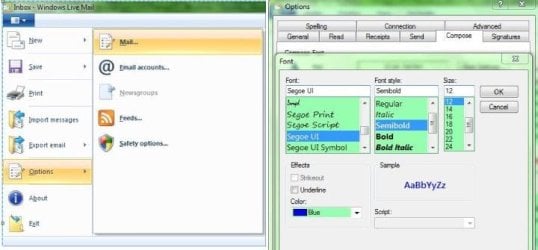
Does anyone know how to change the font of the message list in Windows Live Mail 2011? When I set the message list view to one-line view the subject of unread messages in the message list is bold Calibri and I can't stand it. When I read the email the font changes and is fine. When I change to two-line view the font is fine.

On my other laptop with Windows Live Mail 2011 the font is not Calibri and it's fine. The only difference between the 2 laptops is that I installed IE9 on this one before I installed Windows Live Essentials 2011. I have since uninstalled IE9 because I didn't like it. I'm not sure if that had anything to do with the difference of the one-line message view font.

I've searched high and low for a way to change the message view font in one-line view from Calibri.

Can anyone help me?
 

My Computer My Computer

At a glance

Windows 7 Home Premium x64
OS
Windows 7 Home Premium x64
See my image for how-to.

RR.JPG
 

My Computer My Computer

At a glance

Win7 H.Prem. 32bit+SP1
Computer Manufacturer/Model Number
Look in my Signature.
OS
Win7 H.Prem. 32bit+SP1
Problem fixed...I ended up having to format my primary drive and reinstalling everything Windows 7, Windows Live Essentials 2011, etc, etc. I didn't install IE9 this time and the font of the message list in the inbox is fine now. Looks like IE9 is what changed it.
 

My Computer My Computer

At a glance

Windows 7 Home Premium x64
OS
Windows 7 Home Premium x64
You didn't actually solve any problems. To solve a problem, you have to first identify it, isolate the cause of the problem and identify a specific action to fix it. What causes the email list font to change? Where is the option to change it to your preference? How do you change it?

Re-installing Windows is overkill. It doesn't identify the specific cause(s) of your problem(s), the "fix" you experience is only a side-effect, and your boss probably won't approve you reformatting your machine at work every time you don't like an interface appearance or behavior.

Your solution is like solving a jerky transmission problem by buying a new car.
 

My Computer My Computer

At a glance

Windows 7Intel Pentium4 GB
Computer Manufacturer/Model Number
Acer
OS
Windows 7
CPU
Intel Pentium
Memory
4 GB
Hard Drives
320 GB
i have the same problem. so what should i do except format it? anyone can help?
 

My Computer My Computer

At a glance

windows 7 home 32bit
OS
windows 7 home 32bit
The first and easiest thing to try when Windows Live Mail appears "messed up" in some way is to do a repair of Windows Live Essentials via Programs and Features: Highlight WLE in the list, then choose uninstall/change at the top. In the next window choose "repair". All installed components of the Essentials package will be repaired, including Mail.
 

My Computer My Computer

At a glance

Windows 8 Pro w/MC 32-bitIntel Atom 1.86 GHz2 GBIntel GMA 500
Computer type
PC/Desktop
Computer Manufacturer/Model Number
OQO 2+
OS
Windows 8 Pro w/MC 32-bit
CPU
Intel Atom 1.86 GHz
Motherboard
OQO 2+
Memory
2 GB
Graphics Card(s)
Intel GMA 500
Sound Card
IDT
Monitor(s) Displays
LCD
Screen Resolution
800 x 480 (portable) 1280 x 1024 (docked)
Hard Drives
64 GB SSD
PSU
9 Ah Battery (portable) or OQO Brick (docked)
Case
Shirt Pocket Sized
Cooling
Tiny Fan
Keyboard
Slide out (portable) DiNovo Edge (docked)
Mouse
Eraser head (portable) Logitech Bluetooth (docked)
Internet Speed
WWAN or 802.11G (portable) T1 (docked)
Browser
IE 10
Other Info
DVD-RW OQO Docking Station
Back
Top