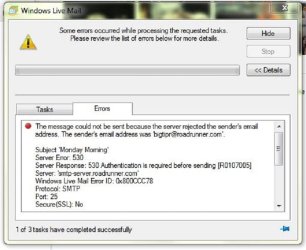
Wlm was working perfectly--past week won't send or receive emails. Server settings for ISP TWC Roadrunner match my upstairs desktop with Outlook Express 6---it works fine. Called Microsoft to find it is a known problem a lot of people are having & the Fee to fix their glitch would be $99. I refused & was told a reinstall of Windows essentials would not solve it. Is there such a thing as a "clean install" of the program ?
Any thoughts on this appreciated.
Roger
Welcome to Seven Forums Roger. This is a send problem? Or send and receive? Give us as much info as possible, you try to do x, and receive so and so error, etc.
Try this, and see if it works. Boot to Safe Mode with Networking, and try there.
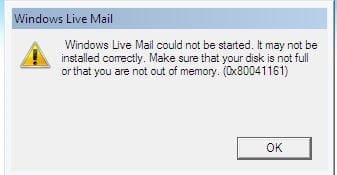
Here is the Message i get after opening WLM2012---will try your suggestions A Guy---thanks for the help. OK--so i booted up in Safe Mode w/Networking & WLM 2012 wouldn't start & i got this message.
Have tried disabling the Mcaffee firewall & have set it to not monitor WLM at all---reopened Mail & still have the problem.
Used the "uninstall program" from control panel & removed entire package of Windows Live Essentials---even looked at Crogram files/windows live & in common files----32 bit Windows 7----those 2 files were gone in uninstall. Downloaded Windows Essentials 2012 & installed---WLM still won't work. Was the way i uninstalled the program the best way to completely clean old files out ?
Just a little more info---this is a dual boot laptop w/2 separate internal hard drives. The Vista drive has WLM2011 & works perfectly,while the other drive has Windows 7 home premium 32 bit & Wlm 2012---all server settings in both WLM programs are identical---ports are 25 & 110.Boxes are checked for "my server requires authentication".
Tried Boot in Safe Mode---- drive is not even 1/2 full.
Tried restore point 30 days ago---still no good.
Update--- just switch over to check my Email on the Vista drive --WLM 2011---now will only receive mail. Won't send text or pics.
How can that happen to 2 separate drives & 2 different programs ? HELP !
All windows updates are current on both drives & i use Mcaffee on both as well & updates are current on it as well.
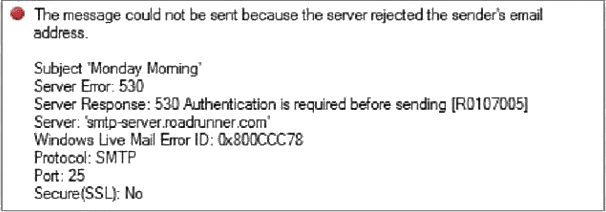
Is it still Roadrunner, or has it changed? Can you sign in to the Roadrunner webmail directly using the same email address and password you use through WLM? The server seems to bejecting your email address, but doesn't really say why.
A-Guy, Thanks again---went to Roadrunner Mail & logged in perfectly,received emails---so my problem is not with the ISP service provider ?
Also tried changing port #s to 587 & 995 on my account properties---still no luck.
Windows Live Mail is starting to frustrate me just a tad !
Some IPS do not like windows live mail and block them. I know some ISP email that force you to use their website to get your email. Why? So they can serve you ads.
Inbound & Outbound Password: Email Password (same as Web Mail)
SMTP Server Requires Authentication: Checked
The FAQ doesn't state whether the ports should be SSL enabled.
I would NOT enable SSL for port 110 (incoming POP3)
I would first try the outbound STMP port 587 WITH SSL enabled
Thanks for the help all. Email works fine on Mail.TWC.com---password & all with ports set at 25 & 110. Today i will try another uninstall & reinstall with the link that was provided. It just bugs me that it all worked so well on both drives until about 2-3 weeks ago.
I also noticed that on TWC Mail i wanted to import my contacts but the drop down menu has everything but WLM---it's almost like you said---they don't like WLM at all.
I welcome any & all help/ideas. Thanks again.
Roger
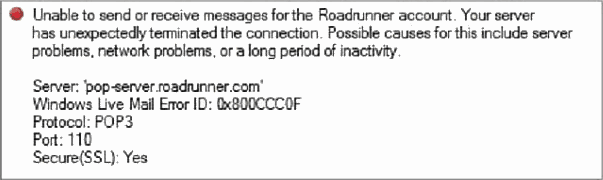
Both errors you received were Server errors. Your mail servers then were:
pop-server.roadrunner.com
-- and --
smtp-server.roadrunner.com
It's possible that TWC is making changes or some network configuration forgot about smtp-server.roadrunner.com (it does happen)
About your Contacts:
You might have to export your contacts to a format TWC accepts, then import the files(s) to TWC.
A common format is Comma Separated Values (.CSV) -- pay attention when you export the contacts ... you have to manually select the fields you want exported - I usually just check every field.
Thanks Bill,
I actually just finished exporting my contacts in csv. file type for TWC Mail. At least i can do mail from this laptop again. Both Windows Live Mail 2011/2012 still don't work but i may yet still mess with it maybe on the Microsoft support website. They know what the fix is but they want $99. to remotely access my laptop.
Thanks to all who tried to help me fix this.



 rogram files/windows live & in common files----32 bit Windows 7----those 2 files were gone in uninstall. Downloaded Windows Essentials 2012 & installed---WLM still won't work. Was the way i uninstalled the program the best way to completely clean old files out ?