Windows Live Mail is not responding

jeffs55

New member
Local time
12:10 PM
Messages
14
I open WLM and see various emails. It might be two or 22 the number does not matter. I do get some junk mail that I do not even open, or I might. I go down the list and delete as I go. After deleting some, be it one or 21 at some point the program freezes and across the top of the page appears the following notation, "Inbox-Windows Live Mail (not responding). This is clearly indicated by the fact that the cursor is not getting anything to work such as the delete button. The screen grays out but does not disappear and then after some seconds it begins to work again.
I am running Windows 7 Home Premium with IE 11 version 11.0.9600.16518
update version 11.0.3
KB 290992
prod ID 00150-20000-00003-AA459
I performed the last update yesterday without it being cured.
I have already tried to locate the file, "wlarp" and it cannot be found using the search bar. I have gone to programs and clicked Windows Live Essentials and clicked "uninstall/change" and it does not do anything. I mean nothing happens when it is clicked. And then there is this when the WLM automatically tries to retrieve mail from the server, see below.
 

Attachments

  • error notice.JPG
    error notice.JPG
    27.2 KB · Views: 26
Last edited:

My Computer

Computer type
PC/Desktop
Computer Manufacturer/Model Number
Dell
OS
Windows 7 Home Premium 64 bit
Antivirus
AVG
Browser
IE 11
Thanks Jeff,

After reading post# 1, I began to think that it might not be WLM at all. There have been some machines that behave badly with IE 11 installed.

Please test this theory by uninstalling IE 11, replace it with IE 10.
http://www.sevenforums.com/tutorials/313358-internet-explorer-11-uninstall-windows-7-a.html

Make sure Windows Update is up-to-date by a manual check for updates (except IE 11 - you might want to hide that update for the time being)

Bill
.
 

My Computer

Computer type
Laptop
Computer Manufacturer/Model Number
HP Pavilion dv6-6c10us
OS
x64 (6.3.9600) Win8.1 Pro & soon dual boot x64 (6.1.7601) Win7_SP1 HomePrem
CPU
AMD A6-3420M APU with Radeon(tm) HD Graphics
Motherboard
Hewlett-Packard 1805
Memory
6.00 GB
Graphics Card(s)
AMD Radeon(TM) HD 6520G
Sound Card
(1) AMD High Definition Audio Device (2) IDT High Definiti
Monitor(s) Displays
HP W2072a 20" LCD (1600 x 900) @ 60 Hz
Screen Resolution
1366 x 768 x 32 bits (4294967296 colors) @ 60 Hz
Hard Drives
ST640LM0 00 HM641JI SATA Disk Device
Keyboard
Logitech k520 wireless KB
Mouse
Logitech m320 wireless mouse (bundled with KB)
Internet Speed
15/5 | 54 MB Wireless 'n'
Antivirus
Realtime: Defender or Avast | On-demand: Malwarebytes, ESET
Browser
IE 11 on Win8, IE 10 on win 7
Other Info
Media: [Gimp, Audacity, VLC] || Comm: [WEmail 2012, Skype] || Productivity: [OpenOffice,| Textpad] || Utils: [Sysinternals, cCleaner, Speccy, Defraggler]
wlm just recently has been updated on my win 7 pro and this was done automatically...all is good. I would uninstall this and then reinstall...all the settings get saved (lucky).... shouldn't matter if its spam or junk
 

My Computer

Computer type
Laptop
Computer Manufacturer/Model Number
dell d610
OS
win 7 pro 32 bit
CPU
2.13
Motherboard
915 chipset
Memory
3 GB
Graphics Card(s)
ati 300
Hard Drives
Wester Digital 80 gb 5400rpm
Mouse
touch
Antivirus
avast free
Browser
chrome
Other Info
index performance 3.4...not too bad for 10 yr old system
I figure that means that I should download IE 10 and save it. UNinstall IE 11 and then open the IE 10 folder and install. Is that correct? I checked to see if there were any Windows updates and there are none except some optional such as Bing and I do not want that.
Jimroad471, you cannot uninstall WLM unless you uninstall Windows Live Essentials on my computer as I have tried. I cannot even uninstall WLE, when I click uninstall/change nothing happens.
So, Slartybart, am I correct in the above statement? What will happen to all my bookmarks if I uninstall IE 11? If these are removed, then this is not a good plan for me. thanx
 

My Computer

Computer type
PC/Desktop
Computer Manufacturer/Model Number
Dell
OS
Windows 7 Home Premium 64 bit
Antivirus
AVG
Browser
IE 11
I'm fairly certain that when you uninstall IE 11, it will revert to IE 10. If it rolls back to IE 9, that's ok - Windows Update (WU) will offer IE 10 again. You want to hide the WU IE 11 offer so it isn't installed - at least for testing purposes.

Favorites will be untouched, you can copy the entire Favorites folder under your user name to a safe place if you want a backup.

Yeah, I just hide all Bing and Silverlight WU offers, there are multiple offers so keep hiding them as they appear.
Here is what is hidden for those offers on my system.
  • Microsoft Silverlight (KB2512827)
  • Microsoft Silverlight (KB2526954)
  • Microsoft Silverlight (KB2617986)
  • Microsoft Silverlight (KB2636927)
  • Microsoft Silverlight (KB2668562)
    .
  • Bing Bar 7.3 (KB2673774)
    .
  • Bing Desktop v1.3.1
An interesting observation - there used to be more Bings (I forget if they were bars or DT). Hmmm, I wonder if one got past me or if MS changed how it offers Bing.
 

My Computer

Computer type
Laptop
Computer Manufacturer/Model Number
HP Pavilion dv6-6c10us
OS
x64 (6.3.9600) Win8.1 Pro & soon dual boot x64 (6.1.7601) Win7_SP1 HomePrem
CPU
AMD A6-3420M APU with Radeon(tm) HD Graphics
Motherboard
Hewlett-Packard 1805
Memory
6.00 GB
Graphics Card(s)
AMD Radeon(TM) HD 6520G
Sound Card
(1) AMD High Definition Audio Device (2) IDT High Definiti
Monitor(s) Displays
HP W2072a 20" LCD (1600 x 900) @ 60 Hz
Screen Resolution
1366 x 768 x 32 bits (4294967296 colors) @ 60 Hz
Hard Drives
ST640LM0 00 HM641JI SATA Disk Device
Keyboard
Logitech k520 wireless KB
Mouse
Logitech m320 wireless mouse (bundled with KB)
Internet Speed
15/5 | 54 MB Wireless 'n'
Antivirus
Realtime: Defender or Avast | On-demand: Malwarebytes, ESET
Browser
IE 11 on Win8, IE 10 on win 7
Other Info
Media: [Gimp, Audacity, VLC] || Comm: [WEmail 2012, Skype] || Productivity: [OpenOffice,| Textpad] || Utils: [Sysinternals, cCleaner, Speccy, Defraggler]
jeff use lotta caution when removing ie11... I did that before and had some issues with missing files. I cant see why you would have trouble removing Live essential. Maybe going to the MS site download live essentials and install and see. something is amiss. I will go to the MS fix it page and see if I can give you an idea what to do

good luck
Jim
 

My Computer

Computer type
Laptop
Computer Manufacturer/Model Number
dell d610
OS
win 7 pro 32 bit
CPU
2.13
Motherboard
915 chipset
Memory
3 GB
Graphics Card(s)
ati 300
Hard Drives
Wester Digital 80 gb 5400rpm
Mouse
touch
Antivirus
avast free
Browser
chrome
Other Info
index performance 3.4...not too bad for 10 yr old system
Use Option One in the tutorial in post# 2.

Sorry, I always forget to check tutorials for multiple options.
 

My Computer

Computer type
Laptop
Computer Manufacturer/Model Number
HP Pavilion dv6-6c10us
OS
x64 (6.3.9600) Win8.1 Pro & soon dual boot x64 (6.1.7601) Win7_SP1 HomePrem
CPU
AMD A6-3420M APU with Radeon(tm) HD Graphics
Motherboard
Hewlett-Packard 1805
Memory
6.00 GB
Graphics Card(s)
AMD Radeon(TM) HD 6520G
Sound Card
(1) AMD High Definition Audio Device (2) IDT High Definiti
Monitor(s) Displays
HP W2072a 20" LCD (1600 x 900) @ 60 Hz
Screen Resolution
1366 x 768 x 32 bits (4294967296 colors) @ 60 Hz
Hard Drives
ST640LM0 00 HM641JI SATA Disk Device
Keyboard
Logitech k520 wireless KB
Mouse
Logitech m320 wireless mouse (bundled with KB)
Internet Speed
15/5 | 54 MB Wireless 'n'
Antivirus
Realtime: Defender or Avast | On-demand: Malwarebytes, ESET
Browser
IE 11 on Win8, IE 10 on win 7
Other Info
Media: [Gimp, Audacity, VLC] || Comm: [WEmail 2012, Skype] || Productivity: [OpenOffice,| Textpad] || Utils: [Sysinternals, cCleaner, Speccy, Defraggler]
OK, I am slow. If I have deleted IE 11, how do I obtain IE 10 or IE 9 unless it has been downloaded previously or it reverts to it automatically. I mean, if ANY IE is uninstalled, how do you access the internet unless you use Firefox or another search engine? I am really afraid to do this. In an aside, I have the "instant email notification" box shown for thread subscription yet I was not notified of your replies. I had to access the site to see if anyone had replied.
 

My Computer

Computer type
PC/Desktop
Computer Manufacturer/Model Number
Dell
OS
Windows 7 Home Premium 64 bit
Antivirus
AVG
Browser
IE 11
Read the tutorial I posted in #2 - Windows update will roll back to the previous IE

Forget about eMail notification for now. Focus on the issue and try to figure out that later.

I'll post again when I see that IE 11 has been rolled back, then we can try other things to fix WEMail (MS changed the Live (WLM) reference to Essentials (WEM) reference)

Bill
.
 

My Computer

Computer type
Laptop
Computer Manufacturer/Model Number
HP Pavilion dv6-6c10us
OS
x64 (6.3.9600) Win8.1 Pro & soon dual boot x64 (6.1.7601) Win7_SP1 HomePrem
CPU
AMD A6-3420M APU with Radeon(tm) HD Graphics
Motherboard
Hewlett-Packard 1805
Memory
6.00 GB
Graphics Card(s)
AMD Radeon(TM) HD 6520G
Sound Card
(1) AMD High Definition Audio Device (2) IDT High Definiti
Monitor(s) Displays
HP W2072a 20" LCD (1600 x 900) @ 60 Hz
Screen Resolution
1366 x 768 x 32 bits (4294967296 colors) @ 60 Hz
Hard Drives
ST640LM0 00 HM641JI SATA Disk Device
Keyboard
Logitech k520 wireless KB
Mouse
Logitech m320 wireless mouse (bundled with KB)
Internet Speed
15/5 | 54 MB Wireless 'n'
Antivirus
Realtime: Defender or Avast | On-demand: Malwarebytes, ESET
Browser
IE 11 on Win8, IE 10 on win 7
Other Info
Media: [Gimp, Audacity, VLC] || Comm: [WEmail 2012, Skype] || Productivity: [OpenOffice,| Textpad] || Utils: [Sysinternals, cCleaner, Speccy, Defraggler]
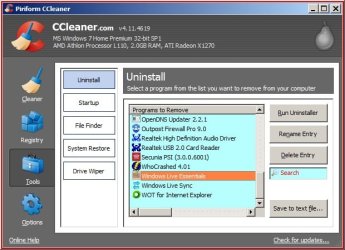
Hi Jeff, use Revo Uninstaller portable to remove all Windows Essentials or Ccleaner.

RR.jpg
 

My Computer

Computer Manufacturer/Model Number
Look in my Signature.
OS
Win7 H.Prem. 32bit+SP1
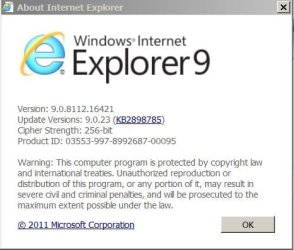
Slarty, I have uninstalled IE 11 and the computer reverted back to IE 9 with no apparent ill effects. Please see the attachment to know where I am.
 

Attachments

  • IE 9 symbols.JPG
    IE 9 symbols.JPG
    34.2 KB · Views: 8

My Computer

Computer type
PC/Desktop
Computer Manufacturer/Model Number
Dell
OS
Windows 7 Home Premium 64 bit
Antivirus
AVG
Browser
IE 11
Thanks, you can stay on IE 9 for testing purposes or update to IE 10 (I recommend going to 10)

Launch Windows Update (WU) and hide IE 11 (right click, hide)

IE 10 is stable now, it does have a Platform update pre-requisite which might already have been installed.
Manually check for updates and apply any that are offered (except IE 11 ;) which should not be offered if you successfully hid the update.)

Test Mail to see if this alone solves the issue.

If not...

Please follow the instructions in OPTION TWO of http://www.sevenforums.com/tutorials/1538-sfc-scannow-command-system-file-checker.html
Attach the entire CBS.log to a post.

Thanks.
 
Last edited:

My Computer

Computer type
Laptop
Computer Manufacturer/Model Number
HP Pavilion dv6-6c10us
OS
x64 (6.3.9600) Win8.1 Pro & soon dual boot x64 (6.1.7601) Win7_SP1 HomePrem
CPU
AMD A6-3420M APU with Radeon(tm) HD Graphics
Motherboard
Hewlett-Packard 1805
Memory
6.00 GB
Graphics Card(s)
AMD Radeon(TM) HD 6520G
Sound Card
(1) AMD High Definition Audio Device (2) IDT High Definiti
Monitor(s) Displays
HP W2072a 20" LCD (1600 x 900) @ 60 Hz
Screen Resolution
1366 x 768 x 32 bits (4294967296 colors) @ 60 Hz
Hard Drives
ST640LM0 00 HM641JI SATA Disk Device
Keyboard
Logitech k520 wireless KB
Mouse
Logitech m320 wireless mouse (bundled with KB)
Internet Speed
15/5 | 54 MB Wireless 'n'
Antivirus
Realtime: Defender or Avast | On-demand: Malwarebytes, ESET
Browser
IE 11 on Win8, IE 10 on win 7
Other Info
Media: [Gimp, Audacity, VLC] || Comm: [WEmail 2012, Skype] || Productivity: [OpenOffice,| Textpad] || Utils: [Sysinternals, cCleaner, Speccy, Defraggler]
In light of Vivies post should I revert back to IE 11 and apply his fix or remain at IE 10 and hope for the best? Also, should I never update to IE 11 and therefore assume that there is not going to be a fix for this issue; or am I the only one in the world experiencing it? Thanx to all that have helped me and I will post follow up to let all know if this is cured. All is good at this point but not enough time has passed to confirm the fix.

Jeff, I was trying to return this thread to the thread starter, vivie.

Stay on IE 10 for the time being. At some point after all is well, I'll recommend that you unhide IE 11 and let Windows update offer it again. I'll post that on your thread, not this one.

I'm going to move my 'refocus Vivie's thread post' to the last post, please keep your focus on your thread.

Thanks,

Bill
.

See, this should have been posted here so members knew the current status. No one is going to search other threads to find out that you did install IE 10 and that things are running well.

That's why I asked you to open a new thread in the first place. so that all information is in one thread and the information applies to the issue on your machine.

Thanks for understanding how difficult trouble shooting can be without good feedback from you, the thread starter.

Bill
.
 

My Computer

Computer type
Laptop
Computer Manufacturer/Model Number
HP Pavilion dv6-6c10us
OS
x64 (6.3.9600) Win8.1 Pro & soon dual boot x64 (6.1.7601) Win7_SP1 HomePrem
CPU
AMD A6-3420M APU with Radeon(tm) HD Graphics
Motherboard
Hewlett-Packard 1805
Memory
6.00 GB
Graphics Card(s)
AMD Radeon(TM) HD 6520G
Sound Card
(1) AMD High Definition Audio Device (2) IDT High Definiti
Monitor(s) Displays
HP W2072a 20" LCD (1600 x 900) @ 60 Hz
Screen Resolution
1366 x 768 x 32 bits (4294967296 colors) @ 60 Hz
Hard Drives
ST640LM0 00 HM641JI SATA Disk Device
Keyboard
Logitech k520 wireless KB
Mouse
Logitech m320 wireless mouse (bundled with KB)
Internet Speed
15/5 | 54 MB Wireless 'n'
Antivirus
Realtime: Defender or Avast | On-demand: Malwarebytes, ESET
Browser
IE 11 on Win8, IE 10 on win 7
Other Info
Media: [Gimp, Audacity, VLC] || Comm: [WEmail 2012, Skype] || Productivity: [OpenOffice,| Textpad] || Utils: [Sysinternals, cCleaner, Speccy, Defraggler]
Now that we have a better understanding...

How is Windows Live Mail running? That was the issue you wanted to solve in this thread.

Don't unhide IE 11 yet - give the system a few days to a week running as is.

After the machine (WLM) shows that it is running stable, I think you should install WEMail (WLM) version 2012 if you're not already at that level. It is far more stable the WLM 2011.

I found it best to uninstall WLM 2011 and use the offline WE 2012 installer. Mail messages, contacts, and other settings are preserved - no sweat there.

But.... that's a task for next week - right?... right!

Bill
.
 

My Computer

Computer type
Laptop
Computer Manufacturer/Model Number
HP Pavilion dv6-6c10us
OS
x64 (6.3.9600) Win8.1 Pro & soon dual boot x64 (6.1.7601) Win7_SP1 HomePrem
CPU
AMD A6-3420M APU with Radeon(tm) HD Graphics
Motherboard
Hewlett-Packard 1805
Memory
6.00 GB
Graphics Card(s)
AMD Radeon(TM) HD 6520G
Sound Card
(1) AMD High Definition Audio Device (2) IDT High Definiti
Monitor(s) Displays
HP W2072a 20" LCD (1600 x 900) @ 60 Hz
Screen Resolution
1366 x 768 x 32 bits (4294967296 colors) @ 60 Hz
Hard Drives
ST640LM0 00 HM641JI SATA Disk Device
Keyboard
Logitech k520 wireless KB
Mouse
Logitech m320 wireless mouse (bundled with KB)
Internet Speed
15/5 | 54 MB Wireless 'n'
Antivirus
Realtime: Defender or Avast | On-demand: Malwarebytes, ESET
Browser
IE 11 on Win8, IE 10 on win 7
Other Info
Media: [Gimp, Audacity, VLC] || Comm: [WEmail 2012, Skype] || Productivity: [OpenOffice,| Textpad] || Utils: [Sysinternals, cCleaner, Speccy, Defraggler]
Jeff - please post updates in your thread, not in Vivie's thread.

Just to keep you folks updated on this repair, 24 hours later all appears to be well. However, there was one minor glitch that was only noticeable because it was never seen before.

There was a notice that there was a problem with sending and/or receiving mail. I did not see the difficulty and would not have known were it not for the notice.

In the most important issues, that of freezing the program, it has not recurred. I thank you all and sincerely hope not to have to address this again. I am one of those folks that freak if my computer hiccups.

Is the send/receive issue constant or an occasional thing. If it's constant, then it's on your side. If it's occasional, then it's more likely on the server side.

Who is your eMail provider (Yahoo, Google, Comcast, Verizon, AT&T.....)

Thanks and please post here, this is the 2nd time and last time I'll copy your post from Vivie's thread (my 3 strikes and you're out rule). I'll gladly answer any questions and address any issues on you machine as long as I don't have to play hide and seek with your feedback.

Don't sweat the stern sounding of the above too much. Everyone has a learning curve on any forum. Do understand that posting information elsewhere slows or stops the process. I've unsubscribed from Vivie's informational thread - I won't see anything you post there.

Bill
.
 

My Computer

Computer type
Laptop
Computer Manufacturer/Model Number
HP Pavilion dv6-6c10us
OS
x64 (6.3.9600) Win8.1 Pro & soon dual boot x64 (6.1.7601) Win7_SP1 HomePrem
CPU
AMD A6-3420M APU with Radeon(tm) HD Graphics
Motherboard
Hewlett-Packard 1805
Memory
6.00 GB
Graphics Card(s)
AMD Radeon(TM) HD 6520G
Sound Card
(1) AMD High Definition Audio Device (2) IDT High Definiti
Monitor(s) Displays
HP W2072a 20" LCD (1600 x 900) @ 60 Hz
Screen Resolution
1366 x 768 x 32 bits (4294967296 colors) @ 60 Hz
Hard Drives
ST640LM0 00 HM641JI SATA Disk Device
Keyboard
Logitech k520 wireless KB
Mouse
Logitech m320 wireless mouse (bundled with KB)
Internet Speed
15/5 | 54 MB Wireless 'n'
Antivirus
Realtime: Defender or Avast | On-demand: Malwarebytes, ESET
Browser
IE 11 on Win8, IE 10 on win 7
Other Info
Media: [Gimp, Audacity, VLC] || Comm: [WEmail 2012, Skype] || Productivity: [OpenOffice,| Textpad] || Utils: [Sysinternals, cCleaner, Speccy, Defraggler]
Back
Top