Windows Live Mail Junk Mail

Tim91

New member
Member
Local time
2:01 PM
Messages
52
Location
West Virginia
I used hotmail for a long time and now i switched to using windows live mail. I keep getting Inappropriate/Dirty Junk mail now several times a day. This didn't happen before i switched except for the occasional friends email that sends out spam... Not sure what to do.
 

My Computer

Computer Manufacturer/Model Number
Sony Vaio VGN-NW120J/S
OS
Windows 7
CPU
Intel Core 2 T6500 / 2.10 Ghz
Memory
4gb
Graphics Card(s)
Mobile Intel Graphics Media Accelerator 4500MHD
Monitor(s) Displays
15.5 / 1366x768
Hard Drives
Western Digital Scorpio Black WD3200BEKT
If your email name is easy to "guess" you can get hit at any time by a spam bot that mass mails names like (Tim1, Tim2, Tim3, Tim4, ... Tim91) BINGO! Your now on a spam list and it will be passed around and your daily spam will grow and grow and grow...

Couple of things you can do, I use the live mail client with a third party email server (not microsoft live) and they have spam filtering on their site that you can turn on. I'm sure microsoft live mail has the same (though you have to go to the web site to set it up).

Another thing is (if my first guess was right) dump that email address as it is now compromised, and come up with a name that is much harder to dictionary attack.

Sadly, it won;t stop there. If you give your email address out to ANY web business. It will most certainly be sold to a spammer sooner or later. I use multiple email accounts. One dedicated to using to give out to businesses that require an email address. It is the WORST hit address I have. Every now and then I dump that and start a new one.

In reality, email is quickly becoming completely useless :( If you really just want to use it for family and friends, come up with a name that is hard to dictionary attack but recognisable to friends (or atleast warn them ). Then never give it out to any buisness or website on the net /evar/.

 

My Computer

Computer Manufacturer/Model Number
Scratch built
OS
Windows 7 x64 Ultimate
CPU
i7 960
Motherboard
Asus P6X58D
Memory
12 Gig Corsair Dominator
Graphics Card(s)
Nvidia 480
Sound Card
Maudio Delta 44 + breakout box
Monitor(s) Displays
Dell UltraSharp U2410 24in and Samsung 21 dual monitors
Screen Resolution
1920x1200 and 1280x1024
Hard Drives
Primary: Intel X-25M G2 160G SSD
Secondary: Segate baracuda 1.0 TB
HDs in AHCI mode.
PSU
Corasair TX850
Case
Cooler Master HAF
Cooling
Corsair H50
Keyboard
Logitech G15 + N52 game pad
Mouse
Logitech MX518
Internet Speed
15kbs down 4.5kbps up
Other Info
WEI 7.6
CPU & RAM 7.6
Graphics 7.9
Hard disk 7.7
Hi.

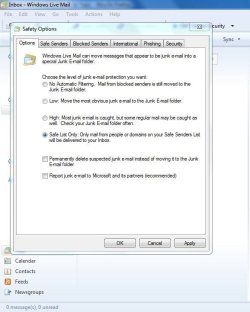
Go to,Tools\Safety options and set it to Safe List Only.

""Only mail from people or domains on your Safe Senders List or Safe Recipients List will be delivered to your Inbox.""

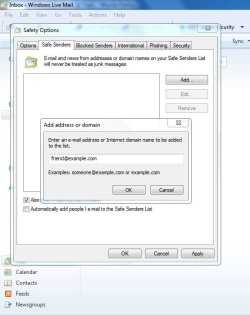
Then in the the same list click Safe Senders and there add your real friends ;)
 

Attachments

  • panais.JPG
    panais.JPG
    69.9 KB · Views: 43
  • panaisb.JPG
    panaisb.JPG
    63.9 KB · Views: 47

My Computer

Computer Manufacturer/Model Number
Custom Built by me.
OS
Windows 7 Ultimate 64bit SP1
CPU
Intel Core 2 Quad Q6600
Motherboard
Gigabyte GA-X38-DS4
Memory
2X2GB DDR2 PC6400 800MHZ DUAL CHANNEL
Graphics Card(s)
XFX RADEON HD 6850 1GB GDDR5
Sound Card
2/4/5.1/7.1-channel Realtek High Definition
Monitor(s) Displays
Samsung LE40A656F1 1080p 100Hz LCD HD TV 50,000:1
Screen Resolution
1366x768 in Desktop,1920x1080p in gaming and video
Hard Drives
C:\WD VelociRaptor 150 GB,10,000 RPM
E:\WESTERN DIGITAL WD15EADS 1.5TB CAVIAR GREEN SATA2 F:\WESTERN DIGITAL WD15EADS 1.5TB CAVIAR GREEN SATA2
PSU
THERMALTAKE W0229 TOUGHPOWER XT 750W
Case
A-Case Twin Engine BB
Cooling
3 x thermaltake smart case fan II + 1 arctic cooling fan
Keyboard
Wireless Logitech LX710
Mouse
Logitech Wireless Gaming Mouse G700
Internet Speed
ADSL 12000 plus
Other Info
Mouse Logitech G700,with 13 buttons who needs keyboard in RPG?

D:\Sony high speed sata Dvd Rewriter
Logitech Cordless Rumblepad 2
...I used hotmail for a long time and now i switched to using windows live mail...
If your email address is the same, the method of access (WLM or Browser) shouldn't matter. However I believe Hotmail has very good spam filtering so only your your junk mail folder (whether on the website or the syncned one in WLM) should be expected to fill up with lots of spam which Microsoft auto deletes after a certain period of time. However your Hotmail (and WLM for Hotmail) Inboxes should remain spam free.
 

My Computer

Computer type
PC/Desktop
Computer Manufacturer/Model Number
OQO 2+
OS
Windows 8 Pro w/MC 32-bit
CPU
Intel Atom 1.86 GHz
Motherboard
OQO 2+
Memory
2 GB
Graphics Card(s)
Intel GMA 500
Sound Card
IDT
Monitor(s) Displays
LCD
Screen Resolution
800 x 480 (portable) 1280 x 1024 (docked)
Hard Drives
64 GB SSD
PSU
9 Ah Battery (portable) or OQO Brick (docked)
Case
Shirt Pocket Sized
Cooling
Tiny Fan
Keyboard
Slide out (portable) DiNovo Edge (docked)
Mouse
Eraser head (portable) Logitech Bluetooth (docked)
Internet Speed
WWAN or 802.11G (portable) T1 (docked)
Browser
IE 10
Other Info
DVD-RW OQO Docking Station
Another thing that you can do is to go to Message Rules via the Folders Menu in Windows Live Mail and keep blocking the Spam and Junk Sites by deleting these messages on the Server itself.

Soon you shall build up a formidable number of such sites and the number of Junk and Spam would continuously keep dwindling till it hits near zero.


I used hotmail for a long time and now i switched to using windows live mail. I keep getting Inappropriate/Dirty Junk mail now several times a day. This didn't happen before i switched except for the occasional friends email that sends out spam... Not sure what to do.
 

My Computer

Computer Manufacturer/Model Number
Custom Built
OS
Windows 7 Pro with SP1 32bit
Motherboard
Intel D845GVS1 X86-based PC
Memory
2 gigs of RAM
Graphics Card(s)
Intel(R) 82845G/GL/GE/PE/GV Graphics Controller
Sound Card
Realtek AC'97 Audio
Monitor(s) Displays
Samsung SyncMaster 931BF Black 19" LCD Monitor
Screen Resolution
1280X960
Hard Drives
1. SAMSUNG SP0822N ATA Device ~ 80 GigaBytes

2. Seagate FreeAgent Go USB Device ~ 500 GigaBytes
Keyboard
COMPAQ Standard PS/2 Keyboard
Mouse
iBall Laser Precise Speedster
Internet Speed
4 mb/sec
Another thing that you can do is to go to Message Rules...
True for POP3 accounts, however Hotmail is usually an HTTP type account for wich the message rules in WLM do not apply.
 

My Computer

Computer type
PC/Desktop
Computer Manufacturer/Model Number
OQO 2+
OS
Windows 8 Pro w/MC 32-bit
CPU
Intel Atom 1.86 GHz
Motherboard
OQO 2+
Memory
2 GB
Graphics Card(s)
Intel GMA 500
Sound Card
IDT
Monitor(s) Displays
LCD
Screen Resolution
800 x 480 (portable) 1280 x 1024 (docked)
Hard Drives
64 GB SSD
PSU
9 Ah Battery (portable) or OQO Brick (docked)
Case
Shirt Pocket Sized
Cooling
Tiny Fan
Keyboard
Slide out (portable) DiNovo Edge (docked)
Mouse
Eraser head (portable) Logitech Bluetooth (docked)
Internet Speed
WWAN or 802.11G (portable) T1 (docked)
Browser
IE 10
Other Info
DVD-RW OQO Docking Station
Thank you for the clarification. One lives and learns.

I do have a HTTP type account, mercifully not HotMail but YahooMail, and I see the messages in it on the Web. However I understand that unlike HotMail, YahooMail provides POP3 access on subscription.


Another thing that you can do is to go to Message Rules...
True for POP3 accounts, however Hotmail is usually an HTTP type account for wich the message rules in WLM do not apply.
 

My Computer

Computer Manufacturer/Model Number
Custom Built
OS
Windows 7 Pro with SP1 32bit
Motherboard
Intel D845GVS1 X86-based PC
Memory
2 gigs of RAM
Graphics Card(s)
Intel(R) 82845G/GL/GE/PE/GV Graphics Controller
Sound Card
Realtek AC'97 Audio
Monitor(s) Displays
Samsung SyncMaster 931BF Black 19" LCD Monitor
Screen Resolution
1280X960
Hard Drives
1. SAMSUNG SP0822N ATA Device ~ 80 GigaBytes

2. Seagate FreeAgent Go USB Device ~ 500 GigaBytes
Keyboard
COMPAQ Standard PS/2 Keyboard
Mouse
iBall Laser Precise Speedster
Internet Speed
4 mb/sec
How well do the built-in filters work? I've never tried them but have used Spamfighter for several years and it works almost perfectly. I made this video to show how it works so I could share it with my clients: https://www.youtube.com/watch?v=Cr_gtCZY_fQ

When my license runs out, maybe I'll try to just use the built-in filters and see how it compares.
 

My Computer

Computer type
PC/Desktop
OS
Windows 7 Pro x64
Back
Top