Windows Live Mail Problem

chrisb1

New member
Local time
9:15 PM
Messages
3
I updated my OS from XP to Windows 7 with a fresh install, saving wanted files into what 7 calls "Windows Old". This included Oulook Express 6 my then email account.
I imported the folders from OE6 into Windows Live Mail with no problems including my "Local Folders".
However, without warning these local folders just disappeared from WLMail. Successfully imprted them again but they still do not show up in Windows Live Mail when I need them to.
Any solutions please?
Thank you.:(
 

My Computer

Computer Manufacturer/Model Number
Self Built
OS
Windows 7 Pro
CPU
AMD ATHLON 64 X 2 5600+
Motherboard
ASUS M2N32 WS PRO
Memory
2 Gb DDR2 SDRAM
Graphics Card(s)
NVIDIA GeForce 6600
Sound Card
None. On board Sound.
Monitor(s) Displays
Belinea 10 19 27 Art No 111925
Hard Drives
WDC WD1600AAJS-OOPSAO
PSU
500 WATTS
Case
Tower
Cooling
CPU FAN AND GPU FAN
It can't hurt and it's easy to do: Repair WLE. Go to Programs and Features, highlight Windows Live Essentials, click uninstall/change at the top, and choose "repair" in the next window. It will repair all components of WLE that were installed, including Mail.
 

My Computer

Computer type
PC/Desktop
Computer Manufacturer/Model Number
OQO 2+
OS
Windows 8 Pro w/MC 32-bit
CPU
Intel Atom 1.86 GHz
Motherboard
OQO 2+
Memory
2 GB
Graphics Card(s)
Intel GMA 500
Sound Card
IDT
Monitor(s) Displays
LCD
Screen Resolution
800 x 480 (portable) 1280 x 1024 (docked)
Hard Drives
64 GB SSD
PSU
9 Ah Battery (portable) or OQO Brick (docked)
Case
Shirt Pocket Sized
Cooling
Tiny Fan
Keyboard
Slide out (portable) DiNovo Edge (docked)
Mouse
Eraser head (portable) Logitech Bluetooth (docked)
Internet Speed
WWAN or 802.11G (portable) T1 (docked)
Browser
IE 10
Other Info
DVD-RW OQO Docking Station
I updated my OS from XP to Windows 7 with a fresh install, saving wanted files into what 7 calls "Windows Old". This included Oulook Express 6 my then email account.
I imported the folders from OE6 into Windows Live Mail with no problems including my "Local Folders".
However, without warning these local folders just disappeared from WLMail. Successfully imprted them again but they still do not show up in Windows Live Mail when I need them to.
Any solutions please?
Thank you.:(


Open WLM > left side, folder list, scroll down and locate Storage Folders under which is Imported Folder. Open it . What do you see ?
 

My Computer

Computer Manufacturer/Model Number
Acer Aspire 7741Z
OS
Windows 7 Home Premium 64-bit, SP1
CPU
Intel Pentium P6200, Cores 2, 2.13 GHz
Memory
4 GB
Graphics Card(s)
Intel HD
Sound Card
unknown
Monitor(s) Displays
17.3 inches
Screen Resolution
1600 x 900
Hard Drives
640 GB, 5400 PRM
It can't hurt and it's easy to do: Repair WLE. Go to Programs and Features, highlight Windows Live Essentials, click uninstall/change at the top, and choose "repair" in the next window. It will repair all components of WLE that were installed, including Mail.

Afraid this din't work.
 

My Computer

Computer Manufacturer/Model Number
Self Built
OS
Windows 7 Pro
CPU
AMD ATHLON 64 X 2 5600+
Motherboard
ASUS M2N32 WS PRO
Memory
2 Gb DDR2 SDRAM
Graphics Card(s)
NVIDIA GeForce 6600
Sound Card
None. On board Sound.
Monitor(s) Displays
Belinea 10 19 27 Art No 111925
Hard Drives
WDC WD1600AAJS-OOPSAO
PSU
500 WATTS
Case
Tower
Cooling
CPU FAN AND GPU FAN
Hi chrisb1, as you never said what is in folders your trying to import, it might help if you sign in to WLM with a W Live ID although its not realy needed.
 

My Computer

Computer Manufacturer/Model Number
Look in my Signature.
OS
Win7 H.Prem. 32bit+SP1
Decided to go with Thunderbird and imprting folders and contacts was no problem.
Windows Live Email is just a pain in my experience.
 

My Computer

Computer Manufacturer/Model Number
Self Built
OS
Windows 7 Pro
CPU
AMD ATHLON 64 X 2 5600+
Motherboard
ASUS M2N32 WS PRO
Memory
2 Gb DDR2 SDRAM
Graphics Card(s)
NVIDIA GeForce 6600
Sound Card
None. On board Sound.
Monitor(s) Displays
Belinea 10 19 27 Art No 111925
Hard Drives
WDC WD1600AAJS-OOPSAO
PSU
500 WATTS
Case
Tower
Cooling
CPU FAN AND GPU FAN
Gentlemen,
Not sure that someone will see my message, but I am trying anyway.
I run Windows7 and therefore Windows Live Mail.
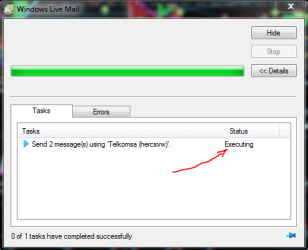
Two days ago I sent 2 e-mails and the message I got was that it is being executed. After 2 days the same applies and I cannot get into Windows Live Mail in order to stop the process. Every time I click on the WLM, this sub-window pops up (attached for your convenience)
Please be kind enough to tell me how I can rectify the situation.
Thanking you most sincerely.
 

Attachments

  • Windows Live Mail.PNG
    Windows Live Mail.PNG
    14.9 KB · Views: 7

My Computer

OS
Ultimate x64
Gentlemen,
Not sure that someone will see my message, but I am trying anyway.
I run Windows7 and therefore Windows Live Mail.
Two days ago I sent 2 e-mails and the message I got was that it is being executed. After 2 days the same applies and I cannot get into Windows Live Mail in order to stop the process. Every time I click on the WLM, this sub-window pops up (attached for your convenience)
Please be kind enough to tell me how I can rectify the situation.
Thanking you most sincerely.

Do you 2 e-mails you were trying to send consist of large attachments ?
If yes, how large ?

In any event, open WLM > click Home tab > click Work Offline > go to your Outbox > are there e-mails stuck there ? If yes, delete them.

t-4-2
 

My Computer

Computer Manufacturer/Model Number
Acer Aspire 7741Z
OS
Windows 7 Home Premium 64-bit, SP1
CPU
Intel Pentium P6200, Cores 2, 2.13 GHz
Memory
4 GB
Graphics Card(s)
Intel HD
Sound Card
unknown
Monitor(s) Displays
17.3 inches
Screen Resolution
1600 x 900
Hard Drives
640 GB, 5400 PRM
Thx for replying

Gentlemen,
Not sure that someone will see my message, but I am trying anyway.
I run Windows7 and therefore Windows Live Mail.
Two days ago I sent 2 e-mails and the message I got was that it is being executed. After 2 days the same applies and I cannot get into Windows Live Mail in order to stop the process. Every time I click on the WLM, this sub-window pops up (attached for your convenience)
Please be kind enough to tell me how I can rectify the situation.
Thanking you most sincerely.

Do you 2 e-mails you were trying to send consist of large attachments ?
If yes, how large ?

In any event, open WLM > click Home tab > click Work Offline > go to your Outbox > are there e-mails stuck there ? If yes, delete them.

t-4-2
====================

Thx for replying t-4-2,

The problem is I am unable to access WLM. When I click on the icon to open it up, the above window appears immediately.

No attachments whatsoever on either of the 2 mails.
 

My Computer

OS
Ultimate x64
Gentlemen,
Not sure that someone will see my message, but I am trying anyway.
I run Windows7 and therefore Windows Live Mail.
Two days ago I sent 2 e-mails and the message I got was that it is being executed. After 2 days the same applies and I cannot get into Windows Live Mail in order to stop the process. Every time I click on the WLM, this sub-window pops up (attached for your convenience)
Please be kind enough to tell me how I can rectify the situation.
Thanking you most sincerely.

Do you 2 e-mails you were trying to send consist of large attachments ?
If yes, how large ?

In any event, open WLM > click Home tab > click Work Offline > go to your Outbox > are there e-mails stuck there ? If yes, delete them.

t-4-2
====================

Thx for replying t-4-2,

The problem is I am unable to access WLM. When I click on the icon to open it up, the above window appears immediately.

No attachments whatsoever on either of the 2 mails.

Go to your webmail site, see what have happened to the 2 mails you were trying to send. Also, perhaps it is time to clear out the read mails still in the web server.

If nothing doing, my only suggestion, the one you may not like to hear, is to ......
uninstall > reinstall WLM.
 

My Computer

Computer Manufacturer/Model Number
Acer Aspire 7741Z
OS
Windows 7 Home Premium 64-bit, SP1
CPU
Intel Pentium P6200, Cores 2, 2.13 GHz
Memory
4 GB
Graphics Card(s)
Intel HD
Sound Card
unknown
Monitor(s) Displays
17.3 inches
Screen Resolution
1600 x 900
Hard Drives
640 GB, 5400 PRM
Thank you so much..

Do you 2 e-mails you were trying to send consist of large attachments ?
If yes, how large ?

In any event, open WLM > click Home tab > click Work Offline > go to your Outbox > are there e-mails stuck there ? If yes, delete them.

t-4-2
====================

Thx for replying t-4-2,

The problem is I am unable to access WLM. When I click on the icon to open it up, the above window appears immediately.

No attachments whatsoever on either of the 2 mails.

Go to your webmail site, see what have happened to the 2 mails you were trying to send. Also, perhaps it is time to clear out the read mails still in the web server.

If nothing doing, my only suggestion, the one you may not like to hear, is to ......
uninstall > reinstall WLM.
================================

Very glad to say that neither was necessary. It rectified itself over the weekend.

Thanking you again for being prepared to help.

Wishing you the very best, always!
 

My Computer

OS
Ultimate x64
Back
Top