Yesterday I reformatted to windows 7/64 from vista. I dled the essentials and got my window live mail operating.
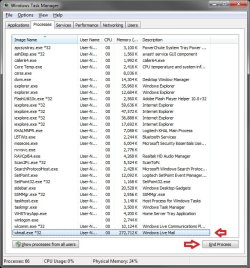
Today I am having problems with the mail not opening. It appears that it is not closing properly as it shows up in the task manager. I have to restart to get it to open.
Googling it appears I am not alone. Anyway I can fix this? Should I remove and reinstall essentials?
This may be caused by WLM not quite through with some process after it was closed, or something is causing it to hangup while closing.
When WLM is closed, Open Task Manager (Ctrl+Shift+Esc), click on the Processes tab, and check to see if you have any wlmail.exe*32 "Image Name" listed. If so, select it and click on End Process for any listed. Hopefully it will open without a problem for you now.
Hope this helps,
Shawn
My Computer
Computer type
PC/Desktop
Computer Manufacturer/Model Number
Self built custom
OS
64-bit Windows 11 Pro for Workstations
CPU
Intel i7-8700K OC'd to 5 GHz
Motherboard
ASUS ROG Maximus XI Formula Z390
Memory
64 GB (4x16GB) G.SKILL TridentZ RGB DDR4 3600 MHz
Graphics Card(s)
ASUS ROG-STRIX-GTX1080TI-O11G-GAMING
Sound Card
Integrated
Monitor(s) Displays
2 x Samsung Odyssey G7 27"
Screen Resolution
2560x1440
Hard Drives
1TB Samsung 990 PRO M.2,
4TB Samsung 990 PRO PRO M.2,
TerraMaster F8 SSD Plus NAS
PSU
Seasonic Prime Titanium 850W
Case
Thermaltake Core P3
Cooling
Corsair Hydro H115i
Keyboard
Logitech wireless K800
Mouse
Logitech MX Master 4
Internet Speed
2 Gb/s Download and 100 Mb/s Upload
Antivirus
Malwarebyte Anti-Malware Premium
Browser
Google Chrome
Other Info
Logitech Z625 speaker system,
Logitech BRIO 4K Pro webcam,
HP Color LaserJet Pro MFP M477fdn,
APC SMART-UPS RT 1000 XL - SURT1000XLI,
Galaxy S23 Plus phone
Mail is still causing problems. Have to go into task manager and stop wlmail.exe*32.
Also noticed that occasionally I will not be able to download. Says something about site unavailable etc. Once I restart all is well.
Is this my problem or a problem with W7 or WLM? Are other people having this problem? Have been alternating between IE 32 and 64 and does not seem to make a difference.
This was a clean install of W7/64 that went with no problems. I am a bit computer challenged so I hope I did not mess anything up.
Do you have a antivirus program installed that has a email scanning option. If so, disable the email scanning option of the program to see if that may be causing WLM to hangup.
My Computer
Computer type
PC/Desktop
Computer Manufacturer/Model Number
Self built custom
OS
64-bit Windows 11 Pro for Workstations
CPU
Intel i7-8700K OC'd to 5 GHz
Motherboard
ASUS ROG Maximus XI Formula Z390
Memory
64 GB (4x16GB) G.SKILL TridentZ RGB DDR4 3600 MHz
Graphics Card(s)
ASUS ROG-STRIX-GTX1080TI-O11G-GAMING
Sound Card
Integrated
Monitor(s) Displays
2 x Samsung Odyssey G7 27"
Screen Resolution
2560x1440
Hard Drives
1TB Samsung 990 PRO M.2,
4TB Samsung 990 PRO PRO M.2,
TerraMaster F8 SSD Plus NAS
PSU
Seasonic Prime Titanium 850W
Case
Thermaltake Core P3
Cooling
Corsair Hydro H115i
Keyboard
Logitech wireless K800
Mouse
Logitech MX Master 4
Internet Speed
2 Gb/s Download and 100 Mb/s Upload
Antivirus
Malwarebyte Anti-Malware Premium
Browser
Google Chrome
Other Info
Logitech Z625 speaker system,
Logitech BRIO 4K Pro webcam,
HP Color LaserJet Pro MFP M477fdn,
APC SMART-UPS RT 1000 XL - SURT1000XLI,
Galaxy S23 Plus phone
Do you have a antivirus program installed that has a email scanning option. If so, disable the email scanning option of the program to see if that may be causing WLM to hangup.
I have turned off my AVG email scanner and still no joy. Uninstalled all Essentials and reinstalled, still hangs.
Checked for ~ and that other symbol in blocked/safe senders and still hangs.
This is beginning to bug me. :shock:
Search indicates that some people are having problems but not many. Since this was a clean install I really don't have much on the computer might be creating some kind of a conflict.
You might see if uninstalling Windows Live Mail, then deleting the hiddenC:\Users\User-Name\AppData\Local\Microsoft\Windows Live Mail folder if still there. This will give you a clean start. Afterwards, reinstall it to see if it work properly.
My Computer
Computer type
PC/Desktop
Computer Manufacturer/Model Number
Self built custom
OS
64-bit Windows 11 Pro for Workstations
CPU
Intel i7-8700K OC'd to 5 GHz
Motherboard
ASUS ROG Maximus XI Formula Z390
Memory
64 GB (4x16GB) G.SKILL TridentZ RGB DDR4 3600 MHz
Graphics Card(s)
ASUS ROG-STRIX-GTX1080TI-O11G-GAMING
Sound Card
Integrated
Monitor(s) Displays
2 x Samsung Odyssey G7 27"
Screen Resolution
2560x1440
Hard Drives
1TB Samsung 990 PRO M.2,
4TB Samsung 990 PRO PRO M.2,
TerraMaster F8 SSD Plus NAS
PSU
Seasonic Prime Titanium 850W
Case
Thermaltake Core P3
Cooling
Corsair Hydro H115i
Keyboard
Logitech wireless K800
Mouse
Logitech MX Master 4
Internet Speed
2 Gb/s Download and 100 Mb/s Upload
Antivirus
Malwarebyte Anti-Malware Premium
Browser
Google Chrome
Other Info
Logitech Z625 speaker system,
Logitech BRIO 4K Pro webcam,
HP Color LaserJet Pro MFP M477fdn,
APC SMART-UPS RT 1000 XL - SURT1000XLI,
Galaxy S23 Plus phone