windows live mail strange problem

DIABLOIII

New member
Local time
6:37 AM
Messages
4
hi there
im new on forum but i know the this forum since many years :)
i wish i can get help about my problem

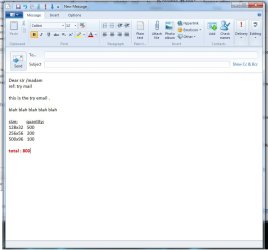
my system is windows 7 64bit sp1 installed and since around 15-20 days i have strange problem when i writting email .i attached photo . pls look photo1 .this is example mailand no strange thing , thats will normal and simple email .
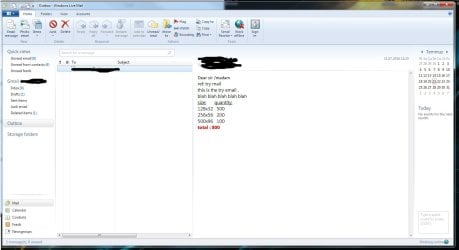
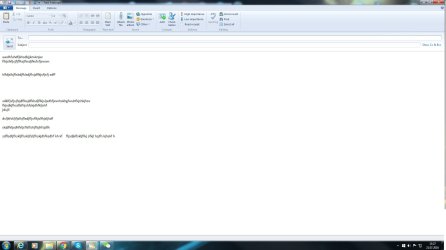
after that when i clicked the send button email style changes.pls look photo2 (taken from outbox)
somehow probram changes the writting style when sending . i tried totaly uninstall the program(even i deleted remained folders and registry entries ) and reinstalled but always happened same thing.
i tried live mail 2012 on another 2 diffirent computer . one was windows 7 64 bit and another is windows 10 pro .in both system result was same ,same problem.
since 3 days im trying to find solution for this but no luck .
can anybody help me or any suggestion?
 

Attachments
  • photo1.jpg
    photo1.jpg
    47.5 KB · Views: 4
  • photo2.jpg
    photo2.jpg
    83.1 KB · Views: 4

My Computer

Computer type
PC/Desktop
OS
windows 7 64bit sp1 installed
Try opening the email full screen, in it's own window and see how it looks. You are looking at the preview window, which is on half of the screen and has to change the formatting to show right. Either that or go to the view tab and disable the preview pane.
 

My Computers

System One System Two

  • Computer type
    PC/Desktop
    Computer Manufacturer/Model Number
    ALWAYS UNDER CONSTRUCTION
    OS
    Windows 11 Pro
    CPU
    Ryzen 9 5900X
    Motherboard
    Asus X570 Crosshair Viii Hero
    Memory
    32GB G Skill DDR4-3600
    Graphics Card(s)
    EVGA RTX 3080 FTW 3 Ultra
    Sound Card
    On Board/Sennheiser PC37X Headset
    Monitor(s) Displays
    3 X Asus 27"
    Screen Resolution
    2560x1440
    Hard Drives
    2 X 1 TB NVME drives
    PSU
    EVGA 850
    Case
    Phanteks Eclipse P400A
    Cooling
    EVGA 280 AIO
    Keyboard
    Logitech G510s/ Logitech G13
    Mouse
    Logitech G502
    Internet Speed
    24/1
    Antivirus
    ESET/MBAM Pro/SAS Pro
    Browser
    Chrome/ Firefox/ Edge
  • Computer type
    Laptop
    System Manufacturer/Model Number
    Dell 16 Plus
    OS
    Windows 11 Pro
    CPU
    Intel Ultra 9 288V
    Memory
    32 GB LPDDR5X 8533
    Monitor(s) Displays
    16" Mini-LED HDR600 Touch 90 Hz
    Screen Resolution
    2560X1600
    Hard Drives
    1 TB NVME
hi essenbe
thank you for quick answer. but i dont think problem comes from window/full screen . i tried that also.same thing happening
somehow live mail doesnt allow height between lines
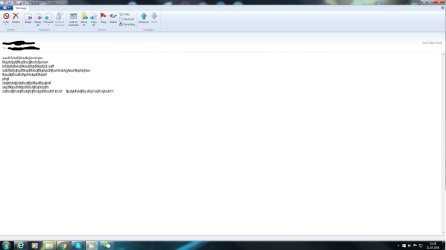
im also adding 2 photo more , these taken full screen (photo3 is from before send and photo4 is after mail sended). as you can see program putting all words together
 

Attachments

  • photo3.jpg
    photo3.jpg
    80.8 KB · Views: 1
  • photo4.jpg
    photo4.jpg
    67.4 KB · Views: 3

My Computer

Computer type
PC/Desktop
OS
windows 7 64bit sp1 installed
one thing more , when you look to photo4 , first line font is calibri but other rest lines changed to ariel font :D
 

My Computer

Computer type
PC/Desktop
OS
windows 7 64bit sp1 installed
I'm not sure what the problem is. See if there is something in the settings that will help. Here is a tutorial. Maybe there is something in it (particularly part 5 ) that will help. http://www.sevenforums.com/tutorials/369546-windows-live-mail-setup-use.html

You can also go to Control Panel > Uninstall a program and look for Windows Essentials. If you highlight that and select uninstall/change, you will be presented with the option to repair. You could try that too, if you think the program is malfunctioning.
 

My Computers

System One System Two

  • Computer type
    PC/Desktop
    Computer Manufacturer/Model Number
    ALWAYS UNDER CONSTRUCTION
    OS
    Windows 11 Pro
    CPU
    Ryzen 9 5900X
    Motherboard
    Asus X570 Crosshair Viii Hero
    Memory
    32GB G Skill DDR4-3600
    Graphics Card(s)
    EVGA RTX 3080 FTW 3 Ultra
    Sound Card
    On Board/Sennheiser PC37X Headset
    Monitor(s) Displays
    3 X Asus 27"
    Screen Resolution
    2560x1440
    Hard Drives
    2 X 1 TB NVME drives
    PSU
    EVGA 850
    Case
    Phanteks Eclipse P400A
    Cooling
    EVGA 280 AIO
    Keyboard
    Logitech G510s/ Logitech G13
    Mouse
    Logitech G502
    Internet Speed
    24/1
    Antivirus
    ESET/MBAM Pro/SAS Pro
    Browser
    Chrome/ Firefox/ Edge
  • Computer type
    Laptop
    System Manufacturer/Model Number
    Dell 16 Plus
    OS
    Windows 11 Pro
    CPU
    Intel Ultra 9 288V
    Memory
    32 GB LPDDR5X 8533
    Monitor(s) Displays
    16" Mini-LED HDR600 Touch 90 Hz
    Screen Resolution
    2560X1600
    Hard Drives
    1 TB NVME
actually i tried many things but no luck , really my brain stoped :)
is there any other suggestions from people ?
 

My Computer

Computer type
PC/Desktop
OS
windows 7 64bit sp1 installed
Back
Top