Solved Windows Live Mail will not install

Sherrylynnc

New member
Local time
5:46 PM
Messages
10
I had windows live mail installed and then it started not working. Could not connect to server. I uninstalled it and tried to reinstall it and the file will not install. I have no email access. I've tried everything I know including creating a new user and it still will not install. It had been working until 2 days ago. Then it just stopped receiving my email. I deleted the account and set it up again. Nothing works.

Can anyone help me?:cry:
 

My Computer

Computer Manufacturer/Model Number
Acer Aspire 8940G-6865
OS
Windows 7
CPU
Intel Core i7 720QM
Memory
4 GB
Graphics Card(s)
Nvidia
I did a system restore back to when I had my email that was hanging, and I now have it installed back on my laptop, but it connected once and now it hangs up on receiving email. It's acting very weird. I wonder if anyone else is having a problem with the Windows Mail? I can pick up my email on my desktop computer, no problem. Just not on my laptop.
 

My Computer

Computer Manufacturer/Model Number
Acer Aspire 8940G-6865
OS
Windows 7
CPU
Intel Core i7 720QM
Memory
4 GB
Graphics Card(s)
Nvidia
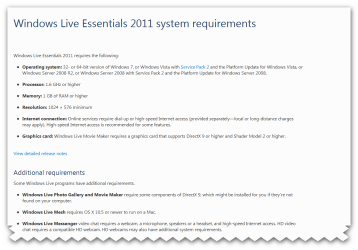
what windows 7 version are you using? requirements Windows Live Essentials 2011 in the pic:)
 

Attachments

  • Snap_2010.12.13 16.53.27_012.png
    Snap_2010.12.13 16.53.27_012.png
    44.8 KB · Views: 117

My Computer

Computer Manufacturer/Model Number
packard bell IXTREME M5722
OS
Operating System : Windows 7 Home Premium Edition 6.01.7600 SP1 (x64)
CPU
Processor : Intel Core 2 Quad Q8300 @ 2500 MHz
Motherboard
Mainboard : Packard Bell (Acer EG43M )
Memory
Physical Memory :8GB Corsair4x 2GB 800MHz C5 DDR2
Graphics Card(s)
Video Card : XFX 6700 AMD
Monitor(s) Displays
Maestro 234DL - BenQ V2220 - BenQ VW2420H
Screen Resolution
Current Display :1920x1080p pixels at 60 Hz in HD LED
Hard Drives
Hard Disks : WDC (1000 GB)
Drive C: (Hard Disk) : 428 GB available on 491 GB
Drive D: (Hard Disk) : 426 GB available on 492 GB
SAMSUNG spinpoint HD103SJ 1000.2 GB
(X 2) KINGSTON SSD NOW V 30GB
PSU
XFX ProSeries 550W PSU
Case
PACKARD BELL IXTREME
Cooling
System Blower Current: 150mA Air Flow16CFM ;Akasa 90mm rear
Keyboard
Gigabyte Aivia K8100
Mouse
TRUST-Wireless Laser Mouse - Carbon edition MI-7770C
Internet Speed
TP-LINK > TL-WN951N / AV500 Gigabit Powerline Adapters
Browser
chrome dev
Other Info
EXTRA COOLING>(FAN CONTROLLER) PC Bay Cooler 3 x 40mm fans; Akasa AK-HD-BL Blue hard drive cooler 2 x 40 mm fan 4500 rpm 29.7 dBA
Bios> American Megatrends Inc.
Version : P01-A1
Date : 08/31/2009
Perform a SFC Scan

1. Click Start, click All Programs, click Accessories, right-click Command Prompt, and then click Run as administrator. If you are prompted for an administrator password or for a confirmation, type the password, or click Allow

2. Type the following command, and then press ENTER:

sfc /scannow

A message will appear stating that 'The system scan will begin'. Be patient because the scan may take some time

3. If any files require a replace SFC will replace them. You may be asked to insert your Windows 7 DVD for this process to continue

4. If everything is okay you should, after the scan, see the following message "Windows resource protection did not find any integrity violations"

5. After the scan has completed, close the command prompt window, restart the computer and check.

more information here :ar: How to use the System File Checker tool to troubleshoot missing or corrupted system files on Windows Vista or on Windows 7
 

My Computer

Computer Manufacturer/Model Number
packard bell IXTREME M5722
OS
Operating System : Windows 7 Home Premium Edition 6.01.7600 SP1 (x64)
CPU
Processor : Intel Core 2 Quad Q8300 @ 2500 MHz
Motherboard
Mainboard : Packard Bell (Acer EG43M )
Memory
Physical Memory :8GB Corsair4x 2GB 800MHz C5 DDR2
Graphics Card(s)
Video Card : XFX 6700 AMD
Monitor(s) Displays
Maestro 234DL - BenQ V2220 - BenQ VW2420H
Screen Resolution
Current Display :1920x1080p pixels at 60 Hz in HD LED
Hard Drives
Hard Disks : WDC (1000 GB)
Drive C: (Hard Disk) : 428 GB available on 491 GB
Drive D: (Hard Disk) : 426 GB available on 492 GB
SAMSUNG spinpoint HD103SJ 1000.2 GB
(X 2) KINGSTON SSD NOW V 30GB
PSU
XFX ProSeries 550W PSU
Case
PACKARD BELL IXTREME
Cooling
System Blower Current: 150mA Air Flow16CFM ;Akasa 90mm rear
Keyboard
Gigabyte Aivia K8100
Mouse
TRUST-Wireless Laser Mouse - Carbon edition MI-7770C
Internet Speed
TP-LINK > TL-WN951N / AV500 Gigabit Powerline Adapters
Browser
chrome dev
Other Info
EXTRA COOLING>(FAN CONTROLLER) PC Bay Cooler 3 x 40mm fans; Akasa AK-HD-BL Blue hard drive cooler 2 x 40 mm fan 4500 rpm 29.7 dBA
Bios> American Megatrends Inc.
Version : P01-A1
Date : 08/31/2009
Windows Live Mail Issues

Thank you, I'll try this. The version of 7 I'm using is Home Premium. I'm also having issues with the computer shutting off. I have to press the off button and hold it down for a few seconds for it to turn completely off. This happened the same time my email started acting up. I can pick up my email on my desktop computer, it's my new laptop that I'm having issues with so I know it's not my internet provider. I was wondering how to do a check disk, or something like that to see if some files were messed up. We had a power outage on Friday, lost all power for several hours. As well as losing our internet connection. Once the power came back on and we got our internet back on, my computer was acting up. It wasn't a power surge, so I know there is no damage like that. Our power transformer for the entire block went out. I disconnected my laptop as soon as it happened because I didn't want the power to come back up and zap my laptop. But it would not turn off on it's own. I had to press the off button. Once we had everything back up and running, I could not access my email.

I appreciate the help and will try this scan.

Thank you,

Sherry Chilcote
 

My Computer

Computer Manufacturer/Model Number
Acer Aspire 8940G-6865
OS
Windows 7
CPU
Intel Core i7 720QM
Memory
4 GB
Graphics Card(s)
Nvidia
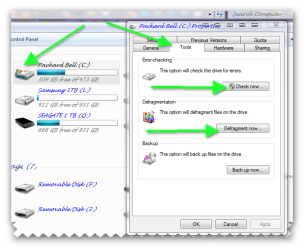
it wont hurt to error check the c drive and defrag

1.
  1. go to computer (make sure you are in administrative mode)
  2. right click on the c drive
  3. click on properties in the window
  4. click on tools
  5. click on check now
windows will part scan then ask you to schedule on next restart to check the drive click yes and reboot
when windows reboots just let it do its job it will repair if it needs to when its finished it will start as normal when you are logged on defrag the hard drive

2.
  1. go to computer (make sure you are in administrative mode)
  2. right click on the c drive
  3. click on properties in the window
  4. click on defrag and follow instructions


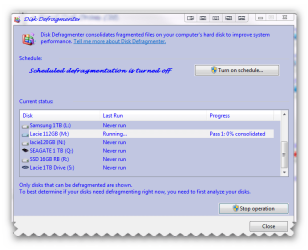
What is disk defragmentation?

Disk defragmentation describes the process of consolidating fragmented files on your computer's hard disk.

Fragmentation happens to a hard disk over time as you save, change, or delete files. The changes that you save to a file are often stored at a location on the hard disk that's different from the original file. Additional changes are saved to even more locations. Over time, both the file and the hard disk itself become fragmented, and your computer slows down as it has to look in many different places to open a file. Disk Defragmenter is a tool that rearranges the data on your hard disk and reunites fragmented files so your computer can run more efficiently.

SEE ALSO BRINKS TUTORIAL :ar: http://www.sevenforums.com/tutorials/11733-disk-defragmenter-open-use.html

How to Turn the Windows 7 Disk Defragmenter Schedule On or Off :ar: http://www.sevenforums.com/tutorials/3292-disk-defragmenter-schedule-turn-off.html
 

Attachments

  • Snap_2010.12.14 18.22.15_001.png
    Snap_2010.12.14 18.22.15_001.png
    42.4 KB · Views: 6
  • Snap_2010.12.14 18.49.30_002.png
    Snap_2010.12.14 18.49.30_002.png
    22.8 KB · Views: 9

My Computer

Computer Manufacturer/Model Number
packard bell IXTREME M5722
OS
Operating System : Windows 7 Home Premium Edition 6.01.7600 SP1 (x64)
CPU
Processor : Intel Core 2 Quad Q8300 @ 2500 MHz
Motherboard
Mainboard : Packard Bell (Acer EG43M )
Memory
Physical Memory :8GB Corsair4x 2GB 800MHz C5 DDR2
Graphics Card(s)
Video Card : XFX 6700 AMD
Monitor(s) Displays
Maestro 234DL - BenQ V2220 - BenQ VW2420H
Screen Resolution
Current Display :1920x1080p pixels at 60 Hz in HD LED
Hard Drives
Hard Disks : WDC (1000 GB)
Drive C: (Hard Disk) : 428 GB available on 491 GB
Drive D: (Hard Disk) : 426 GB available on 492 GB
SAMSUNG spinpoint HD103SJ 1000.2 GB
(X 2) KINGSTON SSD NOW V 30GB
PSU
XFX ProSeries 550W PSU
Case
PACKARD BELL IXTREME
Cooling
System Blower Current: 150mA Air Flow16CFM ;Akasa 90mm rear
Keyboard
Gigabyte Aivia K8100
Mouse
TRUST-Wireless Laser Mouse - Carbon edition MI-7770C
Internet Speed
TP-LINK > TL-WN951N / AV500 Gigabit Powerline Adapters
Browser
chrome dev
Other Info
EXTRA COOLING>(FAN CONTROLLER) PC Bay Cooler 3 x 40mm fans; Akasa AK-HD-BL Blue hard drive cooler 2 x 40 mm fan 4500 rpm 29.7 dBA
Bios> American Megatrends Inc.
Version : P01-A1
Date : 08/31/2009
Windows Live Mail Issues

Thank you Brian. I'm doing the sfc scan now, the computer has been on "verification 61% complete" for a little over 2 hours now. Does that sound right? The curser is blinking so it seems to be working but should it take this long at 61%?

I don't have a Windows DVD for this laptop. I created the backup DVD's when I purchased this machine a year ago. I wouldn't know which one is the Windows DVD as it backup doesn't label them that way. It's a set of "Recovery Disks", disk 1-3 and a Drivers Disk. You mentioned before it might ask me to put in the Windows Disk as some point.

I'm wondering if I should go buy another copy of Windows 7 and install. I don't want to do a clean install or complete systems restore because I don't want to lose all my music and pictures and video. I don't mind buying another copy of Windows. At least I would have one if I needed it later. I don't like how you buy a new computer today and it doesn't come with the DVD's. Everything is preloaded. If I were to buy another Windows 7 copy, should I keep the same one, Home Premium?

I just got the machine back from the factory 4 weeks ago. They had to put a new motherboard and hard drive on it and installed a new Windows Os. I lost everything that was on it at that time. I would hate to lose it all again. I don't know how to back up my iTunes so I keep all my album covers. I did backup the music files but when I did the restore, I lost over half of the album covers. It took me hours to get them all back from iTunes.

I did not make another "recovery disk" set when I got the machine back. Should I? Wouldn't it be the same as the original ones?

The machine was working great until just this past Friday. Well great, after they put a new motherboard and hard drive in it.

If I installed another copy of Windows 7, it might fix the problems I'm having with turning it off too. It will not turn completely off without using the off/on button.

This was a $1400 laptop. I'm just about done with it! I'm thinking I need to go buy a cheap $500 desktop and get on down the road!

Thank you for all your help,

Sherry Chilcote
 

My Computer

Computer Manufacturer/Model Number
Acer Aspire 8940G-6865
OS
Windows 7
CPU
Intel Core i7 720QM
Memory
4 GB
Graphics Card(s)
Nvidia
i can understand your frustration :sick: yes make a new set of recovery discs and a rescue disc why buy another windows 7? buy yourself a portable hard drive and back up all your stuff instead!! and reinstall the windows with the discs:) that seems a long time for the scan to me but wait a bit longer and see. if you have your old discs there pop them in the drive and see whats on them they should be labeled 1-3?
 

My Computer

Computer Manufacturer/Model Number
packard bell IXTREME M5722
OS
Operating System : Windows 7 Home Premium Edition 6.01.7600 SP1 (x64)
CPU
Processor : Intel Core 2 Quad Q8300 @ 2500 MHz
Motherboard
Mainboard : Packard Bell (Acer EG43M )
Memory
Physical Memory :8GB Corsair4x 2GB 800MHz C5 DDR2
Graphics Card(s)
Video Card : XFX 6700 AMD
Monitor(s) Displays
Maestro 234DL - BenQ V2220 - BenQ VW2420H
Screen Resolution
Current Display :1920x1080p pixels at 60 Hz in HD LED
Hard Drives
Hard Disks : WDC (1000 GB)
Drive C: (Hard Disk) : 428 GB available on 491 GB
Drive D: (Hard Disk) : 426 GB available on 492 GB
SAMSUNG spinpoint HD103SJ 1000.2 GB
(X 2) KINGSTON SSD NOW V 30GB
PSU
XFX ProSeries 550W PSU
Case
PACKARD BELL IXTREME
Cooling
System Blower Current: 150mA Air Flow16CFM ;Akasa 90mm rear
Keyboard
Gigabyte Aivia K8100
Mouse
TRUST-Wireless Laser Mouse - Carbon edition MI-7770C
Internet Speed
TP-LINK > TL-WN951N / AV500 Gigabit Powerline Adapters
Browser
chrome dev
Other Info
EXTRA COOLING>(FAN CONTROLLER) PC Bay Cooler 3 x 40mm fans; Akasa AK-HD-BL Blue hard drive cooler 2 x 40 mm fan 4500 rpm 29.7 dBA
Bios> American Megatrends Inc.
Version : P01-A1
Date : 08/31/2009
my choice is a good desktop pc :) laptop i dont use only for work bit limited for my use.
 

My Computer

Computer Manufacturer/Model Number
packard bell IXTREME M5722
OS
Operating System : Windows 7 Home Premium Edition 6.01.7600 SP1 (x64)
CPU
Processor : Intel Core 2 Quad Q8300 @ 2500 MHz
Motherboard
Mainboard : Packard Bell (Acer EG43M )
Memory
Physical Memory :8GB Corsair4x 2GB 800MHz C5 DDR2
Graphics Card(s)
Video Card : XFX 6700 AMD
Monitor(s) Displays
Maestro 234DL - BenQ V2220 - BenQ VW2420H
Screen Resolution
Current Display :1920x1080p pixels at 60 Hz in HD LED
Hard Drives
Hard Disks : WDC (1000 GB)
Drive C: (Hard Disk) : 428 GB available on 491 GB
Drive D: (Hard Disk) : 426 GB available on 492 GB
SAMSUNG spinpoint HD103SJ 1000.2 GB
(X 2) KINGSTON SSD NOW V 30GB
PSU
XFX ProSeries 550W PSU
Case
PACKARD BELL IXTREME
Cooling
System Blower Current: 150mA Air Flow16CFM ;Akasa 90mm rear
Keyboard
Gigabyte Aivia K8100
Mouse
TRUST-Wireless Laser Mouse - Carbon edition MI-7770C
Internet Speed
TP-LINK > TL-WN951N / AV500 Gigabit Powerline Adapters
Browser
chrome dev
Other Info
EXTRA COOLING>(FAN CONTROLLER) PC Bay Cooler 3 x 40mm fans; Akasa AK-HD-BL Blue hard drive cooler 2 x 40 mm fan 4500 rpm 29.7 dBA
Bios> American Megatrends Inc.
Version : P01-A1
Date : 08/31/2009

Attachments

  • Snap_2010.12.14 19.55.41_003.png
    Snap_2010.12.14 19.55.41_003.png
    169.4 KB · Views: 3
  • Snap_2010.12.14 19.57.39_005.png
    Snap_2010.12.14 19.57.39_005.png
    35.9 KB · Views: 2

My Computer

Computer Manufacturer/Model Number
packard bell IXTREME M5722
OS
Operating System : Windows 7 Home Premium Edition 6.01.7600 SP1 (x64)
CPU
Processor : Intel Core 2 Quad Q8300 @ 2500 MHz
Motherboard
Mainboard : Packard Bell (Acer EG43M )
Memory
Physical Memory :8GB Corsair4x 2GB 800MHz C5 DDR2
Graphics Card(s)
Video Card : XFX 6700 AMD
Monitor(s) Displays
Maestro 234DL - BenQ V2220 - BenQ VW2420H
Screen Resolution
Current Display :1920x1080p pixels at 60 Hz in HD LED
Hard Drives
Hard Disks : WDC (1000 GB)
Drive C: (Hard Disk) : 428 GB available on 491 GB
Drive D: (Hard Disk) : 426 GB available on 492 GB
SAMSUNG spinpoint HD103SJ 1000.2 GB
(X 2) KINGSTON SSD NOW V 30GB
PSU
XFX ProSeries 550W PSU
Case
PACKARD BELL IXTREME
Cooling
System Blower Current: 150mA Air Flow16CFM ;Akasa 90mm rear
Keyboard
Gigabyte Aivia K8100
Mouse
TRUST-Wireless Laser Mouse - Carbon edition MI-7770C
Internet Speed
TP-LINK > TL-WN951N / AV500 Gigabit Powerline Adapters
Browser
chrome dev
Other Info
EXTRA COOLING>(FAN CONTROLLER) PC Bay Cooler 3 x 40mm fans; Akasa AK-HD-BL Blue hard drive cooler 2 x 40 mm fan 4500 rpm 29.7 dBA
Bios> American Megatrends Inc.
Version : P01-A1
Date : 08/31/2009
Hi Brian,

The scan didn't work. It was hung at 61% and never got out of that. I had to exit it after six hours. I have an external hard drive, one for each of my computers but the only time I backed up my iTunes it didn't save the album covers. Using the music for my iPhone, I wanted the covers. I used the backup software that comes preloaded on the SeaGate External HD. Should I use the Windows backup instead? Do you think it would backup iTunes without losing the album data?

I also have the laptop set to defrag automatically so I don't think it's in bad shape. I tried to do it manually and it told me to schedule it to be done, but would not go into the schedule mode. I seem to be having several Windows 7 issues, Windows Explorer locked up yesterday.

If I make a new set of recovery disks, wouldn't they contain the problem files? I started to make a new set yesterday, after the scan wouldn't work, but then thought I might just be copying the problem files on to the DVD.

I have Norton Backup on my computer too. I was wondering about using it to backup my computer. Do you know anything about it?

Thank you for your help.

Sherry Chilcote
 

My Computer

Computer Manufacturer/Model Number
Acer Aspire 8940G-6865
OS
Windows 7
CPU
Intel Core i7 720QM
Memory
4 GB
Graphics Card(s)
Nvidia
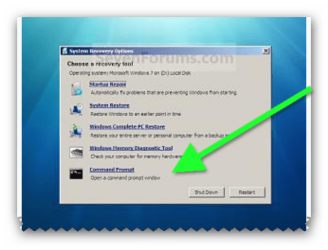
i would use the windows System Repair Disc . boot from that and use command promt there to run the SFC scan have you a System Repair Disc?
 
Last edited:

My Computer

Computer Manufacturer/Model Number
packard bell IXTREME M5722
OS
Operating System : Windows 7 Home Premium Edition 6.01.7600 SP1 (x64)
CPU
Processor : Intel Core 2 Quad Q8300 @ 2500 MHz
Motherboard
Mainboard : Packard Bell (Acer EG43M )
Memory
Physical Memory :8GB Corsair4x 2GB 800MHz C5 DDR2
Graphics Card(s)
Video Card : XFX 6700 AMD
Monitor(s) Displays
Maestro 234DL - BenQ V2220 - BenQ VW2420H
Screen Resolution
Current Display :1920x1080p pixels at 60 Hz in HD LED
Hard Drives
Hard Disks : WDC (1000 GB)
Drive C: (Hard Disk) : 428 GB available on 491 GB
Drive D: (Hard Disk) : 426 GB available on 492 GB
SAMSUNG spinpoint HD103SJ 1000.2 GB
(X 2) KINGSTON SSD NOW V 30GB
PSU
XFX ProSeries 550W PSU
Case
PACKARD BELL IXTREME
Cooling
System Blower Current: 150mA Air Flow16CFM ;Akasa 90mm rear
Keyboard
Gigabyte Aivia K8100
Mouse
TRUST-Wireless Laser Mouse - Carbon edition MI-7770C
Internet Speed
TP-LINK > TL-WN951N / AV500 Gigabit Powerline Adapters
Browser
chrome dev
Other Info
EXTRA COOLING>(FAN CONTROLLER) PC Bay Cooler 3 x 40mm fans; Akasa AK-HD-BL Blue hard drive cooler 2 x 40 mm fan 4500 rpm 29.7 dBA
Bios> American Megatrends Inc.
Version : P01-A1
Date : 08/31/2009

Attachments

  • Snap_2010.12.15 13.15.27_004.png
    Snap_2010.12.15 13.15.27_004.png
    51.5 KB · Views: 5

My Computer

Computer Manufacturer/Model Number
packard bell IXTREME M5722
OS
Operating System : Windows 7 Home Premium Edition 6.01.7600 SP1 (x64)
CPU
Processor : Intel Core 2 Quad Q8300 @ 2500 MHz
Motherboard
Mainboard : Packard Bell (Acer EG43M )
Memory
Physical Memory :8GB Corsair4x 2GB 800MHz C5 DDR2
Graphics Card(s)
Video Card : XFX 6700 AMD
Monitor(s) Displays
Maestro 234DL - BenQ V2220 - BenQ VW2420H
Screen Resolution
Current Display :1920x1080p pixels at 60 Hz in HD LED
Hard Drives
Hard Disks : WDC (1000 GB)
Drive C: (Hard Disk) : 428 GB available on 491 GB
Drive D: (Hard Disk) : 426 GB available on 492 GB
SAMSUNG spinpoint HD103SJ 1000.2 GB
(X 2) KINGSTON SSD NOW V 30GB
PSU
XFX ProSeries 550W PSU
Case
PACKARD BELL IXTREME
Cooling
System Blower Current: 150mA Air Flow16CFM ;Akasa 90mm rear
Keyboard
Gigabyte Aivia K8100
Mouse
TRUST-Wireless Laser Mouse - Carbon edition MI-7770C
Internet Speed
TP-LINK > TL-WN951N / AV500 Gigabit Powerline Adapters
Browser
chrome dev
Other Info
EXTRA COOLING>(FAN CONTROLLER) PC Bay Cooler 3 x 40mm fans; Akasa AK-HD-BL Blue hard drive cooler 2 x 40 mm fan 4500 rpm 29.7 dBA
Bios> American Megatrends Inc.
Version : P01-A1
Date : 08/31/2009
Wow Brian, this is a great link. I'll make a system repair disk. The link you sent me has all kinds of help tools. My computer actually did a scandisk when I turned it on this morning, and I was able to pick up email on it. Haven't tried to do it twice in a row, but maybe it's getting there using all the information you sent me.

How do I "rep you on a job well done"? Is there a feedback button I'm not seeing?

Again, Thank you for all your help. I had no idea how to use anything in Windows 7.

Sherry Chilcote
 

My Computer

Computer Manufacturer/Model Number
Acer Aspire 8940G-6865
OS
Windows 7
CPU
Intel Core i7 720QM
Memory
4 GB
Graphics Card(s)
Nvidia
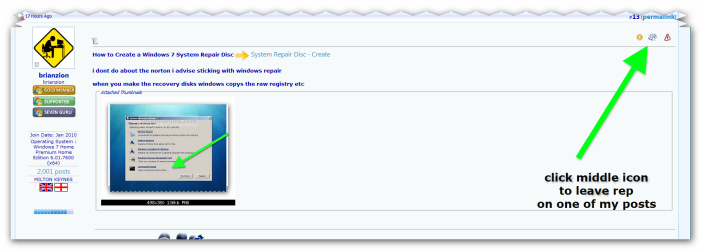
thats very nice of you im always on the forums and i dont mind personal messages glad to help (in the pick if you click on it to enlarge it is how to rep) :)
 

Attachments

  • brys snap ?16 ?December ?2010 14h52m57s.png
    brys snap ?16 ?December ?2010 14h52m57s.png
    59.6 KB · Views: 5

My Computer

Computer Manufacturer/Model Number
packard bell IXTREME M5722
OS
Operating System : Windows 7 Home Premium Edition 6.01.7600 SP1 (x64)
CPU
Processor : Intel Core 2 Quad Q8300 @ 2500 MHz
Motherboard
Mainboard : Packard Bell (Acer EG43M )
Memory
Physical Memory :8GB Corsair4x 2GB 800MHz C5 DDR2
Graphics Card(s)
Video Card : XFX 6700 AMD
Monitor(s) Displays
Maestro 234DL - BenQ V2220 - BenQ VW2420H
Screen Resolution
Current Display :1920x1080p pixels at 60 Hz in HD LED
Hard Drives
Hard Disks : WDC (1000 GB)
Drive C: (Hard Disk) : 428 GB available on 491 GB
Drive D: (Hard Disk) : 426 GB available on 492 GB
SAMSUNG spinpoint HD103SJ 1000.2 GB
(X 2) KINGSTON SSD NOW V 30GB
PSU
XFX ProSeries 550W PSU
Case
PACKARD BELL IXTREME
Cooling
System Blower Current: 150mA Air Flow16CFM ;Akasa 90mm rear
Keyboard
Gigabyte Aivia K8100
Mouse
TRUST-Wireless Laser Mouse - Carbon edition MI-7770C
Internet Speed
TP-LINK > TL-WN951N / AV500 Gigabit Powerline Adapters
Browser
chrome dev
Other Info
EXTRA COOLING>(FAN CONTROLLER) PC Bay Cooler 3 x 40mm fans; Akasa AK-HD-BL Blue hard drive cooler 2 x 40 mm fan 4500 rpm 29.7 dBA
Bios> American Megatrends Inc.
Version : P01-A1
Date : 08/31/2009
Hi Brian

I wanted to let you know after all this mess with my computers, it wasn't Windows afterall. It was Norton Anti Virus that was causing the problem with my entire computer. I guess when I had the power outage, it shut down my computer and caused some files to be damaged and hang up. Since Norton effects everything on the computer, it cause many problems.

I appreciate all your help and the links to other help information on Windows 7. I had no idea all of this help with available. I learned a lot with this issue.

I went online to Norton and did a Scan and somehow it located the damaged files and repaired them. Of course I'm sure all the scans I did using Windows helped too.

Now my laptop is back up and running great.

I appreciate all your help.

Sherry Chilcote
 

My Computer

Computer Manufacturer/Model Number
Acer Aspire 8940G-6865
OS
Windows 7
CPU
Intel Core i7 720QM
Memory
4 GB
Graphics Card(s)
Nvidia
well done glad you sorted it:)
 

My Computer

Computer Manufacturer/Model Number
packard bell IXTREME M5722
OS
Operating System : Windows 7 Home Premium Edition 6.01.7600 SP1 (x64)
CPU
Processor : Intel Core 2 Quad Q8300 @ 2500 MHz
Motherboard
Mainboard : Packard Bell (Acer EG43M )
Memory
Physical Memory :8GB Corsair4x 2GB 800MHz C5 DDR2
Graphics Card(s)
Video Card : XFX 6700 AMD
Monitor(s) Displays
Maestro 234DL - BenQ V2220 - BenQ VW2420H
Screen Resolution
Current Display :1920x1080p pixels at 60 Hz in HD LED
Hard Drives
Hard Disks : WDC (1000 GB)
Drive C: (Hard Disk) : 428 GB available on 491 GB
Drive D: (Hard Disk) : 426 GB available on 492 GB
SAMSUNG spinpoint HD103SJ 1000.2 GB
(X 2) KINGSTON SSD NOW V 30GB
PSU
XFX ProSeries 550W PSU
Case
PACKARD BELL IXTREME
Cooling
System Blower Current: 150mA Air Flow16CFM ;Akasa 90mm rear
Keyboard
Gigabyte Aivia K8100
Mouse
TRUST-Wireless Laser Mouse - Carbon edition MI-7770C
Internet Speed
TP-LINK > TL-WN951N / AV500 Gigabit Powerline Adapters
Browser
chrome dev
Other Info
EXTRA COOLING>(FAN CONTROLLER) PC Bay Cooler 3 x 40mm fans; Akasa AK-HD-BL Blue hard drive cooler 2 x 40 mm fan 4500 rpm 29.7 dBA
Bios> American Megatrends Inc.
Version : P01-A1
Date : 08/31/2009
Back
Top