Windows Live Messenger ( taskbar problem )

shellman

New member
Local time
7:29 PM
Messages
34
I don't know if there is away to configure this. I use Auto hide for the task bar and I want it to be hidden unless I want to open something or go back to a previous window well this app won't let the task bar hide it's an annoying behavior.

Hope it has a way to change that but I still don't find anything in the configurations.
 

My Computer

Computer Manufacturer/Model Number
Acer Aspire 5735
OS
Windows 7 Home Edition 64 bits
CPU
i5
Memory
4GB
Graphics Card(s)
Intel HD graphics
Monitor(s) Displays
16:9
Screen Resolution
1366 X 768
Hard Drives
500GB
Other Info
Laptop
Will this do what you want?

WM.PNG
 

My Computer

Computer Manufacturer/Model Number
HP Pavilion Elite 495UK
OS
Windows 7 Ultimate SP1 64-Bit
CPU
Intel Core i7 870 @ 2.93GHz
Motherboard
MSI 2A9C (CPU1)
Memory
8Gb Dual-Channel DDR3 @ 664MHz
Graphics Card(s)
nVidia GeForce GTX 460 1024MB dedicated RAM
Sound Card
Realtek HD Audio
Monitor(s) Displays
HP2310i
Screen Resolution
1920 x 1080
Hard Drives
1x1954GB Hitachi HDS22020ALA 330 (RAID), 1x1954GB Hitachi External for backup and storage
PSU
460W
Case
HP Elite
Cooling
Air cooled
Keyboard
Logitech K750 solar-powered keyboard
Mouse
Logitech Wireless M180 mouse
Internet Speed
2Mb
Other Info
Pure Avanti Flow Internet Radio with iPod Dock, 64Gb iPod, HP USB Speakers, Sony MDR-V500 Headphones, Sony Vaio F-Series Laptop
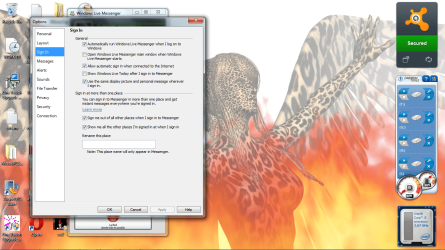
Mine looks different.

WLM_bug.png

But I need to use a IM. :(
 

My Computer

Computer Manufacturer/Model Number
Acer Aspire 5735
OS
Windows 7 Home Edition 64 bits
CPU
i5
Memory
4GB
Graphics Card(s)
Intel HD graphics
Monitor(s) Displays
16:9
Screen Resolution
1366 X 768
Hard Drives
500GB
Other Info
Laptop

My Computer

Computer Manufacturer/Model Number
Acer Aspire 5735
OS
Windows 7 Home Edition 64 bits
CPU
i5
Memory
4GB
Graphics Card(s)
Intel HD graphics
Monitor(s) Displays
16:9
Screen Resolution
1366 X 768
Hard Drives
500GB
Other Info
Laptop
Uncheck the box as seavixen shows you. You can still start WLM from your Start menu.
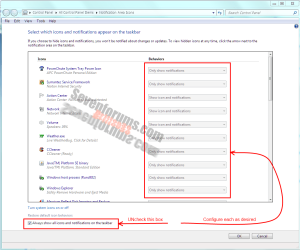
Also configure the Notifications Area for the Taskbar to Hide Notifications.
 

My Computer

Computer type
PC/Desktop
Computer Manufacturer/Model Number
Home Built Desktop By DataTech
OS
Windows 7 Ultimate X64 SP1
CPU
Intel i5-2550K, Differing ~4.4-4.8GHz No built in GPU
Motherboard
ASUS P8Z68-V PRO/GEN3
Memory
16GB G.Skill Sniper 1866MHz @ 2133MHz 2x8GB
Graphics Card(s)
ASUS GTX650TIB-DC2OC-2GD5, (650TI Boost)
Sound Card
Onboard Realtek 5-1
Monitor(s) Displays
Samsung P2570HD
Screen Resolution
1920x1080
Hard Drives
Samsung 840 Pro 256GB SSD for OS, 500GB Seagate Constellation (Enterprise drive) for Data
PSU
Corsair HX650W
Case
Inwin Dragon Rider
Cooling
Hyper 212 EVO w/two Noctua fans, push-pull, @1300 RPM
Keyboard
E-Z Eyes, bright yellow keys with large characters
Mouse
steelseries SENSEI Laser Pro Gaming
Internet Speed
48-51Mbs Mbs down, 11 Mbs up Xfinity Cable
Antivirus
Norton Internet Security 2013
Browser
IE 10, Opera, Pale Moon if needed
Other Info
4 case fans, LG BluRay-RE, ASUS DVD-RW, Mr. Fusion power supply, 1.21 gigawatts.

OK

well his instruction is clear but I only see "Alerts" and no Taskbar related options found.
 

My Computer

Computer Manufacturer/Model Number
Acer Aspire 5735
OS
Windows 7 Home Edition 64 bits
CPU
i5
Memory
4GB
Graphics Card(s)
Intel HD graphics
Monitor(s) Displays
16:9
Screen Resolution
1366 X 768
Hard Drives
500GB
Other Info
Laptop
Sorry shellman, go to Control Panel|Notification Area, un check the box indicated below, then configure each item above it as you like. hopefully this will work.
notif.PNG
 

My Computer

Computer type
PC/Desktop
Computer Manufacturer/Model Number
Home Built Desktop By DataTech
OS
Windows 7 Ultimate X64 SP1
CPU
Intel i5-2550K, Differing ~4.4-4.8GHz No built in GPU
Motherboard
ASUS P8Z68-V PRO/GEN3
Memory
16GB G.Skill Sniper 1866MHz @ 2133MHz 2x8GB
Graphics Card(s)
ASUS GTX650TIB-DC2OC-2GD5, (650TI Boost)
Sound Card
Onboard Realtek 5-1
Monitor(s) Displays
Samsung P2570HD
Screen Resolution
1920x1080
Hard Drives
Samsung 840 Pro 256GB SSD for OS, 500GB Seagate Constellation (Enterprise drive) for Data
PSU
Corsair HX650W
Case
Inwin Dragon Rider
Cooling
Hyper 212 EVO w/two Noctua fans, push-pull, @1300 RPM
Keyboard
E-Z Eyes, bright yellow keys with large characters
Mouse
steelseries SENSEI Laser Pro Gaming
Internet Speed
48-51Mbs Mbs down, 11 Mbs up Xfinity Cable
Antivirus
Norton Internet Security 2013
Browser
IE 10, Opera, Pale Moon if needed
Other Info
4 case fans, LG BluRay-RE, ASUS DVD-RW, Mr. Fusion power supply, 1.21 gigawatts.
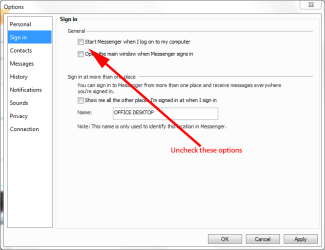
Nope it doesn't appear anything for that there

Thank you so much for your attention! I think WLM is programmed to act like that and every IM in W's does the same.
 

My Computer

Computer Manufacturer/Model Number
Acer Aspire 5735
OS
Windows 7 Home Edition 64 bits
CPU
i5
Memory
4GB
Graphics Card(s)
Intel HD graphics
Monitor(s) Displays
16:9
Screen Resolution
1366 X 768
Hard Drives
500GB
Other Info
Laptop
I have the same problem and i have windows 7 ,it has happend recently.
 

My Computer

OS
windows 7 home premiun 32
I Had the samer problem, [FIXED IT.]

Right click on your taskbar , you should see lock the taskbar un select it and select it.

If it doesn't work do it again but click on windows live messenger and try if it works before you re tick it.:D
 

My Computer

OS
windows 7 home premiun 32
If you have Taskbar set to Auto hide, then all the icons on it will likewise hide too.
 

My Computer

Computer type
PC/Desktop
Computer Manufacturer/Model Number
Home Built Desktop By DataTech
OS
Windows 7 Ultimate X64 SP1
CPU
Intel i5-2550K, Differing ~4.4-4.8GHz No built in GPU
Motherboard
ASUS P8Z68-V PRO/GEN3
Memory
16GB G.Skill Sniper 1866MHz @ 2133MHz 2x8GB
Graphics Card(s)
ASUS GTX650TIB-DC2OC-2GD5, (650TI Boost)
Sound Card
Onboard Realtek 5-1
Monitor(s) Displays
Samsung P2570HD
Screen Resolution
1920x1080
Hard Drives
Samsung 840 Pro 256GB SSD for OS, 500GB Seagate Constellation (Enterprise drive) for Data
PSU
Corsair HX650W
Case
Inwin Dragon Rider
Cooling
Hyper 212 EVO w/two Noctua fans, push-pull, @1300 RPM
Keyboard
E-Z Eyes, bright yellow keys with large characters
Mouse
steelseries SENSEI Laser Pro Gaming
Internet Speed
48-51Mbs Mbs down, 11 Mbs up Xfinity Cable
Antivirus
Norton Internet Security 2013
Browser
IE 10, Opera, Pale Moon if needed
Other Info
4 case fans, LG BluRay-RE, ASUS DVD-RW, Mr. Fusion power supply, 1.21 gigawatts.
Back
Top