windows Live Messenger

theski232

New member
Member
VIP
Local time
8:07 PM
Messages
399
Location
Massachussetts
Windows live messenger always opens on start-up but i have never opened it or plan to use it. Is there any way to stop it from opening on start-up?
 

My Computer

Computer Manufacturer/Model Number
Dell Studio 1749
OS
Windows 7 Home Premium 64 Bit
CPU
Intel i5 2.40GHz
Internet Speed
university ethernet sucks
Hello and Welcome !

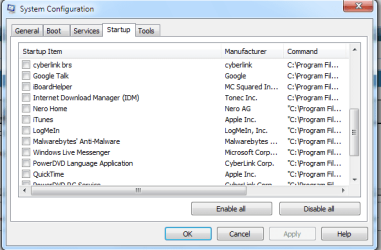
Go to Start | under search type in MSCONFIG | Go to the Start up tab there look for "Windows Live Messenger" and uncheck that and click OK it will Prompt to reboot the System. Just reboot the System.

Capture.PNG

Hope this helps,
Captain
 

My Computer

Computer Manufacturer/Model Number
Samsung NP550P5C-S02IN
OS
Windows 7 Ultimate - 64-bit | Windows 8 Pro - 64-bit
CPU
Intel® Core™ i7 Processor 3,610QM (2.30Hz, 6MB L3 Cach
Memory
8 GB
Graphics Card(s)
NVIDIA® GeForce® GT 650M 2GB Graphics, Optimus™ techno
Sound Card
SoundAlive™ JBL 3 Speakers (With sub-Woofer)
Monitor(s) Displays
39.62cm (15.6) SuperBright 300nit HD+ LED Display
Screen Resolution
1,600 x 900, Anti-Reflective
Hard Drives
1TB S-ATA II Hard Drive (5,400RPM)
thanks, it did work
 

My Computer

Computer Manufacturer/Model Number
Dell Studio 1749
OS
Windows 7 Home Premium 64 Bit
CPU
Intel i5 2.40GHz
Internet Speed
university ethernet sucks
Back
Top