Windows Live Messenger

randycmj98

New member
Local time
10:17 AM
Messages
19
Apparently, when ever I sign in into Windows Live Message used to be a pop up showing that the number of mail at the bottom right corner of my desktop .
Since then, it doesn't appear anymore when ever I sign in or I received Emails .
It's only happen with one of my Windows Live ID account . I have checked the setting . But I still don't have the pop up appearing at my desktop . When I tried using other ID's it does have that pop out appear . Is it something wrong with my computer or Windows Live ID ? Any solution to it ?
 

My Computer

OS
window 7
on my live messenger it show the inbox count under my name at the top of the window
i use messenger plus with third party themes but i still see my mail count.

wlm.png
 

My Computer

Computer Manufacturer/Model Number
Hewlett packard/p6512uk
OS
Microsoft Windows 7 Home Premium 64-bit 7600
CPU
IIx4 amd athelon 635 processor
Motherboard
FOXCONN 2AA9
Memory
2x2gb
Graphics Card(s)
ati radeon HD 5450
Sound Card
(1) Realtek High Definition Audio (2) AMD High Definition
Monitor(s) Displays
samsung lcd tv 32"
Screen Resolution
1360x 768
Hard Drives
(1) WDC WD10 01FAES-60Z2A0 SATA Disk Device (2) Maxtor OneTouch USB Device (3) ST310003 33AS USB Device (4) WD My Book 1111 USB Device
PSU
?
Cooling
air!
Keyboard
wireless hp
Mouse
wireless Hp,optical
Internet Speed
1.10mb/s
Antivirus
MSE
Browser
Firefox
Hi Randy
When you open WLM with this particular ID click on VIEW and see if STATUS BAR is checked or not.
 

My Computer

Computer type
Laptop
Computer Manufacturer/Model Number
HP pavilion DV6
OS
win7 home premium-64bit-SP1-IE10
CPU
T6600 2.2Ghz
Motherboard
HP Model 3628
Memory
4 Gb
Graphics Card(s)
ATI Mobility Radeon HD 4530
Sound Card
IDT High Definition
Screen Resolution
1366x768 @ 60Hz
Hard Drives
500Gb Western Digital
Antivirus
MSE
Other Info
Malwarebytes Antimalware + Spybot-Search&Destroy
I can't find status bar by the way I'm using the new WLM .

PS. Is this thing that doesn't appear on one of my Windows Live ID
lol.jpg
 

My Computer

OS
window 7
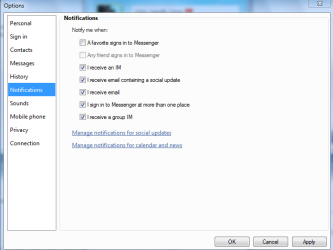
have you checked whether you have un-ticked any of these options in that account?
 

Attachments

  • Capture.PNG
    Capture.PNG
    15.6 KB · Views: 7

My Computer

Computer type
PC/Desktop
Computer Manufacturer/Model Number
Self assembled
OS
Windows 10 Home 64Bit
CPU
Intel Core i5 10400 @ 2.90GHz
Motherboard
Intel Corporation DG41WV (PROCESSOR)
Memory
8.00GB Single-Channel Unknown @ 1329MHz (16-20-20-38)
Sound Card
Realtek High Definition Audio
Monitor(s) Displays
DELL E170S
Screen Resolution
1280x1024 pixels
Hard Drives
931GB TOSHIBA DT01ACA100 (SATA)
238GB TEAM TM8PS7256G (SATA SSD)
Case
Nothing Fancy
Cooling
Fans
Keyboard
A4 Tech Co LTD
Mouse
A4 Tech Co Ltd/Logitech
Internet Speed
25 Mbps
Randy
When you sign-in to WLM tick FILE and hover on GO TO then you can find how many emails you have in your Inbox.
As for your picture, YES that's what you find.
Good luck
 

My Computer

Computer type
Laptop
Computer Manufacturer/Model Number
HP pavilion DV6
OS
win7 home premium-64bit-SP1-IE10
CPU
T6600 2.2Ghz
Motherboard
HP Model 3628
Memory
4 Gb
Graphics Card(s)
ATI Mobility Radeon HD 4530
Sound Card
IDT High Definition
Screen Resolution
1366x768 @ 60Hz
Hard Drives
500Gb Western Digital
Antivirus
MSE
Other Info
Malwarebytes Antimalware + Spybot-Search&Destroy
have you checked whether you have un-ticked any of these options in that account?

Yes . I've it all checked .

Randy
When you sign-in to WLM tick FILE and hover on GO TO then you can find how many emails you have in your Inbox.
As for your picture, YES that's what you find.
Good luck

Okay . It's look weird . I found that when I used other ID's under GO TO it shows 3 options and with the one showing how many emails I have in my inbox .
The current ID's with problem it's only show me 1 option " Email Inbox "
It's doesnt show me how many emails I have :\
 

My Computer

OS
window 7
Back
Top