Windows loading cursor frozen animation

Firestrider

New member
Power User
VIP
Local time
6:52 AM
Messages
333
The loading cursor animation on my laptop freezes for some reason, does anyone know what could cause this?

FYI this is what it looks like:
wib.PNG
 

My Computer

Computer Manufacturer/Model Number
Intel WBIBX10J
OS
Linux (Debian, Android)
CPU
Intel Core i7 860
Motherboard
Intel DP55WB
Memory
2x 2GB Kingston DDR3-1333
Graphics Card(s)
AMD Radeon HD 5750
Sound Card
Realtek ALC888
Monitor(s) Displays
2x Dell Inc. E248WFP
Screen Resolution
3840x1200
Hard Drives
Intel X25-V
Samsung HD103SJ
PSU
Corsair CX400
Case
Silverstone GD05
Cooling
Stock
Keyboard
Dell Inc. Bluetooth Wireless
Internet Speed
30 Mbps
Well do you guys thing this is related to the graphics driver or something else?
 

My Computer

Computer Manufacturer/Model Number
Intel WBIBX10J
OS
Linux (Debian, Android)
CPU
Intel Core i7 860
Motherboard
Intel DP55WB
Memory
2x 2GB Kingston DDR3-1333
Graphics Card(s)
AMD Radeon HD 5750
Sound Card
Realtek ALC888
Monitor(s) Displays
2x Dell Inc. E248WFP
Screen Resolution
3840x1200
Hard Drives
Intel X25-V
Samsung HD103SJ
PSU
Corsair CX400
Case
Silverstone GD05
Cooling
Stock
Keyboard
Dell Inc. Bluetooth Wireless
Internet Speed
30 Mbps
Hi Firestrider, sorry for the late reply.

Have you downloaded & installed the lates driver for your GFX card?
 

My Computer

Computer Manufacturer/Model Number
Compaq Desktop
OS
Windows 7 Ultimate x64
CPU
AMD Sempron Dual Core
Memory
3GB
Graphics Card(s)
NVIDIA GeForce 6150SE nForce 430
Screen Resolution
1024x768
Hard Drives
150GB Sata
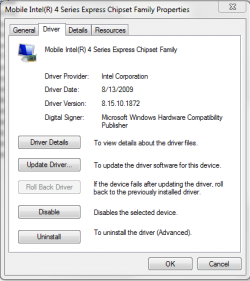
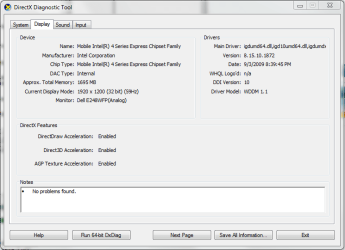
Yes, here are some SS of the driver version:

gfxdriver1.PNG gfxdriver2.PNG
 

My Computer

Computer Manufacturer/Model Number
Intel WBIBX10J
OS
Linux (Debian, Android)
CPU
Intel Core i7 860
Motherboard
Intel DP55WB
Memory
2x 2GB Kingston DDR3-1333
Graphics Card(s)
AMD Radeon HD 5750
Sound Card
Realtek ALC888
Monitor(s) Displays
2x Dell Inc. E248WFP
Screen Resolution
3840x1200
Hard Drives
Intel X25-V
Samsung HD103SJ
PSU
Corsair CX400
Case
Silverstone GD05
Cooling
Stock
Keyboard
Dell Inc. Bluetooth Wireless
Internet Speed
30 Mbps
What exactly is happening when it freezes? Does it completely cr@p out or is it just the cursor?
 

My Computer

Computer Manufacturer/Model Number
Compaq Desktop
OS
Windows 7 Ultimate x64
CPU
AMD Sempron Dual Core
Memory
3GB
Graphics Card(s)
NVIDIA GeForce 6150SE nForce 430
Screen Resolution
1024x768
Hard Drives
150GB Sata
Just the loading animation freezes. Once it is frozen it stays like that until I restart my computer and then after about a minute it would freeze again.

No, the whole system doesn't lock up.
 

My Computer

Computer Manufacturer/Model Number
Intel WBIBX10J
OS
Linux (Debian, Android)
CPU
Intel Core i7 860
Motherboard
Intel DP55WB
Memory
2x 2GB Kingston DDR3-1333
Graphics Card(s)
AMD Radeon HD 5750
Sound Card
Realtek ALC888
Monitor(s) Displays
2x Dell Inc. E248WFP
Screen Resolution
3840x1200
Hard Drives
Intel X25-V
Samsung HD103SJ
PSU
Corsair CX400
Case
Silverstone GD05
Cooling
Stock
Keyboard
Dell Inc. Bluetooth Wireless
Internet Speed
30 Mbps
Switch mouse cursor themes. Boot. Test.

If problem solved, restore cursor theme. Boot. Test.
 
Hello,

I believe I have the same problem as you regarding the freezing cursor. It looks as though you have a Dell computer, and from the chipset, it looks like a laptop.

From my research, I have determined that the ALPS Touchpad driver that Dell uses disables cursor animations. Looks like it has been a problem for quite a while with no fix (that I can find at least) available at this time.

I have tried updating my driver to no avail. I am sorry I couldn't be of more help, but at least you might have a good idea as to what might be wrong.
 

My Computer

Computer Manufacturer/Model Number
Dell Inspiron 1440
OS
Windows 7
CPU
Core 2 Duo T6600 - 2.2GHz
Memory
4 Gig
Graphics Card(s)
Intel x4500MHD
Sound Card
IDT
Monitor(s) Displays
1600x900 LED Backlit
Hard Drives
320 Gb - 5400 RPM
Case
Black
Cooling
Little Bitty Fan
Hello,

I believe I have the same problem as you regarding the freezing cursor. It looks as though you have a Dell computer, and from the chipset, it looks like a laptop.

From my research, I have determined that the ALPS Touchpad driver that Dell uses disables cursor animations. Looks like it has been a problem for quite a while with no fix (that I can find at least) available at this time.

I have tried updating my driver to no avail. I am sorry I couldn't be of more help, but at least you might have a good idea as to what might be wrong.

Yes, this is the conclusion I have come to as well! It's the Dell Touchpad software/driver. This is unfortunate since all the E6500 Dell Latitudes at work use this driver and some people want to disable tap-to-click and enable some gestures.

Thank you for your response.
 

My Computer

Computer Manufacturer/Model Number
Intel WBIBX10J
OS
Linux (Debian, Android)
CPU
Intel Core i7 860
Motherboard
Intel DP55WB
Memory
2x 2GB Kingston DDR3-1333
Graphics Card(s)
AMD Radeon HD 5750
Sound Card
Realtek ALC888
Monitor(s) Displays
2x Dell Inc. E248WFP
Screen Resolution
3840x1200
Hard Drives
Intel X25-V
Samsung HD103SJ
PSU
Corsair CX400
Case
Silverstone GD05
Cooling
Stock
Keyboard
Dell Inc. Bluetooth Wireless
Internet Speed
30 Mbps
Hello,

I believe I have the same problem as you regarding the freezing cursor. It looks as though you have a Dell computer, and from the chipset, it looks like a laptop.

From my research, I have determined that the ALPS Touchpad driver that Dell uses disables cursor animations. Looks like it has been a problem for quite a while with no fix (that I can find at least) available at this time.

I have tried updating my driver to no avail. I am sorry I couldn't be of more help, but at least you might have a good idea as to what might be wrong.

Yes, this is the conclusion I have come to as well! It's the Dell Touchpad software/driver. This is unfortunate since all the E6500 Dell Latitudes at work use this driver and some people want to disable tap-to-click and enable some gestures.

Thank you for your response.

Get the driver here:

Dell Inspiron 1545 laptops driver free download - DELL Drivers Downloads
 

My Computer

Computer Manufacturer/Model Number
Sony Vaio Z46GDU
OS
Windows 7 Ultimate x86-64
CPU
[email protected] 1066MHz FSB
Motherboard
Sony branded
Memory
6GB DDR3 1066MHz
Graphics Card(s)
9300M GS 256MB Dedicated (Speed) + Intel4500MHD (Stamina)
Sound Card
Realtek HD Audio
Monitor(s) Displays
13.1' WXGA
Screen Resolution
1600x900
Hard Drives
320GB 7200RPM w/ 16MB cache
Internet Speed
1MB/s
if your interested here is a link to neowin which claims to have a registry fix for it.
 

My Computer

Computer Manufacturer/Model Number
Dell Inspiron 1545
OS
Windows 7 build 7100 x86
CPU
Intel Core 2 Duo 2.1GHz
Motherboard
GM45 chipset
Memory
3GB
Graphics Card(s)
Intel(TM) Graphics Media Accelerator X4500HD
Sound Card
Realtek HD
Monitor(s) Displays
15.6" WLED 720p
Screen Resolution
1366x768
Hard Drives
320GB 5400rpm hard drive
You're welcome Firestrider.


Thanks to you, antt. I checked out that link and tried what they suggested for the animation problem (I don't have the other problem detailed on that page). The fix worked, the Windows cursor animation now works. The fix has one side effect though, the touchpad custom cursors no longer work. What I mean is that when you use the zoom, scroll, or swirl scroll, the cursor no longer turns into the magnifying glass, scroll arrows, or the curly arrows. The cursor just sits there as the regular Windows arrow. Not a biggy in my book.

Just wanted to pass that along.

Vince
 

My Computer

Computer Manufacturer/Model Number
Dell Inspiron 1440
OS
Windows 7
CPU
Core 2 Duo T6600 - 2.2GHz
Memory
4 Gig
Graphics Card(s)
Intel x4500MHD
Sound Card
IDT
Monitor(s) Displays
1600x900 LED Backlit
Hard Drives
320 Gb - 5400 RPM
Case
Black
Cooling
Little Bitty Fan
Hello, I am having the same issue but I have Sony Vaio laptop
 

My Computer

Computer Manufacturer/Model Number
Sony Viao Laptop
OS
Windows 7 Home Premium
Check out the post by antt, it has a link that will fix the problem. But see my post above about side-effects.

I would not see where the fix wouldn't work for your computer also as long as it uses the same Alps touchpad hardware and driver. But as always, your mileage may very, and messing with the registry can be a messy business. For all I know, the fix may only work for Dells.
 

My Computer

Computer Manufacturer/Model Number
Dell Inspiron 1440
OS
Windows 7
CPU
Core 2 Duo T6600 - 2.2GHz
Memory
4 Gig
Graphics Card(s)
Intel x4500MHD
Sound Card
IDT
Monitor(s) Displays
1600x900 LED Backlit
Hard Drives
320 Gb - 5400 RPM
Case
Black
Cooling
Little Bitty Fan
The site's down for upgrading or something...Same problem, VAIO Notebook. Computer's fine, just the crusor animation.
 

My Computer

OS
I don't know what that means, mate.
Back
Top