windows mail essentials or outlook

a7medo778

New member
Local time
11:01 PM
Messages
24
hi there
i been using wlm or windows mail essentials for more than 2 years now
with 8 email accounts stored i couldnt be happier with it

but i recently got an iphone and after adding my mail accounts their its kinda stupid having to delete the same email once from the iphone and then from the desktop wlm

but after doing some reading i found that through outlook you can overcome this problem by " web access "

is their a solution for this and to keep using wlm ?
if not how can i apply that to the outlook ?

regards
ahmed
 

My Computer

OS
7
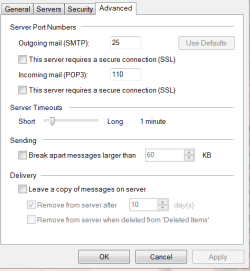
Don't know about the phone but each account in WLM has this Delivery option.

Mail.PNG

Jim :geek:
 

My Computer

Computer type
PC/Desktop
Computer Manufacturer/Model Number
Home Built
OS
Windows 8.1 Pro w/Media Center 64bit, Windows 7 HP 64bit
CPU
Phenom II X6 1100T
Motherboard
ASUS M5A99X EVO
Memory
Crucial Balistic 8gb DDR3-1866 CL9
Graphics Card(s)
MSI R6850 Cyclone IGD5 PE
Sound Card
On Board
Monitor(s) Displays
ASUS VE258Q 25" LED with DVI-HDMI-DisplayPort
Screen Resolution
1920 x 1080
Hard Drives
Two WD Cavier Black 2TB Sata III, WD My Book Essential 2TB USB 3.0
PSU
Seasonic X650 80 Plus GOLD Modular
Case
Corsair 400R
Cooling
Antec Kuhler H2O 620, Two 120mm and four 140mm
Keyboard
Logitech K120
Mouse
Logitech Marble Mouse USB, Logitech Precision Game Pad
Internet Speed
15MB
Antivirus
Norton IS 2013, Malwarebytes Pro Beta 2
Browser
IE-11, FF-27
Other Info
APC UPS ES 750, Netgear WNR3500L Gigabit & Wireless N Router with SamKnows Test Program, Motorola SB6120 Gigabit Cable Modem. Brother HL-2170W Laser Printer, Epson V300 Scanner
mmmm so how is it going to help me ?
my computer and phone is on

the email arrives

both of them are pulling it
i delete it from 1 side.. it will stay at the other side still
 

My Computer

OS
7
If both the phone and WLM have the account set up as pop3, and you do not check the option to "leave mail on server" for either device then the first device you use will download the messages and delete them from the server.

If OTOH both devices have the accounts set up as IMAP then you will be reading (or ignoring) each message on the server individually. Messages won't be saved on either device, but will remain on the email account provider's server until you delete it using either device. After deletion from the server, there are no copies left to view anywhere.

If you want to save the messages on one device, but not the other the "save" device would be set up as pop3 while the other would be set up as IMAP. Deleting it after viewing on either device will make it go away forever also (assuming you're not saving stuff in a "deleted items" folder).

Note: I'm assuming your email account provider offers both IMAP and POP3 service and that the iPhone has the ability to use them the same as a full featured email client like WLM.

EDIT: Just as POP3 uses a deleted items folder as an intermediate location for deletions, IMAP uses the "Purge" command...To remove a message from the IMAP server you must "delete" and then "purge".
 
Last edited:

My Computer

Computer type
PC/Desktop
Computer Manufacturer/Model Number
OQO 2+
OS
Windows 8 Pro w/MC 32-bit
CPU
Intel Atom 1.86 GHz
Motherboard
OQO 2+
Memory
2 GB
Graphics Card(s)
Intel GMA 500
Sound Card
IDT
Monitor(s) Displays
LCD
Screen Resolution
800 x 480 (portable) 1280 x 1024 (docked)
Hard Drives
64 GB SSD
PSU
9 Ah Battery (portable) or OQO Brick (docked)
Case
Shirt Pocket Sized
Cooling
Tiny Fan
Keyboard
Slide out (portable) DiNovo Edge (docked)
Mouse
Eraser head (portable) Logitech Bluetooth (docked)
Internet Speed
WWAN or 802.11G (portable) T1 (docked)
Browser
IE 10
Other Info
DVD-RW OQO Docking Station
I believe what you want will require either an IMAP account or an Exchange account. POP3 won't give you the options you are looking for. I currently use WLM for my personal e-mail, which is an IMAP account, and my corporate e-mail which is using Outlook 2007 as the client. I have both accounts coming into my iPhone, and when I delete anything in either account, it is reflected properly....regardless of where I make the change/deletion.

The key point isn't what mail client you use...it's what type of e-mail account you have.
 

My Computer

OS
Windows 7 Ultimate x64 SP1
CPU
Intel Core i7-2600
Motherboard
Gigabyte GA-P67A-UD3P-B3
Memory
12 GB Patriot Extreme DDR3-1333
Graphics Card(s)
Nvidia GTX 470
Monitor(s) Displays
Dell UltraSharp 2209WA
Hard Drives
OCZ Agility3 240 GB, WD5001AALS, WD7501AALS
PSU
OCZ ModStream 700W
Case
CoolerMaster HAF 912 Advanced
Cooling
CoolerMaster Hyper 212 Plus
WLM

Don't know about the phone but each account in WLM has this Delivery option.

View attachment 108331

Jim :geek:

Hi Jim

I beg to differ with you but I have a WLM account and I do not have that advanced option when I bring up this little box. Why don't I.? I have the newest version of WLM, 2011.

Thanx....Gunny
 

My Computer

Computer Manufacturer/Model Number
PC desktop
OS
win7
CPU
Intel Pent 4 3.2 G
Motherboard
Intel DG965WH
Memory
3G
Graphics Card(s)
Nividia G-force 6600
Sound Card
na
Monitor(s) Displays
Samsung 22"
Hard Drives
1-WD 500G
PSU
600
Keyboard
Microsoft
Mouse
Microsoft
Don't know about the phone but each account in WLM has this Delivery option.

View attachment 108331

Jim :geek:

Hi Jim

I beg to differ with you but I have a WLM account and I do not have that advanced option when I bring up this little box. Why don't I.? I have the newest version of WLM, 2011.

Thanx....Gunny

I right click on my account and select Properties and I get that window.

Jim :cool:
 

My Computer

Computer type
PC/Desktop
Computer Manufacturer/Model Number
Home Built
OS
Windows 8.1 Pro w/Media Center 64bit, Windows 7 HP 64bit
CPU
Phenom II X6 1100T
Motherboard
ASUS M5A99X EVO
Memory
Crucial Balistic 8gb DDR3-1866 CL9
Graphics Card(s)
MSI R6850 Cyclone IGD5 PE
Sound Card
On Board
Monitor(s) Displays
ASUS VE258Q 25" LED with DVI-HDMI-DisplayPort
Screen Resolution
1920 x 1080
Hard Drives
Two WD Cavier Black 2TB Sata III, WD My Book Essential 2TB USB 3.0
PSU
Seasonic X650 80 Plus GOLD Modular
Case
Corsair 400R
Cooling
Antec Kuhler H2O 620, Two 120mm and four 140mm
Keyboard
Logitech K120
Mouse
Logitech Marble Mouse USB, Logitech Precision Game Pad
Internet Speed
15MB
Antivirus
Norton IS 2013, Malwarebytes Pro Beta 2
Browser
IE-11, FF-27
Other Info
APC UPS ES 750, Netgear WNR3500L Gigabit & Wireless N Router with SamKnows Test Program, Motorola SB6120 Gigabit Cable Modem. Brother HL-2170W Laser Printer, Epson V300 Scanner
Hi Jim

I can right click all day and never get the "advanced" option. I understand the live mail by default leaves your mail on the server. So why can't I get that advanced option.? Do you want me to send you a picture to prove what I am saying.? There is no advanced option in my little box.

Thanx...Gunny
 

My Computer

Computer Manufacturer/Model Number
PC desktop
OS
win7
CPU
Intel Pent 4 3.2 G
Motherboard
Intel DG965WH
Memory
3G
Graphics Card(s)
Nividia G-force 6600
Sound Card
na
Monitor(s) Displays
Samsung 22"
Hard Drives
1-WD 500G
PSU
600
Keyboard
Microsoft
Mouse
Microsoft
Hi Jim

I can right click all day and never get the "advanced" option. I understand the live mail by default leaves your mail on the server. So why can't I get that advanced option.? Do you want me to send you a picture to prove what I am saying.? There is no advanced option in my little box.

Thanx...Gunny

Not sure why you don't have that tab. Are you using POP3 or IMAP.
I use POP3 and have the option. Maybe IMAP doesn't.

Jim :cool:
 

My Computer

Computer type
PC/Desktop
Computer Manufacturer/Model Number
Home Built
OS
Windows 8.1 Pro w/Media Center 64bit, Windows 7 HP 64bit
CPU
Phenom II X6 1100T
Motherboard
ASUS M5A99X EVO
Memory
Crucial Balistic 8gb DDR3-1866 CL9
Graphics Card(s)
MSI R6850 Cyclone IGD5 PE
Sound Card
On Board
Monitor(s) Displays
ASUS VE258Q 25" LED with DVI-HDMI-DisplayPort
Screen Resolution
1920 x 1080
Hard Drives
Two WD Cavier Black 2TB Sata III, WD My Book Essential 2TB USB 3.0
PSU
Seasonic X650 80 Plus GOLD Modular
Case
Corsair 400R
Cooling
Antec Kuhler H2O 620, Two 120mm and four 140mm
Keyboard
Logitech K120
Mouse
Logitech Marble Mouse USB, Logitech Precision Game Pad
Internet Speed
15MB
Antivirus
Norton IS 2013, Malwarebytes Pro Beta 2
Browser
IE-11, FF-27
Other Info
APC UPS ES 750, Netgear WNR3500L Gigabit & Wireless N Router with SamKnows Test Program, Motorola SB6120 Gigabit Cable Modem. Brother HL-2170W Laser Printer, Epson V300 Scanner
Hi Jim

I am assuming it is POP3, the reason I am saying I assume this because my original Yahoo mail is POP3. My provider is AT&T/Yahoo, and I have Yahoo mail which is POP3, and my configuration with Outlook is POP3, so I am assuming that Live mail is the same. I have never seen any where in WLM saying it is POP3 though.

I am using 2 computers, both have Win 7, and have about the same setup, minus or plus a few diff programs, and they both have Yahoo, Outlook and WLM on them, plus my wife's computer, she has the same provider, e-mail, and none of the 3 computers has this "advanced" option. Now you figure that one out.

Personally I think it is this new WLM 2011 myself. I have done a lot of reading and there are a lot of people having a ton of problems with this new WLM 2011. To give you an example, as an experiment I opened a new address in WLM, and I sent mail to my self, from both computers and my wife sent me one from her computer and I have not received any mail in that new address yet. I just know if that was the old original live mail that would be working like a champ.

Now do you have any ideas of my I don't have the advanced tab, in all 3 of these computers.

Thanx....Gunny
 

My Computer

Computer Manufacturer/Model Number
PC desktop
OS
win7
CPU
Intel Pent 4 3.2 G
Motherboard
Intel DG965WH
Memory
3G
Graphics Card(s)
Nividia G-force 6600
Sound Card
na
Monitor(s) Displays
Samsung 22"
Hard Drives
1-WD 500G
PSU
600
Keyboard
Microsoft
Mouse
Microsoft
I don't have a clue. I have the latest version of WLM 2011 (Build 15.4.3508.1109) and I have the advanced tab.

Jim :geek:
 

My Computer

Computer type
PC/Desktop
Computer Manufacturer/Model Number
Home Built
OS
Windows 8.1 Pro w/Media Center 64bit, Windows 7 HP 64bit
CPU
Phenom II X6 1100T
Motherboard
ASUS M5A99X EVO
Memory
Crucial Balistic 8gb DDR3-1866 CL9
Graphics Card(s)
MSI R6850 Cyclone IGD5 PE
Sound Card
On Board
Monitor(s) Displays
ASUS VE258Q 25" LED with DVI-HDMI-DisplayPort
Screen Resolution
1920 x 1080
Hard Drives
Two WD Cavier Black 2TB Sata III, WD My Book Essential 2TB USB 3.0
PSU
Seasonic X650 80 Plus GOLD Modular
Case
Corsair 400R
Cooling
Antec Kuhler H2O 620, Two 120mm and four 140mm
Keyboard
Logitech K120
Mouse
Logitech Marble Mouse USB, Logitech Precision Game Pad
Internet Speed
15MB
Antivirus
Norton IS 2013, Malwarebytes Pro Beta 2
Browser
IE-11, FF-27
Other Info
APC UPS ES 750, Netgear WNR3500L Gigabit & Wireless N Router with SamKnows Test Program, Motorola SB6120 Gigabit Cable Modem. Brother HL-2170W Laser Printer, Epson V300 Scanner
I use IMAP for my Google account and delete the emails on my computer that are pushed to my iPhone and they are then deleted on my iPhone without physically deleting them from my iPhone. It works the same in reverse. I can delete emails on my iPhone and those emails no longer show up in my Outlook IMAP account on the computer.

I also use a POP3 account for my Google mail so I can save all of my emails locally. I just hate having a bunch of emails to wade through on my iPhone so I just delete them from the IMAP account in Outlook and they are deleted from the iPhone, as well.

Been doin' it for a number of years.

I love "push" email, only available with IMAP or Exchange or, I guess, some of the Apple offerings.

Sorry I wasn't much help, just tossing in a few cents. Forgive me, please.
 
Last edited:

My Computer

Computer Manufacturer/Model Number
Toshiba L355D
OS
Windows 7 Ultimate x64 SP1
CPU
Core2 Duo
Motherboard
Intel
Memory
4 GB
Graphics Card(s)
GM965 on-board
Sound Card
RealTek on-board
Monitor(s) Displays
19"+17"(laptop)
Screen Resolution
1440x900 (x 2)
Hard Drives
500GB Ext. 200GB Internal
PSU
N/A
Case
N/A
Cooling
N/A
...Now do you have any ideas of my I don't have the advanced tab, in all 3 of these computers...
Among the WLM "Tools" there ought to be an option called "Accounts..." each one of the individual accounts you have set up has a "properties" window...highlight the account your interested in (click on it) then hit the "properties" button. There is only one "properties" button but when clicked it opens the properties window for the highlighted account. There should be several tabs in the properties window, one called "advanced". The prodedure I've described applies all of the free email clients provided by Miscrosft (OE, WM, and WLM). Although I'm still using the version of WLM previous to 2011, the 2011 version should also be able to show you the properties window for each account. However, the Advanced tab for IMAP accounts does not have an option to "leave mail on server" since it is always left there. The option is available on the advanced tab of pop3 accounts since messages are normally deleted from the pop3 server when downloaded, so the option is there to tell it not to delete.
 
Last edited:

My Computer

Computer type
PC/Desktop
Computer Manufacturer/Model Number
OQO 2+
OS
Windows 8 Pro w/MC 32-bit
CPU
Intel Atom 1.86 GHz
Motherboard
OQO 2+
Memory
2 GB
Graphics Card(s)
Intel GMA 500
Sound Card
IDT
Monitor(s) Displays
LCD
Screen Resolution
800 x 480 (portable) 1280 x 1024 (docked)
Hard Drives
64 GB SSD
PSU
9 Ah Battery (portable) or OQO Brick (docked)
Case
Shirt Pocket Sized
Cooling
Tiny Fan
Keyboard
Slide out (portable) DiNovo Edge (docked)
Mouse
Eraser head (portable) Logitech Bluetooth (docked)
Internet Speed
WWAN or 802.11G (portable) T1 (docked)
Browser
IE 10
Other Info
DVD-RW OQO Docking Station
Hi Roncerr

If that is all there is under that advanced tab, (leave mail on the server) then I won't worry about it. This is free WLM all I have ever had since I started using it a couple of years ago. And Yes I know right where you are talking about, I have clicked on that more times then I can count, I know exactly what you are talking about. When I had the older version,(pre 2011) I don't remember if the advanced tab was there or not, it worked so great I probably never had a reason to go there. Up until recently it was always separate form my Yahoo or Outlook mail. But my one week of having Outlook mail with it started this whole thing.

You are probably thinking why is he so bothered by this little problem, and the best way I know to answer that is I have lived my whole life with this one idea, if it is broke fix it, and don't fix if it isn't broke. Well this is broke, and it needs fixing. if it was working right with one computer that would be an easy out, copy what is there and they should all work right, but this is 3 computers that are broke.

I pride my self on being able to use common sense and figure out most problems with my computers, and I am not afraid to ask for help on the problems I can't fix. It is hard to imagine I am the only person that has this problem, really. I am not saying this is a common problem, but of all the thousands of computers out there that this forum reaches, I have to think I am not alone with this problem, maybe not the exact problem but close enough.

I am just shy of getting rid of my WLM mail and start fresh, with a new address and password, and the only thing stopping me is I really think this problem will follow me, what are my odds.?

Thanx....Gunny
 

My Computer

Computer Manufacturer/Model Number
PC desktop
OS
win7
CPU
Intel Pent 4 3.2 G
Motherboard
Intel DG965WH
Memory
3G
Graphics Card(s)
Nividia G-force 6600
Sound Card
na
Monitor(s) Displays
Samsung 22"
Hard Drives
1-WD 500G
PSU
600
Keyboard
Microsoft
Mouse
Microsoft
...If that is all there is under that advanced tab, (leave mail on the server) then I won't worry about it...
Post #2 of this thread shows the properties window of a pop3 account with the contents of its advanced tab showing. "Leave mail..." is only one of the items on that tab. For an IMAP account that item is missing but port numbers and server timeouts are still there. IMAP accounts also have an additional "IMAP" tab. I don't have any http accounts set up, so I set up a test "http" account and discovered its properties window does not have an advanced tab. It only has General, Server, Connection, and Security. Perhaps you're only using http accounts?
 

My Computer

Computer type
PC/Desktop
Computer Manufacturer/Model Number
OQO 2+
OS
Windows 8 Pro w/MC 32-bit
CPU
Intel Atom 1.86 GHz
Motherboard
OQO 2+
Memory
2 GB
Graphics Card(s)
Intel GMA 500
Sound Card
IDT
Monitor(s) Displays
LCD
Screen Resolution
800 x 480 (portable) 1280 x 1024 (docked)
Hard Drives
64 GB SSD
PSU
9 Ah Battery (portable) or OQO Brick (docked)
Case
Shirt Pocket Sized
Cooling
Tiny Fan
Keyboard
Slide out (portable) DiNovo Edge (docked)
Mouse
Eraser head (portable) Logitech Bluetooth (docked)
Internet Speed
WWAN or 802.11G (portable) T1 (docked)
Browser
IE 10
Other Info
DVD-RW OQO Docking Station
Hi roncerr

I guess like so many people I just have always taken this pop3 and imap mail thing for granted, it worked so why bother. Since this happened and getting posts like yours has me really curious now. Is there such a thing as good, better, best with these diff e-mail accounts.? I have done some reading on this http and https that happens to be in the news recently, and that is for security issues.

Now do you know of any site that I can go to that will help me understand these diff accounts and see what they do or don't do. Maybe this will shed some light on my problem.

Thanx....Gunny
 

My Computer

Computer Manufacturer/Model Number
PC desktop
OS
win7
CPU
Intel Pent 4 3.2 G
Motherboard
Intel DG965WH
Memory
3G
Graphics Card(s)
Nividia G-force 6600
Sound Card
na
Monitor(s) Displays
Samsung 22"
Hard Drives
1-WD 500G
PSU
600
Keyboard
Microsoft
Mouse
Microsoft
Hi All

Well I have some good news and some bad news. The good news is it is fixed....:D

And the bad news is I am really really upset with my self, for several diff reasons. I am disappointed in myself for being really stupid, and upset for taking all of you good people's time. And those that want me on their friend list might want to take that offer back, after I tell you how I fixed it. I pride my self in being really thorough in my thinking and, trying things to fix problems. And when I say I have done so in following your suggestions, you can take it to the bank. The only thing that might get in the way of this is if I don't have a clear understanding of your suggestion. I try to keep a smooth running, and bug free computer all the time. And try to fix things before asking for help.

Now here is what I did to fix it. I think I have gone to this page before but I know I did not click on the things I did a little bit ago to solve this problem.

I opened WLM and up on the ribbon the very last item is an Icon with your name, and I clicked on it and one of the selections was View account info, so I did so. Then you have to sign in, and one of the selections down toward the bottom of the page is Windows live options, so I clicked on that and the next page gave you a selection of General, Mail, Spaces and Privacy. So I clicked on Mail, and the next choice was sending and receiving mail from other accounts, and when I clicked on that another page opened and low and behold right in front of my eyes was my Sbcglobal address, and gave you the choice of edit or remove, so I clicked on remove and it asked me if I wanted to do this and I clicked yes. The address went away, so I proceeded to send my self mail, just to see what would happen, and I got the mail in my Outlook mail but not in the WLM like before, it was fixed.

I was even ashamed to tell my wife about this, I could not believe it. I know how much time I have put in, and knowing that makes this really tough to take. And if that is not embarrassing enough just me knowing this, but to have to tell people on a forum, makes it double tough.

Well my apology goes out to all of you that tried helping me on this. :sick: I hate eating Crow..( pass the salt and pepper please )

Thanx.....Gunny

 

My Computer

Computer Manufacturer/Model Number
PC desktop
OS
win7
CPU
Intel Pent 4 3.2 G
Motherboard
Intel DG965WH
Memory
3G
Graphics Card(s)
Nividia G-force 6600
Sound Card
na
Monitor(s) Displays
Samsung 22"
Hard Drives
1-WD 500G
PSU
600
Keyboard
Microsoft
Mouse
Microsoft
Hi Gunny3053

Glad to hear you got it worked out, don't beat yourself up over it just chalk it up to a learning experience, kinda like getting your sea legs been there done that.;)
 

My Computer

Computer Manufacturer/Model Number
Dell XPS 730
OS
Windows 7 Home Premium 64 bit
CPU
Intel Core 2 quad Extreme Q9770 @ 3.2 GHz
Memory
4x2 GB Muskin 1600 MHz ram
Graphics Card(s)
NVidia GTX 250
Sound Card
Soundblaster X-Fi Fatality Champion
Monitor(s) Displays
2 Dell 2007WFP Ultrascans
Screen Resolution
3360 x 1050
Hard Drives
WD Black 1TB sata, 2-WD Black 500 sata, 2-Seagate 500 Go external
PSU
1000 Watt
Cooling
air
Keyboard
MS Natrual Keyboard Pro
Mouse
Logitech Wireless Trackball
Internet Speed
DSL Elite
Hi Bowtie

Thanx for the kind words. If this was not so stupid it would really be funny.

Ya I know we all make mistakes. I guess the important thing is that we learn by our mistakes. Count the day lost you don't learn something.

Great avatar. :)

Thanx...Gunny
 

My Computer

Computer Manufacturer/Model Number
PC desktop
OS
win7
CPU
Intel Pent 4 3.2 G
Motherboard
Intel DG965WH
Memory
3G
Graphics Card(s)
Nividia G-force 6600
Sound Card
na
Monitor(s) Displays
Samsung 22"
Hard Drives
1-WD 500G
PSU
600
Keyboard
Microsoft
Mouse
Microsoft
...Windows live options, so I clicked on that and the next page gave you a selection of General, Mail, Spaces and Privacy. So I clicked on Mail, and the next choice was sending and receiving mail from other accounts...
When doing the above, you do not need WLM (the downloaded program) at all. Microsoft has created a lot of confusion by naming everything "Live", especially two different ways for people to get their email. "mail.live.com" is a website where you view the mail in your Hotmail account using your browser. By default it's the email account that came with your "Live ID". But Microsoft wanted people to be able to get all their mail (even from other email service providers) through the Hotmail website, so they added this function to the website accessible through your Live account.

However, if you are one of the people who prefers to use a client email program like WLM, instead of a web browser viewing Hotmail, you can add any accounts you have directly to the program. If you do, then your WLM program (not Hotmail) goes directly to your email service provider for that account to get your mail. That's what we were talking about when we were referring to "Accounts" in WLM. What you were doing was viewing your email by first having Hotmail retrieve it and then you viewed it with your Hotmail account (http) using WLM. As we discovered, http accounts don't have an advanced tab. If you add your other (non-Hotmail) account to WLM directly you will most likely be setting it up as a pop3 or IMAP account which will have an advanced tab and a properties window all existing and visible only within WLM.
 

My Computer

Computer type
PC/Desktop
Computer Manufacturer/Model Number
OQO 2+
OS
Windows 8 Pro w/MC 32-bit
CPU
Intel Atom 1.86 GHz
Motherboard
OQO 2+
Memory
2 GB
Graphics Card(s)
Intel GMA 500
Sound Card
IDT
Monitor(s) Displays
LCD
Screen Resolution
800 x 480 (portable) 1280 x 1024 (docked)
Hard Drives
64 GB SSD
PSU
9 Ah Battery (portable) or OQO Brick (docked)
Case
Shirt Pocket Sized
Cooling
Tiny Fan
Keyboard
Slide out (portable) DiNovo Edge (docked)
Mouse
Eraser head (portable) Logitech Bluetooth (docked)
Internet Speed
WWAN or 802.11G (portable) T1 (docked)
Browser
IE 10
Other Info
DVD-RW OQO Docking Station
Back
Top