windows mail for windows 7

phillipcc

New member
Local time
6:44 AM
Messages
10
hi can anyone tell me how i can get windows mail for windows 7 i liked it in vista but microsoft have murdered the only decent email program i would sooner use it than any other program worse case scenario i will revert to some software i use nearly 4 years ago at least its better than the rubbish windows live mail actually anything would be better but id prefer windows mail any help would be most appreciated
thanks
phillip
 

My Computer

Computer Manufacturer/Model Number
dell laptop
OS
windows 7
Memory
4 gig
Monitor(s) Displays
laptop display
Hard Drives
internal 160 3 external
Internet Speed
broadband
Don't think you can get it anymore, I hate Live mail as it can't do messasge rules but I found a way to get them back, I setup Outllook Connector for Outlook 2007 to receive my live.co.uk messages.
 

My Computer

Computer type
PC/Desktop
Computer Manufacturer/Model Number
Self Built
OS
Windows 7 Home Premium (64 bit)
CPU
Intel I5 2500K 3.3Ghz Stock
Motherboard
Asus P8H 61-M LE USB 3
Memory
8Gig Kingston DDRIII HyperX Blue 1333 Mhz
Graphics Card(s)
AMD Sapphire 7870 2GB
Sound Card
Creative Fatality Pro
Monitor(s) Displays
27" BENQ LED
Screen Resolution
1920X1080
Hard Drives
1 x OCZ Agility 3 120GB SSD
1 x Seagate 250GB
1 x Western Digital 1000GB
1 x HP 500GB
PSU
700W Coolermaster Stealth Pro etc
Case
Coolermaster Scout
Cooling
Some fans
Keyboard
Some Logitech type.
Mouse
Logitech MX518
Internet Speed
Wireless 8mb
Other Info
Canon Scanner
Epson Printer
Nikon DSLR 3000
Wacom Tablet
This question has been asked a few times. We have a tutorial here and how to reinstate Windows Mail.
 

My Computer

Computer Manufacturer/Model Number
self built
OS
Windows 7 Professional 64-bit
CPU
Intel E8400 3GHz
Motherboard
Intel DX48BT2
Memory
Kingston PC3-10700H 4Gb
Graphics Card(s)
XFX Radeon HD 5850 BlackEd.
Sound Card
Asus Xonar DG
Monitor(s) Displays
2x Samsung SM-T220HD 22"
Screen Resolution
1680x1050 on two monitors
Hard Drives
OCZ Vertex 2 120gb 3.5" (OS)
Seagate Momentus XT 500gb
Samsung F3 1Tb (games)
2x Samsung F1 1Tb
PSU
Thermaltake ToughPower 850w
Case
Thermaltake Armor
Cooling
Scythe Mugen II
Keyboard
Microsoft Comfort Curve USB
Mouse
Razer Diamondback 3G
Internet Speed
8128/443
That's a link for Vista Windows Mail if peeps can't get it....

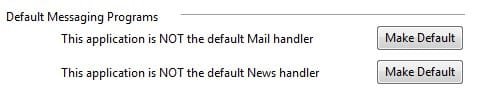
Thanks for the info Swarf :) By the way any way you can set it as default mail handler I can't figure it out :( it just keeps reverting to this
 

Attachments

  • Clipboard01.jpg
    Clipboard01.jpg
    7.4 KB · Views: 29
Last edited:

My Computer

Computer type
PC/Desktop
Computer Manufacturer/Model Number
Self Built
OS
Windows 7 Home Premium (64 bit)
CPU
Intel I5 2500K 3.3Ghz Stock
Motherboard
Asus P8H 61-M LE USB 3
Memory
8Gig Kingston DDRIII HyperX Blue 1333 Mhz
Graphics Card(s)
AMD Sapphire 7870 2GB
Sound Card
Creative Fatality Pro
Monitor(s) Displays
27" BENQ LED
Screen Resolution
1920X1080
Hard Drives
1 x OCZ Agility 3 120GB SSD
1 x Seagate 250GB
1 x Western Digital 1000GB
1 x HP 500GB
PSU
700W Coolermaster Stealth Pro etc
Case
Coolermaster Scout
Cooling
Some fans
Keyboard
Some Logitech type.
Mouse
Logitech MX518
Internet Speed
Wireless 8mb
Other Info
Canon Scanner
Epson Printer
Nikon DSLR 3000
Wacom Tablet
Enabling Windows Mail in Windows 7

I found this elsewhere and I have no idea if it even works as I do not have Windows 7 installed yet, but I will give it a try. I hope this helps everyone if it's true.
Regards to all.
franmere
=================================================


Enabling Windows Mail in Windows 7
Some people Running the Windows 7 Pre Beta 6801 have been asking about Windows Mail in Windows seven
and where they can find it.

The strange thing is it is there but it's hidden and doesn't do anything when you click on it, although you will see it in task manager, so if you do want Windows Mail this is what you have to do.

First go to folder options and deselect hide protected operating system files and do not show hidden files, you will now be able to see the Windows Mail executable file which was previously hidden.

Next go to your programs folder and Windows Mail folder and take Ownership of all the files in there, you will need to do this one file at a time and Don't Forget to Give Yourself FULL CONTROL of each file.

Just in case there is another fix for this in the Future you may want to make a copy of this folder and keep it somewhere

Once you have taken ownership and given yourself full control copy all your files from Vista's Windows Mail folder and paste and replace ALL of the files in Windows 7 Mail folder.

That's it and DON'T try to click on the Original Hidden WinMail.exe file, if you do you will not be able to replace it, as it will run and you wont see anything but you will still need to kill the process in task manager.

 

My Computer

OS
vista

My Computer

Computer type
PC/Desktop
Computer Manufacturer/Model Number
Acer M5641
OS
Windows 7 Home Premium 64bit
CPU
Q6600
Motherboard
Nvidia MCP73PV
Memory
4GB.
Graphics Card(s)
Sapphire Vapor-X 5750
Sound Card
XFI Extreem music
Monitor(s) Displays
Acer X223W
Screen Resolution
1680x1050
Hard Drives
WD10 02FAEX
WD64 00AAKS
PSU
stock 450w
Case
acer
Cooling
stock
Keyboard
Microsoft Digital Media Pro.
Mouse
Logitech MX620
Internet Speed
49.51Mbs down 4.98Mbs up 17.6ms ping
Antivirus
MSE
Browser
Waterfox
Other Info
Shaw Cable
Netgear R6200
Back
Top