Windows Mail Program on Pc .. Message Rules Stopped Working

jo69

New member
Local time
10:34 PM
Messages
37
I have always used Message Rules in my Windows Mail Program (not the web one)

However it was a Pop account
Now I have changed my internet provider and deleted that account

I have now added a Gmail IMAP Account to Windows Mail

But cannot seem to get it to set the message rules where I get emails to be highlighted in different colours for each sender

Is it still possible please? :shock:
 

My Computer

Computer type
PC/Desktop
Computer Manufacturer/Model Number
HP
OS
Windows 7 Home Premium 64bit
Hi jo69, welcome to Seven Forums.
I have never attempted to do what you do but, I do use Gmail in WLM 2012 using POP, why not change from IMAP to POP, it worked for you in the past.
 

My Computer

Computer Manufacturer/Model Number
Look in my Signature.
OS
Win7 H.Prem. 32bit+SP1
According to the information in msg rules: You cannot apply rules to IMAP (or HTTP -> hotmail) accounts.

You can however do as Roderunner suggests and revert to POP3 for Gmail.


In WLM,
  1. disable (untick include this account when receiveing or synchronizing) the IMAP account (options eMail accounts)
  2. create a new eMail account and manually configure it as POP3
    https://support.google.com/mail/troubleshooter/1668960?hl=en#ts=1665119
    On the link -click on the I want to enable POP radio button and then click on the Windows Mail radio button
 

My Computer

Computer type
Laptop
Computer Manufacturer/Model Number
HP Pavilion dv6-6c10us
OS
x64 (6.3.9600) Win8.1 Pro & soon dual boot x64 (6.1.7601) Win7_SP1 HomePrem
CPU
AMD A6-3420M APU with Radeon(tm) HD Graphics
Motherboard
Hewlett-Packard 1805
Memory
6.00 GB
Graphics Card(s)
AMD Radeon(TM) HD 6520G
Sound Card
(1) AMD High Definition Audio Device (2) IDT High Definiti
Monitor(s) Displays
HP W2072a 20" LCD (1600 x 900) @ 60 Hz
Screen Resolution
1366 x 768 x 32 bits (4294967296 colors) @ 60 Hz
Hard Drives
ST640LM0 00 HM641JI SATA Disk Device
Keyboard
Logitech k520 wireless KB
Mouse
Logitech m320 wireless mouse (bundled with KB)
Internet Speed
15/5 | 54 MB Wireless 'n'
Antivirus
Realtime: Defender or Avast | On-demand: Malwarebytes, ESET
Browser
IE 11 on Win8, IE 10 on win 7
Other Info
Media: [Gimp, Audacity, VLC] || Comm: [WEmail 2012, Skype] || Productivity: [OpenOffice,| Textpad] || Utils: [Sysinternals, cCleaner, Speccy, Defraggler]
Hi jo69, welcome to Seven Forums.
I have never attempted to do what you do but, I do use Gmail in WLM 2012 using POP, why not change from IMAP to POP, it worked for you in the past.

Thanks
But can I do that?
Need some help there

I have changed my internet account and now added a Gmail Account to the Windows Mail program (not web one) on my pc
I set it up as Imap as was told that I needed to do that, to be able read my email on my tablet and phone while I was out and about
Is that correct?

I have also got a second Gmail account forwarded as Imap to this account

Is this the correct way?

Would still like to be able to use message rules though
But not if it messes up other things:(
 

My Computer

Computer type
PC/Desktop
Computer Manufacturer/Model Number
HP
OS
Windows 7 Home Premium 64bit
Thanks
But can I do that?
Need some help there

I have changed my internet account and now added a Gmail Account to the Windows Mail program (not web one) on my pc
I set it up as Imap as was told that I needed to do that, to be able read my email on my tablet and phone while I was out and about
Is that correct?

I have also got a second Gmail account forwarded as Imap to this account

Is this the correct way?

Would still like to be able to use message rules though
But not if it messes up other things:(

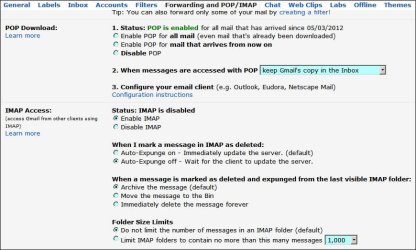
Set both your Gmail Accounts to have POP & IMAP enabled.
Both accounts can be added to WLM using POP, their is no need to forward one to the other.
Use IMAP to access your mail on your tablet & phone.
Set both accounts like this:-

RR.JPG

This zip file will show you how, read the pdf first. Remember these are my settings. View attachment WLM Option Settings.zip
 

My Computer

Computer Manufacturer/Model Number
Look in my Signature.
OS
Win7 H.Prem. 32bit+SP1
Thank you Roderunner

That sounds very clear Why cant all forums have simple posts lol

Didn't know I could have pop and Imap too
Don't I have to enter a forwarding address at all?
Double dutch to me

So I just added both Gmail accounts to my windows mail then? Then I can use message rules also for both accounts?

Will they both show up in the main mail window?
 

My Computer

Computer type
PC/Desktop
Computer Manufacturer/Model Number
HP
OS
Windows 7 Home Premium 64bit
Hi jo69, when you have added both Gmail accounts to WLM, you can right click an account then select the colour you want to use.
Only the default account will be selected on opening WLM, select the other one to read it's messages.
When replying to or sending mail, your default account will be selected automatically but can be changed easily. You'll see what I mean when you try it.
 

My Computer

Computer Manufacturer/Model Number
Look in my Signature.
OS
Win7 H.Prem. 32bit+SP1
Didn't know I could have pop and Imap too
Don't I have to enter a forwarding address at all?
Double dutch to me

So I just added both Gmail accounts to my windows mail then? Then I can use message rules also for both accounts?

Will they both show up in the main mail window?
YES
I don't know why you needed 2 Gmail accounts, but for whatever reason, I suggest keeping them separate i.e. NO FORWARDING.
P.S. I don't use message rules.
 

My Computer

Computer Manufacturer/Model Number
Look in my Signature.
OS
Win7 H.Prem. 32bit+SP1
Hi jo69,
My previous image was (in my opinion) not very clear / correct but I think you got it done correctly, just in case, this is how it should have been.

Gmail.JPG
 

My Computer

Computer Manufacturer/Model Number
Look in my Signature.
OS
Win7 H.Prem. 32bit+SP1
Oh drat lol Just printed it out to save
Changing to Pop instead of Imap in the gmail in windows mail doesn't seem to let me access all my mail on my phone and tablet though as before

On google it says use Imap if you have a pc tablet and phone
But as I say I want message rules also
 

My Computer

Computer type
PC/Desktop
Computer Manufacturer/Model Number
HP
OS
Windows 7 Home Premium 64bit
If you set Gmail exactly as in my #9 post image, all should work.
 

My Computer

Computer Manufacturer/Model Number
Look in my Signature.
OS
Win7 H.Prem. 32bit+SP1
Back
Top