Windows Mail Stationery

My Computer

Computer Manufacturer/Model Number
HP Pavillion dv-7 1005 Tx
OS
Win 8 Release candidate 8400
CPU
[email protected]
Memory
4 gigs
Graphics Card(s)
Nvidia 9600M
Sound Card
HD built-in
Monitor(s) Displays
17" Wxga
Screen Resolution
1440x900
Cooling
none
Internet Speed
45Mb down 5Mb up
Sorry... zigzag3143 ... I should have posted the fact I'm running Windows7 Pro 64 bit.
Does this mean that I'm "out of Luck" getting any additional stationery for Windows Live Mail ?
 

My Computer

OS
Windows 7
Sorry... zigzag3143 ... I should have posted the fact I'm running Windows7 Pro 64 bit.
Does this mean that I'm "out of Luck" getting any additional stationery for Windows Live Mail ?


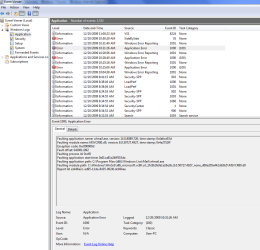
No I am curious why it didnt work for you. I have an idea. You can type eventvwr in seaerch and go tot hein windows log>application tab. see if there are any errors ( they have red in the left h and column). You are looking for something that has app hang, app crash, or WLM in their listing. When you fin them use the snipping tool (built in to win 7 ) to take a scrfeen shot and the attachment icon (shaped like a paperclip) in the reply form to upload it to us.

Se pics

Ken J+
 
Last edited:

My Computer

Computer Manufacturer/Model Number
HP Pavillion dv-7 1005 Tx
OS
Win 8 Release candidate 8400
CPU
[email protected]
Memory
4 gigs
Graphics Card(s)
Nvidia 9600M
Sound Card
HD built-in
Monitor(s) Displays
17" Wxga
Screen Resolution
1440x900
Cooling
none
Internet Speed
45Mb down 5Mb up
Trust this is what you are looking for..
 

Attachments

  • Capture.PNG
    Capture.PNG
    35.1 KB · Views: 184

My Computer

OS
Windows 7
Hi Ken J+ ... any thoughts after looking at the above ?
 

My Computer

OS
Windows 7
Discovered something

I discovered that Downloaded Stationary that is in a single file folder will work correctly.. example Flowers also Nature.
However Stationery that is in a folder inside another folder will crash Windows Live Mail.... example, folder Holidays contains another folder called Christmas ... or.. the folder for Special Occasions & Invitations contains another folder called Birthdays.
Can this problem be solved by simply removing the Christmas folder and the Birthday folder from their respective folders and placing them under Stationery and deleting the now empty folders "Holidays" and "Special Occasions & Invitations".
Because I'm running 64bit I also get the following attached screen.
 

Attachments

  • stationeryCapture.PNG
    stationeryCapture.PNG
    13.7 KB · Views: 17

My Computer

OS
Windows 7
Back
Top