Windows Mail

TheIgster

AV Aficionado
Pro User
Local time
5:16 PM
Messages
408
I know there have been a few threads about this and I have searched through them and tried just about everything I can think of so I though I would post if someone has had the same issues.

With the RTM, I had Windows Mail (not Windows Live Mail - in your default browser). I had the actual Windows Mail program up and running, so whenever I clicked the mail icon in Messenger, I could open Windows Mail and use it.

Now, after installing Windows 7 after purchasing , I cannot for the life of me get Windows Mail back. I even saved the old Mail.msi file that I had previously and installed it after installing Messenger, but no go.

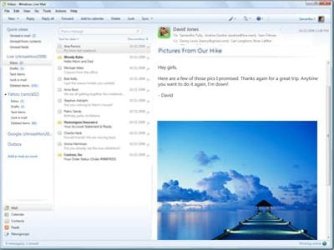
If you go right now to the Microsoft page about Windows mail, there is a screen shot there of the actual Windows Mail app. You can download from there, but it ends up being Windows Live Mail in the browser.

There seem to be 3 folders, Program Files (x86)\Windows Mail, Program Files\Windows Mail and Program Files (x86)\Windows Live\Mail. Not sure which one it's using.

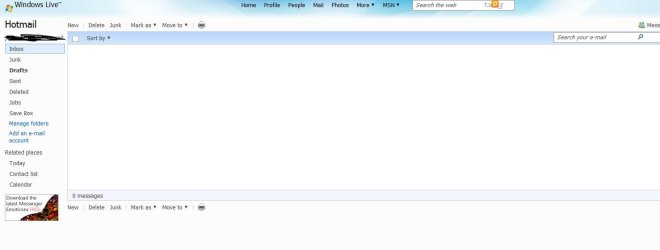
First screen shot below is from the Microsoft web page, the second is what I get when I click email in Messenger. Can someone help? I can't stand having my Hotmail in a browser like this, the Windows Mail app is so much better. :(
 

Attachments

  • Capture.JPG
    Capture.JPG
    23.5 KB · Views: 54
  • Capture2.JPG
    Capture2.JPG
    38.7 KB · Views: 21

My Computer

Computer Manufacturer/Model Number
HP
OS
Windows 7 Home Premium 64-bit
CPU
Intel Core2 Quad Q6600 @ 2.40 Ghz
Memory
8GB RAM
Graphics Card(s)
ATI Radeon HD 4600
Monitor(s) Displays
HP w2007
Screen Resolution
1680 x 1050
Hard Drives
700 GB
Windows 7 doesn't include an email program anymore. You can do like I did and copy the Windows Mail folder from Vista over to Windows 7.
 

My Computer

Computer Manufacturer/Model Number
Self Build
OS
Windows 7 Ultimate 64bit
CPU
Intel Xeon 3110 (Same as Core 2 Duo E8400) 3.0Ghz @ 3.6Ghz
Motherboard
Gigabyte EX38-DS4
Memory
8GB G. Skill PC2-8500
Graphics Card(s)
PALiT GeForce 9600 GT PCI Express 2.0
Sound Card
OnBoard - Realtek ALC889A High Definition Audio
Monitor(s) Displays
Dell 24" LCD
Screen Resolution
1920x1200
Hard Drives
Western Digital VelociRaptor WD3000GLFS - 300GB | Western Digital Caviar SE16 WD7500AAKS - 750GB | LaCie d2Next-Quadra external - 1TB
PSU
Corsair HS620W
Case
Lian Li PC-V1100b Plus II
Cooling
Thermalright Ultra 120 eXtreme
Keyboard
Logitech
Mouse
Logitech MX Laser
Internet Speed
SLOW - HughesNet Satellite Internet - SUCKS!
Windows 7 doesn't include an email program anymore. You can do like I did and copy the Windows Mail folder from Vista over to Windows 7.

Yes, I know this, hence my post. Thats the point, I tried that and still no go. Also, like I mentioned, there are 3 different folders. Which one does it use? Again, I had it working just fine with the RTM before installing my purchased copy of Windows 7 and used the same installer I used before, but still no go.

Not sure why Windows Mail is installed in 3 different places and why this is such a mess. I had a buddy send me his Windows Mail folder, tried overwriting every folder and still no go.

Anyone?
 

My Computer

Computer Manufacturer/Model Number
HP
OS
Windows 7 Home Premium 64-bit
CPU
Intel Core2 Quad Q6600 @ 2.40 Ghz
Memory
8GB RAM
Graphics Card(s)
ATI Radeon HD 4600
Monitor(s) Displays
HP w2007
Screen Resolution
1680 x 1050
Hard Drives
700 GB
Did your buddy send you the 32bit or 64bit version of Windows Mail from Vista? The 32bit version would go in Program Files (x86)\Windows Mail. 64bit goes in Program Files\Windows Mail.

Ok, first take ownership of the Windows Mail folder in Windows 7. Then you can replace it with the one from Vista. Then make a shortcut to the Program Files\Windows Mail\winmail.exe executable. Rename shortcut to Windows Mail. Should work ok. Did for me.
 

My Computer

Computer Manufacturer/Model Number
Self Build
OS
Windows 7 Ultimate 64bit
CPU
Intel Xeon 3110 (Same as Core 2 Duo E8400) 3.0Ghz @ 3.6Ghz
Motherboard
Gigabyte EX38-DS4
Memory
8GB G. Skill PC2-8500
Graphics Card(s)
PALiT GeForce 9600 GT PCI Express 2.0
Sound Card
OnBoard - Realtek ALC889A High Definition Audio
Monitor(s) Displays
Dell 24" LCD
Screen Resolution
1920x1200
Hard Drives
Western Digital VelociRaptor WD3000GLFS - 300GB | Western Digital Caviar SE16 WD7500AAKS - 750GB | LaCie d2Next-Quadra external - 1TB
PSU
Corsair HS620W
Case
Lian Li PC-V1100b Plus II
Cooling
Thermalright Ultra 120 eXtreme
Keyboard
Logitech
Mouse
Logitech MX Laser
Internet Speed
SLOW - HughesNet Satellite Internet - SUCKS!

My Computer

Computer Manufacturer/Model Number
Self Build
OS
Windows 7 Ultimate 64bit
CPU
Intel Xeon 3110 (Same as Core 2 Duo E8400) 3.0Ghz @ 3.6Ghz
Motherboard
Gigabyte EX38-DS4
Memory
8GB G. Skill PC2-8500
Graphics Card(s)
PALiT GeForce 9600 GT PCI Express 2.0
Sound Card
OnBoard - Realtek ALC889A High Definition Audio
Monitor(s) Displays
Dell 24" LCD
Screen Resolution
1920x1200
Hard Drives
Western Digital VelociRaptor WD3000GLFS - 300GB | Western Digital Caviar SE16 WD7500AAKS - 750GB | LaCie d2Next-Quadra external - 1TB
PSU
Corsair HS620W
Case
Lian Li PC-V1100b Plus II
Cooling
Thermalright Ultra 120 eXtreme
Keyboard
Logitech
Mouse
Logitech MX Laser
Internet Speed
SLOW - HughesNet Satellite Internet - SUCKS!

My Computer

Computer Manufacturer/Model Number
Self Build
OS
Windows 7 Ultimate 64bit
CPU
Intel Xeon 3110 (Same as Core 2 Duo E8400) 3.0Ghz @ 3.6Ghz
Motherboard
Gigabyte EX38-DS4
Memory
8GB G. Skill PC2-8500
Graphics Card(s)
PALiT GeForce 9600 GT PCI Express 2.0
Sound Card
OnBoard - Realtek ALC889A High Definition Audio
Monitor(s) Displays
Dell 24" LCD
Screen Resolution
1920x1200
Hard Drives
Western Digital VelociRaptor WD3000GLFS - 300GB | Western Digital Caviar SE16 WD7500AAKS - 750GB | LaCie d2Next-Quadra external - 1TB
PSU
Corsair HS620W
Case
Lian Li PC-V1100b Plus II
Cooling
Thermalright Ultra 120 eXtreme
Keyboard
Logitech
Mouse
Logitech MX Laser
Internet Speed
SLOW - HughesNet Satellite Internet - SUCKS!
Hi TheIgster

Just gone through the transposition to windows mail myself on 64x using the tutorials that are placed here on the forums and all went smooth. You just need to transfer the necessary files accross to the programs file folder. Ensure you take ownership of the files first and ensure that the files come from a 64x vista box.
 

My Computer

Computer Manufacturer/Model Number
Custom - PC Specialist
OS
Windows 7/Linux
CPU
Athlon 64 x2 6000+
Motherboard
ASUS M3N78 PRO
Memory
4Gb Dual Channel
Graphics Card(s)
Geforce 8400
Sound Card
On Board
Monitor(s) Displays
BenQ G2222HDL
Screen Resolution
1920x1080
Hard Drives
1Gb Spinpoint F3/740Gb Western Digital
640Gb Western Digital
PSU
National Grid
Case
Yes
Cooling
Stock Cooler
Keyboard
Saitek Eclipse II
Mouse
Microsoft Laser Mouse
Internet Speed
50Mb
Windows 7 doesn't include an email program anymore. You can do like I did and copy the Windows Mail folder from Vista over to Windows 7.

Yes, I know this, hence my post. Thats the point, I tried that and still no go. Also, like I mentioned, there are 3 different folders. Which one does it use? Again, I had it working just fine with the RTM before installing my purchased copy of Windows 7 and used the same installer I used before, but still no go.

Not sure why Windows Mail is installed in 3 different places and why this is such a mess. I had a buddy send me his Windows Mail folder, tried overwriting every folder and still no go.

Anyone?
Do a search on ms web site, Windows live mail desktop. You will get what you want, I have it on my desktop works good just like windows mail, its not in the browser its on your pc.
 

My Computer

Computer Manufacturer/Model Number
Gateway GT5692
OS
Windows 7 Ulti. x64
CPU
AMD Phenom 8450 triple-core 2.10 ghz
Memory
4GB
Graphics Card(s)
ATI Radion HD 3200
Monitor(s) Displays
Gateway FPD1775W
Screen Resolution
1280x720
Hard Drives
465.6613 Gibibytes
Well, I played around some more and finally got it to work. Not sure how, but it's working now. I have a couple of WinMail.exe files on my system and a wlmail.exe in the Program Files (x86)\Windows Live\ folder. I double clicked this file and got Windows Mail to start. Once started, it seems to associate itself with Messenger so when I click the mail icon in Messenger, it opens this instead of a browser.

Not sure why this has to be such a pain. The wlmail.exe file is dated July 26/09 so it's not like it's old or from Vista from what I can see.
 

My Computer

Computer Manufacturer/Model Number
HP
OS
Windows 7 Home Premium 64-bit
CPU
Intel Core2 Quad Q6600 @ 2.40 Ghz
Memory
8GB RAM
Graphics Card(s)
ATI Radeon HD 4600
Monitor(s) Displays
HP w2007
Screen Resolution
1680 x 1050
Hard Drives
700 GB
OK...I had a Vista 32 Windows Mail. When I installed Windows 7 I went with the 64 bit version. I can't get the Windows Mail to work. I've tried (I think) to do what the tutorial said but when I try to open Windows Mail my machine hangs and I have to hit the reset button to start over. Is there any way I can get Windows Mail to work?
 

My Computer

Computer Manufacturer/Model Number
home built
OS
Windows 7 Professional x64
CPU
AMD Athlon 64 X2 6000 3.1GHz
Motherboard
Asus M3A78-EM
Memory
G.SKILL 4GB (2 x 2GB) 240-Pin DDR2 SDRAM DDR2 800 (PC2 6400)
Graphics Card(s)
ATI Radeon HD4350 512mb
Sound Card
on board
Monitor(s) Displays
Samsung SyncMaster 206bw
Screen Resolution
1680x1050
Hard Drives
Seagate 250gb
WD 160gb
WD 250gb USB
Maxtor 40gb (backup)
PSU
Thermaltake PurePower 500watt
Case
Apevia
Cooling
2x120 case fans
Keyboard
wireless Logitech
Mouse
wireless Logitech
Internet Speed
DSL (best I can do in the boonies)
Other Info
Lord make my word sweet, in case I have to eat them later...
The absolutely best advice I can give...Forget about Windows Mail, Outlook Express and what not. Take the time NOW to move away because it is only going to get harder from here on out. Windows Mail and Outlook Express are going the way of the Doodo bird, you'll be luck of future updates don't break them.

Just move on, adapt to change and forget about them...best advice I have.
 

My Computer

Computer type
PC/Desktop
Computer Manufacturer/Model Number
Alienware Aurora ALX R4
OS
Windows 10 Pro (x64)
CPU
Intel Core i7-3930K (3.2GHz - 4.5GHz)
Motherboard
Alienware Aurora-R4 x79
Memory
4x Samsung 4GB PC3-12800 DDR3 (16GB 1600MHz)
Graphics Card(s)
Nvidia Geforce GTX 690
Sound Card
SteelSeries Siberia Elite
Monitor(s) Displays
Dell UltraSharp U3011
Screen Resolution
2560x1600
Hard Drives
Samsung 850 Pro 256 GB, Seagate 1TB Desktop Hybrid HDD, 2x Western Digital 4TB Green HDD
PSU
875W Some Dell PSU <.<
Case
Alienware Aurora ALX
Cooling
Custom Liquid Cooling (EK CPU & GPU blocks) dual EK 480RAD
Keyboard
Logitech G710+ Mechanical
Mouse
Logitech G700s
Internet Speed
Verizon Fios (50 mbps average)
Other Info
Server: Intel NUC D54250WYK: i5-4250U, 16GB, 256 GB mSATA, Windows Server 2012 R2
You may have done the tut right but if you did then you are trying to put 32 bit files from a 32 bit os into a 64 bit os and that will not work.

mcleod I agree with logicearth. Windows live mail desktop is the same thing as vista windows mail. With some perks. If you need to you can get your mail or a past email that you have saved by logging on to any browser anywhere away from home. The desktop client will let you add accounts so you can keep your isp email account same as vista
 

My Computer

Computer Manufacturer/Model Number
Gateway GT5692
OS
Windows 7 Ulti. x64
CPU
AMD Phenom 8450 triple-core 2.10 ghz
Memory
4GB
Graphics Card(s)
ATI Radion HD 3200
Monitor(s) Displays
Gateway FPD1775W
Screen Resolution
1280x720
Hard Drives
465.6613 Gibibytes
Just move on, adapt to change and forget about them...best advice I have.

Fair enough, but for Hotmail, this is what I like to use.

For anything else, I use Thunderbird. I see no reason not to use Windows Mail for Hotmail and now that I've got it working in my brand new, shiny and activate OS, I'm happy... :D
 

My Computer

Computer Manufacturer/Model Number
HP
OS
Windows 7 Home Premium 64-bit
CPU
Intel Core2 Quad Q6600 @ 2.40 Ghz
Memory
8GB RAM
Graphics Card(s)
ATI Radeon HD 4600
Monitor(s) Displays
HP w2007
Screen Resolution
1680 x 1050
Hard Drives
700 GB
If you have saved any email from Windows Mail on a CD (which I did and copied the folder to Win7), change the extension to .eml in order to open and view. :)
 

My Computer

Computer type
PC/Desktop
Computer Manufacturer/Model Number
Bruce ... somewhere in his 40's
OS
Windows 7 Ultimate 32bit SP1
CPU
Intel(R) Core(TM)2 Quad CPU @ 2.40GHz, 2400 MHz
Motherboard
INTEL/D975XBX2
Memory
4 GB
Graphics Card(s)
ATI Radeon HD 2600 Pro
Monitor(s) Displays
Samsung SyncMaster 914v
Screen Resolution
1280 x 1024
Hard Drives
2/500GB each ... ST3500630AS ATA Device.
One is not connected
PSU
Rocketfish 700 W
Case
G.Skill Gigabyte Chassis
Keyboard
Standard PS/2 Keyboard
Mouse
Microsoft PS/2 Mouse
Internet Speed
DSL
Antivirus
Avira Internet Security
Browser
IE 11
Other Info
ATI HDMI Audio
Why not use Microsoft Outlook 2010 Beta? It's a wonderful program. It has mail, contacts, calendar and rss feeds support. The new ribbon UI is very nice too. I have been very impressed with this update. Give it a try.
 

My Computer

OS
Windows 7 RTM x86
You may have done the tut right but if you did then you are trying to put 32 bit files from a 32 bit os into a 64 bit os and that will not work.

mcleod I agree with logicearth. Windows live mail desktop is the same thing as vista windows mail. With some perks. If you need to you can get your mail or a past email that you have saved by logging on to any browser anywhere away from home. The desktop client will let you add accounts so you can keep your isp email account same as vista
I appreciate the advice, but they are not the same. Sure Windows Live has more to offer but there is one thing that you can do with Windows Mail that they took out when they developed Windows Live. That's the ability to edit (clean up) all those blue vertical lines that come with forward emails. There are some emails that I like to clean up before I pass them on. You simply can't do it with Windows Live. That's why I still want W.M. If there is another email program out there that will do this, I'll try it.
 

My Computer

Computer Manufacturer/Model Number
home built
OS
Windows 7 Professional x64
CPU
AMD Athlon 64 X2 6000 3.1GHz
Motherboard
Asus M3A78-EM
Memory
G.SKILL 4GB (2 x 2GB) 240-Pin DDR2 SDRAM DDR2 800 (PC2 6400)
Graphics Card(s)
ATI Radeon HD4350 512mb
Sound Card
on board
Monitor(s) Displays
Samsung SyncMaster 206bw
Screen Resolution
1680x1050
Hard Drives
Seagate 250gb
WD 160gb
WD 250gb USB
Maxtor 40gb (backup)
PSU
Thermaltake PurePower 500watt
Case
Apevia
Cooling
2x120 case fans
Keyboard
wireless Logitech
Mouse
wireless Logitech
Internet Speed
DSL (best I can do in the boonies)
Other Info
Lord make my word sweet, in case I have to eat them later...
NOT a reply but associated question. How can I SAVE emails in my selected folders indexed by senders' names? Windows help says to right click message and select 'SAVE AS' from dropdown list (same as old Outlook Express and Vista mail) - but the drop down list DOES NOT INCLUDE 'SAVE AS'. Have tried setting up new folder and using 'move to' but that will only export to 1 folder - not named sub-folders. Can anyone out there help?
 

My Computer

OS
Windows 7
GPICK, Welcome to SevenForums.
Is this what you are wanting to do?
copy to folder wlm.JPG
 

My Computer

Computer Manufacturer/Model Number
Gateway GT5692
OS
Windows 7 Ulti. x64
CPU
AMD Phenom 8450 triple-core 2.10 ghz
Memory
4GB
Graphics Card(s)
ATI Radion HD 3200
Monitor(s) Displays
Gateway FPD1775W
Screen Resolution
1280x720
Hard Drives
465.6613 Gibibytes
Back
Top