Windows Media Center LOCKED UP, can't break it loose!

Bob M W

New member
Local time
12:17 PM
Messages
5
Location
Jacksonville, FL
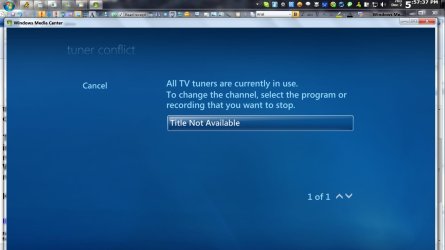
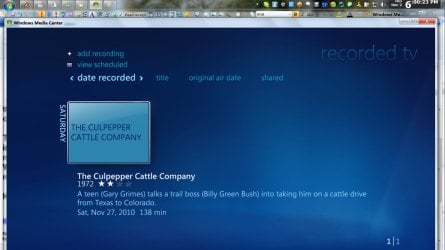
:cry::cry: My Windows Media Center is locked up. Apparently, the software thinks it is still RECORDING (it's not). I can't change channel or record any programs (TV). When I try to change the channel, I get a window that says tuner is in use and to click on program that I want to STOP recording, but there is no file name given and clicking does nothing. If I did it right there should be a screen shot of this attached in JPG format.:geek::geek:

My system is a new (less than 3 weeks) HP DV7.4190us with 6 GB RAM and Intel i720QM CPU running Windows 7 64 bit.:cool:

I have tried to do restore but that failed several times (Norton? Ran into failed restores with Norton before - is this a known issue?). I also tried to uninstall the tuner reboot and reinstall it thru the Device Manager. I also tried doing the same and PHYSICALLY removing the tuner. Multiple reboots of WMC and computer and deleting all recorded TV all failed.:confused::confused:

I am using a Hauppauge HVR950Q 72100 USB tuner stick with a Comcast cable feed and set top box controlled by a MCE Kit.:)

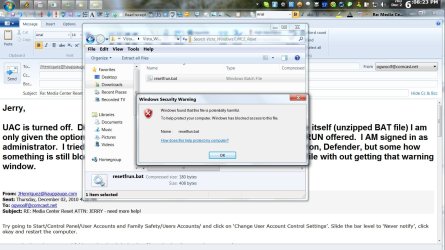
:cry: I called Hauppauge and they sent me a BAT file to RESET WMC, but they sent it in a Zipped folder and for some reason, once I unpacked it, my system would NOT let me run it, move it or copy that BAT file. A right click on it only offers: OPEN, CUT, COPY, :(DELETE, and PROPERTIES. I tried to copy it, but it won't allow me to paste it any where without giving me the windows security "file blocked" windows. See attached screen shot there also.:geek:

I have also attached the BAT file they sent me to reset WMC.:cool:

So, my question is multi-layered::D

1) How can I break WMC loose from this lock up?
2) How can I reset the WMC?
3) And finally, failing all other avenues, assuming that the BAT file is the answer, how do I run it when the system stops me? Can it be doen from cmd prompt?

If cmd is the answer, please give me syntax and remember I can't get that BAT file out of the ZIP folder. I can only get to it via Explorer INSIDE the zip folder.:mad:

Any and all help woild be appreciated. MY UAC is OFF and I tried turning off Windows Firewall, Norton's Firewall and Defender, but the file is still blocked.:cry:

Suggestions? The goal is to get WMC back to work, with or without the use of the BAT file. :huh::huh:

Thank you! :D:D

Bob Woolf:devil:
 

Attachments

  • WMC LU 1.jpg
    WMC LU 1.jpg
    68.9 KB · Views: 22
  • BAT Block.jpg
    BAT Block.jpg
    172.3 KB · Views: 28
  • WMC LU 2.jpg
    WMC LU 2.jpg
    85.1 KB · Views: 13
  • Vista_Windows7_MCE_Reset.zip
    Vista_Windows7_MCE_Reset.zip
    354 bytes · Views: 55

My Computer My Computer

At a glance

Win7 X64Intel i720QM 1.60 GHtz with TurboBoost & 8 lo...6 GBGeForce 8600
Computer Manufacturer/Model Number
HP DV7.4190us
OS
Win7 X64
CPU
Intel i720QM 1.60 GHtz with TurboBoost & 8 logical cores
Memory
6 GB
Graphics Card(s)
GeForce 8600
Sound Card
RealTek
Monitor(s) Displays
Laptop 1200x800
Hard Drives
Two internal 500 GB, one USB 1 TB and one USB 2 TB, both WD
Internet Speed
12 to 20 Mbps down and about 4 Mbps up (t1 or t2 equiv)
right-click the task bar and start task manager. if media center is in the list, highlight it and click the "end task" button. if its not there, check the processes and services tabs for any media center entries and end those.
 

My Computer My Computer

At a glance

windows 7 ultimate 64bitIntel Core2 Extreme x9000 2.8GHZ4Gig2 NVidia GeForce 8800M GTX (SLi)
Computer Manufacturer/Model Number
Alienware AREA-51 M17x
OS
windows 7 ultimate 64bit
CPU
Intel Core2 Extreme x9000 2.8GHZ
Motherboard
Asus P965 Intel chipset
Memory
4Gig
Graphics Card(s)
2 NVidia GeForce 8800M GTX (SLi)
Sound Card
onboard
Monitor(s) Displays
17in. built-in, 47in JVC LCD
Screen Resolution
1080p
Hard Drives
2 250Gig Hitachi (RAID 0) @ 7200RPM
Case
17in. laptop
Mouse
touchpad, Logitech Anywhere Mouse cordless laser
Internet Speed
cable

Attachments

  • Capture.JPG
    Capture.JPG
    109 KB · Views: 41

My Computer My Computer

At a glance

Win 10 Pro x64Intel I5-2500K @3.3GHz16GB G.Skill Ripjaws X (4x4GB)EVGA GeForce 750 Ti SC 2GB
Computer type
PC/Desktop
Computer Manufacturer/Model Number
Self Built
OS
Win 10 Pro x64
CPU
Intel I5-2500K @3.3GHz
Motherboard
Asrock P67 Extreme4
Memory
16GB G.Skill Ripjaws X (4x4GB)
Graphics Card(s)
EVGA GeForce 750 Ti SC 2GB
Sound Card
ASUS Xonar DG 5.1 Channels 24-bit 96KHz PCI Interface Sound
Monitor(s) Displays
auria eq2367
Screen Resolution
1920 x 1080
Hard Drives
250GB Samsung 850 EVO SSD
1TB WD Blue
1TB Hitachi
PSU
SeaSonic X 650W 80 Plus Gold
Case
Corsair Obsidian 750D
Cooling
Corsair H60, Three 140mm case fans
Keyboard
Logitech Wireless Keyboard K520
Mouse
Logitech Wireless Mouse M310
Internet Speed
Wave Broadband ~ 100 dn 5 up
Antivirus
Windows Defender, Malwarebytes Premium
Browser
Edge, IE11, Chrome
Other Info
Laptop specs: HP g7-1365dx /
CPU: AMD A6-3420M APU with Radeon(tm) HD Graphics /
RAM: Crucial 8Gb (2x4Gb) /
SSD: Crucial M4-CT128M4SSD2 ATA Device/ FW 000F /
GFX: AMD Radeon HD 6520G /
OS: Windows 10 Pro x64
:cry::cry:Thank you, Gentleman, but neither approach worked.

Closing the WMC completely did NOT effect the lock up. That included using the ask Manager to termination every service and/or process associated with it. When opened back up, it was still locked.

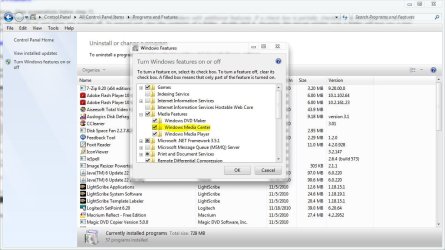
Turning WMC OFF in the Windows features was a good idea and I thought it would work for sure. Wrong! :cry: Turning it off was easy, but turning it back on gave repeated errors. I finally got it back on, BUT, it was still in that same locked condition.:(

I'm pretty sure that IF someone had been able to give me the correct syntax to run that BAT file under the CMD prompt, or any other way, that would have fixed it.:confused:

Unfortunately, no on, so far, has come forward with a workable way to run that "runfreset.bat" from the Hauppauge Computer Works Tech. Those guys are usually pretty good at their job.:cool:

What I wound up doing, since I only had about 3 weeks invested in tweaking my set up, I did a complete destructive RECOVERY from media. That took a good part of the night, but it did solve that issue and WMC is reconfigured and working now.:)

Now I just have a couple of missing shortcut desktop Icons that have disappeared following a Windows set of update! Oh Well, SSDD. I love Microsoft!!! LOL:D:D

Thanks!

Bob Woolf:o
 

My Computer My Computer

At a glance

Win7 X64Intel i720QM 1.60 GHtz with TurboBoost & 8 lo...6 GBGeForce 8600
Computer Manufacturer/Model Number
HP DV7.4190us
OS
Win7 X64
CPU
Intel i720QM 1.60 GHtz with TurboBoost & 8 logical cores
Memory
6 GB
Graphics Card(s)
GeForce 8600
Sound Card
RealTek
Monitor(s) Displays
Laptop 1200x800
Hard Drives
Two internal 500 GB, one USB 1 TB and one USB 2 TB, both WD
Internet Speed
12 to 20 Mbps down and about 4 Mbps up (t1 or t2 equiv)
Well I'm sure someone here could have helped with that .bat file, they just didn't see your post yet. A repair install would have been my next suggestion anyway since there seems to be a serious problem there.

At least you are now up and running, Thanks for posting back with your results. :)
 

My Computer My Computer

At a glance

Win 10 Pro x64Intel I5-2500K @3.3GHz16GB G.Skill Ripjaws X (4x4GB)EVGA GeForce 750 Ti SC 2GB
Computer type
PC/Desktop
Computer Manufacturer/Model Number
Self Built
OS
Win 10 Pro x64
CPU
Intel I5-2500K @3.3GHz
Motherboard
Asrock P67 Extreme4
Memory
16GB G.Skill Ripjaws X (4x4GB)
Graphics Card(s)
EVGA GeForce 750 Ti SC 2GB
Sound Card
ASUS Xonar DG 5.1 Channels 24-bit 96KHz PCI Interface Sound
Monitor(s) Displays
auria eq2367
Screen Resolution
1920 x 1080
Hard Drives
250GB Samsung 850 EVO SSD
1TB WD Blue
1TB Hitachi
PSU
SeaSonic X 650W 80 Plus Gold
Case
Corsair Obsidian 750D
Cooling
Corsair H60, Three 140mm case fans
Keyboard
Logitech Wireless Keyboard K520
Mouse
Logitech Wireless Mouse M310
Internet Speed
Wave Broadband ~ 100 dn 5 up
Antivirus
Windows Defender, Malwarebytes Premium
Browser
Edge, IE11, Chrome
Other Info
Laptop specs: HP g7-1365dx /
CPU: AMD A6-3420M APU with Radeon(tm) HD Graphics /
RAM: Crucial 8Gb (2x4Gb) /
SSD: Crucial M4-CT128M4SSD2 ATA Device/ FW 000F /
GFX: AMD Radeon HD 6520G /
OS: Windows 10 Pro x64
Back
Top