Windows Media Center Movies Preview Image

paulpp

Learner & Helper
Power User
Local time
2:51 AM
Messages
208
Hello i have recently started using windows media center and when i go to my movie section it show them all but only shows a box with the name,

Is there a way i can get it to show an image of some kind for the movie just like it shows when you go to the directory?

Regards Paul
 

My Computer My Computer

At a glance

windows 72.13GBATI Radeon
Computer Manufacturer/Model Number
Acer Aspire 5536
OS
windows 7
CPU
2.1
Motherboard
Acer
Memory
3GB
Graphics Card(s)
ATI Radeon
Sound Card
Built in 5.1 HD
Screen Resolution
15.4"
Hard Drives
250GB
Internet Speed
4MB

My Computer My Computer

At a glance

Windows 7 Ultimate x32DualCore Intel Pentium E2200, 2218 MHz (11 x ...2 GB DDR2-800 DDR2 SDRAMnVIDIA GeForce 9500GT 1GB
Computer Manufacturer/Model Number
Micro-Star International/MS-7529
OS
Windows 7 Ultimate x32
CPU
DualCore Intel Pentium E2200, 2218 MHz (11 x 202)
Motherboard
MSI G31M3 V2 (MS-7529) (2 PCI, 1 PCI-E x16,2 DDR2 DIMM)
Memory
2 GB DDR2-800 DDR2 SDRAM
Graphics Card(s)
nVIDIA GeForce 9500GT 1GB
Sound Card
Realtek ALC888/1200 @ Intel 82801GB ICH7
Monitor(s) Displays
Samsung SyncMaster 2253BW (Digital) 22'' LCD
Screen Resolution
1680x1050
Hard Drives
SAMSUNG HD322IJ ATA Device (298 GB , IDE)
I try to download the top link which you provided me but it does not load on the download page,

do you know anywhere else where i can get it from?

Regards paul
 

My Computer My Computer

At a glance

windows 72.13GBATI Radeon
Computer Manufacturer/Model Number
Acer Aspire 5536
OS
windows 7
CPU
2.1
Motherboard
Acer
Memory
3GB
Graphics Card(s)
ATI Radeon
Sound Card
Built in 5.1 HD
Screen Resolution
15.4"
Hard Drives
250GB
Internet Speed
4MB

My Computer My Computer

At a glance

Windows 7 Ultimate x32DualCore Intel Pentium E2200, 2218 MHz (11 x ...2 GB DDR2-800 DDR2 SDRAMnVIDIA GeForce 9500GT 1GB
Computer Manufacturer/Model Number
Micro-Star International/MS-7529
OS
Windows 7 Ultimate x32
CPU
DualCore Intel Pentium E2200, 2218 MHz (11 x 202)
Motherboard
MSI G31M3 V2 (MS-7529) (2 PCI, 1 PCI-E x16,2 DDR2 DIMM)
Memory
2 GB DDR2-800 DDR2 SDRAM
Graphics Card(s)
nVIDIA GeForce 9500GT 1GB
Sound Card
Realtek ALC888/1200 @ Intel 82801GB ICH7
Monitor(s) Displays
Samsung SyncMaster 2253BW (Digital) 22'' LCD
Screen Resolution
1680x1050
Hard Drives
SAMSUNG HD322IJ ATA Device (298 GB , IDE)
Thanks mate i downloaded and installed it and now i go into the settings and add the directory to where the video path is and then i go into the center and it is still the same without not art work?

Regards Paul
 

My Computer My Computer

At a glance

windows 72.13GBATI Radeon
Computer Manufacturer/Model Number
Acer Aspire 5536
OS
windows 7
CPU
2.1
Motherboard
Acer
Memory
3GB
Graphics Card(s)
ATI Radeon
Sound Card
Built in 5.1 HD
Screen Resolution
15.4"
Hard Drives
250GB
Internet Speed
4MB
i like this center app but the sound from it is to quite i can barley hear my movies, do you know how i can increase the sound?

my laptop is normally much louder than that and it is not the movie becuase all of the video files are also quite within the center,

when i play the movies within windows media player the sound is much more better
 

My Computer My Computer

At a glance

windows 72.13GBATI Radeon
Computer Manufacturer/Model Number
Acer Aspire 5536
OS
windows 7
CPU
2.1
Motherboard
Acer
Memory
3GB
Graphics Card(s)
ATI Radeon
Sound Card
Built in 5.1 HD
Screen Resolution
15.4"
Hard Drives
250GB
Internet Speed
4MB
configure the speakers to dvd quality, see will that help.
right click the icon on the taskbar, go to playback devices, right click speakers>properties>advanced make it dvd quality
 

My Computer My Computer

At a glance

Windows 7 Ultimate x32DualCore Intel Pentium E2200, 2218 MHz (11 x ...2 GB DDR2-800 DDR2 SDRAMnVIDIA GeForce 9500GT 1GB
Computer Manufacturer/Model Number
Micro-Star International/MS-7529
OS
Windows 7 Ultimate x32
CPU
DualCore Intel Pentium E2200, 2218 MHz (11 x 202)
Motherboard
MSI G31M3 V2 (MS-7529) (2 PCI, 1 PCI-E x16,2 DDR2 DIMM)
Memory
2 GB DDR2-800 DDR2 SDRAM
Graphics Card(s)
nVIDIA GeForce 9500GT 1GB
Sound Card
Realtek ALC888/1200 @ Intel 82801GB ICH7
Monitor(s) Displays
Samsung SyncMaster 2253BW (Digital) 22'' LCD
Screen Resolution
1680x1050
Hard Drives
SAMSUNG HD322IJ ATA Device (298 GB , IDE)
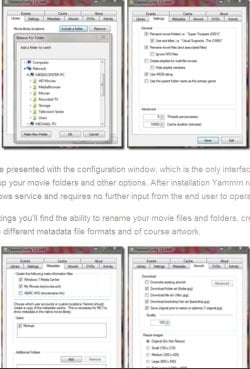
about yamm configuration, this pic is from mikinho's web site, his recommendation (at least it was):
yamm setup.JPG
 

My Computer My Computer

At a glance

Windows 7 Ultimate x32DualCore Intel Pentium E2200, 2218 MHz (11 x ...2 GB DDR2-800 DDR2 SDRAMnVIDIA GeForce 9500GT 1GB
Computer Manufacturer/Model Number
Micro-Star International/MS-7529
OS
Windows 7 Ultimate x32
CPU
DualCore Intel Pentium E2200, 2218 MHz (11 x 202)
Motherboard
MSI G31M3 V2 (MS-7529) (2 PCI, 1 PCI-E x16,2 DDR2 DIMM)
Memory
2 GB DDR2-800 DDR2 SDRAM
Graphics Card(s)
nVIDIA GeForce 9500GT 1GB
Sound Card
Realtek ALC888/1200 @ Intel 82801GB ICH7
Monitor(s) Displays
Samsung SyncMaster 2253BW (Digital) 22'' LCD
Screen Resolution
1680x1050
Hard Drives
SAMSUNG HD322IJ ATA Device (298 GB , IDE)
Also, you can try this: in wmc, go to tasks>settings>general>wmc setup>setup your speakers and follow the instructions, there is setting and for laptop to.
Another thing, If you change the equalizer in wmp, it should make changes in wmc too.
Hope this helps,
cheers
 

My Computer My Computer

At a glance

Windows 7 Ultimate x32DualCore Intel Pentium E2200, 2218 MHz (11 x ...2 GB DDR2-800 DDR2 SDRAMnVIDIA GeForce 9500GT 1GB
Computer Manufacturer/Model Number
Micro-Star International/MS-7529
OS
Windows 7 Ultimate x32
CPU
DualCore Intel Pentium E2200, 2218 MHz (11 x 202)
Motherboard
MSI G31M3 V2 (MS-7529) (2 PCI, 1 PCI-E x16,2 DDR2 DIMM)
Memory
2 GB DDR2-800 DDR2 SDRAM
Graphics Card(s)
nVIDIA GeForce 9500GT 1GB
Sound Card
Realtek ALC888/1200 @ Intel 82801GB ICH7
Monitor(s) Displays
Samsung SyncMaster 2253BW (Digital) 22'' LCD
Screen Resolution
1680x1050
Hard Drives
SAMSUNG HD322IJ ATA Device (298 GB , IDE)
hmm i did do that but nothing really changed, i think it could be just the movie after all and i have got the same settings as that picture which you have listed but i still cannot see the images, do i have to reboot my laptop?

Regards Paul
 

My Computer My Computer

At a glance

windows 72.13GBATI Radeon
Computer Manufacturer/Model Number
Acer Aspire 5536
OS
windows 7
CPU
2.1
Motherboard
Acer
Memory
3GB
Graphics Card(s)
ATI Radeon
Sound Card
Built in 5.1 HD
Screen Resolution
15.4"
Hard Drives
250GB
Internet Speed
4MB
don't now about the reboot, can't remember, I'm not using it anymore, try, it will not hurt right? If I remember right, mikinho somewhere in that thread that I posted said that there were some problems with yamm, do some reading there, or see if media browser works for you.
cheers
 

My Computer My Computer

At a glance

Windows 7 Ultimate x32DualCore Intel Pentium E2200, 2218 MHz (11 x ...2 GB DDR2-800 DDR2 SDRAMnVIDIA GeForce 9500GT 1GB
Computer Manufacturer/Model Number
Micro-Star International/MS-7529
OS
Windows 7 Ultimate x32
CPU
DualCore Intel Pentium E2200, 2218 MHz (11 x 202)
Motherboard
MSI G31M3 V2 (MS-7529) (2 PCI, 1 PCI-E x16,2 DDR2 DIMM)
Memory
2 GB DDR2-800 DDR2 SDRAM
Graphics Card(s)
nVIDIA GeForce 9500GT 1GB
Sound Card
Realtek ALC888/1200 @ Intel 82801GB ICH7
Monitor(s) Displays
Samsung SyncMaster 2253BW (Digital) 22'' LCD
Screen Resolution
1680x1050
Hard Drives
SAMSUNG HD322IJ ATA Device (298 GB , IDE)
Back
Top