Windows Media Center pause buffer

IggyAZ

A Sr. Senior Member
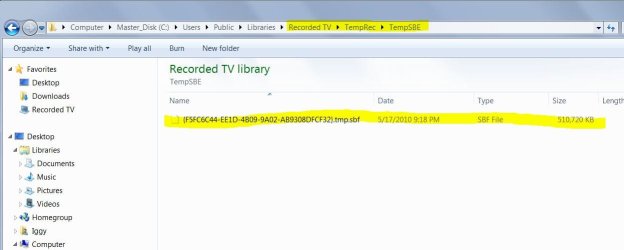
When watching TV on my PC Windows 7 Media Center creates and stores the pause buffer data in ......\Recorded TV\TempRec in several very large files.
These are not my recordings and the files end in ".tmp.sbf".
I was wondering if their was a way to automatically delete within MC or do they just build up to a max? Can they be reduced in size as I don't need to store watched TV program in that large of a buffer.

What are your thoughts?:cool:
 

Attachments

  • Capture.JPG
    Capture.JPG
    66.8 KB · Views: 176

My Computer

Computer type
PC/Desktop
Computer Manufacturer/Model Number
Self Built
OS
Windows 10 Pro
CPU
Intel i5
Motherboard
I have a fatherboard
Memory
I'm old and lost a few chips
Graphics Card(s)
Yup
Sound Card
Yup
Monitor(s) Displays
Samsung 32" UHD
Screen Resolution
3840 x 2160
Hard Drives
Samsung 860 EVO drives
PSU
450 Watt and some fans that blow
Case
Small tower
Cooling
Yes I am cool. lol
Keyboard
Who needs a keyboard?
Mouse
Logitech Laser G7 wireless
Internet Speed
Zippy fast UP and DOWN
Antivirus
I got a shot
Browser
The new Improved EDGE 2020
Some what of an answer

I just noticed that htese large files dissappear after you reboot your computer.
So it seems on shutdown something deleted them.

Still very interesting files.
 

My Computer

Computer type
PC/Desktop
Computer Manufacturer/Model Number
Self Built
OS
Windows 10 Pro
CPU
Intel i5
Motherboard
I have a fatherboard
Memory
I'm old and lost a few chips
Graphics Card(s)
Yup
Sound Card
Yup
Monitor(s) Displays
Samsung 32" UHD
Screen Resolution
3840 x 2160
Hard Drives
Samsung 860 EVO drives
PSU
450 Watt and some fans that blow
Case
Small tower
Cooling
Yes I am cool. lol
Keyboard
Who needs a keyboard?
Mouse
Logitech Laser G7 wireless
Internet Speed
Zippy fast UP and DOWN
Antivirus
I got a shot
Browser
The new Improved EDGE 2020
In case you are not the Shutdown types (like me), just create a simple batch file to delete these files, then set up a task in Task Scheduler using that batch file. That way the folder will get emptied from time to time.
 

My Computer

Computer Manufacturer/Model Number
Too many to describe...
OS
Windows 7 x64 pro/ Windows 7 x86 Pro/ XP SP3 x86
In case you are not the Shutdown types (like me), just create a simple batch file to delete these files, then set up a task in Task Scheduler using that batch file. That way the folder will get emptied from time to time.

Thanks for the idea. It seems it already has soemthing built in the scheduler for deleting them.
 

My Computer

Computer type
PC/Desktop
Computer Manufacturer/Model Number
Self Built
OS
Windows 10 Pro
CPU
Intel i5
Motherboard
I have a fatherboard
Memory
I'm old and lost a few chips
Graphics Card(s)
Yup
Sound Card
Yup
Monitor(s) Displays
Samsung 32" UHD
Screen Resolution
3840 x 2160
Hard Drives
Samsung 860 EVO drives
PSU
450 Watt and some fans that blow
Case
Small tower
Cooling
Yes I am cool. lol
Keyboard
Who needs a keyboard?
Mouse
Logitech Laser G7 wireless
Internet Speed
Zippy fast UP and DOWN
Antivirus
I got a shot
Browser
The new Improved EDGE 2020
Back
Top