Windows Media Center Split Screen

pbhuter

New member
Local time
11:01 PM
Messages
3
I imagine I am not the first person to ask/complain about this, but I scoured the Forum for a solution, and couldn't find one - so please be patient.

Why can't I "split screen" my Media Center window? By that, I mean - why can't I drag it to the side of the screen and have it take up half the screen? I love this feature of Win7, but I want to use it when watching TV, playing a DVD, or playing a Blu-Ray. Is there a solution? Is there some other software I should use?

Thanks.
 

My Computer

OS
Windows 7 Professional x64
Restore Down?

Sounds like maybe you are in Full Screen mode. Up in the top right corner, can you click on the "Restore Down" button. After restore down you should be able to make the window any size you want.
 

My Computer

OS
MS Windows 7 Ultimate 64-bit SP1
CPU
AMD Phenom II X4 965 Deneb 45nm
Motherboard
ASUS M4A78 PRO AM2
Memory
Corsair 8.00 GB Dual-Channel DDR2 @ 1705MHz (5-5-5-18)
Graphics Card(s)
AMD Radeon HD 6700 Series (XFX Pine Group)
Sound Card
VIA1708S onboard, Sony HT-CT150 3D
Monitor(s) Displays
Dell M770 Standard VGA, Samsung UN 32D 5500
Hard Drives
112GB OCZ OCZ-VERTEX3 ATA Device (SSD)
2 TB Seagate ST2000DM001-9YN164 ATA Device (SATA)
3 TB Seagate ST3000DM001-1CH166 ATA Device (SATA)
PSU
Rosewill Hive 650 Watt
Case
Rosewill Blackhawk
Cooling
Antec Kuhler 620
Other Info
Burners=ATAPI iHBS312 BlueRay + ATAPI iHAS424 Cd Dvd,
Modem=Arris TM 722,
Router=Asus RT N56U,
Switch=24 Port - Dell PowerConnect 5324,
Coax Signal Amp=Motorola BDA S4.
Split Screenplay

I want to drag thhe window and make Windows 7 split it to half the screen. Like it does with Word or Adobe.
 

My Computer

OS
Windows 7 Professional x64
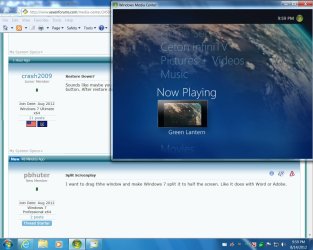
Like this?

You have to get out of full screen mode first. Then you can make the window any size you want.
 

Attachments

  • TESTING001.jpg
    TESTING001.jpg
    112.5 KB · Views: 20

My Computer

OS
MS Windows 7 Ultimate 64-bit SP1
CPU
AMD Phenom II X4 965 Deneb 45nm
Motherboard
ASUS M4A78 PRO AM2
Memory
Corsair 8.00 GB Dual-Channel DDR2 @ 1705MHz (5-5-5-18)
Graphics Card(s)
AMD Radeon HD 6700 Series (XFX Pine Group)
Sound Card
VIA1708S onboard, Sony HT-CT150 3D
Monitor(s) Displays
Dell M770 Standard VGA, Samsung UN 32D 5500
Hard Drives
112GB OCZ OCZ-VERTEX3 ATA Device (SSD)
2 TB Seagate ST2000DM001-9YN164 ATA Device (SATA)
3 TB Seagate ST3000DM001-1CH166 ATA Device (SATA)
PSU
Rosewill Hive 650 Watt
Case
Rosewill Blackhawk
Cooling
Antec Kuhler 620
Other Info
Burners=ATAPI iHBS312 BlueRay + ATAPI iHAS424 Cd Dvd,
Modem=Arris TM 722,
Router=Asus RT N56U,
Switch=24 Port - Dell PowerConnect 5324,
Coax Signal Amp=Motorola BDA S4.
I don't think you understand...

Windows 7 has the capability to split the screen. If you open Word or Adobe or IE or Chrome, make it not fullscreen, then drag it to the side of the Desktop, Windows 7 will make it fill half of the screen. You can do the same on the other side of the screen with another program.

So the question is: Why can't I do this with Media Center, or my Blu-Ray software, or my DVD software?
 

My Computer

OS
Windows 7 Professional x64
Windows 7 has the capability to split the screen. If you open Word or Adobe or IE or Chrome, make it not fullscreen, then drag it to the side of the Desktop, Windows 7 will make it fill half of the screen. You can do the same on the other side of the screen with another program.

So the question is: Why can't I do this with Media Center, or my Blu-Ray software, or my DVD software?

Split screen is not allowed because you cannot scrolll your TV with a scroll bar. Imagine you have an HD (Widescreen) signal. If you split screen, you'd either have huge black bars on top and bottom or you'd cut off the TV on the sides because you want to put the window vertically and the signal is horizontal.
 

My Computer

OS
Win 7 Pro x64
Back
Top