Windows Media Center Trashed My Mp3 Collection

MattHawkins

New member
Local time
10:29 AM
Messages
8
Hi all,

I have been using Windows 7 for a few days now will no major problems.

I particularly like Media Center as it works great with my TV Tuner. Goodbye Powercinema!

However today I noticed that Media Center has :

1) Edited most of my MP3 files so the last edit date has changed. I've no idea what changes have been made or why MC was touching them in the first place.
2) Deleted all my high res album art "folder.jpg" files and replaced them with low res versions.
3) Created a whole load of AlbumArt_{....} files.

I have spent the last 3 years carefully organising my music collection and creating high quality album art files and I don't want any application messing with it :mad:

I've got a backup so I will have restore my whole collection.

So the question is how can I stop Media Center doing this in the future?

Help!
 

My Computer My Computer

At a glance

Windows 7 Home PremiumAMD 642GB
Computer Manufacturer/Model Number
Custom
OS
Windows 7 Home Premium
CPU
AMD 64
Memory
2GB
Hard Drives
2 x Samsung Spinpoint F1 500GB
It appears that when you add your collection to MC library, it is taking the liberty of changing the edited date to the date it was last indexed.

As for the album art, in Media Center check:

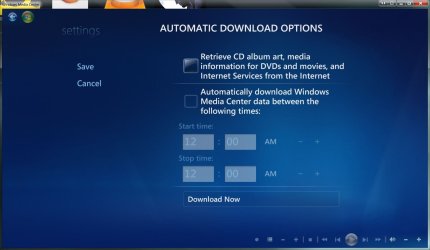
Settings > General > Automatic Download Options and ensure the "retrieve CD album art etc" is unticked.

mediac.JPG

You may also wish to look through Media Players settings that pertain to downloading art, info etc and disable it there as well.
 

My Computer My Computer

At a glance

8 Pro x64i7 3770K 4.6GHz16GB G.Skill Trident X 2666mhzx2 EVGA 780 Ti Superclocked SLI
Computer type
PC/Desktop
Computer Manufacturer/Model Number
Systems by SmartEyeball
OS
8 Pro x64
CPU
i7 3770K 4.6GHz
Motherboard
ASUS P8Z77 WS
Memory
16GB G.Skill Trident X 2666mhz
Graphics Card(s)
x2 EVGA 780 Ti Superclocked SLI
Sound Card
SB X-FI Surround 5.1 PRO USB / ATH-AD900 Headphones
Monitor(s) Displays
x3 Dell U2410 / 58" Samsung
Screen Resolution
5760*1200/ 1920*1200
Hard Drives
2x Intel 520 240GB (RAID 0) * 2x WD Caviar Blacks 2TB (RAID 0) * 2TB WD Caviar Black * Sony Optirac DVD
PSU
Silverstone Strider Evolution 1200W
Case
Thermaltake Level 10 GT Snow Edition
Cooling
Noctua NH-D14
Keyboard
Topre Realforce // Ducky Shine MX Black // Filco Ninja TKL
Mouse
Thermaltake Theron (Highly Recommended) + Razer Imperator
Antivirus
MSE
Browser
IE, FF, WaterFox
Other Info
GT Extreme V2 Sim Racing Cockpit + 40" LCD and K/B Mouse stand ▼
Fanatec CSR Elite Wheel + Clubsport V1 Pedals + CSR shifter/7G-H ▼Saitek X52 Pro ▼ TrackIR 5 Pro
Buttkicker v2 Seat Rumbler with Dedicated 5.1 and Sub Woofer attached to frame ▼
=
Bloody Big Grin
It appears that when you add your collection to MC library, it is taking the liberty of changing the edited date to the date it was last indexed.

Which is unnecessary and really sucks for those of us who back up our music.

As for the album art, in Media Center check:

Settings > General > Automatic Download Options and ensure the "retrieve CD album art etc" is unticked.

View attachment 33622
Won't that also knock out desirable features like Netflix and Internet TV?

You may also wish to look through Media Players settings that pertain to downloading art, info etc and disable it there as well.
IMO, the best thing to do is nuke the Music library so that Media Center and Player don't index it. Use another program for music. I have a Zune, so I use the Zune software, which in its current incarnation, works much better anyway. (Thank goodness the Zune software isn't married to the Windows 7 Library feature like WMP and WMC.) The AlbumArt stuff does not appear to be related to WMP or WMC. At least, after removing all folders from my Music library, I deleted it all a few weeks ago, and it's back now, even for music I downloaded just a day ago from Zune Marketplace.

The OP should also be embedding album art in his music files. Relying on folder.jpg is a mistake. Also, disallow all software from automatically overwriting MP3/WMA tags. However, for a couple of reasons, you have to let the Zune software add missing information, and with great reluctance, I did, and it's been OK.
 

My Computer My Computer

At a glance

Windows 7 Ultimate RTM
OS
Windows 7 Ultimate RTM
The OP should also be embedding album art in his music files. Relying on folder.jpg is a mistake.

I do that as well :) That is one of the reasons I don't want any software touching my mp3s. I have tagged them to a far higher standard than any automatic software could ever manage.

If WMC changes my file dates then WMC is useless to me because I will not be able to any synchronised backups of my media collection. WMC was one of the reasons I actually paid for a copy of Windows 7. If I had known what WMC was going to do I might have reconsidered.

I can live without control of the folder.jpg, which is afterall a system file, but WMC messing with MY data is a disaster.

I think I will set my media collections (when I've repaired them!) to read only and hope that stops WMC from corrupting them.

Its a shame the options don't provide a bit more detail. I don't mind WMC downloading info about albums and artists as long as it doesn't mess with existing info in my data.

I thought this sort of stuff would have come out in the beta testing.
Someday MS will learn.If I had wanted them to ransack my mp3 collection I would have just installed iTunes!

Thanks for replies guys. Gives me confidence that I wasn't going mad and missing something obvious.
 

My Computer My Computer

At a glance

Windows 7 Home PremiumAMD 642GB
Computer Manufacturer/Model Number
Custom
OS
Windows 7 Home Premium
CPU
AMD 64
Memory
2GB
Hard Drives
2 x Samsung Spinpoint F1 500GB
Back
Top