
windows media center volume limit of 50????

jorpe

New member
Power User
VIP
Local time
3:43 AM
Messages
278
Location
mile high
Is there any way to change this? on my 7600 x64 the volume stops at ''50'' and is nowhere near as loud as the rest of the sounds from other programs.
 

My Computer My Computer

At a glance

7600x64 ultimate, not SP1i7 93012gb ddr3 1600 triple channel Corsair XMS3Radeon 5850 1gb OC edition
OS
7600x64 ultimate, not SP1
CPU
i7 930
Motherboard
Gigabye X58A-ud5
Memory
12gb ddr3 1600 triple channel Corsair XMS3
Graphics Card(s)
Radeon 5850 1gb OC edition
Sound Card
Asus Xonar Essence STX
Monitor(s) Displays
Acer 24'', Dell 23'' display port
Screen Resolution
1920x1200, 1920x1080
Hard Drives
3x64GB Microcenter SSDs RAID0
1tb spinpoint f3 (system)
1tb spinpoint f3 (media)
1tb spinpoint f3 OSX
1x2TB WD green images
1tb 7200.12 (time machine)
2x 500gb western digital green drives for archiving,keeping install files.
PSU
700 modular
Case
Antec 1200
Cooling
Promlimatech Megahalems
Keyboard
logitech 2.4ghz wireless wave something
Mouse
logitech laser wireless mouse.
Internet Speed
50/10
Other Info
4 systems currently:
1. sig rig
2. 930 i7 x64 ultimate (backup, media center PC)
3. c314 2gb ram tablet 7600 ultimate
4. athlon 6000+ home server (still in progress)
5. ipad for on the go
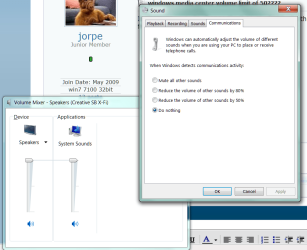
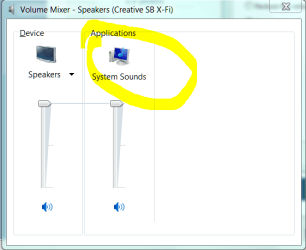
Check your system sounds properties.
 

Attachments

  • Capture.PNG
    Capture.PNG
    39.9 KB · Views: 188
  • Capture2.PNG
    Capture2.PNG
    13.3 KB · Views: 82
Check your system sounds properties.
this doesnt really fix the problem he is talking about i've noticed it on every system i've installed windows 7 on (13 total all legal installs.) 7mc for some reason limits the volume to about half of what your speakers can handle regardless of how you have your sound properties set up, i've yet to find a way around this and it's one of the few things i dont like about media center. just hold out a bit longer someone will probably find a fix for this within a month of official release.
 

My Computer My Computer

At a glance

Windows 7 Ultimate Signature EditionIntel Core i7 Extreme 3.33GHz12GB DDR32x EVGA 285 2GB in SLI
Computer Manufacturer/Model Number
Custom
OS
Windows 7 Ultimate Signature Edition
CPU
Intel Core i7 Extreme 3.33GHz
Motherboard
EVGA X-58 SLI Classified
Memory
12GB DDR3
Graphics Card(s)
2x EVGA 285 2GB in SLI
Sound Card
Creative Labs X-Fi ExtremeGamer
Monitor(s) Displays
30" Viewsonic
Hard Drives
2x1TB Western Digital 7200RPM in RAID 0/1TB WD My Book External HDD
PSU
Thermaltake 1000w supporting quad SLI
Case
Thermaltake Armor Full Tower
Cooling
Thermaltake V1 CPU+DIY Liquid cooling
i don't have that problem at all. yes, the display says the volume is at "50", however the speaker volume shows 100%. if i take it down to "0" the speaker volume shows 0%. as far as i can tell it just means that each increment on the WMC scale is 2% of the max volume. i have mediamonkey installed and if i max the volume, the volume level sounds the same coming from both mediamonkey and WMC.
 

My Computer My Computer

At a glance

Windows 7 RTM Ultimate x64Intel Core 2 Quad Q8200 @ 2.33 GHz4 GB Dual Channel DDR2 SDRAM @ 800MHz512MB NVIDIA GeForce 9600M GT
Computer Manufacturer/Model Number
Dell XPS One 24 (A2420)
OS
Windows 7 RTM Ultimate x64
CPU
Intel Core 2 Quad Q8200 @ 2.33 GHz
Motherboard
Intel P45 Express Chipset
Memory
4 GB Dual Channel DDR2 SDRAM @ 800MHz
Graphics Card(s)
512MB NVIDIA GeForce 9600M GT
Sound Card
Realtek ALC262 Integrated HD Audio
Check your system sounds properties.
this doesnt really fix the problem he is talking about i've noticed it on every system i've installed windows 7 on (13 total all legal installs.) 7mc for some reason limits the volume to about half of what your speakers can handle regardless of how you have your sound properties set up, i've yet to find a way around this and it's one of the few things i dont like about media center. just hold out a bit longer someone will probably find a fix for this within a month of official release.

Yes, for my system the 50 seems to correlate with 50% of the volume of the rest of the sounds, regardless of how everything else is set. It's been the same on my on board sound as well as the creative audigy card when Ive used it.
 

My Computer My Computer

At a glance

7600x64 ultimate, not SP1i7 93012gb ddr3 1600 triple channel Corsair XMS3Radeon 5850 1gb OC edition
OS
7600x64 ultimate, not SP1
CPU
i7 930
Motherboard
Gigabye X58A-ud5
Memory
12gb ddr3 1600 triple channel Corsair XMS3
Graphics Card(s)
Radeon 5850 1gb OC edition
Sound Card
Asus Xonar Essence STX
Monitor(s) Displays
Acer 24'', Dell 23'' display port
Screen Resolution
1920x1200, 1920x1080
Hard Drives
3x64GB Microcenter SSDs RAID0
1tb spinpoint f3 (system)
1tb spinpoint f3 (media)
1tb spinpoint f3 OSX
1x2TB WD green images
1tb 7200.12 (time machine)
2x 500gb western digital green drives for archiving,keeping install files.
PSU
700 modular
Case
Antec 1200
Cooling
Promlimatech Megahalems
Keyboard
logitech 2.4ghz wireless wave something
Mouse
logitech laser wireless mouse.
Internet Speed
50/10
Other Info
4 systems currently:
1. sig rig
2. 930 i7 x64 ultimate (backup, media center PC)
3. c314 2gb ram tablet 7600 ultimate
4. athlon 6000+ home server (still in progress)
5. ipad for on the go
I posted a similar question yesterday. Its driving me batty. I can understand if its setup as a default for use with home theater systems and you can crank up the volume with a receiver, but on my laptop speakers its just not good enough. I have resorted to using VLC where I can listen at acceptable levels and even crank it past 100%.
 

My Computer My Computer

At a glance

w7 dual boot vista32Core2Duo T5800 2GHz4gigNVIDIA GeForce 9600M GT
Computer Manufacturer/Model Number
HP Pavilion dv7
OS
w7 dual boot vista32
CPU
Core2Duo T5800 2GHz
Motherboard
HP
Memory
4gig
Graphics Card(s)
NVIDIA GeForce 9600M GT
I posted a similar question yesterday. Its driving me batty. I can understand if its setup as a default for use with home theater systems and you can crank up the volume with a receiver, but on my laptop speakers its just not good enough. I have resorted to using VLC where I can listen at acceptable levels and even crank it past 100%.


I'm with you... 50% is all you get. If someone can fix this it would be alright, and I would start using it again, however I've install VLC too. and now I can use my Ipod touch as a remote with VLC... It would be nice to have a patch, even with a disclamer (however you spell it) to say "you MAY F*** your speakers".. =-)

I would still use it.

Greeny
 

My Computer My Computer

At a glance

Win 7Intel Centrino Duo T75002GBNVIDIA GeForce 8600m GS 256mb
Computer Manufacturer/Model Number
Asus A7Sv
OS
Win 7
CPU
Intel Centrino Duo T7500
Memory
2GB
Graphics Card(s)
NVIDIA GeForce 8600m GS 256mb
Monitor(s) Displays
17" WXGA+
Hard Drives
Hitachi 250GB
Back
Top