Windows Media center

lartomar2002

New member
Member
VIP
Local time
5:35 PM
Messages
98
I know I have Windows Media center somewhere and now can not find it. Where is it located and what program would I use to open/start it? Thanks:rolleyes:
 

My Computer

Computer Manufacturer/Model Number
hp pavilion p633f
OS
windows 7 home premium
CPU
intel cor i3 2.93 ghz
Memory
ddr3 6gb
Graphics Card(s)
intel
Sound Card
stock
Monitor(s) Displays
pe1901
Hard Drives
1tb internal
250gb external
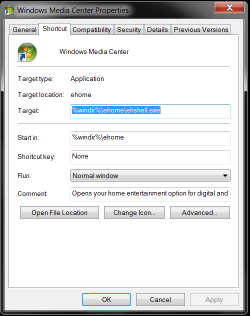
if you create a shortcut on your desktop pointed to
%windir%\ehome\ehshell.exe
It should open it.

or what would probably be easier navigate to it in start menu at the top of all programs, right click it and choose send to desktop
 

Attachments

  • Untitled.png
    Untitled.png
    16.3 KB · Views: 5

My Computer

Computer Manufacturer/Model Number
Insane hobo technologies. ;-)
OS
Windows 7 x64
CPU
Intel i7 2600k
Motherboard
Asrock z68 extreme 4 gen 3
Memory
G.skill Ripjaw 16gigs @ 1866
Graphics Card(s)
Nvidia gtx580 (evga)
Sound Card
Integrated HD audio + hdmi
Monitor(s) Displays
24" ASUS widescreen + 42" insignia
Screen Resolution
1080p (1920x1080)
Hard Drives
128 Samsung 830
256 Samsung 840
3 x 1tb storage drive (various)
1 western digital 1tb (eSATA)
1 Seagate 1tb (eSATA)
PSU
1 kilowatt SLI/Crossfire rated Silverstone modular
Case
NZXT Phantom + additional 220 fan
Cooling
Zalmann
Keyboard
Microsoft wireless 3000 (v2)
Mouse
MS - wireless 5000 (bluetrack)
Internet Speed
depends on if you ask me or my provider.
Other Info
The above information is provided as is, and the author assumes no responsibility for issues it may cause with your sanity or fanboyism.
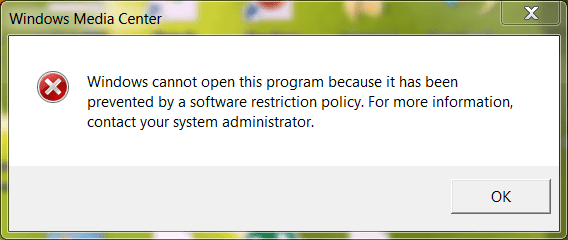
I did as you suggested about creating a shortcut because it is not at the top of the start menu. When I clicked on the short cut I received a pop up which I have attached as a .png file.
 

Attachments

  • WMC.PNG
    WMC.PNG
    15 KB · Views: 2

My Computer

Computer Manufacturer/Model Number
hp pavilion p633f
OS
windows 7 home premium
CPU
intel cor i3 2.93 ghz
Memory
ddr3 6gb
Graphics Card(s)
intel
Sound Card
stock
Monitor(s) Displays
pe1901
Hard Drives
1tb internal
250gb external
It would seem you do not have an admin account on the machine.

You can try running this command from start or cmd window if that doesn't work.
reg delete HKLM\SOFTWARE\Policies\Microsoft\WindowsMediaCenter /v MediaCenter /f

that should remove any additional policies that have been put on mediacenter.
 
Last edited:

My Computer

Computer Manufacturer/Model Number
Insane hobo technologies. ;-)
OS
Windows 7 x64
CPU
Intel i7 2600k
Motherboard
Asrock z68 extreme 4 gen 3
Memory
G.skill Ripjaw 16gigs @ 1866
Graphics Card(s)
Nvidia gtx580 (evga)
Sound Card
Integrated HD audio + hdmi
Monitor(s) Displays
24" ASUS widescreen + 42" insignia
Screen Resolution
1080p (1920x1080)
Hard Drives
128 Samsung 830
256 Samsung 840
3 x 1tb storage drive (various)
1 western digital 1tb (eSATA)
1 Seagate 1tb (eSATA)
PSU
1 kilowatt SLI/Crossfire rated Silverstone modular
Case
NZXT Phantom + additional 220 fan
Cooling
Zalmann
Keyboard
Microsoft wireless 3000 (v2)
Mouse
MS - wireless 5000 (bluetrack)
Internet Speed
depends on if you ask me or my provider.
Other Info
The above information is provided as is, and the author assumes no responsibility for issues it may cause with your sanity or fanboyism.
It would seem you do not have an admin account on the machine.

You can try running this command from start or cmd window if that doesn't work.
reg delete HKLM\SOFTWARE\Policies\Microsoft\WindowsMediaCenter /v MediaCenter /f

that should remove any additional policies that have been put on mediacenter.
I went into regedit but I do not have \WindowsMediaCenter /v MediaCenter /f
 

My Computer

Computer Manufacturer/Model Number
hp pavilion p633f
OS
windows 7 home premium
CPU
intel cor i3 2.93 ghz
Memory
ddr3 6gb
Graphics Card(s)
intel
Sound Card
stock
Monitor(s) Displays
pe1901
Hard Drives
1tb internal
250gb external
that's a command to edit, not a path to the actual entry.
 

My Computer

Computer Manufacturer/Model Number
Insane hobo technologies. ;-)
OS
Windows 7 x64
CPU
Intel i7 2600k
Motherboard
Asrock z68 extreme 4 gen 3
Memory
G.skill Ripjaw 16gigs @ 1866
Graphics Card(s)
Nvidia gtx580 (evga)
Sound Card
Integrated HD audio + hdmi
Monitor(s) Displays
24" ASUS widescreen + 42" insignia
Screen Resolution
1080p (1920x1080)
Hard Drives
128 Samsung 830
256 Samsung 840
3 x 1tb storage drive (various)
1 western digital 1tb (eSATA)
1 Seagate 1tb (eSATA)
PSU
1 kilowatt SLI/Crossfire rated Silverstone modular
Case
NZXT Phantom + additional 220 fan
Cooling
Zalmann
Keyboard
Microsoft wireless 3000 (v2)
Mouse
MS - wireless 5000 (bluetrack)
Internet Speed
depends on if you ask me or my provider.
Other Info
The above information is provided as is, and the author assumes no responsibility for issues it may cause with your sanity or fanboyism.
that's a command to edit, not a path to the actual entry.
Sorry but you are way above my head when you start talking about using command lines. I can enter command prompts and do certain things but I do not like to delve into areas I have no knowledge of. Thanks
 

My Computer

Computer Manufacturer/Model Number
hp pavilion p633f
OS
windows 7 home premium
CPU
intel cor i3 2.93 ghz
Memory
ddr3 6gb
Graphics Card(s)
intel
Sound Card
stock
Monitor(s) Displays
pe1901
Hard Drives
1tb internal
250gb external
You can also check to make sure WMC is setup to function.

1. Control Panel\Programs > Turn Windows features on or off
2. Control Panel\Programs\Default Programs > Set program access and computer defaults
 

My Computer

Computer type
PC/Desktop
Computer Manufacturer/Model Number
Custom Build
OS
Windows 7 Home Premium 64 bit
CPU
Intel Core i7-4790
Motherboard
GA-Z87X-D3H
Memory
G.SKILL 8GB (2 x 4GB) DDR3 F3-10666CL9D-8GBNT
Graphics Card(s)
AMD Radeon R7 250
Sound Card
Realtek ALC892
Monitor(s) Displays
Samsung UN32EH5000, Dell 1703FPT
Screen Resolution
1920 x 1080, 1280 x 1024
Hard Drives
WD5003AZEX
WD10EZEX
Samsung HD103SJ
Samsung 128 GB 840 PRO
PSU
SeaSonic M12II SS-500GM
Case
Fractal Design Define R4
Cooling
Zalman CNPS9900ALED
Keyboard
Logitech K800
Mouse
Logitech M705
Internet Speed
16 Mbps
Antivirus
Avast
Browser
Firefox
Other Info
Bose Companion 2 Multimedia Speakers
it's not really that complex
just type cmd in the search box in the start menu and hit enter, then type verbatim
reg delete HKLM\SOFTWARE\Policies\Microsoft\WindowsMediaCenter /v MediaCenter /f
and hit enter.
That's the whole thing.
You can then either type exit and hit enter. or just close the window the way you normally would.
 

My Computer

Computer Manufacturer/Model Number
Insane hobo technologies. ;-)
OS
Windows 7 x64
CPU
Intel i7 2600k
Motherboard
Asrock z68 extreme 4 gen 3
Memory
G.skill Ripjaw 16gigs @ 1866
Graphics Card(s)
Nvidia gtx580 (evga)
Sound Card
Integrated HD audio + hdmi
Monitor(s) Displays
24" ASUS widescreen + 42" insignia
Screen Resolution
1080p (1920x1080)
Hard Drives
128 Samsung 830
256 Samsung 840
3 x 1tb storage drive (various)
1 western digital 1tb (eSATA)
1 Seagate 1tb (eSATA)
PSU
1 kilowatt SLI/Crossfire rated Silverstone modular
Case
NZXT Phantom + additional 220 fan
Cooling
Zalmann
Keyboard
Microsoft wireless 3000 (v2)
Mouse
MS - wireless 5000 (bluetrack)
Internet Speed
depends on if you ask me or my provider.
Other Info
The above information is provided as is, and the author assumes no responsibility for issues it may cause with your sanity or fanboyism.
You can also check to make sure WMC is setup to function.

1. Control Panel\Programs > Turn Windows features on or off
2. Control Panel\Programs\Default Programs > Set program access and computer defaults
Everything is checked.
 

My Computer

Computer Manufacturer/Model Number
hp pavilion p633f
OS
windows 7 home premium
CPU
intel cor i3 2.93 ghz
Memory
ddr3 6gb
Graphics Card(s)
intel
Sound Card
stock
Monitor(s) Displays
pe1901
Hard Drives
1tb internal
250gb external
it's not really that complex
just type cmd in the search box in the start menu and hit enter, then type verbatim
reg delete HKLM\SOFTWARE\Policies\Microsoft\WindowsMediaCenter /v MediaCenter /f
and hit enter.
That's the whole thing.
You can then either type exit and hit enter. or just close the window the way you normally would.
Did what you said verbatim and the response was. "The system was unable to find the specific key or value"
 

My Computer

Computer Manufacturer/Model Number
hp pavilion p633f
OS
windows 7 home premium
CPU
intel cor i3 2.93 ghz
Memory
ddr3 6gb
Graphics Card(s)
intel
Sound Card
stock
Monitor(s) Displays
pe1901
Hard Drives
1tb internal
250gb external
Take a look at the following keys:

HKLM\Software\Policies\Microsoft\WindowsMediaCenter\MediaCenter
HKCU\Software\Policies\Microsoft\WindowsMediaCenter\MediaCenter
A ValueData of 0 = MC can run; 1= MC is disabled

You can also try disabling WMC under Defaults Program, restart PC.
Then enable it.
 

My Computer

Computer type
PC/Desktop
Computer Manufacturer/Model Number
Custom Build
OS
Windows 7 Home Premium 64 bit
CPU
Intel Core i7-4790
Motherboard
GA-Z87X-D3H
Memory
G.SKILL 8GB (2 x 4GB) DDR3 F3-10666CL9D-8GBNT
Graphics Card(s)
AMD Radeon R7 250
Sound Card
Realtek ALC892
Monitor(s) Displays
Samsung UN32EH5000, Dell 1703FPT
Screen Resolution
1920 x 1080, 1280 x 1024
Hard Drives
WD5003AZEX
WD10EZEX
Samsung HD103SJ
Samsung 128 GB 840 PRO
PSU
SeaSonic M12II SS-500GM
Case
Fractal Design Define R4
Cooling
Zalman CNPS9900ALED
Keyboard
Logitech K800
Mouse
Logitech M705
Internet Speed
16 Mbps
Antivirus
Avast
Browser
Firefox
Other Info
Bose Companion 2 Multimedia Speakers
In HKLM\Software\Policies\Microsoft\WindowsMediaCenter\MediaCenter there was no WMC
In
HKCU\Software\Policies\Microsoft\WindowsMediaCenter\MediaCenter there was WMP but, no WMC
 

My Computer

Computer Manufacturer/Model Number
hp pavilion p633f
OS
windows 7 home premium
CPU
intel cor i3 2.93 ghz
Memory
ddr3 6gb
Graphics Card(s)
intel
Sound Card
stock
Monitor(s) Displays
pe1901
Hard Drives
1tb internal
250gb external
Control Panel\Programs\Default Programs > Set program access and computer defaults

Tick Microsoft Windows.
 

My Computer

Computer type
PC/Desktop
Computer Manufacturer/Model Number
Custom Build
OS
Windows 7 Home Premium 64 bit
CPU
Intel Core i7-4790
Motherboard
GA-Z87X-D3H
Memory
G.SKILL 8GB (2 x 4GB) DDR3 F3-10666CL9D-8GBNT
Graphics Card(s)
AMD Radeon R7 250
Sound Card
Realtek ALC892
Monitor(s) Displays
Samsung UN32EH5000, Dell 1703FPT
Screen Resolution
1920 x 1080, 1280 x 1024
Hard Drives
WD5003AZEX
WD10EZEX
Samsung HD103SJ
Samsung 128 GB 840 PRO
PSU
SeaSonic M12II SS-500GM
Case
Fractal Design Define R4
Cooling
Zalman CNPS9900ALED
Keyboard
Logitech K800
Mouse
Logitech M705
Internet Speed
16 Mbps
Antivirus
Avast
Browser
Firefox
Other Info
Bose Companion 2 Multimedia Speakers
That was already done. Thanks
 

My Computer

Computer Manufacturer/Model Number
hp pavilion p633f
OS
windows 7 home premium
CPU
intel cor i3 2.93 ghz
Memory
ddr3 6gb
Graphics Card(s)
intel
Sound Card
stock
Monitor(s) Displays
pe1901
Hard Drives
1tb internal
250gb external
Back
Top