Windows Media Centre artifacts

Dazza007

New member
Local time
11:58 AM
Messages
6
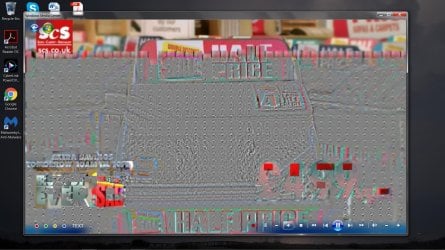
Hi everyone, Ive been using WMC for a few years now and I have put up with intermittent artifacts while watching and recording tv shows. Last week I found a usb DVB T stick in my spare room so I decided to install it and re-set up WMC tv signal and got exactly the same display artifacts making the TV unwatchable, can someone give me some idea as what is the cause? At first I thought it was one of the tuners in my dual dvb t pcie card but as its doing it using the outboard usb stick it must be the pc (maybe).
The ariel is brand new with very good signal strength going into an A/C booster/splitter box feeding my tv and pc. my set up is:

i7 3770k with onboard graphics (HD4000)
8gb ddr3 1600
Asrock Fatal1ty Z77 pro
Kworld 2 tuner dvb t pci e card
August t201 dvb t usb stick
Win 7 Pro
MSE AV
everything stock.

regards

Daz
 
Last edited:

My Computer

Computer type
PC/Desktop
Computer Manufacturer/Model Number
Custom Build
OS
Win 7 Pro x64, Win 10 Pro x64, WS2012r2 x64
CPU
i7 3770K
Motherboard
Asrock Fatal1ty Z77 Pro
Memory
*gb ddr3 1600
Hard Drives
120gb Kingston SSD Now 300
Antivirus
Defender
Browser
Chrome

My Computer

Computer type
PC/Desktop
Computer Manufacturer/Model Number
Gateway DX4831-01e (Mid-Tower Desktop)
OS
Originally Win 7 Hm Prem x64 Ver 6.1.7600 Build 7601-SP1 | Upgraded to Windows 10 December 14, 2019
CPU
Intel i3 530 2.93GHz, 2933MHz 2 Cores 4 Logical Processors
Motherboard
Gateway H57M01 133 megahertz
Memory
6GB of 1,333MHz DDR3 SDRAM
Graphics Card(s)
32MB Intel Graphics Media Accelerator HD IGChip
Sound Card
Realtek High Definition Audio
Monitor(s) Displays
Gateway HX2000 20inch TFT active matrix TN
Screen Resolution
1600 x 900 x 59 hertz
Hard Drives
WDC WD10EADS-00M2B0 [HDD] (1000.20 GB) -- drive 0,
HL-DT-ST DVDRAM GH41N [CD-ROM dr]
Four card readers, and Four USB 2.0
PSU
300watts.
Case
Mid-Tower Desktop
Cooling
Stock from Gateway
Keyboard
Natural Ergonomic Keyboard 4000, see Other Info
Mouse
Orig. Gateway wore out now using Insignia USB wired optical
Internet Speed
Vz FIOS 10ms png 57.64Mbps down 65.53Mbps up Speedtest.org
Antivirus
Zamana Anti-logger with Anti-malware, MSE, Windows Firewall,
Browser
IE11.0.9600.19399-Upd ver11.0.135, Firefox 68.0.1 x64
Other Info
System Specs by Belarc.

BIOS: American Megatrends Inc. P01-A0 11/17/2009

Replaced the MS 'Natural' Standard PS/2 Enhanced 101-102 Keyboard with a new Natural Ergonomic Keyboard 4000 on August 1st 2014.

Canon Pixma MG3222 Printer.

Updated to IE11 on 12102015 | Fios Quantum Router g1100

Additional AV: SpywareBlaster, manual Mbam, SAS
updated

Thanks for your reply, I have updated my 1st post to include gfx. also please find a screen shot I took showing my problem (hopefully it worked)
 

Attachments

  • artefacts.jpg
    artefacts.jpg
    210.8 KB · Views: 2

My Computer

Computer type
PC/Desktop
Computer Manufacturer/Model Number
Custom Build
OS
Win 7 Pro x64, Win 10 Pro x64, WS2012r2 x64
CPU
i7 3770K
Motherboard
Asrock Fatal1ty Z77 Pro
Memory
*gb ddr3 1600
Hard Drives
120gb Kingston SSD Now 300
Antivirus
Defender
Browser
Chrome
You're welcome,

it must be the pc (maybe)
Do you have this problem while running skype or any other video, like a dvd movie?

In other words, you have this problem only while using WMC?

~~~~~

Related to posting;

Not sure if you've seem this tutorial: Screenshots and Files - Upload and Post in Seven Forums At step 10 it shows how to use the paperclip (PC) icon
attach.gif
using the PC icon allows placement of the attachment within the post, this is helpful if you have more than one pix because three, four, five or six pixs at the end of a post is confusing to follow, and it removes the border around uploaded images to give a cleaner effect.
Although, I have seen where it doesn't matter if a single pix, like yours, is placed at the end of a post, and it's quicker. The decision is yours as a matter of personal preference.

Example using the PC icon:

sample.PNG


Not using the icon; Note the larger border box around the pix, and black image size bar at bottom:


sample1.PNG
 

My Computer

Computer type
PC/Desktop
Computer Manufacturer/Model Number
Gateway DX4831-01e (Mid-Tower Desktop)
OS
Originally Win 7 Hm Prem x64 Ver 6.1.7600 Build 7601-SP1 | Upgraded to Windows 10 December 14, 2019
CPU
Intel i3 530 2.93GHz, 2933MHz 2 Cores 4 Logical Processors
Motherboard
Gateway H57M01 133 megahertz
Memory
6GB of 1,333MHz DDR3 SDRAM
Graphics Card(s)
32MB Intel Graphics Media Accelerator HD IGChip
Sound Card
Realtek High Definition Audio
Monitor(s) Displays
Gateway HX2000 20inch TFT active matrix TN
Screen Resolution
1600 x 900 x 59 hertz
Hard Drives
WDC WD10EADS-00M2B0 [HDD] (1000.20 GB) -- drive 0,
HL-DT-ST DVDRAM GH41N [CD-ROM dr]
Four card readers, and Four USB 2.0
PSU
300watts.
Case
Mid-Tower Desktop
Cooling
Stock from Gateway
Keyboard
Natural Ergonomic Keyboard 4000, see Other Info
Mouse
Orig. Gateway wore out now using Insignia USB wired optical
Internet Speed
Vz FIOS 10ms png 57.64Mbps down 65.53Mbps up Speedtest.org
Antivirus
Zamana Anti-logger with Anti-malware, MSE, Windows Firewall,
Browser
IE11.0.9600.19399-Upd ver11.0.135, Firefox 68.0.1 x64
Other Info
System Specs by Belarc.

BIOS: American Megatrends Inc. P01-A0 11/17/2009

Replaced the MS 'Natural' Standard PS/2 Enhanced 101-102 Keyboard with a new Natural Ergonomic Keyboard 4000 on August 1st 2014.

Canon Pixma MG3222 Printer.

Updated to IE11 on 12102015 | Fios Quantum Router g1100

Additional AV: SpywareBlaster, manual Mbam, SAS
only in wmc

thanks for the tips about inserting pics.

The problem Im having is within WMC, the tv card has 2 tuners, if I go to the channel im watching and its having issues I can change the sources of which there are usually 4 choices (the 1st 2 are selected automatically) which can help, but then a week later it starts having problems again. I started looking into buying another card but remembered I had a usb one id never used. I installed that and it had the same problem so it cant be the tv tuner card.
 

My Computer

Computer type
PC/Desktop
Computer Manufacturer/Model Number
Custom Build
OS
Win 7 Pro x64, Win 10 Pro x64, WS2012r2 x64
CPU
i7 3770K
Motherboard
Asrock Fatal1ty Z77 Pro
Memory
*gb ddr3 1600
Hard Drives
120gb Kingston SSD Now 300
Antivirus
Defender
Browser
Chrome
Hi, take the booster out of the equation.
Feed direct from the antenna and see.
 

My Computer

Computer type
PC/Desktop
Computer Manufacturer/Model Number
Owner Builder
OS
Windows 7 Ultimate x64 SP1 OEM
CPU
Intel i7 3930K
Motherboard
Asus X79 Deluxe
Memory
Kingston Genesis KHX2133C11D3K4/32G
Graphics Card(s)
Asus RTX 2070 Ti Turbo fan series
Sound Card
Creative Sound Blaster ZXR
Monitor(s) Displays
Samsung U32J39 UHD
Screen Resolution
3840 x 2160
Hard Drives
Samsung 860 Pro 256 GB
OCZ Vertex 4 512GB
Western Digital Black 4TB
PSU
Corsair AX850
Case
Gigabyte
Cooling
Push - Pull 120 mm Noctua PWM, Scythe Big Shuriken 2 Rev. B
Keyboard
Logitech K800 Backlit
Mouse
Logitech MX2 Master
Internet Speed
NBN 25 Mbps
Antivirus
Kaspersky Internet Security
Browser
Mozilla FireFox
Other Info
TP-Link Archer VR600v
Sennheiser TR220 WiFi Head Phones.
I took your advice and got weak reception in every channel. My upstairs ariel has started being jittery too so maybe its my antenna.
 

My Computer

Computer type
PC/Desktop
Computer Manufacturer/Model Number
Custom Build
OS
Win 7 Pro x64, Win 10 Pro x64, WS2012r2 x64
CPU
i7 3770K
Motherboard
Asrock Fatal1ty Z77 Pro
Memory
*gb ddr3 1600
Hard Drives
120gb Kingston SSD Now 300
Antivirus
Defender
Browser
Chrome
Antenna do play a big part in the problem of yours.

You play around by moving the antenna (any) directions.
Although it is clear when you adjust it at that time, another time will not be the same, as it may pop-up again.

The Antenna is also similar to router antenna on the way on how it work.

As you now need to concentrate on antenna issue.

Luckily in Singapore the cables are fully wired nationwide.

On top that ISP do provide Cable TV Set-top box to watch other content providers channels.
This will soon to be cease, as now Fibre network is almost complete, nationwide.

As i do had this type of problem in the past, thus unable to find any solution.


Note:
If a human touch the antenna, the pictures can be quite clear.
That is to say, human is also consider as an antenna!


Eric.
 

My Computer

Computer type
Laptop
Computer Manufacturer/Model Number
Toshiba L630 and L735
OS
Windows 7 x64
Hard Drives
240 GB SSD
Signal reception can be a difficult thing sometimes.
Antenna too high too low wrong direction, ghosting of signal from some large object.
A cheap booster will amplify the crap part of the signal as well as the signal.
The better type is the antenna base amplifier/splitter.
Also you need to Google up the transmitting directions for your area.
Here in Perth Western Australia I have 3 different points to aim my antenna for all of the free to air stations.
The best is the one that is closest to me.
 

My Computer

Computer type
PC/Desktop
Computer Manufacturer/Model Number
Owner Builder
OS
Windows 7 Ultimate x64 SP1 OEM
CPU
Intel i7 3930K
Motherboard
Asus X79 Deluxe
Memory
Kingston Genesis KHX2133C11D3K4/32G
Graphics Card(s)
Asus RTX 2070 Ti Turbo fan series
Sound Card
Creative Sound Blaster ZXR
Monitor(s) Displays
Samsung U32J39 UHD
Screen Resolution
3840 x 2160
Hard Drives
Samsung 860 Pro 256 GB
OCZ Vertex 4 512GB
Western Digital Black 4TB
PSU
Corsair AX850
Case
Gigabyte
Cooling
Push - Pull 120 mm Noctua PWM, Scythe Big Shuriken 2 Rev. B
Keyboard
Logitech K800 Backlit
Mouse
Logitech MX2 Master
Internet Speed
NBN 25 Mbps
Antivirus
Kaspersky Internet Security
Browser
Mozilla FireFox
Other Info
TP-Link Archer VR600v
Sennheiser TR220 WiFi Head Phones.
I had a similar problem that turned out to be caused by packet throttling. In this post, I followed these directions:

Network loss due to Vista/7/8 network throttling:
http://support.microsoft.com/kb/948066

Windows Vista, 7, and 8 can throttle network performance when using multimedia applications such as Windows Media Center. This can lead to network packet loss when navigating the WMC user interface.

Try disabling this feature by changing the following registry setting to ffffffff (Hexadecimal):
HKEY_LOCAL_MACHINE\SOFTWARE\Microsoft\Windows NT\CurrentVersion\Multimedia\SystemProfile\NetworkThrottlingIndex

You will need to reboot after making this change.


Ironically, I developed this problem after I switched from Wi-Fi to Ethernet.
 

My Computer

Computer type
PC/Desktop
Computer Manufacturer/Model Number
Custom Build
OS
Win 7 Ultimate 64 bit
CPU
Intel i7-3930K
Motherboard
ASUS P9X79 WS
Memory
Kingston HyperX Genesis 32GB Kit (8x4GB Modules) 1600MHz DDR
Graphics Card(s)
MSI R7850 Twin Frozr 2GD5/OC Radeon HD 7850 2GB 256-bit GDDR
Sound Card
Asus Xonar Essence STX
Monitor(s) Displays
3x Asus VG248QE 24", Vizio 32" TV
Screen Resolution
1920 x 1080, ?
Hard Drives
Samsung 128GB 840 Pro SSD (1),
Samsung 4TB 850 EVO SSDs (4)
Samsung 4TB 850 EVO SSDs (16) external backup drives used in 2.5" hot swap bays in the computer.
PSU
Corsair HX750w
Case
Antec Two Hundred v2 (modified)
Cooling
Cooler Master GeminII S524 120mm (fan replaced with a 140mm)
Keyboard
Logitech G510s
Mouse
Logitech M525 (two in use)
Internet Speed
=< 32Mbps down, 8Mbps up
Antivirus
AVAST!, MBAM, SAS, Spybot S&D (all but MBAM free) Glary Util
Browser
IE11
Other Info
LSI 9211-8i HBA card (8 SATA III ports), 2.5" & 3.5" Hot Swap Bays, HooToo HT-CR001 PCI-E to USB 3.0 Internal Hub + 6 Slot Card Reader, and LG Model CH12LS28 BD-ROM Optical Drive. Also, ScanSnap S1500 ADF duplexing scanner, Canon 9000F flat bed scanner, Corsair SP2500 2.1 speakers, Samsung CLP 415nw laser color printer, Cyberpower PP2200SW UPS
Back
Top