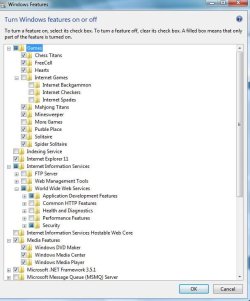
Control Panel -> Programs and Features -> Turn Windows Features on and off
I'm wondering what does it mean when Media Features folder shows blue tick box even when I have disabled the three subfolders in it (Windows Media Center, Windows Media Player, Microsoft DVD maker). I don't use any of the media programs that come with Windows AFAIK.
I found out that service called svchost.exe (LocalServiceAndNoImpersonation) is bottlenecking* performance of several other services: svchost.exe (NetworkService), svchost.exe (netsvcs), svchost.exe (LocalServicePeerNet). That first mentioned service seems to have something to do with Windows media features. I would like to disable it altogether if I can do it safely.
*Task manager -> Resource monitor -> right-click service -> analyze wait chain
I'm wondering what does it mean when Media Features folder shows blue tick box even when I have disabled the three subfolders in it (Windows Media Center, Windows Media Player, Microsoft DVD maker). I don't use any of the media programs that come with Windows AFAIK.
I found out that service called svchost.exe (LocalServiceAndNoImpersonation) is bottlenecking* performance of several other services: svchost.exe (NetworkService), svchost.exe (netsvcs), svchost.exe (LocalServicePeerNet). That first mentioned service seems to have something to do with Windows media features. I would like to disable it altogether if I can do it safely.
*Task manager -> Resource monitor -> right-click service -> analyze wait chain
My Computer
At a glance
Windows 7 Home Premium 64bitAMD Athlon II X4 635 ~2.9 GHz4096MB RAMClub 3D Radeon HD 6770
- Computer type
- PC/Desktop
- Computer Manufacturer/Model Number
- Asus
- OS
- Windows 7 Home Premium 64bit
- CPU
- AMD Athlon II X4 635 ~2.9 GHz
- Motherboard
- ASUS M4A77TD
- Memory
- 4096MB RAM
- Graphics Card(s)
- Club 3D Radeon HD 6770
- Hard Drives
- Seagate Barracuda 1TB, 64 MB, 7200 RMP, 3.5'' SATA
- PSU
- 500 watts
- Case
- Antec Sonata III Silent ATX
- Browser
- Firefox