
Windows Media Player 12 - Last track of selection starts playing

Brammo

New member
Local time
11:33 AM
Messages
3
Location
Rotterdam
Hey guys,

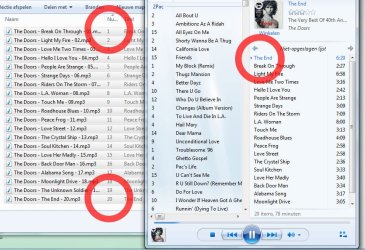
I got this really strange error, or I guess it's actually a bug. It happens in Windows Media Player 12 (my default player). When I select some audio files (no difference between extensions) and press play, WMP (12) doesn't play the first file. Instead, it plays the last file of my selection/selected tracks. He puts this last track on top of my original selection, so after this track he plays the original (first) track. :sarc:

Besides that being really annoying (can you imagine playing you're favourite cd of the most awesome band in the world, which happens to be a live recording, and than have it start with the end of their perfomance?! :shock:), it has this even more annoying feature: it doesn't happen all the time. Most of the times, like 75% or so. That makes it really hard to figure out, at least I can't think of what 'triggers' the bug. :huh:

When my laptop just started, the bug seems to happen more frequently. But to be clear; it doesn't always happen.

I've attached a screenshot to clarify it.


PS: Don't mind the crazy language in the picture :party:, it's Dutch.

I couldn't find any information on this bug anywhere so I decided to post it here. I also posted this question on another forum.

All help and tips are greatly appreciated!


Attachments
  • 30lpkl4.jpg
    30lpkl4.jpg
    110 KB · Views: 38

My Computer My Computer

At a glance

Windows 7 Professional 64 biti5 - 420M4GBATI Mobility Radeon HD 5730
Computer Manufacturer/Model Number
Asus N61JA-JX046X
OS
Windows 7 Professional 64 bit
CPU
i5 - 420M
Memory
4GB
Graphics Card(s)
ATI Mobility Radeon HD 5730
Hi,

I am wondering why you're using Windows Explorer to open the files in WMP, instead of using the Libraries in WMP. It might certainly make your life easier.

The only thing that comes to my mind is that perhaps some of your MP3s don't have tags, or aren't properly tagged. That would explain the issue NOT occurring all the time.
 

My Computer My Computer

At a glance

Windows 7 Home Premium x64Intel Core i5 2500K8GB DDR3nVidia GeForce GTX650 Ti BOOST
Computer type
Laptop
Computer Manufacturer/Model Number
Custom
OS
Windows 7 Home Premium x64
CPU
Intel Core i5 2500K
Motherboard
MSI MS-7750
Memory
8GB DDR3
Graphics Card(s)
nVidia GeForce GTX650 Ti BOOST
Sound Card
Realtek
Monitor(s) Displays
21' Philips
Screen Resolution
Full HD
Hard Drives
1TB
PSU
500W
Hey Gornot,

Thanks for your reply. Well sometimes it is just quicker to select a few files and press Enter than to start up WMP and find for the specific file(s). However, that's a different topic
:).

I checked the mp3 (ID3) tags, there seems to be nothing wrong. Unfortunately
:(.

Any more suggestions? Anyone?
 

My Computer My Computer

At a glance

Windows 7 Professional 64 biti5 - 420M4GBATI Mobility Radeon HD 5730
Computer Manufacturer/Model Number
Asus N61JA-JX046X
OS
Windows 7 Professional 64 bit
CPU
i5 - 420M
Memory
4GB
Graphics Card(s)
ATI Mobility Radeon HD 5730
Hey Brammo
The solution is very simple..it really matters where you grab the marked songs.
Let me guess: you mark the songs you want to play and grab the marked block at the LAST song to drop it into the player. That's why it starts with the last song and goes from there.

Next time, mark the block and grab it at the FIRST item...you'll see ;)

-DG
 

My Computer My Computer

At a glance

Windows 7 Ultimate x86DualCore AMD Athlon 64 X2, 2600 MHz 5200+Samsung 2GB DDR2Onboard NVIDIA GeForce 6150SE nForce 430
Computer Manufacturer/Model Number
HP m8000n
OS
Windows 7 Ultimate x86
CPU
DualCore AMD Athlon 64 X2, 2600 MHz 5200+
Motherboard
Asus M2N68-LA (Narra)
Memory
Samsung 2GB DDR2
Graphics Card(s)
Onboard NVIDIA GeForce 6150SE nForce 430
Sound Card
Onboard nVIDIA nForce 6100-430 (MCP61P)
Monitor(s) Displays
Westinghouse 19" LED
Screen Resolution
1280x1024
Hard Drives
SATA II Seagate Barracuda 500GB
USB II WD Elements 500GB
USB II WD My Book 1TB
USB II WD My Book 2TB
PSU
Stock (HP)
Case
Stock (HP)
Cooling
Stock
Keyboard
Logitech Classic KB 200
Mouse
Standard HP opticle USB mouse
Lol, I think you're right! Thx a lot SledgeDG!

Topic answer: The track WMP plays first in your playlist, is the track that you 'clicked' last in Explorer. So here are two things possible.

1 - Selecting more than one tracks (the file that actually got clicked, gets played first)
2 - Clicking a file, holding down Shift and selecting a bunch of tracks (the last file you clicked gets played first)
 

My Computer My Computer

At a glance

Windows 7 Professional 64 biti5 - 420M4GBATI Mobility Radeon HD 5730
Computer Manufacturer/Model Number
Asus N61JA-JX046X
OS
Windows 7 Professional 64 bit
CPU
i5 - 420M
Memory
4GB
Graphics Card(s)
ATI Mobility Radeon HD 5730
It's one from the box "It's not a bug, it's a feature" :D

I'm glad you're dilemma is solved, Brammo
Thanks for the feedback
Heb een mooie dag tot Rotterdam

-DG
 

My Computer My Computer

At a glance

Windows 7 Ultimate x86DualCore AMD Athlon 64 X2, 2600 MHz 5200+Samsung 2GB DDR2Onboard NVIDIA GeForce 6150SE nForce 430
Computer Manufacturer/Model Number
HP m8000n
OS
Windows 7 Ultimate x86
CPU
DualCore AMD Athlon 64 X2, 2600 MHz 5200+
Motherboard
Asus M2N68-LA (Narra)
Memory
Samsung 2GB DDR2
Graphics Card(s)
Onboard NVIDIA GeForce 6150SE nForce 430
Sound Card
Onboard nVIDIA nForce 6100-430 (MCP61P)
Monitor(s) Displays
Westinghouse 19" LED
Screen Resolution
1280x1024
Hard Drives
SATA II Seagate Barracuda 500GB
USB II WD Elements 500GB
USB II WD My Book 1TB
USB II WD My Book 2TB
PSU
Stock (HP)
Case
Stock (HP)
Cooling
Stock
Keyboard
Logitech Classic KB 200
Mouse
Standard HP opticle USB mouse
I just tried this (I'm kind of bored), and here goes 3 and 4
3. If you hit ctrl+A when you are in the actual folder, and hit enter, it will start playing from the first song (top on, or the first from left, depends of view of the folder) in the folder.
4. Choosing random number of songs with dragging the cursor, again it will start the first from left, or from the top on (depends of the folder view). Doesn't matter from which song you'll start selecting.
cheers
 

My Computer My Computer

At a glance

Windows 7 Ultimate x32DualCore Intel Pentium E2200, 2218 MHz (11 x ...2 GB DDR2-800 DDR2 SDRAMnVIDIA GeForce 9500GT 1GB
Computer Manufacturer/Model Number
Micro-Star International/MS-7529
OS
Windows 7 Ultimate x32
CPU
DualCore Intel Pentium E2200, 2218 MHz (11 x 202)
Motherboard
MSI G31M3 V2 (MS-7529) (2 PCI, 1 PCI-E x16,2 DDR2 DIMM)
Memory
2 GB DDR2-800 DDR2 SDRAM
Graphics Card(s)
nVIDIA GeForce 9500GT 1GB
Sound Card
Realtek ALC888/1200 @ Intel 82801GB ICH7
Monitor(s) Displays
Samsung SyncMaster 2253BW (Digital) 22'' LCD
Screen Resolution
1680x1050
Hard Drives
SAMSUNG HD322IJ ATA Device (298 GB , IDE)
media player playing order

I'm not able to reply to the exact thread because of the age of this issue, however this issue is still relevant. The origin of the thread was why tracks within Windows media player are not played in the right order when selecting multiple tracks directly from a certain folder after hitting enter. One of the responses was that it is related to the chronological order in which the tracks were selected. In other words, the last track will always play first when selecting from top to bottom as we do most of the time. The reasoning was correct but the question the is why the chronology of the other tracks (in between the first and the last track) is respected even though. My point is if you select from bottom to top the problem is resolved. However this is inconsistent.. All tracks should play in backword order then. If it would be a hexidecimal issue 10 would be placed right after 1 (because 1 is not equal to 01) but then f. ex. 19 would be placed after 1 instead of in front. I'm continuing the issue because I agree with the idea that it is a lot more organic, intuitive, to select multiple tracks directly from folders then creating playlists which absorbs more time. BTW using control-A doesn't resolve the problem. Draggin either because it implies that the playlist is already active.
 

My Computer My Computer

At a glance

Win 10 x64
Computer type
PC/Desktop
OS
Win 10 x64
Back
Top